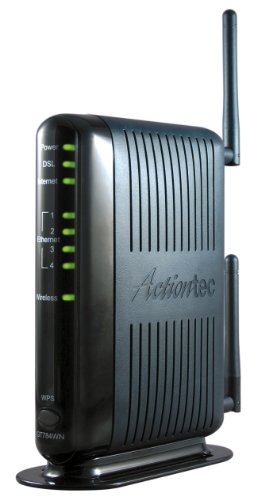


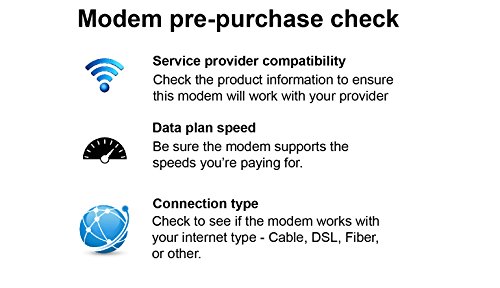

- Compatible with ADSL CenturyLink (NOT their VDSL) and major DSL service providers
- Not compatible with Verizon FIOS, AT&T U-verse or cable systems such as Comcast,Time Warner, Cablevision, Cox, Charter etc. WIRELESS SECURITY: TKIP, AES encryption, 802.1x authentication,Pre-Shared Key (PSK),MAC Address Filtering
- Preconfigured for simple setup and will auto-detect your specific service settings. Includes high-grade firewall, parental controls and a variety of protections and encryptions.
- Three products in one: full-rate ADSL 2/2+ modem, 4-port switch, and 300 Mbps wireless-N router. INTERFACES: Four 10/100 Ethernet Local Area Network, One Asymmetric digital subscriber line ( ADSL ) Port
- With the latest 802.11n technology your newer devices will achieve wireless N speeds.Backwards compatibility ensures that older wireless devices are supported, giving your wireless network the best of both worlds.The modem has been tested for maximum performance on all major DSL providers and supports ADSL2+ with speeds up to 24 Mbps downstream.
-
Information
-
Twitter
-
Pinterest
-
Youtube
-
Facebook
Shannon Kilfoil-Russo
Up and running in half an hour!
I couldn't believe how simple this installation was! I was replacing a Westell 327W modem which kept dropping out, and based on previous experiences with Verizon, I expected to spend all day on this. I was connected to the internet and ready to use all my wireless devices within half an hour!!! Just be SURE you have your modem user name and password, then follow the (VERY simple) instructions! Now it this little wonder is only as durable as the old Westell was (lasted 12 years!), I'll be delighted with my purchase.
Victor W Black
AT&T DSL users! This is a great modem/router for you.
EVERYTHING I connected to this unit came online perfectly! We had been suffering with an AT&T installed Netgear 7550 for months. My kindle would not even connect. All other wireless devices (ipads, laptops, iphones, etc) would have to be manually connected several times a day by turning off the wi fi and then turning it back on again. NOTHING but trouble since the day they installed it. Then, based on others' reviews, I took a chance and ordered this Actiontec 300Mbps Wireless-N DSL modem. Works like a dream, so far. If anything changes, I will come back and say so. I am new to Actiontec, but impressed! Set up was so simple, without any hiccups! The quick install sheet guided me thru perfectly and was very simple to understand.
SecretoMoney Na Power
Great DSL modem. Works with Windstream. Great Tech Support!
Got this to replace a Windstream modem which was constantly disconnecting. (the tech guy who came out to my house told me that since the updated the local C.O. (central office) for my area, the older Windstream modems weren't doing well). Bought this, as the ActionTec is what Windstream is now installing ... buy you have to pay $10/month if you get one from them! That's B.S.! So, I bought this, called their tech support to ask how to put it into "Bridge mode" and its been perfect every since .. no disconnects and better than stated speed on my connection (listed at 12mbps and I'm getting 13mbps). Definitely recommended. Tech support is knowledgeable.
Pretty Swag
Works great
Got this to replace a Linksys modem/router that was starting to have problems. This modem was super easy to set up on Centurylink. Auto configuration was very smooth. It has better range than previous modem. It covers my whole house without the need of another access point or range extender. Had it for over a month now and have not had any issues. Very pleased. This is an adsl2+ modem so make that's the type you need for your provider before you buy.
Prabhu Kumar
Best Modem I Ever Owned
Great product, saved me a lot of money. I have DSL at my country house (only available service). When my Provider modem died recently, I was told they no longer sell modems, only rent them for $11/month. I could buy 2 or 3 DSL modems per year for that price. So I took a chance and purchased this modem, based on their claim that they worked with my Provider's service. So glad I did. Plugged this in, connected my tablet to it, answered like 5 on screen questions, and it set itself up! Painless, hassle free, reliable unit! What a great product. Highly recommend this modem.
Yami Nada
Solid Performer on ATT
Quick and Easy set up on ATT network. The only failure in the setup was when ATT wanted to download and install their software. My last modem/router was an ATT provided unit which locked me out of the DNS server and some other settings so I feel that it was a GOOD 'fail". I would recommend denying the download. Since I can now choose the DNS server I want, my internet access has been much more reliable and with better performance. Really good wifi signal. I use MAC filtering for basic security so once I set the SSID and password to mimic my old router all of my devices (tv, laptops, tablets, phones and printer) connected automatically after I entered the MAC addresses in the MAC table. I spent more time manually entering the MAC addresses than anything else. Several things will help to make the installation painless: !) Make sure you know your ISP ID and password 2) make screen prints of all settings on your old modem router 3) even if you don't use MAC filtering it a good idea to make a list of the MAC for all or devices. A final note: look for an article called "Clone Your Current Router . . ." It isn't a step-by-step how-to but it isn't a bad reminder of things you need to pay attention to.
John Case
Great Router/Modem, Easy Port Forwarding
Received this unit a couple weeks ago and replaced my Westell 7500 provided by my Frontier IP. The reason I replaced the Westell unit was because it was dropping connections and since setting up port forwarding was very confusing, even with directions. The Actiontec had minimal directions, but there are many videos in youtube that show how to configure it. Basically, you plug it in, fill out the information (user name and password for the internet provider) and copy information from the old router (wireless configurations and access keys) so that existing wireless components, like computers and streaming devices like Fire TV, can access the internet. It worked amazingly well. The problem came when I tried to set up my existing Foscam IP cameras using the existing settings. It was no go. Reason: the IP addresses of the devices had to be changed to accommodate the Actiontec addresses, so I had to hard reset (wipe out) the existing settings on the cameras and then add the new information following the directions with the Foscam system. This took several hours but eventually the cameras were visible on the local network. A second problem came with attempting to access the cameras via the internet. Firstly, you have to open up ports on the Actiontec (in port forwarding section) and then check if they really are opened (using an open port checker). Some of my previous ports (like 8082) could not be opened no matter what. Finally, I found four ports in the 80's that I could open. I could not open a fifth port, so I suspect that Frontier is blocking them to save bandwidth. After setting up port forwarding, using dyndns.com, the cameras were now accessible via the internet. I checked this using my Android phone. So far, everything is working just fine: no more dropped internet connections, streaming videos hardly ever re-buffer and the IP cameras are always accessible by internet. Aside from the headaches involved with reprogramming some of the devices and setting up new port forwarding addresses (which you would expect with any new router/modem), it went well. Port forwarding is so much easier on the Actiontec (compared to the older Westell 7500) that this made the whole purchase worthwhile for me.
Dana Vironet
Actiontec 300 Mbps Wireless-N ADSL Modem/Router working great with Windstream standard DSL
The Actiontec 300 Mbps wireless-n ADSL modem router is working perfectly. I'm on Windstream DSL in Dawsonville, Ga and have not dropped my internet connection in the 3 weeks that I have been using the Actiontec. The gateway modem/router that I got from Windstream a couple of years ago was loosing connection I don't know the technical term. I was having to unplug and then replug in the unit multiple times a day - I haven't had to do that once since I got this new unit up and running. Windstream no longer allows customers to purchase their modems - you have to lease them. If I remember correctly the lease was $9.99 a month so if the Actiontec last seven months I haven't lost anything and if it last longer then I'm ahead. I'm think my internet package is standard, it definitely is Not premium speed package (from what I've read this unit will not work on the premium speed package). I set it up myself without any problems. You do need to enter your Windstream email and password so before I started I pulled up Windstream on my laptop and logged in to my account ( just to be sure I remembered the password). With the email app on my iPad I hardly ever use my Windstream password and I tend to forget it. The only piece of equipment that was slow to take to the Actiontec was my Verizon network extender. It could have been my impatience, I don't remember how long it took to set the extender up originally (when I first got the extender and was using official Windstream gateway) but I unplugged the extender from the wall and then plugged it back in and it was up and running in a few minutes and hasn't had any issues.
Joshua Berry
Breathe of Hope for us AT&T dsl folks
I have AT&T DSL(not U-Verse) and the old modem(Motorola 3360) was an awful designed modem forced on us by AT&T for years which I got when I first activated my AT&T account. Tried to get an off brand and they poo-pooed me. Finally I have some relief with this modem/router. It just came today and I followed the instructions loosely with a few non-connections but reset it and re-entered all my info more closely this time. SUCCESS!! I did need to have my AT&T network username:______@att.net was mine. network password:__________ Also I knew my system uses PPPOE not the other choices they had as options, so may need to make that call as well or check via your old modem if possible open the browser even if you have no internet connection and type the code on back of the old modem called on mine "Advance Device Configuration" which is a number ex. 192.168.1.000 and that takes me to the modem interface where it has all kinds of info. Not wanting to share to much but just fyi. Don't change stuff but you can glean some very helpful but confusing info there. Cheers and good luck AT&T peoples!! The set up is easy if you pay attention(I had company at the time) but you can always start over if you have an issue. I have as good speed (via Speedtest) on wifi as I did plugged in, so great signal also!! I will amend this if things change but I am always glass half full guy and hope there will be no amending needed.
Leno Fountain
Best ever!
I'm an AT&T dsl customer. Of all the boxes we have gotten through AT&T, this beats them all!!! Strong, Excellent signal all over the house. I almost didn't get this due to complaints that it is difficult to install. IT IS EASY TO INSTALL. If you are an existing AT&T customer, you know your sign up email and the password they gave you at that time, you are good to go! It took all of 10 - 15 minutes...out of box to working. Very easy. (And I don't easily understand what to do on computers. So, if I can do it, so can you!) You won't be sorry. It is a great product. It took us from 500 kbps to 3-5 Mbps!!! My son isn't getting lag or dropped from games. We can stream movies again. We are thrilled!