


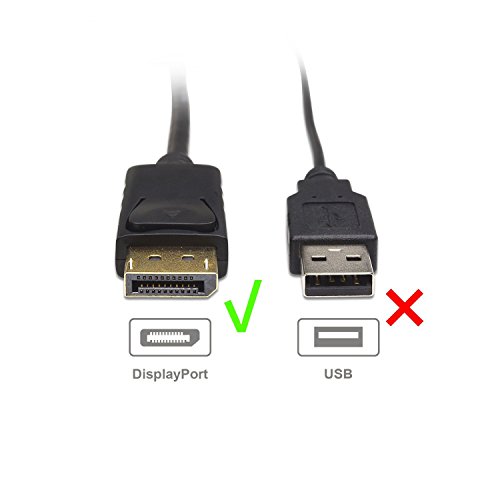


- Portable HDMI to DisplayPort cable adapter connects a DisplayPort (DP, DP++, DisplayPort++) equipped laptop or desktop to an HDTV, monitor, or projector with HDMI input; An HDMI cable (sold separately) is required for this Display Port to HDMI adapter
- HDMI to DisplayPort adapter transmits high-definition audio and video from your computer with DisplayPort to an HDTV with HDMI for video streaming or gaming; Display Port to HDMI adapter connects and configures your monitor for an Extended Desktop or Mirrored Displays
- DisplayPort to HDMI cable adapter supports video resolutions up to 1080P (Full HD); The Display to HDMI cable also supports uncompressed digital 7.1, 5.1 or 2 audio channels
- Display Port to HDMI cable with gold-plated connectors resists corrosion, provides durability and improves the signal transmission
- HDMI to Display Port connector with latches provides a secure connection with a release button that must be depressed before unplugging the HDMI to DP adapter
-
Information
-
Twitter
-
Pinterest
-
Youtube
-
Facebook
Tammy O'Brien
Stopped Working -- But GREAT customer service!!
--update 11/24/2018: After reformatting my PC and setting up fresh Windows 10 installation, my computer was consistently crashing and the monitor was turning black with random glitchy colors on it. The culprit seemed to be this adapter, as when I had my TV plugged into the computer, only then was this occurring. After much finagling around, I determined the NVidia driver that was installed by default with the Windows updates was to blame. If you're having trouble with this adapter, before blaming the hardware, make sure to check that your system is running the latest drivers from manufacturer websites, not necessarily what Windows thinks is best. --update 11/06/2018: I reached out to the company to let them know about the issue. There is a chance the product failing may not have been their fault, as power went out and this was not the only device on the hdmi line that stopped working. That said, I reached out to let them know my adapter was no longer working, after ordering another one that worked to confirm it was in fact my adapter that was the problem. They were very quick to refund me for my initial order, and the new adapter is still working. Also, I bought a warranty during the second order from square trade for about 1 dollar for 4-years of coverage. This may be something to consider if anyone looks to buy one of these things and lives in an area where they may be prone to power outages. I used to think having a good surge protector was enough, but it seems this may be an unfair assumption. --original comment: I ordered one of these and it stopped working. I ordered another one of these to make sure it was actually the adapter and confirmed it is. Is there anyway the initial order can be refunded? Thank you
Jody Fick
It works great behind my desktop tower under my desk
I purchased this product with hesitation based on the many poor reviews of similar products that stated the clip was too tight/too loose/broke off/etc. My video card has an HDMI port and a displayport. I already had a monitor using the HDMI and my monitors don't have a displayport so I needed this little adapter. I haven't had any issues with this product so far. I've had it in the back of my desktop tower under my desk for a month now and it has been performing perfectly. UPDATE: 11/30/2012 Still working without any issues. I've had to move my computer a few times since purchasing but I haven't had any issues. 12/18/2012 Another move and still no issues. It feels solid so I really can't understand how people had a bad experience. They must have been yanking on the cord or something because it works fine for me. If this reviews was helpful in your decision to buy or not, please let me know! That's how I know where to improve in my reviews.
Jeff McDaniel
Audio should pass through as well but check your audio control panel
I bought a 5-year old laptop that had a DisplayPort as its multimedia interface, but I needed it to be able to connect to our media project at work through HDMI. It took some research to learn about the similarities and differences between the two standards. In many respects DisplayPort appears to be a more robust standard but has been largely overshadowed by the ubiquity of HDMI in home media products. My main concern was whether or not this adapter would be able to transmit audio alongside the video signal. Many reviews seemed to indicate it would handle the video with ease (which it does), but few commented about whether audio would pass through as well (and frustratingly little or no commentary in the product description itself), which of course is one of the main selling points for the HDMI standard. When I first attempted to connect to my television I was greatly disappointed that the audio did not pass through, but then I checked my sound control panel and discovered that the television speakers now appeared as a separate audio device. I switched the television speakers to act as the default and the rest is history. You get one set of speakers or the other but not both. So you should expect to get good audio pass through, but be sure to check you settings if it looks like it is not working.
Jesse Mason Capucci
Perfect
I have a 4K monitor that doesn't use DP. Personally I really don't like DP due to the clips used on the connection. So, I've changed everything over to HDMI and used this adapter on the computer. I also use one of these on my theater amplifier to my 85" TV. While it has DP, I couldn't find a good reason other than spending more money on the cable to do the same thing as the audio is handled by the amp and there is no return data from the TV needed... (ie it's a massive moniter). I used my Amazon Firestick and loaded up third party applications so I can stream whatever media I want. The default firestick just flat out sucks for streaming unless you mod it... Once modded, it's almost as good as a Chromecast Ultra with a rooted Android phone. Or you could just get a Chromecast Ultra and forego the unnecessary steps of having to hack anything to make it moderately useful.
Peter Patino
Very nice product
I purchased a computer server that had only a display port video output. This allowed me to connect the server to a HDTV via an HDMI cable. Both video and audio are transmitted via the HDMI cable. The short, flexible cable between the display port connector and the HDMI connector allows for adjusting the connection in tight quarters.
Angel Dimitrov
No Audio as described but they made it good by sending me another FREE
From the description, "Transmits high-definition audio and video from your computer to an HDTV for video streaming or gaming; Connect and configure your monitor for an Extended Desktop or Mirrored Displays". Um, nope, no audio. Revising first review. The company read my review and contacted me, offering to send another at no charge. They were quick to send and the replacement worked perfectly! Thank you for reaching out to me and making it right. EXCELLENT customer service and follow through!!
Mian Sohail Farooqi
Need it? Just go ahead and get it.
Works like it should. Just be sure to push the button down if you go to remove it. It is there to keep it from accidentally slipping out if you happen to move a cable or the computer too much. If you have an issue, just make sure it's sold by Amazon and ask for help from them. They are great to work with. (Only saying this because I see posts all the time about people just throwing stuff away or giving up without even trying to get Amazon to help them. It's super easy to get stuff that is messed up replaced by Amazon.)
Carmen Helene Malou Hansson
Confirmed performance via 25 ft HDMI cable!
I've gotten other products by Cable Matters and liked their quality, so after searching around for DisplayPort to HDMI adapters, I decided to try this one. Good choice. Using this to hook up my everything-except-DisplayPort monitor to my new nVidia EVGA GTX 970 SSC ACX 2.0. I have three monitors, the card has one DVI, one HDMI, and 3 DisplayPorts.. so I needed to convert one of the DisplayPorts to HDMI. This adapter is doing that successfully, and with nVidia's current drivers, is correctly utilizing the full RGB color range (so black is black, not gray.. apparently a common issue with monitors via HDMI). UPDATE 20150328: I've confirmed this adapter's performance from my computer's GTX 970 -> DisplayPort adapter -> HDMI -> ASUS monitor, using 6 ft, 10 ft, and 25 ft BlueRigger HDMI cables. Everything worked flawlessly, even at 25 ft!
James Yants
Easy to use, worked great
I was unsure if this would work. I’ve tried a few cables before and nothing worked. This connection was perfect between my display port and my hdmi connection to my tv. Even the audio worked great. I did have to change the sound settings to a different output for the cable, but that took about 15 seconds. I’m very happy with this cable. The construction seems solid and the cord feels like a good quality.
Amos Akinwale Ayoola
Works and even recognised my Sony TV
This thing is useful for those who want to connect their monitors or TVs or Screens to their computer's graphics card which now a days may only have one HDMI port and a bunch of Display Ports. I connected my SONY Bravia TV to my computers Display Port with this and my Win 10 recognized it. Will update if it goes dead.