

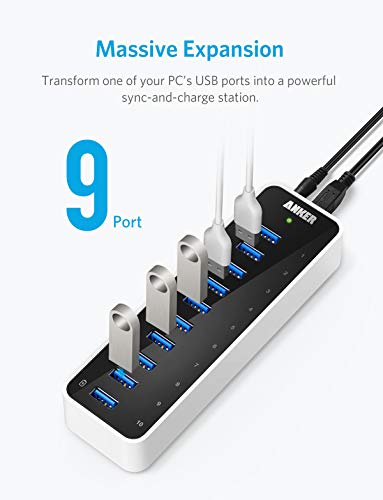




- Easily add 10 USB 3.0 SuperSpeed ports to your PC and enjoy data transfer rates of up to 5Gbps for faster sync times.
- 10th data port also delivers BC 1.2 charging speeds of up to 2 amps, while the other 9 ports charge at speeds of up to 0.9 amps each, with 10 amps overall among 10 ports.
- High-power 60W adapter ensures stable data transfer. Blue LED indicates normal operation.
- Designed with a built-in surge protector to keep your devices safe. Supports hot swapping. No installation of drivers required for Windows XP / Vista / 7 / 8 / 10 or Mac OS X 10.2 and above.
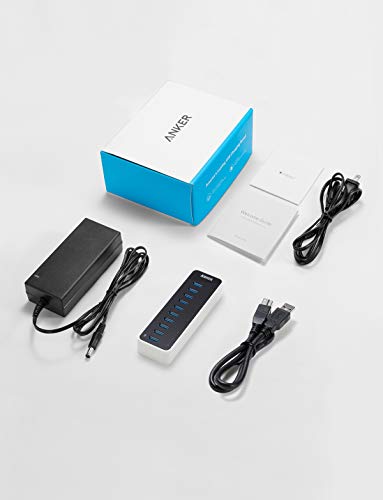
- Package contents: Anker USB 3.0 10-Port Hub, 12V / 5A power adapter, 2.6ft USB 3.0 cable, welcome guide, 18-month hassle-free warranty.
-
Information
-
Twitter
-
Pinterest
-
Youtube
-
Facebook
Jessica Schoenfelder
Fast, small, powerful USB 3.0 HUB
So I read a TON of reviews and tried 3 different products before going with the Anker 9port + charge port. I have a few 3.0 devices and a few others (2.0). I was having trouble with another hub where I had a USB HDD that kept disconnecting under heavy load. I tried two others but kept having different issues, disconnects, speed, random errors about devices not working properly. They all went away with the Anker 3.0 9-port. Pro's: Function: - FAST - Every port works together with out issue - Power brick is small enough and has enough cord to keep the desk looking clean (I used Velcro and put mine under a desk) - Errors related to devices not working went away - Under full load nothing disconnects or spins into oblivion. Aesthetic: - Slick, small, light but solid. Cons: Function: - Ports are close together so chubby devices will eliminate an extra port. Aesthetic: - Power light seems to glow brighter on the side than on the top.
Bryan Soon
Read this important info for all Mac owners...
Update April 13, 2017: [First read my original message (1 star) below] <> I am increasing my star rating for this product so as not to arbitrarily lower the overall average score for this product without due cause. Turns out this problem is most likely not due to anything the hub manufacturer (ANKER) has control over. After a bit of research I ran across this message on the Apple Communities chat website, sent by someone named Marianco1 on Feb 2, 2016... "...Due to an update to Apple's USB 3.0 drivers, some USB 3.0 hubs and peripherals may occasionally not work on Apple products running the OS X El Capitan operating system. Apple is working on a fix to the problem, but in the meantime, you may have issues such as the device resetting or the OS recognizing a USB 3.0 device as a USB 2.0 device. ... - this is a software issue and we hope to see Apple deliver a working update soon. HooToo - a maker of USB 3.0 Hubs - recommends that Mac users do not use their hubs since performance is unstable. Their hubs worked well in OS X 10.10 Yosemite. But they fail in OS X 10.11 El Capitan." The author also notes the following about mac computers, "There is also a port limit of 15 for the USB drivers. Each USB 3.0 port takes up 2 ports, each USB 3.0 port takes up 1 port. So USB 3.0 Hubs rapidly use up the available ports so that the remaining ports on the hub are ignored." These are the exact problems I am currently experiencing on my Late 2013 iMac 27" with I7 processor and I've tried a total of about 5 different manufacturers USB 3.0 hubs all with individual power and USB 3.0 data transfer cables. After I wrote the message below an Anker representative contacted me thanked me for the feedback and sent me a free USB 3.0 4-port Hub. The folks at ANKER are truly a class act. Five stars for customer service! --------------------------------------------------------- My original message: my USB 2.0 mouse movement was choppy on screen and my late 2013 27" iMac shows this device as a USB 2.0 device not USB 3.0. Also, the device arrived clearly used and not new as purchased. The model # is AH231 and serial number is 229Q6AGC. I sent the item back immediately.
Love Die
Works Perfectly With My 2016 Macbook Pro dual Thunderbolts
Being a musician and music writer, I had to finally upgrade my gear. And part of that upgrading came in the form of a new laptop. A lot of my equipment utilized the USB A kind of input. But this laptop utilized the USB C type of plug...and there was only two inputs. So, naturally I needed an adapter and preferably one with tons of inputs...and this more than fits the bill. The only thing was that I had to replace the connection cable that came with the product. It comes with a USB 3.0 type B to type A cable...but what I needed was the Type B to Type C (which I purchased on amazon in conjunction). It works phenomenally now with my laptop with no problems. Here are some things to note though: 1. There are 10 USB slots, but the 10th one is the only one that can both charge AND connect the device to the computer. All other slots are just basic connection points. 2. I love the slim design. Really easy to pack and carry to sessions along with my laptop. 3. You will need to plug this hub in with the included adapter. Some may find this a hassle, but for me and my line of work, this is much preferred. It means that I can run multiple gear and equipment with consistent power going into it....and not draw much from the laptop itself. I can use preamps keyboards, etc. simultaneously. Obviously, I'm quite pleased with this purchase and it does the job exceptionally well.
Heather Eaton Biggs
Anker stands behind their products
I'm pleased to say that Anker has sent me a new replacement USB hub and, after using it for like... 2 minutes... I can say it's working. Mind you this replacement came from Anker because I had complained in my review (below) and they reached out to me. I had not expected them to be so proactive nor for them to support a 10-month old product. I happily give this product 5 stars, because I do really like its design and Anker support has been above & beyond my expectations. Should this product fail like the original one then I'll update this review at that time, but until then, I feel I can recommend this USB hub to other customers. Old review below: After only about 10 months I find myself having to retire this device. I was having problems with intermittent mouse operation and finally tracked down the problem to this USB Hub. After looking through some of the comments here I can see I wasn't the only one. It's really too bad because I did like the physical design of this hub. UPDATE(this was from the old review, not the new review): Well Anker has shipped me a replacement hub. It hasn't arrived yet, so I can't say more about it. But it does appear that Anker is trying to stand behind their products so I'll update again after the hub arrives.
Alecia Rakes
Good stuff, it helps get things organize and unclutter messy wirings.
I withheld my review for a year just to test it out. And it did failed me, in 3 months time. The other slots at one time or another will work or will not work, the charging slot just the same...I kept on inserting and reinserting and still the same. So I called customer service and they replace it and shipped me a new one. I could have given them 1 star review or none at all, but I factored in these 2 reasonings above anything else. Anyway, no things made by men are perfect, all has flaws. Here are the reasons (in my experience, which maybe different from what you have). A.Whenever you not using the Anker, unplugged it just the same when you shut off your computer or other appliances, when not in use. And it will work for a long long time, as my old one is still working at this time. Just unplugged Anker when not in use. B. The customer service are wonderful, They listens and will help whenever possible. I hoped this helps.
Betty Straub
A short life but now replaced with a first rate product
I rarely write a negative review, in fact almost never. This AnkerDirect 10-Port USB Data hub lasted only about 2 months. Now none of the USB ports work. For the first couple of weeks all the ports seemed fine. Then one by one they stopped working. Power gets to the unit and the USB ports on my MAC work fine. I've been waiting for a replacement from the company ever since April 20th 2017, after sending their support group my address as requested, but it had not arrived. I wish to amend this review by saying that the Anker customer service folks were very helpful in rectifying this situation. After some checks on the original item at their direction, the Anker folks came to the conclusion that I had a defective product and quickly replaced it with a new model. I've had a couple of days to test it out and it appears to be working just fine. I have always felt that a product or service can go bad but it is the company's response to that problem, should it arise, that gains my respect and future business.
Kera Presentandfuture Wilson
Great compact hub.
My first thought upon opening the box was to send it back. I needed a hub that could handle a lot of equipment and it does. I also needed a hub that could be mounted to a panel inside the equipment it is servicing. Sadly it does not have any mounting brackets. I decided to try it out anyway and I was pleasantly surprised with the hubs performance. I loaded all 10 ports with various different equipment. 6 radio panels, two button control panels and two input output boards. Everything runs perfectly with no dropouts. Not one dropout in many hours. I have a lower watt industrial hub that is constantly dropping ports. I will be replacing that hub as well. The unit itself is very small and light weight and it comes with a power brick and instructions. Installation was straight forward and easy. Another reviewer stated that the ports are extremely close together and I agree. If you have wide plugs you should consider a different model. I overcame my mounting problem with 3m double sided tape. I know that the tape won't last long because of the heat inside the cabinet but it will work until I come up with a permanent solution. All in all this is a great 60 watt powered usb hub and I'm glad that I didn't send it back.
Lai Yin Han Oo
Highly and Wholeheartedly RECOMMEND!
After purchasing another hub that seemed flimsy and did not meet my expectations, I read and also wrote to various people who had purchased this one, asking and getting kind responses from a number of them (THANK YOU!!!). I purchased this hub and was instantly pleased but had an issue which necessitated calling their Customer Service (turns out the company is located in So CA, about 30 minutes from me!). I could not be happier with the knowledgable Customer Service, nor with the product. I highly recommend it. It is sturdy, lovely compact design. When a device (not just the USB cord) is plugged into one of the outlets, it lights up with a low-key blue little LED - which is a great way to let me know that the outlet is working and the device is synching/charging. I charge and synch my iPad/iPhone and iPod Touch normally from the "regular" outlets but when I need to just charge a device quickly, I use the CHARGE ONLY outlet for a quick boost.
Ne Ha
Nice USB hub! Excellent time saver!
Ordered from AMAZON with same day shipping option & received it a few hours later. So far it's working as expected. Needed a hub to clone a source flash drive to multiple USB sticks simultaneously and it's working flawless so far. Excellent time saver! I can confirm that this updated model does support USB 1.1 & 2.0 without a problem. I briefly connected my WD 4TB external drives to it and they were detected without a problem. Also tested a TRENDnet TU3-S25 external 2.5 hard drive housing & it also worked flawless. Loaded up a 32 GB SANDISK USB 2.0 flash drive to maximum capacity & cloned it to 9 USB SANDISK 2.0 flash drives in about 2 hrs & 30 minutes on an IBM CORE2DUO 2.66 system with 4 GB ram running Windows 10. Of course if I were using 3.0 USB flash drives it would have been less than half that time. I fomatted all 9 drives within 1 minute. I'm happy with it for now & hopefully ANKER can put out larger capacity USB hubs instead of forcing me to purchase additional hubs with these semi large power bricks. : ) TIP To avoid transfer rate inconsistency make sure you remove the USB flash drive & plug it back in after formatting ect.. If you don't you may notice file transfer rates will suffer ( Noticeable on larger file transfers ) when dumping data to the target USB flash drive connected to the ANKER hub. I was getting 1 KB to 2 MB/s transfer rate after formatting a USB drive & trying to dump a 4 GB ISO to it. After removing it and plugging it back in, it worked as expected.
Yolanda Renee Small
Turn off "USB selective suspend setting" before using this hub!
Update: When using a WD 4 TB portable drive the drive kept disconnecting intermittently. I assumed this was because the drive was drawing too much current from the hub. I wasn't happy with this because why would you build a device that didn't work with commonly available peripherals? However, this is the way of the world nowadays and I thought it was something I was just going to have to live with. Then I bought two WD 8 TB book-type drives with their own power source. I thought surely this would resolve the issue with the drives drawing too much current from the hub. Imagine my dismay when these external drives exhibited the same behavior! Fairly disappointed I wrote the review below after learning that several other people have been having issues with WD drives and this hub. Well, yesterday I came across another review which suggested that disabling the "USB selective suspend setting" in Windows would fix this specific problem. It has now been 24 hours since I have done this and I can report no problems with any of my drives disconnecting when attached to this hub while in use, including the non-powered 4 TB drive. This setting can be found in the advanced features of the power settings. If you are having the same issue then disable this function and enjoy the hub. I'm upgrading this review to 5 stars from 3. Old review: Works great until you plug an external hard drive into it. Yeah, I know, product information states not to do that, but can anyone tell me what good is a USB 3.0 expansion port that won't reliably transfer data between two commonly available 4 TB portable hard drives? Or even two commonly available 8 TB external drives with their own separate power supplies? That being said, until the drives drop out the transfer speeds are great and I can usually get about 30 - 120 minutes of use at a time (depending on sunspots, I guess) out of this device. Just be sure that high speed data transfer between external drives (or even just using them for playback of your stored downloaded media) is not what you want this device for and you won't be disappointed.