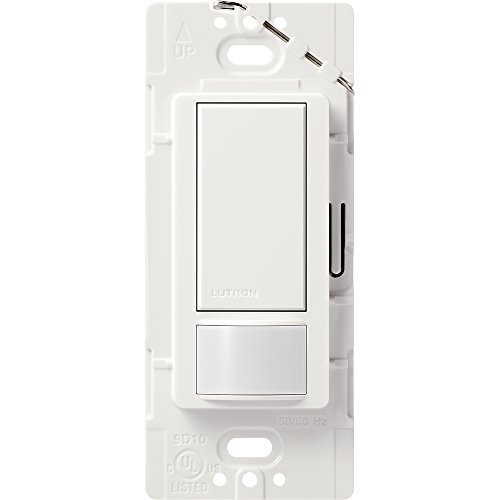
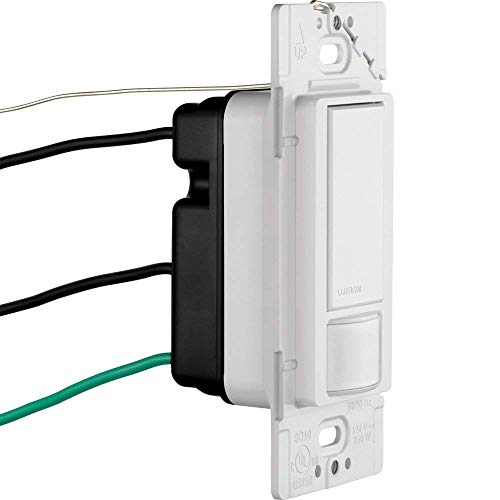
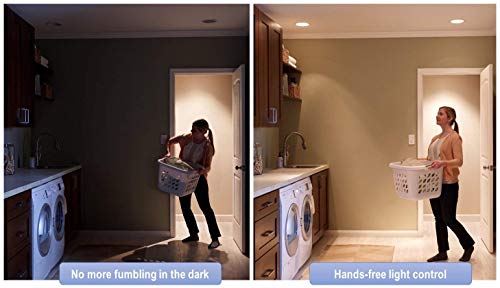


- Automatically turns the lights on when you enter the room and off when you leave
- Features XCT sensing technology which detects fine motion, such as typing at a desk or reading, ensuring lights do not turn off inadvertently
- Optional: senses daylight so lights do not turn on when there is enough natural light in the room
- Programmable time-out of lights - 1, 5, 15 or 30 minutes
- Works with all bulb types; up to 250-Watt incandescent, halogen, electronic low voltage 200-Watt magnetic low voltage 150-Watt CFL/LED 2 Amp ballasts
- Single-pole only; great for small rooms like kitchens, laundry rooms and closets
- Installs in as little as 15 minutes; ground wire is required, no neutral required
- Includes (1) maestro sensor switch; coordinating wallplate sold separately
-
Information
-
Twitter
-
Pinterest
-
Youtube
-
Facebook
Shazia Khan
Excellent Product - A troubleshooting note
This guy is awesome and an cheap way to not only upgrade your house, but save power. No more getting mad when the kids leave lights on in the basement for 12 hours because this guy will shut the lights off from them. You can easily configure it (after the fact too, just hold the button) from 60 seconds up to 30 minutes which is very nice and the kids love it and think its cool. It doesn't make sense for something like a bedroom where you sleep (don't want the lights coming on in the middle of the night if you roll around), but great for those other rooms where people come and go. Some notes: 1) Be aware of the wattage limitation. It appears that it's limited to 250 watts total flowing through it. Maybe I'm wrong, but that's what it seems to indicate. Now adays with LED lighting, that might not be an issue, but if you're thinking of having it shutdown a large room with lots of CFL or candescent bulbs, be aware that it might not work for you. 2) Troubleshooting Note - If you wire it and the lights remain on, the switch doesn't turn off the lights and it doesn't light up when you hold the button then it's not a problem with the switch. It's your GROUNDING. You MUST have a working ground wire. That's not a concern if you're in a more recently built house, but if you're like me and living in a 1970s house, be aware that you might not be able to use it in a lot of circuits. 3) Works perfectly with my Leviton Decora wall plates. I've been swapping out my old switches/receptacles with the rectangle form and they fit perfectly on it. MAYBE a very slight white sheen difference (maybe), but not even close to being worth being concerned about 4) Uses wire to wire connection instead of screw type - This actually makes it quicker to install versus the traditional bend-the-wire and fit it around the screws of the device. I always use one of the quick connectors and it makes install a breeze 5) What's the deal with the thin wire thing on the top - My version (new from Amazon) didn't have the brass top as shown in the main picture, but if you look closely at the second picture, you'll see a thin bare wire that goes through holes in the top of the device. I don't understand this at all. It gets wired into the ground (for some reason) and looks totally out of place. At first I thought it was some shipping wire or something. Strange. Of course, once you get the wallplate on, its invisible. Great device and hope it lasts for a long time.
Jeannette Chambers
Everyone needs a few of these.
I installed these in my laundry room, stairway and garage. It is so nice to walk into a dark room and have the light come on automatically. It stays on as long as you are there and then shuts off by itself. Easy install. Cover plate is included.
Sharon Perkins
Good sensor for bathroom lights/fan
My 3-year-old daughter can use the bathroom by herself, but can't reach the light switch and won't use it in the dark (not that I blame her). This seemed like an obvious solution, since the light switch in our bathroom faces the toilet and the shower as well. The good news is that the field of view is low enough that it can see a 3-year-old walking by. It turns the light (and fan) on by the time she gets to the toilet. The off-time is adjustable from 15 seconds (for testing the sensor) to over 15 minutes. You can also set it to manual-on only mode so that it only turns off automatically. It has a daylight sensor as well for the auto-on feature, but I can't test that because our bathrooms have no windows. The motion sensor can't seem to see through the shower curtain, but that's hardly reasonable to expect. We have the off timer set to 5 minutes, which at least should provide a reasonable reminder that your shower is going too long. It looks especially nice with Lutron's Claro wall plates (photo attached).
Becky Johnson
Options for 3-way (2-switch) setup.
Here are two ways you can use this in a 3-way circuit, assuming the location of the motion sensing switch is satisfactory to you. Option 1 will allow you to override the light to stay ON, ignoring the motion sensing switch (which will continue to do its thing). So basically, the light is ON or under motion sensor control. Disclaimer: although highly unlikely, if something goes wrong with the 3-way switch causing the two traveler wires to short together, something bad could happen to the sensor switch. I don't think anything bad would happen to it, but not knowing the exact construction of the sensor switch, I can't be certain. It's also highly unlikely for the 3-way switch to become defective in that fashion. Option 2 will allow you to override the whole thing OFF. You're basically able to cut power to the whole setup as you wish. So basically, the light (and the sensor switch) is OFF or under motion sensor control. You can leave the existing 3-way switch on the LINE side and just tie off one of the traveler wires at the other side, or replace it with a standard 1-pole switch and tie off one of the traveler wires on both ends. I went with this option because I wanted to be able to keep the light OFF when I want to. I did not draw in any of the ground connections to keep the illustration as simple as possible. You'll obviously need to hook up all the necessary ground connections.
Laura
the best "upgrade" I've made to my house yet
These little switches have got to be one of the best "upgrade" improvements I've made to my house yet. I am a stay at home father of three children ages six, four, and two and I was CONSTANTLY having to walk through the house and turn off the lights or follow my little one around and turn ON the lights for my little one. I installed these in the two bathrooms and I don't have to worry about it anymore. That nightime run to the bathroom with dirty hands? no problem. The light turns on for you! Kids forgetting to flip a switch? Not any more. No more wasted electricity (on lightbulbs anyway). Instalation is a snap. You just turn off your breaker at the panel, unscrew the face plate and old switch, swap a few wires, put everything back the way you found it, and turn the breaker back on and voilà! The only slightly negative thing I have to say is that they ARE a little big. They take up a significant amount of realestate in the electrical box so if you have a busy wiring junction, it might get to be a tight fit, but it's not bad. You will also probably need new faceplates since these don't come with them. Not a big deal, my local hardwarte store had them for like thirty cents each. My wife has already asked me to replace some other switches with motion detector lights, and i'm considering it.Good product, over all.
Travis J Strachan
A well built, long lasting switch with plenty of adjustable options.
[Original review 1.3.2018] - Love these switches. I have one in the garage which automatically turns the overhead lights on when we pull into the garage or open the door from the house to walk out into the garage. It has been functioning for over a year now without any hiccups. I have two in the kids bedrooms as punishment for leaving the lights on all the time (he he he). The only drawback / bonus to that is the angle of motion it will receive. From the light switch location on the bedroom wall, the motion sensor will pickup any movement in the hallway if the bedroom door is left open. So a bit of masking tape across half the sensor fixes that nicely. Just don't hang a mirror on the door as the sensor WILL pickup motion via the mirror. These switches are very adjustable & have a learning algorithm in them as well. In the garage, I have the time set for 30 minutes on this switch as there are many times I'm doing something in the garage for an extended period of time & can't have the lights going out in the middle of a project if it doesn't pick up any movement. When I initially installed the switches in the bedrooms three months ago, I set the time to leave the lights on after there was zero motion for 10 minutes. Drives the kids nuts having to get up from their desk to turn the lights back on (he he he). In the morning hours the bedrooms have sunlight streaming in through their windows. Initially, when I would walk past the switch into the bedroom the light would come on. But if you quickly hit the switch within 5 seconds of turning the light on, the switch will remember the environment (how light it currently is in the room) & the next time you enter the room with the same environment (or lighter even), the switch will leave the light off. If you're looking for a well built, long lasting switch with plenty of adjustable options, this is your switch.
Mayodele Mosuro
Instantly recognises any movement.
Put this in an 8x8 utility room. There are two doors into the room with only one switch. I was going to open up some walls and install a couple three way switches so I'd have a way to turn on the light from either door. This eliminated the need and was a simple install. Whenever I enter from either door it turns on the light instantly. When I toss my dirty clothes into the utility room without entering, it comes on. It remains on as long as I'm working there. If it detects no movement then I've set it to wait 1 minute before shutting the lights off. That gives me a minute to stand motionless watching the clothes go around before being bathed in darkness, ha. Any slight movement and it turns the lights back on. The room has no windows and it's always dark so I didn't have to calibrate it for whether it was daylight or not. I put another one in our greenhouse and it only turns on the lights when the ambient light is dim, but that one I had to follow the instructions and choose the day/night option. Piece of cake. I really feel like I've given myself some luxury.
Sanam Samiullah
Good job sensing
This switch will allow your lights to turn on when a person's movement is sensed, or alternatively, turn it off when there's daylight. Its settings allow you to have the light stay on for 1,5,15, or 30 minutes after it no longer senses movement. It also has two levels of sensitivity and a test mode. Unlike many earlier sensor switches on the market, this one works with fluorescent, incandescent and LED lights. Although it requires a ground wire, which typical standard switches may not have, it doesn't need a neutral (white) wire, unlike many sensor switches. I placed this switch in a bathroom, where I needed one for two reasons. The light was frequently left on by mistake, and the room has fluorescent bulbs. Bulbs with CFLs inside do not favor well with short cycles, and are better off left on for a number of minutes than being switched off after a minute of being on. One concern with a bathroom switch is the level of sensitivity. I put the switch in test mode (15 seconds) and went behind a shower curtain. The light stayed on. Likewise, it stayed on while sitting on the room's seat. I haven't had any false responses, even when turning the ceiling fan on, although it's possible for air currents to trigger the sensor. UPDATE: I bought a second one for another room that gets light through windows during the day. The switch senses when a person is in the room and if it's dark enough, the light goes on. This is a much bigger room and I was concerned it might be a problem if the light went off with a person in it, but it seems to be working well. Another feature is that within five seconds of entering the room, you can turn it on or off, and it will learn from that. If you turn it on because it's already dark enough, it will learn to turn on earlier in the future. And if you turned it off, it would have recognized that there was enough ambient light that it should not have needed to still be on. Over time, it adjusts. Setting the time interval is simply a matter of holding in the button until it blinks the appropriate number of times indicated in the instructions. Other (less common) settings involve a small button that's normally hidden by the switch plate. That makes setting a simple task, and the defaults (5 minutes and movement sensor mode) might be sufficient. This uses a standard Decora switch plate, so depending on your current plate, you may or may not have to buy one. They are under a dollar at many hardware stores. I had a twin Decora plate from a previous sensor switch, but in one location I changed from a standard toggle switch and used a Leviton 2-Gang 1-Toggle 1-Decora Combination Wallplate. Overall, this works better and is more versatile than a number of sensor switches I've used in the past. It also has a lower sensitivity setting that I haven't tested, but if this causes lights to go on too easily, that's an available option. UPDATE: After using this switch for several months, I continue to be impressed by it, and it's the hands down winner compared to other brands I have tried. I have already bought an additional one and may buy more. UPDATE 9/2012: This switch allows you to set the amount of time after sensing no activity before the lights turn off. My wife decided that five minutes was too long for the bathroom and had me set it to a minute. I found that if I sit perfectly still, the light will go out. A simple turn of the head or wave of a hand will switch it back on. With a five minute setting, any movement within the past five minutes will have been enough to keep things on. So if you use one in a room where you sit very still such as while working at a desk with your back to the switch and a high chair back, a short setting could leave you in the dark until you wave your arm around. Ultimately it means that it senses small movements well, but in situations where small movements might not happen for a while you will do better with a longer period before it times out. So it's not just a matter of how long you want it to stay on after you leave the room, but a matter of how much you move around in short periods of time. UPDATE 8/2017: In December of 2016, I upgraded the fixture controlled by this switch and it now uses all LED lamps. It works perfectly.
Carrington Keys
10 stars!
I love my occupancy switches so much that I would give these 10 stars if I could!!! We just moved into a new house (new construction), and apparently CA code now requires vacancy switches in places like bathrooms and laundry rooms. I've learned a lot since we moved in - I had no idea what the difference was between a vacancy switch and an occupancy switch (or that there were two kinds of switches). I worked in an office where they have occupancy switches in the conference rooms and the light will turn off since everyone was sitting around a table without moving much, and a whole room of professionals in suits and ties will start waving their arms in the air to get the lights to go back on ... it's pretty funny! So I assumed that when there is a motion detector on the switch, that it is an occupancy switch ... I had no idea there was such a thing as a vacancy switch. So we moved into this house with these vacancy switches, and they never seemed to work - they never came on unless you pushed the button, and they never seemed to go off without using the switch. So I started googling, and learned all about vacancy vs occupancy - quick overview: vacancy will turn off a switch after a certain amount of time with inactivity, but it will not turn the lights on; an occupancy switch will turn the lights on when it detects motion, and off after a certain amount of time with no activity. These Lutron occupancy switches can be set up to act as vacancy switches if you want. Since we have no kids, and it is just 2 reasonably responsible adults living in the house, turning off lights is not an issue for us, so vacancy switches don't really make sense in our house ... in fact the ones we had were extra useless because they waited for 30 minutes of inactivity before turning the lights off, so we had lights on much longer than if we turned them off ourselves. Plus, the guest bathroom motion detector faced the mirror, which faced the door, so every time someone (or a dog) walked by the open door the motion detector saw the activity in the mirror, so the switch never turned off ... totally impractical. So ... I switched out the vacancy switches in the bathrooms and laundry room for regular toggle switches ... what a relief! But, all of this put it into my head that occupancy switches would be really nice in several other locations, so I checked the reviews and found these switches, and got 4 of them (2 orders of 2-packs): - I now have one installed in our walk-in pantry ... the light pops on as soon as you step into the room, and it shuts off after 30 seconds (the minimum you can set these switches to). - One installed in our master walk-in closet ... my husband's robe actually hangs on a hook right next to the switch, and tends to cover up the motion detector a little bit, but the side of the motion detector still catches the motion as we walk into the closet, and if it doesn't, we just have to touch his robe and the motion makes the light go on :-) The only issue I have found is when I'm folding laundry in the closet, and the robe is hiding me from the motion sensor, the light goes off ... not that big a deal. I have this one also set to go off after 30 seconds. - The third one is in the laundry room ... this was the hardest to install because it was a 3 way switch, and these occupancy switches are single pole. Since the two switches in the laundry room are literally so close to each other that you can touch them both at the same time, it made no sense to have 2 switches, so I googled it and took out one of the switches and set it up so that the other switch was now a single pole, so that I could replace the switch with the occupancy switch. It worked perfectly, and now when I go in the laundry room with a load of clothes I don't have to find the switch, and when we come in from the garage through the laundry room, the light also comes on, so we can see where we are going. I also have this one set to 30 seconds. - The 4th switch is in the garage ... the location of the switch is such that you actually have to step into the garage to hit the switch, and with the required "automatically closing" garage door, the door closes as you go for the switch leaving you in darkness until you find it. The motion detector has fixed all of that. And a bonus is that when the overhead garage door opens that garage light also comes on, so it is nice and bright in the garage. I've got this one set up to do the daylight sensing, so the lights only come on when it is dark in the garage. I've also got this one set to turn off after 5 minutes. Now I need to put one in the coat closet ... and I'm sure there are other places :-) Loving them!! (Sorry for the long review ... I guess I got carried away)
Stephanie Holton
Awesome even if your want a full smart home
We have full advanced smart home functionality almost everywhere, but these simple Lutron motion switches are 100% as good and cheaper if you use them in the right areas. For example small bathrooms and garage lighting. If you have a guest bathroom you don’t need to trigger it via wifi to start the oven bakin, you don’t even care about seeing if it’s on remotely via an app. You walk into the bathroom without thinking about it and the light goes on, and turns off shortly after you leave. It’s sounds simple but these switches are actually some of the most useful automation hardware we’ve purchased. Do you have kids that leave the lights on? Our kids have a total of four bathroom switches. Never again do we walk by their room and see them left on. Important note on quality: We tried several times with Lutron competitors like Leviton (sp?) and had reliability problems across multiple samples. I’ll only buy Lutron now. We do use their cool full smart home Lutron Caseta line as well, it’s just that for certain areas these are just as good. In fact, it makes for less clutter in management in our home automation apps because we don’t have to have these added in to confuse things when they don’t really need management,