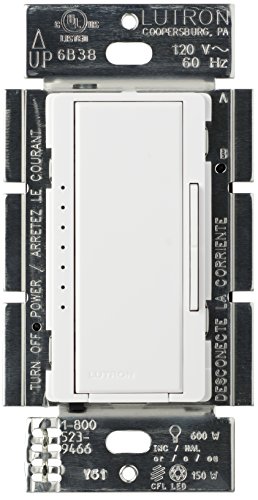



- Tested on 1,000s of bulbs and dozens of brands for flicker-free dimming. For list of recommended bulbs view "Technical Specification" below
- Provides over 250 lighting levels so you can create the perfect light for any activity
- Works with up to 150 Watts of dimmable LED/CFL bulbs or 600 Watts of Incandescent/Halogen bulbs. For list of recommended bulbs, view "Technical Specification" below
- Lutron patented technology to optimize the dim range of your bulb and prevent interference with other dimmers in the home
- Can be used in single-pole or 3-Way/multi-location dimming applications (up to 10 locations, Maestro companion dimmer MA-RR-XX required)
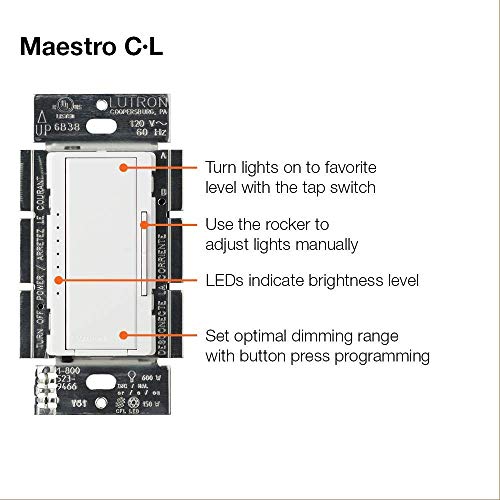
- Easy-to-operate tap switch turns lights on/off to favorite light level. Rocker dims and brightens. Advanced programming settings for features such as customizable delayed-fade-to off
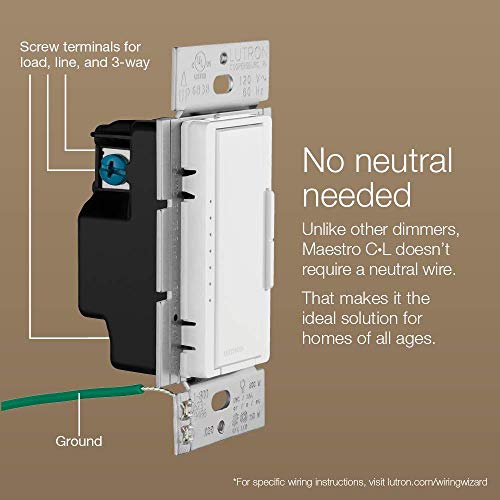
- Installs in as little as 15 minutes in homes of all ages – NO NEUTRAL REQUIRED
- Includes (1) Maestro C.L Dimmer Switch; coordinating wallplate sold separately
- Volts: 120 VAC, 60 Hz
-
Information
-
Twitter
-
Pinterest
-
Youtube
-
Facebook
Marisa Salas
Not exactly smart, but highly functional
I've installed several of these dimmers in our home, in both one and two dimmer configurations. They are both attractive and functional, and they allow you to use multiple dimmers on a 3-way circuit without any rewiring. They work well with both incandescent bulbs, compact fluorescents and LED lights that are dimmable, and provide the fullest range of dimming I have seen with these types of bulbs. They come pre-programmed to bring lights to full brightness quickly, and to turn lights out by slowly dimming them, allowing you to see where you're going even after turning out the lights. A pair of small buttons allow you to set the brightness level, and that level will be maintained even after a power failure. Double tapping the switch always brings it back to full brightness, however, which is very convenient. Every aspect of how these dimmers function is programmable, from ramp-up and ramp-down times to dimming modes. However, the programming sequence is not at all intuitive, so most people will undoubtedly use the default program. Programming involves tapping specific buttons in a specific sequence - it's a bit like programming some cars or resetting the check engine light, where you may have to turn the ignition on, then off, turn on the left turn signal and blink the headlights twice. One thing that may not be clear from the instructions is that you are not limited to using only one companion switch with this master switch. If you have the wiring for it, you can wire several companion switches in parallel, all of which can control the same light. There is also a version that includes two dimmer switches in one unit, which is very handy when space is limited. One caution is that these are electronic dimmers and they need a small amount of power to function. That power comes from current flowing through the circuitry, even when the switch is off. It's difficult to find in the instructions, but they require a minimum 40 watt load to function. That's no problem with an incandescent bulb, but many LED's use much less than that. For example, a light fixture that has two 1600 lumen bulbs (equivalent to 100 watt incandescent bulbs) may use as little as 26 watts. In theory, that's not enough for these dimmers to function. Sure enough, I had a light with three 5000 lumen bulbs, each using only 7 watts. It wasn't enough for the dimmer to work. However, when I replaced the bulbs with 800 lumen bulbs, each using 9 watts, the dimmer worked without any problems. So it would appear they can function with anything above 25 watts or so, but the stated minimum is 40. Finally, a word about intelligence. Lutron was the original manufacturer of mood lighting, with multi-zone dimmers, each controlling multiple lights and with programs that, with a single button, allow one to set a bunch of lights to specified levels simultaneously. The Maestro is not one of those. These are not smart dimmers and they can't be controlled by Alexa, or via the Internet. You can't even use an app to control all of your dimmers from your smart phone. These are also a lot less expensive than smart dimmers, and they're a lot less confusing to the uninitiated. When your mother-in-law visits, it won't take her any time at all to figure out how to use one of these that controls the dining room lights. With a smart dimmer, it might take some time to learn which button to push, or to say, "Alexi, set lights for dinner." Furthermore, there's no danger that these dimmers will ever be hacked the way a smart dimmer can be. After all, smart devices usually have almost no security and there have already been cases of people 'gas-lighting' their ex-spouses remotely to drive them nuts. No such worries with these switches. Simple, elegant and highly functional - what more could you want?
Lou Olmos
Great LED dimmer
Great dimmer, relatively easy to program. The 3 way function is compatible with a standard 1 or 3 way switch but it's a little confusing to set up. The fading option is very cool, it takes about 5 seconds to completely fade out. I am using with torchstar led can lights and the range of dimmable is great, it dims to below a useable amount of light and everywhere in between
Jamie Biancalana
The perfect dimmer for the nerd in your family
I bought this Lutron dimmer to control six dimmable LEDs installed in recessed lighting in my kitchen. I was hoping the dimmer would eliminate the buzz I could hear from my old analog dimmer; this one reduced, but did not totally eliminate, that buzzing. I don't even care, though. I am almost a little ashamed of how happy I feel just turning a few lights on and off, but I still nerd out over how cool this switch is, even now, almost a year after I installed it. The programmable features for min/max brightness, fade on/off times, and the shut-down timer are all elegantly implemented and easy to configure. Lutron did a remarkable job of thinking through so many little user interface features, like the built-in indicator lights that let you know, when the lights are off, the brightness level the lights will reach when you turn them on. Or simply pressing the on button twice to quick reach full brightness. After a year of use, the hardware itself still looks great and perfectly matches my run-of-the-mill wall plate. This may be the longest product review I've written on Amazon. And it's for a light switch. A kick-ass light switch.
Raluca Teodorescu
Good looking switch, Nice features
Picked up three of these to replace some older slide switches as we upgraded from incandescents to LED. The older manual slide switches worked well and we liked them, but they didn't play quite as well with our new LED lights (mostly Philips & Cree brand). These switches have a low-power threshold setpoint that lets you ensure that at the lowest level the switch is providing enough power to turn on the LEDs since LEDs don't dim down to quite as low power as incandescents in general. The feature works well and assures a lack of flicker or cut-out at the lowest level and was one of the main reasons we selected this model. The switch remembers the lighting level when turned off and returns to this level automatically which is a nice feature. If you want to fully brighten the room you can double-tap the switch instead. The fade-on and fade-off settings, while not strictly necessary, are cool and have gotten some comments :-) Overall we're very pleased with these switches. One of the switches is on a three-way circuit with a non-dimming switch. Lutron included detailed instructions for wiring and configuring the switch for this situation and they worked well. Overall very satisfied with this switch and would recommend it for incandescent or LED lights.
Kenneth Latham
Works perfectly, as advertised.
I am using this in my living room and it's controlling 4 Cree recess mounted LED bulbs. The default dimmest setting works well with the bulbs. I haven't seen any flickering at all. When you turn off, it remembers the last brightness level and it also indicates the level by illuminating the appropriate LED. You can double tap the switch to turn it ON at full brightness or single tap to turn it ON at the last brightness level. Pressing and holding the switch for some time enters the switch into programming mode, where you can change the minimum dim level. My 5 year old once accidentally did it (instead of pressing the dimmer buttons on the side) and it entered the programming mode. Fortunately, she didn't change anything. After telling her how to use the dimmer, she hasn't messed with it again. Something to watch for if you have toddlers at home.
Sulaimon Shukroh Modupehorlaa
My new favorite dimmer
This is my new favorite dimmer. I bought a whole bunch of FEIT R30 bulbs from Costco. I had some dinky little LED dimmers from the previous owner that were a tiny slider on the side of a standard toggle switch. The bulbs would flicker in any position, infuriatingly only after you walked away from the switch. This dimmer is a high quality piece--the ears break off nice and clean for multi-gang boxes, and the insert terminals on the back are great. It has a series of green tiny LEDs on the side to indicate relative intensity of the light setting. You can program this thing with all kinds of stuff, like soft fade on, fade off, resume at last setting or always resume to full power, etc. The lights might give you the impression that it only has about 10 increments of dimming, but it actually is very widely variable and can hold all kinds of dimming intensities, from barely on to 95%. I love be able to bring the lights down very low at night just so I can see in the kitchen without bumping around but also not messing up my night vision. I get zero flickering at any level, and that was a particularly nice surprise because I checked the huge list of compatible bulbs, and most FEIT products were on there but not my particular bulbs (and I have 20 of them). Fortunately, it works fine. I think this is the best dimmer around--it feels nice, and can do some really fancy things that make your room feel more expensive--just something as simple as a soft-on! I'm a fan. This is not cheap but it's worth the money.
Ggja Tabo Tabo
Great dimmer, but be aware of your LED bulb choice!
I already have multiple Lutron Caseta Wireless Smart Dimmers and were very happy with them. I then decided to install a few additional "dumb" dimmers that did not need remote/smart features. The Maestro line is most closely related to the Caseta line of dimmers, so I bought 3 Lutron Maestro MACL-153M-WH dimmers. Many reviews have already covered its usage and features (my favorite being single tap = recall last dimming setting, double tap = full brightness), so I will not go over them again. What I do want to add is which LED bulb works best with this dimmer, because I had heck of a time finding one that did not buzz. I thought I would just use the same CREE LED bulbs that worked well with Caseta, but it turned out that produced audible buzzing sounds with the Maestro. In fact, I tried 4 different LED bulbs before I found one that did not buzz (or rather, buzzed so faintly that I can't hear it even in a quiet environment). Here are the LED bulbs I tried: CREE SA19-08127MDFD-12DE26-1-14 (Buzzed - 37 dB@1ft): Cree 8 Pack SA19-08127MDFD-12DE26-1-14 LED 60W Replacement A19 Soft White (2700K) Dimmable Light Bulb Hyperikon FBA_192000405-4Pack (Buzzed - 38 dB@1ft): Hyperikon A19 Dimmable LED Light Bulb, 9W (60W Equivalent), ENERGY STAR Qualified, 2700K (Warm White), CRI90+, 800 Lumens, Medium Screw Base (E26), UL-Listed, Standard Light Bulb (4 Pack) EcoSmart 1001370384 (Buzzed - 36 dB@1ft): EcoSmart 60W Equivalent Soft White A19 Energy Star LED Light Bulb 8-Pack Phillips 461228 (No audible buzz - 32 dB@1ft): Philips 461228 60 Watt Equivalent Soft White Dimmable A19 LED Light Bulb, Energy Star Certified, 8-Pack At 32 dB, it's about as loud as a quiet whisper. Note that the measurements were taken from 1 ft away. Three Phillips bulbs are installed over the mirror in my bathroom, which is several feet away from my head when I stand in front of the sink. At this distance, I cannot hear the Phillips bulbs at all, but I can hear the other 3 bulbs, even when there is no other background noise.
Brad Ailani Bradshaw
Cut to the chase...
Now, I don't know why or see how this being a "digital" dimmer makes a difference (I haven't tried the analog Lutron dimmers), but I can say this, I tried the Pass & Seymour HCL453PTCCCV6 as well as Feit Dimmers from Costco (both were analog sliders and both claimed compatibility with LED) and neither of them were able to maintain a steady stream of light... What I mean by that is...you know how when your A/C kicks on, and your lights dim for a second and come back to normal brightness? That would happen ALL. The. Time. with the previous dimmers I had. They wouldn't necessarily "flicker" in the LED sense, but they'd constantly fluctuate brightness when dimmed as far down as the dimmer would bring them. Now with the Lutron dimmer...I set it to its lowest setting out of the box, and literally not even a single flicker. So I say: "Screw it....hey, doll...you think I should adjust the default level? Doll (wife) says: "Leave well enough alone!" I, of course, did it anyhow, and you know what? It dimmed down WAYY further than the analog ones and STILL no flicker... I love this dimmer. You have to understand something about me...I can see the dimmed LED flicker like you wouldn't believe. It's VERY obvious to me. I can't stand that flicker. My "setup" 2 Commercial Electric CER6730DWH27 for the entry way 8 Commercial Electric CER6730DWH27 for the living room 4 Commercial Electric CER6730DWH27 for the dining room all on the new dimmers, and literally no flicker, and they go WAYY dim.
Keshab Bhatta
The dimmer works great. My only criticism is the directions that come ...
I purchased this dimmer switch to control under-cabinet lighting. The dimmer works great. My only criticism is the directions that come with it are vague and offer little rationale. For example, I didn't think their wiring diagram was very clear how to wire this thing (and I know how to read schematic diagrams). As I figured out on my own, you need to connect the power source to the black terminal on the dimmer, and the output (the lights) to the brass terminal. In my case, the blue terminal wasn't needed (you only need it to connect a companion dimmer or switch). But once it was all connected, I calibrated it according the instructions and it works very well with absolutely No flicker in the LED lights. The dimmer itself is a good product, but they need to re-write their instruction sheet so it is more clear.
Nikki Darling
An even better, more versatile, Maestro dimmer, and still the same price
A few years ago, when I installed Maestro digital dimmers in my home (and one Abella, which I think suited the sideways kitchen backsplash better), it took a little homework to pick the right one for single-pole and multi-pole locations. But the Maestro dimmers' performance is great, I was glad to spend the effort. At that time, they could be custom programmed with the following custom adjustments: 1. Preset lockout (whether the dimmer always comes on to the same setting, or the last setting used) 2. Fade-on speed 3. Fade-off speed Now, the new Maestro 153 for dimmable LED, CFL, as well as halogen and incandescent bulbs, brings all that to the table and more. Something I didn't like was that the Maestro and Abella had preset "delayed dim" (turns the lights off very slowly so you can leave the room without being in the dark). Now, the 153 brings the following user-customizable settings: 1. Preset light level (preset lockout) 2. Fade-on speed 3. Fade-off speed 4. Delayed dim duration 5. Night indicator on/off (a single LED indicator glows dimly, indicating the setting that it will come on to) 6. Low-end trim (dimmest setting for bulbs) 7. High-end trim (brightest setting for bulbs) In a word, W-O-W. You may want to use the switch with the factory default settings (which are fine, and you can reset to the default easily if you get confused), but for a bathroom, a bedroom, kitchen, dining room, home office, you might want completely different configurations. For instance, I like my master bathroom lights to come on rather slowly, but fade off briskly. The delayed dim is a very short duration, 10 seconds. But for the kitchen and dining rooms, I like the lights to snap on in 2-3 seconds, but fade off slowly, about 5 seconds. Delayed dim is longer, like 15-30 seconds so I can close the dishwasher, hang up the hand towel, and walk out. The dining room, kitchen overhead lights don't need the "night indicator," but one is really helpful in the bedroom and bathroom. Now, if you've never used a Lutron digital dimmer, you might think this is pretty geeky and frivolous stuff. But actually, once you've used them for a few days, you begin to appreciate the elegance and comfort of these smooth fade-on and fade-off settings. It's calming and relaxing when lights don't just snap on and snap off abruptly. For rooms you don't light often, this would be overkill, but those rooms that realtors will tell you are the biggest return on upgrade investment, putting sophisticated lighting controls in can change the character of the rooms, remarkably. A couple of caveats. I found that the Lutron method of dimming -- digitally oscillating the power -- can make some bulbs "sing" at lower brightness.[1] This can be remedied with an expensive add-on, or using rough service bulbs, or (as I did in my dining room) using halogen bulbs with more resilient filaments. This probably isn't a problem with LED or CFL bulbs, which is why I upgraded my dimmers from MA-600s to the MACL-153 -- I can upgrade my bulbs later. Halogen bulbs in particular are getting harder to find, and more expensive. (update) Also, the MACL-153 nightlight (the locked preset, if any, is dimly lit when the switch is off) now shows more of the setting LEDs. My MAW-600 previously installed showed the preset pretty clearly, and the other little dots barely had any light showing. Now, they're all sort of glowing, and the preset dot slightly brighter. ,:\ I've given Lutron feedback on this via their web site. The advanced programming guide (how to change all these presets) isn't included in the blister pack, but you can find it (PDF) easily on the Lutron web site (Google for it). I would save a copy on your computer, or print one, for future reference. The blister packs I bought did not come with faceplates. If you switch from conventional 1" switches to these, you'll need new "decorator" faceplates. Lutron makes them (the Claro line, e.g. Lutron CW-1-WH 1-Gang Claro Wall Plate, White), so do other companies, and most major hardware stores carry them. The -WH in the part number indicates the color, WHITE, so if you need a different color, check the color codes at the Lutron site and search for the part number with that color code, e.g. MACL-153-[color code]. Likewise if you want a Claro faceplate in matching color (or want a faceplate to complement your wall color). I really enjoy the Lutron dimmers and after 2-3 years of regular use, none have failed on me. The packs I bought included an offer to extend the factory warranty to two years. [1] The "singing" is the result of the filaments vibrating with the high-speed changes in current.