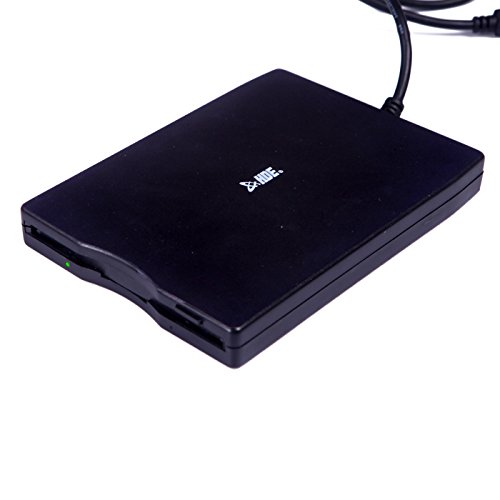


- Portable, compact, and light weight
- USB Powered, no extra power cable required
- Supports 1.44 MB 3.5" Floppy Disks
- Plug and Play, no extra setup required
- Windows Compatible: 98/2000/ME/XP/7/8/10
-
Information
-
Twitter
-
Pinterest
-
Youtube
-
Facebook
David Phillips
OMG! It worked!
Bottom Line: - It successfully read all 47 of my disks from 1986 to 1994. - I plugged it into my Windows 7 Home Premium computer, and it was recognized quickly (less than 1 minute) - It showed up as "Floppy Disk Drive (A:) under "Computer", and was accessible upon clicking on that. Boring details:: - Serious nostalgia trip. It survived my tears of joy as I viewed how well I used to write and comment C code a quarter century ago. - If you're like me, you were concerned after reading all the reviews for USB floppy drives. After all, who the f still manufactures these things? Yesterday, I bought two from different sources, assuming, at best, that one would work. I started with this one and it worked. Unbelievably, every floppy was readable.. - We are all reliant upon the statistics of reviews. Before purchasing this, I read 20% negative reviews on many makes of USB floppy drives, some claiming that the manufacturers were just sticking surplus floppy drives from salvaged computers into cases with a USB interface. This may be true. I have no idea. I am not going to break open this product to see if the drive is 20 years old. But I can happily report that this one worked.
Jacinda Lynn Walker
Simple & Easy
Simple and Easy. Amazing when a product does exactly what it is supposed to do. I recently unearthed some old floppy files from nearly 20 years ago. I bought the external drive in hopes of recovering some of the old files. I plugged it in and it was ready to play instantly. The drive read and converted the files effortlessly to Windows10 format. Thanks, HDE. I can now enjoy all the pics and video I saved from the 90's
Toni Sandell
Disk Drive
I LOVE this .I soooooo missed being able to "see my old timey" LOL disks. I didn't know such a thing existed! My 23 yr old grandson told me about this gadget and I must say I LOVE it. AND it works perfectly. No complicated connections just plug in and you are ready to go! May God bless Great product AND great service from seller. Cheri
Lenelyn Igbuhay
Awesome!
This product saved my life as I had written a novel 12 years ago on floppy disks, and no one in my area could convert it to a flash drive. Not even Staples, Office Deport, or Fed-Ex Office Services. I wanted to revise the book for a new generation of readers. Thanks to the HDE External USB 1.44 3.5" Floppy Disk Drive, I'm back in business again. Thrilled! Awesome!
Juna Lin
Looking into ancient history!
The wife and I are in the process of getting rid of the excess in our home and being ready for what may be coming ahead. Doing so, I found a whole bunch of old floppy disks that I didn't want to throw away until I knew what was on them. Found this drive to be readily available and reasonably cheap, I ordered it. It was amazing the things I found on those old floppies! I have a new hobby now, transcribing the info for "historical" purposes! There was a "trick" though, when using it on a Windows 7 machine. It said "just plug it in and it will work". Plugged it in, opened up Windows Explorer - not there! Hmmm... Started searching the internet and found that a lot of people were having this problem with this device on WIN7. Hmmm... Then, almost by accident, I stumbled on the answer. To get it going, it has to read a disk. But you can't see it in Explorer to activate the disk. The answer? Go to Start, Computer and you will see the floppy drive there proudly labeled as Drive A. Click on it, and it starts the drive, and NOW it shows up in Windows Explorer! The only catch is that, when you change disks, it retains the info from the prior disk and adds the new disk data to what you are seeing. Wasn't too much trouble to just start each disk from Start Computer. Got the job done!
Elena Hepworth
IF YOUR A CNC PROGRAMMER, BUY IT!
IF YOUR A CNC PROGRAMMER, BUY IT! For 10 bucks this is a nice tool for those darn floppy drives on the old HAAS mills and prototraks! haha. Couldn't believe i bought one of these again. pretty much outlawed by the tech world but brought back to life thanks to the design world.
Donna Getty
Good find.
I love this product because I can now access a lot of my old files on the floppies. Took a little finagling to get it going but once it was setup, it was easy to use. Excellent item for a reasonable price.
Maggie Hart
Works great with Linux, and supports both DD and HD disks without problems. Useful to create disks for old systems
Reads PC formatted 720kB and 1.44MB floppies without issues. I'm using it with Linux Mint, and it is auto-detected out of the box. I bought it to format DD (720kB) disks to use with an old XT type computer without an HD floppy drive, and it got the job done. Note: I *WON'T* be able to read Macintosh (Plus) 800kB disks, since that format requires different hardware capabilities in the drive (variable spindle speed). I did not have any issues with the drive after figuring out the proper tools for formatting disks in Linux. No compatibility issues that I noticed. See below if you want to save yourself the trouble of doing that yourself. :) It worked in Windows 7 as well, though you can't format DD/720kB disks with that OS. I haven't tried it on a Mac. Some people complained about the units failing after reading a couple of disks, but mine is holding up great so far. That said, I only read and formatted about 10 disks with it yet, but still. --> Five stars for a drive that does exactly what's written on the box, including the advertised support for old disk formats. I was pleasantly surprised, given that the drive was so cheap. :-) Useful tips regarding the disk drive itself: * It shows up on lsusb as: Bus 003 Device 013: ID 057b:0000 Y-E Data, Inc. FlashBuster-U Floppy * The drive respects the media-type hole to determine whether it's an HD or DD disk. See https://en.wikipedia.org/wiki/Floppy_disk#/media/File:Floppy_disk_internal_diagram.svg. If you want to format an HD disk to DD formats, you'll need to tape over that hole, or formatting will fail. * It seems to support a range of different formats, depending on what type of disk is inserted: # HD disk inserted: $ sudo ufiformat /dev/sdd -i vendor: Y-E DATA product: USB-FDU write protect: off media type: 2HD status block size kb formatted 2880 512 1440 formattable 2880 512 1440 formattable 1232 1024 1232 formattable 2400 512 1200 # DD disk inserted: $ sudo ufiformat /dev/sdd -i vendor: Y-E DATA product: USB-FDU write protect: off media type: 2DD status block size kb formatted 1440 512 720 formattable 1440 512 720 formattable 1280 512 640 Some tips if you're trying to use it with Linux below. WARNING: If you don't know about block devices or how devices are mounted in Linux, DO NOT BLINDLY COPY AND PASTE THESE COMMANDS. You might delete a hard disk partition, USB stick or whatever else is connected to your computer. You've been warned. * You'll need the following tools to format disks: # ufiformat -- to low-level format the disk, e.g. when formatting from 720kB to 1.4MB or vice versa. # mkdosfs -- to create a file-system on a formatted disk You can install both on Ubuntu or Linux Mint by running $ sudo apt-get install ufiformat dosfstools * It'll take couple seconds for the disk to auto-mount after you insert it. Be patient. * Writes to the disk drive are buffered, so always unmount the disk before ejecting it, or you might lose data. The drive will mount as a block device like /dev/sdd. It will NOT show up in lsblk, unless you specify -a. * Command lines for formatting a disk. It is assumed that /dev/sdd is the floppy drive. As stated above, you have to modify the media type hole accordingly, you cannot override it by software. After formatting, eject and insert the disk again for it to mount. # DD / forcing to 720kB: $ sudo ufiformat /dev/sdd -v -f 720 $ sudo mkdosfs /dev/sdd -I # HD / forcing to 1.4MB: $ sudo ufiformat /dev/sdd -v -f 1440 $ sudo mkdosfs /dev/sdd -I * Writing a disk image to a floppy (it must be formatted, though it doesn't need an existing file system). The image must be a raw, uncompressed file that should be of the exact size as the target format (720kB or 1.4MB), which are usually files ending in ".img". Again, assuming that /dev/sdd is your floppy drive: $ sudo dd if=/home/$USER/Downloads/disk.img of=/dev/sdd * I did not manage to make this drive accessible to a real DOS/Windows system through VirtualBox. This is needed since some images come form of a self-extracting/self-writing executable which requires a real DOS environment with device access. I finally found an old Win98 laptop with a floppy drive to write those.
Bonnie Clyde
Perfect for copying old floppies to new storage mediums
I bought this since FDDs no longer exist for newer desktops or laptops and I have a handful of old floppies with games, old school work, and family documents. This floppy drive from HDE works perfectly and allowed me to relive some old memories and transfer them to more modern forms of storage. I can't say I'll be using this product too often but it's certainly handy to keep around.
Stephanie Holton
Excellent solution to provide 3½ floppy access on PC systems from Win 2K on up.
Worked as advertised. Plugged into my Win 7 Pro 64-Bit SP1 HP computer. Did not see any driver loading or searching activity. Opened Windows Explorer and Drive A: was listed. Inserted a 720KB (DD) disk and waited for a minute or two. THIS IS IMPORTANT. Several reviewers mention this: you have to be patient. Apparently, working data through the FDD-USB-MOBO signal interface is not instant like it was when Windows / PCs actually supported floppy disk drives (newer computers don't any more BTW, directly at least). Anyhow, when the floppy disk drive got quiet and the drive activity light went out, I clicked on View / Refresh and the disk contents appeared, sub-directories and all. I read a few files including opening a 14-year-old TTF font file and it displayed / printed faultlessly. I then did the same with a 1.44MB (HD) floppy disk without any problems. The only caveat I ran into was that it does not always know when you change disks. The View / Refresh handles that nicely. I can live with this since it is the ONLY USB FD I found that can actually read _both_ 720KB (DD) and 1.44MB(HD) disks. I have not tried writing yet because I want to archive my 250+ disks before taking any chances with the data (trying to write to a disk). I will provide feedback when writing has been tried. When disconnecting the USB floppy disk, follow the rules (as you always should). Click on the "Safely Remove Hardware" icon and click on "Eject Floppy Drive". When the message pops up, you can unplug the cable and put the drive away. I would suggest storing it in the box it came in, in the bag it came in. Dust was always the enemy of floppy drives. Note: Yes, the box states it includes the drive, a disc and a manual. The disc is ONLY needed for Windows 98 and 98SE systems (because they did not properly support USB). Windows 95 never properly supported USB so it is out. The disc is NOT needed for any later operating system. Now, I've heard that Win8 and WinX have additional problems (because Microsoft has begun leaving out standard system drivers so I am told). That's on Microsoft and I would hammer on their door nice and loudly if you have an issue there. In any event, the DESCRIPTION for this product states that ONLY the drive is included thus it is accurate. Ergo, giving low ratings on this account merely highlights that reviewer's inability to read English. RIF P.S. My drive did include a manual but it doesn't say much beyond (1) you need a USB port, (2) your OS may assign it any letter (not always A:) , (3) go ahead and plug it in, and (4) you only need a driver for Win98/98Se systems. The supported system list reads, Win 98 / 98SE / 2KPro / ME / XP. But it works fine on my Win 7 Pro system so I suspect it will work on any newer Win OS in the stock configuration (with the caveat already mentioned) So, if your box didn't have one you didn't miss much. ^_^