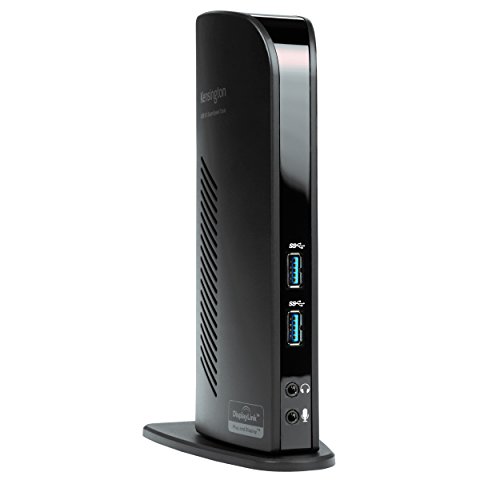
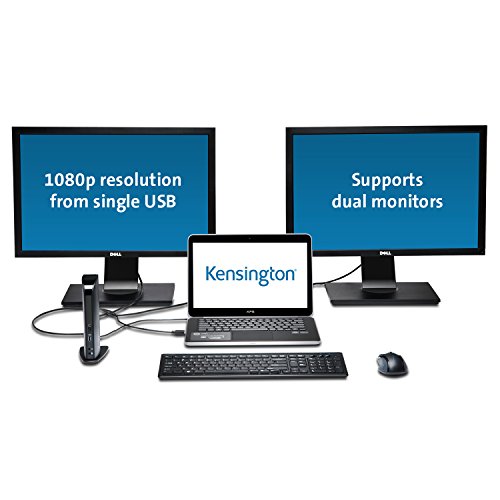
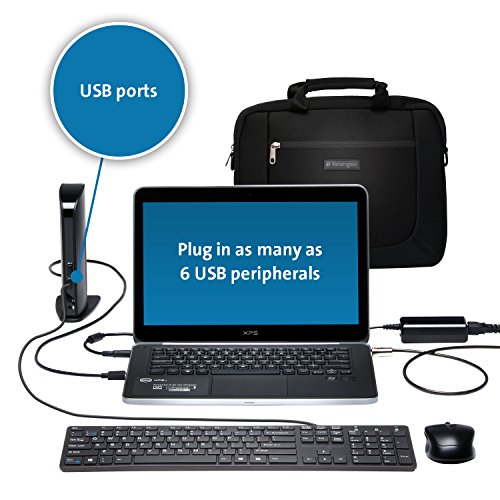
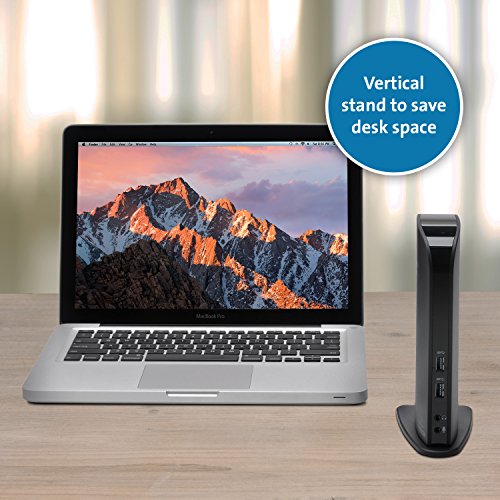
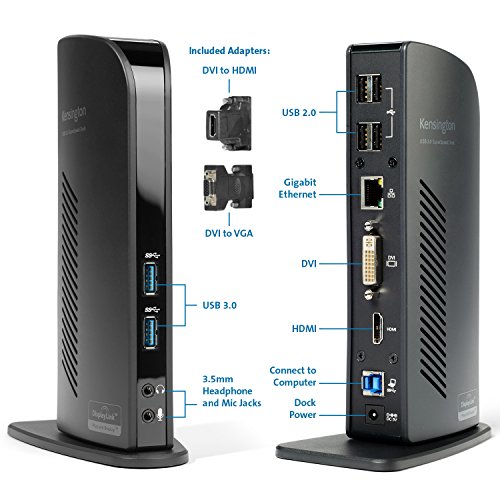

- Universal USB Type "A" dock for Windows, Surface Pro, and MacBook's (Mac OS version 10. 14 and later) powers two displays, six USB-A peripherals, Ethernet, Microphone and Headphones/speakers; watch the video to the left for more information, setup, and usage.
- The USB-A cable (included) from your laptop to the docking station provides all the connectivity – so your displays and peripherals can stay at home or at the office – just attach the one USB-A cable and you’re off and running.
- Single display resolution of up to 2560x1600 @60Hz (including QHD 2560x1440) via HDMI; Dual Display resolution of up to 2048x1152 @60Hz including 1080P video via HDMI, VGA or DVI; add a third monitor using a USB-A to DVI Display Link adapter (Kensington part #K33974AM or similar); for Mac So download the latest Display Link drivers from the Display link website
- 2 Superspeed USB 3. 0 Ports (backwards compatible to USB 2. 0) that support high-speed data transfer up to 5Gbps; 4 USB 2. 0 Ports for peripherals like a keyboard and Mouse, printers, and other accessories. Universal USB connection for hassle-free setup
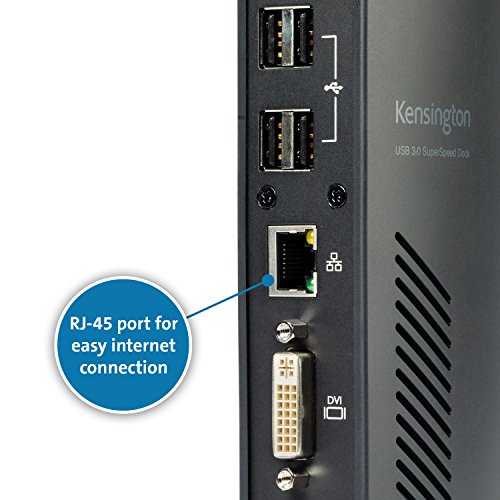
- Gigabit (10/100/1000) Ethernet; external headphone and microphone jacks with audio 2. 0 for enhanced sound quality
- DVI-to-VGA and DVI-to-HDMI adapters included for greater monitor compatibility; power supply included to power the dock and all the ports (does not supply power to a laptop)
- 2 year and lifetime technical support
-
Information
-
Twitter
-
Pinterest
-
Youtube
-
Facebook
Romel Cinco
Looking for a dock? Stop! You just found it.
When it was time for a new computer, I wanted to go from a desktop and laptop (and copying things back and forth, etc) to just a laptop. But, at home, I like the "feel" and convenience of a desktop (full keyboard, mouse, big monitor; you know what I mean). This is a great docking station and gives me just the setup I want. It was very easy to install the drivers and it runs everything well. I run it from a USB 3 port on my lattop. In the station I have an 8 port USB hub plugged in (with 4 peripherals in that: Keyboard, wireless mouse, etc), and an external monitor and speaker set. All works well through this station and, when it's time to disconnect my laptop for use elsewhere, I just unplug the one USB (and laptop power) and I'm off. I don't recall if it is supposed to be "plug and play" but it is. When you need to add a peripheral for just a while, the 2 USB 3 ports in the front are very convenient. If you are interested in doing the "make my laptop a desktop at home" thing like I wanted to do, this is what you want and need (given you also need another monitor, keyboard, mouse, etc). If I ever need another one, I'll look first for a Kensington like this one. Definitely recommended.
Mary Dewitt
Works Perfectly
I ordered this docking station as my Macbook Pro, running mountain lion, has only two USB ports. I had considered a standalone USB hub, but instead ordered this as I had some extra LCD panels hanging around. After installing the DisplayLink drivers from the supplied CD, I grabbed a couple of monitors and HDMI cables and connected them to the Sd3500v, one using the HDMI connection, another with the supplied DVI to HDMI connector. I then attached a Yamaha MOX8 music production workstation, a Focusrite Scarlett 18i6 audio interface, and a Yamaha dtx700k drum module to three of the USB 2.0 ports on the back. Next I plugged in the supplied USB cable and attached it to one of the mac's 2 USB 3.0 ports. I was about to attach it to a power source, but like many before me I found I had no space left on the power bar. So off to a big box store to grab one... After powering up, both of the monitors came to life. I was also able to create an aggregate device in the mac's audio MIDI setup tool, and add the Yamaha MOX8 and the Focusrite 18i6 devices and boom i've got 20+ musical devices talking to my music production software through this humble little docking station. Couldn't have been easier, and I couldn't have been happier. Pros. HDMI and DVI connected monitors worked flawlessly USB 2.0 connections worked fine USB 3.0 stick plugged into a front USB 3.0 port worked Plugged a PC style headset/microphone (pink+green 3.5mm connectors) and verified that the audio connection in/out worked Cons: The Kensington sd3500v like just about everyone these days places the transformer on the plug so that you need waste 2 or three power bar spaces to plug it in. Same with my Macbook and music devices. My thinkpad does this right by having a normal plug and cord into the transformer. Didn't test the wired ethernet connection. just for fun I plugged a windows 8 laptop into it. Everything hooked up to the docking station worked fine. Couldn't create an aggregate ASIO device on windows, but after all it is windows. Would I buy this again? Yes 100%
Keny Ewican
Works Perfect
I am using a Lenovo Thinkpad Carbon X1 for my daily driver, and an HP laptop from work as needed. I fought with 2 other docking stations before arriving at a last ditch effort with the Kensington. I tried Toshiba's Dyna Dock which is very similar to the Kensington in style and functionality however fell short with reliability. I also tried Lenovos in house USB 3.0 dock which is, at of today, a firmware disaster. I think in months to come Lenovo will sort out the stability issues with their offering, but I am not willing to wait. The Kensington has been bullet proof since day one. No issues that I have been facing with the other two are present in the Kensington. I am very happy and would recommend this to anyone looking for a stable USB 3.0 dock that gives you desktop accessibility on a laptop. Only gripe is I wish it had more than 2 x USB 3.0 ports. But I am nit picking now, seriously, it's a great product. To the three star review, please try updating the Display Link drivers to the latest. The Gigabit Ethernet driver is baked into that. Can't fault Kensington for your issue. I have had 0 issues with the gigabit Ethernet choosing priority over wireless.
Deeya Bagwan
I was super hesitant about purchasing the product because I had tried ...
Reason for purchase: I have an HP Envy laptop that only has one video out (HDMI) but I have two monitors and I was in the process of replacing my desktop computer with the ENVY and I wanted the laptop to be able to make use of both of my monitors. First impression: I was super hesitant about purchasing the product because I had tried an IOGear (or something like that) USB display module before that, too, used DisplayLink. I had soooo many problems with it...well actually just like one or two but they were happening frequently and in my mind I came to associate the problems with DisplayLink, not the module. So when I saw that this docking station used DisplayLink as well I was nervous but the reviews were so positive that I figured the previous problems might have been with the module itself. My first impression: nice looking piece, looks kinda like a router, solid packaging though it was difficult to remove initially. Setup: I literally just plugged my monitors into the back of the docking station as well as two ext. hdds and the speakers. I then plugged the docking station into a surge protector and connected it to my laptop via the provided usb. For those of you who are confused as I was at first, all of the video goes through the usb cable, so you can have two external displays without plugging anything into your laptop's video output. My laptop recognized the docking station and a window popped up where I could install the drivers that I wanted (one for audio, one for video, etc). The set-up was seamless and it blew me away. As soon as the drivers were installed the monitors came to life, I don't even think it required a restart (though it may have but I don't think it did). Overall Experience: It's been pretty awesome, I've noticed little to no lag at all when dragging stuff between monitors, no delay or sync issues with audio, the hdds are fast as ever, I'm blown away really. I've only really noticed two semi-issues--playing two separate videos on the two monitors creates problems, even when they're not playing in full screen. Also (and this may not be the module, I'm not sure) but when I first hooked everything up, I decided to leave my wireless mouse and keyboard connected directly to the laptop but after a while I noticed a TON of lag with the mouse...the keyboard was fine. I changed the batteries and still, TONS of lag...to the point where it was unusuable. But when I moved the receivers to the docking station, the problem was gone. Not sure what happened there, I had never had an issue with the mouse before so I'm not sure if that has anything to do with the docking station or not. OVERALL: awesome purchase that I highly, highly, highly recommend.
Carol Lynn Edelmann
MacBook Pro touchbar
Works exactly like I wanted it to. It will display two 24” monitors along with the screen of my 2016 MacBook Pro with touchbar. Three screens at once. Note: you do have to install a usb video driver. But it already is OSX High Sierra compatible. A+ so far. One usb-plug to connect power, my usb label printer, keyboard, external hard drive, and two monitors. So simple.
Chantelle Reid
Good docking station value for the money
Purchased for my wife's new Dell laptop, which no longer conforms to the old ease-to-connect dock that Dell has been using for 10 years or more. As the install instructions are pictures only, make sure to plan ahead: know what ports are available on the dock itself, what cables you have (only the USB cable for connecting laptop to dock is included), and what ports are available on the monitors you are connecting to. 2 adapters are included, and you are likely to use at least one of them, as there is only 1 DVI and 1 HDMI port (most common on current monitors). But if you make sure to take stock of monitor connections and available cables BEFORE you begin the process, you'll be very happy with the results. I ended up taking about an hour from start to finish (a Win10 install, no need to DL the software from Kensington), and a very happy wife was then able to work on 2 monitors once again. So, yes, make your wife happy and buy this Kensington docking station!
Jenny Lynn Marshall
Contrary to what others reported, this is a true plug-n-play device!
Worked flawlessly and all plug-n-play, literally. I have a Dell Latitude E7470 ultrabook. This laptop has every built-in "tight-as-a-frog's-ass" restriction in it because it's work-issued. And despite all that, it worked the moment I plugged the USB cord from the dock to the laptop and it immediately recognized the two monitors, the wireless mouse and the MSFT ergo keyboard. I was prepared to do battle with it, drivers and troubleshooting apps on-hand and I didn't even need any of them. Caveat though. It seems it works with certain Windows 10 laptops only. I tried with the Microsoft Surface 3 and it worked as well. I connected it with the 17 inch HP Pavilion and it didn't work at all. I however decided two out of three is a good batting average and stopped troubleshooting the HP. I'll wage that battle later when I need to plug that laptop.
Mera Tumpang
Working perfectly
I was looking for a docking station of some kind to make it easy to use my new laptop while hooked up to dual HD monitors at home, plus save me from plugging/unplugging several other devices from the laptop, too, when I wanted to take it with me (ie, sound, usb hub, network cable, etc). I was a little nervous, reading other reviews of this device, that it might be a little flaky, but so far, my experience with this docking station has been perfect. I just got a new Asus laptop (12Gb mem, Win 8), and mostly wanted to use the docking station to drive my two, twin 24" Samsung HD monitors (each is 1920x1080). Both the monitors are have DVI ports, but no HDMI (they're a little older but still work perfectly). Rather than install the docking station drivers included with this fellow, I followed the enclosed card's advice and downloaded a newer version from the Kensington site (I suppose to address the Win 8/USB 3.0 issues others have mentioned). Once that was installed, I plugged in the docking station and it found the other monitors and cranked up a feed to all three (the laptop monitor, plus the two external). Video feed was crisp and clear to all of them. I've now also got my network, sound, external hard drive, USB 3.0 hub, etc all running through the docking station and have had no issues at all. It's working for me exactly how I hoped it would!
Rodica Liliana
Works well with Surface Book
My overpriced docking station that I bought specifically for my Surface Book died after two years (firmware updates did not help). After reading reviews and seeing some compatibility issues with other docking stations, I decided to buy this one. The price was reasonable. I just hooked it up and it did not detect my external monitor, so I went to the Kensington website and downloaded the most recent software update. It's now working and I also have plugged in my SSD external storage device and my Logitech wireless keyboard and mouse. I'm curious to see how the storage device interacts now with the laptop as the laptop has power issues at times (SSD drive in use can make the keyboard stop working). So for now - so far so good!
Neil Bell
Works for Both PC and Mac
After seeing that people having positive feedback after Mac OS Mojave released, I decided to buy this one for both my work Macbook Pro and Windows Laptop. Although it didn't work right away, after updating to Mac OS Mojave and installing DisplayLink software on both Mac and PC, it worked for both! I have two monitors with Full HD (1920 x 1080), and both are working great. After setting it up and plugged in everything to this Docking Station, I can just plug into USB 3.0, and my two monitors, keyboard, and mouse all connect together! Few times I saw some glitches on my PC laptop (probably it's because this one is a bit lower spec than Macbook Pro), but most of time it works great. Another times, I had mic not working or sound not connecting to HDMI and only through my laptop, but after restarting the computer, everything worked again. So far so good. I'm really glad that I purchased this. I can fully use my two monitors to work or for everyday life.