
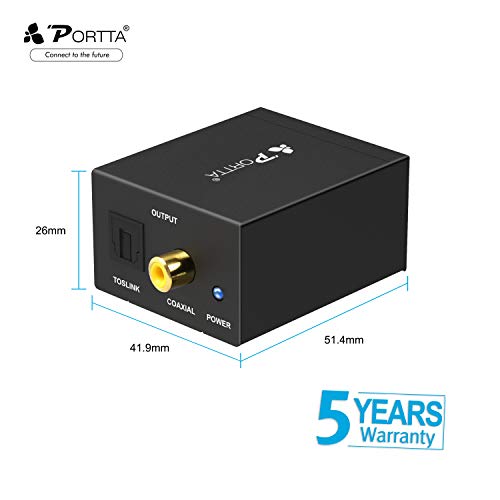
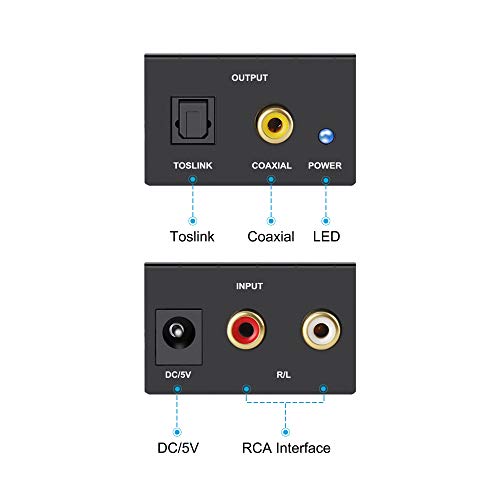
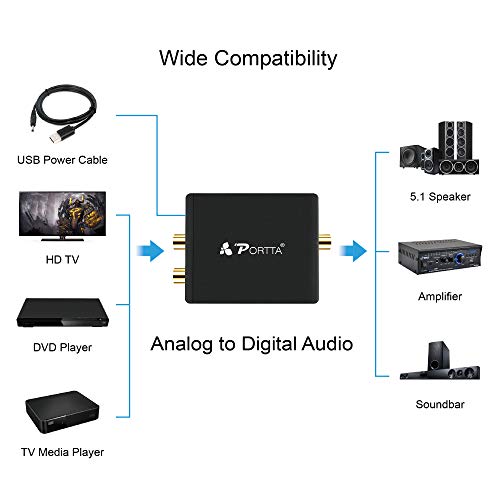
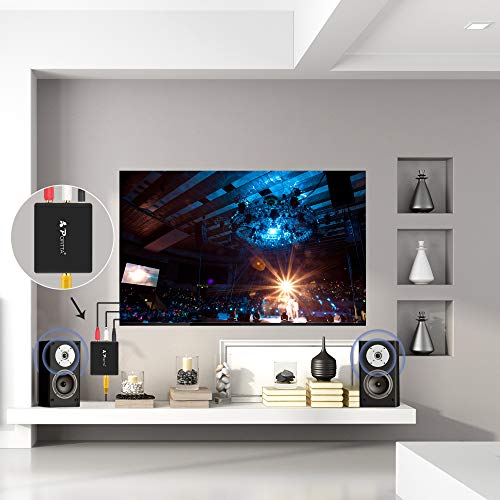
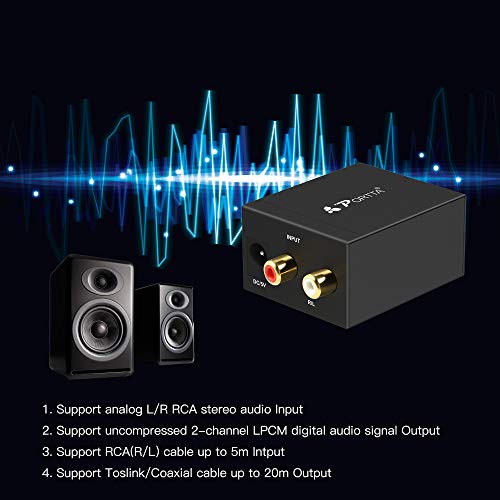
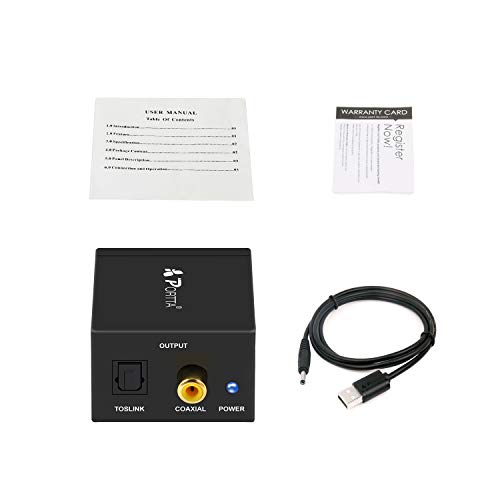

- 【Portta Analog R/L to Digital Coax/ Toslink Audio Converter】Convert or split your analog stereo audio into 2-channel Digital Coaxial and Toslink output signals.
- 【Easy Plug & Play】Power from 5V DC power adapter ,easy to install and simple to operate.
- 【Noise-Free Transmission】Provides electromagnetic-noise-free transmission, bring the best sound experience to you.
- 【HD audio formats】Supports uncompressed LPCM or CH2.0 digital audio signal output, NOTE that NOT supports 5.1 channel.
- 【Package Contents】Analog R/L to Digital Coax/ Toslink Audio Converter _ x1, DC Power Cable x1, User Manual x1, Warranty Card x1(5 Years Worry-free Warranty)
-
Information
-
Twitter
-
Pinterest
-
Youtube
-
Facebook
Rita Grech
Plugged it in and it just worked.
When we got our new TV and still had our old surround sound, this is what I got. I got the Digital Optical cable as well, but as it turns out I did not need that as my TV uses the CoAx connection - both are on the back of the converter box. It worked perfectly for the TV. Plugged it in and it just worked. However when I went to play a DVD the surround sound did not work. Switch back to TV and wham - instant sound through the S.S. system. I'm not thinking that is an adapter issue, but something in my connection. I will have to investigate further. My wife and I both agree the S.S. sounds better than it did through our old TV. I'm sure that has more to do with the new TV than the converter box, but it definitely shows that it doesn't degrade the sound. One other thing: I was expecting this little box to be bigger (should have looked at the pictures, but size wasn't really an issue where we needed it to go). It is about the size of a snack size box of raisins. So if it has to go in a small space, it certainly can do that!
Eddie De Leon
A very good product that's perfect for new HDTVs and older steroes.
I have a late model Emerson 32 inch HDTV that has only 1 Audio Digital Coax Jack that can be used to hook up a home theater system. I have an old Aiwa Home Theater System that has the standard RCA Red and White Jacks. This converter has made the electronic systems work to get the total 5.1 digital surround sound fron analog TV stations. Make it 7.1 with TV speakers added in. In the late Spring of 2014 I autoscanned my TV and and digital channels were added to my basic cable lineup. Unfortunately my Awia analog stereo can't process the audio signals from digital HDTV. TV stations. For the price I paid for it was well worth it. You may have to spend more money buying a RCA converter to digital audio to get digital sound for an HDTV digital audio for an old stereo system. However you may be better off in the long run buying a new home theater system or sound bar with a sub woofer to carry digital audio from HDTV for the high quality home theatre system. I plan on buying a sound bar in the Spring of 2015 for digital HDTV sound.
Michael Lynch
Works (Almost) Perfect!
Purchased this a couple-ish years ago or so? It works great. My dad's audio receiver got fried and so he replaced it with an older one he had kicking around, which is still a good one, but does not have the opitical inputs. His brand-spanking new Samsung smart-telly, on the other hand, only has optical outputs for audio. Only issue is feedback through the audio receiver when streaming movies directly to the tv's wifi receptor. But I blame that more on electric-noise from having everything in the neighborhood practically plugged into one powerstripped-up-the-whazzooo outlet. Oh, and a few times it freaked out and stopped working altogether for a short time. But then it started working fine again. Just unplug it from the power supply and plug it back in and it may possibly might should could maybe work. 😀
Tr Delphine
The perfect solution to my optical signal splitting/analog problem.
Cut the cable and needed a way to adapt my wireless headphones which used to be connected to the RCA analog outputs of the Frontier FIOS set top box. The Toslink optical cable from my TV plugs into the Subwoofer/amplifier of my Sony Soundbar so I bought a Toslink optical splitter and a 3-foot optical cable which I ran into this adapter. Works GREAT and now there is no lag between the TV sound and my headphones (a small problem with the previous connection to the STB).
Chloey Amber-rose Ella-Grace
Attach a Blu-Ray Playe to an Old TV
A couple of weeks ago I nabbed a superb deal on a refurbished Sony Blu-Ray player. Unfortunately for me, I didn't bother to check the ports and jacks that the player was equipped with, and thus was extremely surprised when I was confronted with an HDMI and digital-audio coax jacks. That was it. The problem lay in that, while my TV had a DVI jack and thus could be paired to the player via an HDMI-to-DVI cable, this solution didn't transmit audio. My TV lacked any sort of digital audio input option, and thus a solution needed to be found. A quick web search told me that I needed a little adapter box to solve my woes, and that's when I came across the little device you're reading this review about. All it does is convert digital PCM audio (with input options of copper coax or fiber-optic) to analog (using "RCA" style red-and-white cables). While I could have saved a few bucks ordering this from the world's favorite online auction site, I had a lot more trust in Amazon and their absolutely epic return policy. (Super-fast shipping didn't hurt.) Ordered this little guy, it showed up a couple of days later, and about thirty minutes later my new Blu-Ray player was completely installed and streaming HD video from YouTube. Audio was crystal clear, with no white noise or audio defects whatsoever, unless the player was turned off but not the TV. (Then there was white-noise.) NOTE: I had to set my player's audio output to be transmitted in PCM format. Until I did that, the box didn't seem to be doing anything. (Or maybe I was doing something wrong.)
Willye Taylor
works great
I ordered this as a stop gap to use my old Pioneer receiver with new Samsung HDTV as the receiver does not have either HDMI or optical connections and I'm not quite ready to upgrade receivers with the new HDMI 2.2 coming soon as standard. I ordered several items and hadn't realized this is shipped from China. Amazon said expect delivery in 4 weeks but I think it arrived in 3 weeks, was packaged in a bubble lined envelope via air mail just fine. The Petdtat couldn't be simpler to set up (had to also order optical cable) and already had the red/white connectors. Seems to work fine with or without changing speaker setting on TV except with smart TV Netflix. The Netflix is just a very loud studder which is not a negative on this product, I suspect Netflix uses something other than PCM setting which my TV uses. I can get Netflix working via my receiver by using my PC and Widi to send to TV.
KD Wilson
Five Stars
This item came faster than anticipated, works exactly as advirtised, and is solidly built, metal construction.
Helena Loffelmanova
Works Perfectly
The title really says it all. I fairly recently bought my wife a 32" Panasonic TV for her den. When I tried to output the TV's sound to her bookshelf stero unit, I found out that the TV's only audio out was a digital optical jack. Her stereo is an old one with only analog RCA input jacks, so I couldn't make the connection. I came up with some less than ideal work-arounds until I then found the Conversions Technology HDE Digital to Analog Audio Converter. The converter took only a few minutes to connect, with the biggest portion of the time spent trying to plug the optical cable into the back of the TV as it hung on the wall. With the optical cable coming out of the TV, it was just a matter of plugging it into the converter, plugging in the RCA audio cables, and plugging in the power from the transformer. The box is small enough to fit behind my existing components, neatly out of sight. After that, it quite simply works. The sound is crisp and clear, with no buzzing or any other audio artifacts to be heard. Neither are there any issues with the volume level coming out. So given the choice between laying out serious money for a new sound system that accepts a digital audio optical input or spending less than $20 on this converter, I'm really gald this was available. It is a perfect solution.
Emily Mertis Cherukara
Boston Acoustics BA735 digital speaker interface workaround
This product is and does exactly as it says. I purchased this because I have a set of older Boston Acoustics speakers from my old (yes, old) Gateway 2000 computer (told you). They had only a digital input, so I have had them in a box for over 15 years (OK, more than that), so when I reorganized my computer desk, I remembered how great they always sounded so I did a couple of internet searches on the model and how to get them operating with a more modern computer. I found a site that said to purchase an analog to digital converter so I went to Amazon and found this VERY inexpensive model. I received it today, plugged it in and it worked first shot!!!! Love it! This was one of my better purchases as it will give my audio joy for a long time to come. Thanks Amazon!
Olabiyi Olugbenga Damilare
Works Great with X Rocker Game Chair Transmitter
My Converter did come with power supply. Works Great with X Rocker Game Chair Transmitter if you do not have Right/Left (R/L) RCA Out on Your TV. I have a 32 in LG LED TV with only a Digital Coaxial Audio Output or an Optical Audio Output. This converter is the answer to convert the audio from Digital to Analog. A Digital Coaxial Audio cable is thicker grade single RCA cable. The Digital Coaxial Audio cable and Optical Audio (Toslink) cable are not included with the X Rocker Game Chair. You can get the digital cable you need from Amazon very reasonably. With This set up both the chair speakers and the TV speakers work. All you have to do is plug in the respective digital cable from the TV to the respective input in the converter and Output the Male RCA R/L Y cable with 3.5mm in the X Rocker Transmitter. There is a bright blue LED power indicator light that is always on unless you unplug the converter. A heavy or thick small piece of tape is needed to drown out the light. The unit has remained cool and soes not heat up.