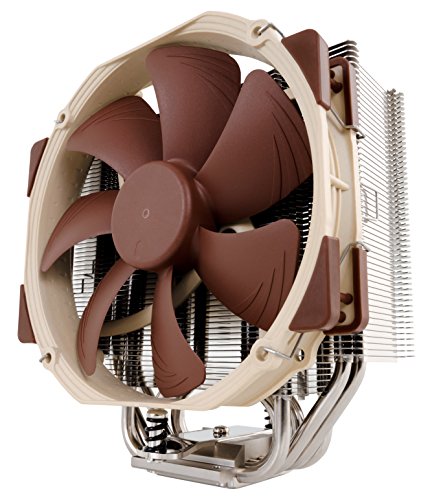

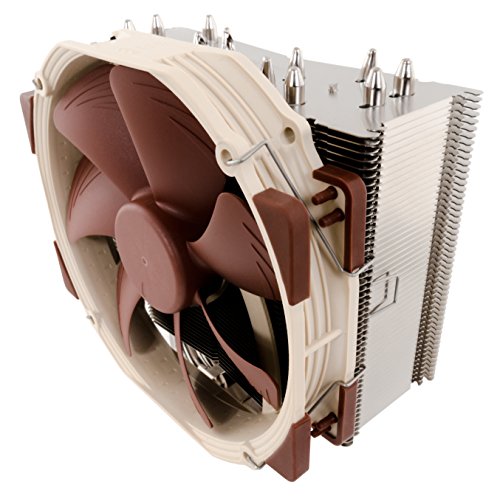


- Award-winning, slim 140mm single-tower design combines outstanding cooling performance with superb quietness of operation and excellent RAM compatibility
- Does not overhang the RAM slots on LGA2066 and LGA2011 motherboards, ensuring full compatibility with tall modules
- Highly optimised NF-A15 140mm fan with PWM support and Low-Noise Adaptor for automatic speed control and ultra-quiet operation
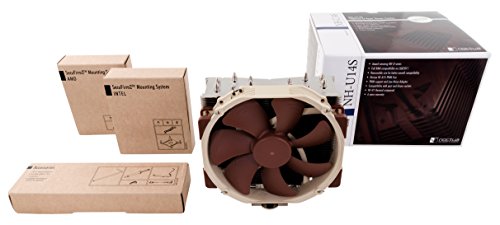
- Includes high-end NT-H1 thermal paste and SecuFirm2 mounting system for easy installation on Intel LGA1150, LGA1151, LGA1155, LGA1156, LGA1200, LGA2011, LGA2066 and AMD AM4, AM3(+), AM2(+), FM2(+)
- Renowned Noctua quality backed up by 6-year manufacturer’s warranty, deluxe choice for Intel Core i9, i7, i5, i3 (e.g. 10900K, 10700K, 10600K, 10980XE) and AMD Ryzen (e.g. 3950X, 3900X, 3700X, 3600X)
-
Information
-
Twitter
-
Pinterest
-
Youtube
-
Facebook
Melly Mel
Amazing performance - Better than 120MM AIO!
I absolutely love this CPU cooler. I have used many brands of CPU coolers in the past, from tower coolers and downdraft coolers to all-in-one liquid coolers and I have to say that this is my absolute favorite so far. It is very well made, quality all around from the finish to the packaging. It was easier to install than nearly any other cooling solution I have used, save for the stock AMD tension arm. I bought this to replace a Hyper 212 cooler that was incapable of cooling my Ryzen 1700 @4ghz. I have tried the following coolers on this CPU: Hyper 212 EVO DeepCool GAMMAX 400 CoolerMaster MA610P RGB Corsair H100i GTX (v2) None of those coolers allowed stable operation of my Ryzen 1700 when overclocked to 4.0ghz @ 1.4375v. Ryzen is temperature sensitive when overclocked, while 80c @ 3.8ghz is just fine, the higher the clock the lower the max stable temp. I found that when clocked at 4ghz, my CPU is only stable up to 74c. None of those other coolers were able to keep my chip under 75c at max load. Only the Noctua NHU14S did. At max load under a synthetic stress test or rendering workload my CPU temp maxes out at 72c, and is completely stable for 24/7 operation. During gaming sessions the max recorded temp is 60c. Adding to that the ease of installation and this cooler is the absolute best I have ever owned. I set a max fan speed of 80% in my BIOS and even at full load the computer is still virtually silent, with only the faintest hum audible. I would strongly recommend this case to anyone who doesn't want liquid cooling but may want to overclock their processor. Just make sure your case and motherboard will accomodate it as it is truly a beast, I've added a pic of it in comparison to the Hyper 212 that it replaced.
Amy Czerw
You want the best? You're getting the best. Noctua.
I used an H100i v2 for a build I did back in May of 2018 (i7 8700K on an Asus Prime Z370-A) and it was great...for less than a year. The pump failed and the temps were out of control (90C plus under load). I went with the U14s instead of the D15s simply for clearance purposes, and my god was I blown away by the craftsmanship and the packaging of this thing. It's built like a tank, and it's super easy to install. The mounting hardware itself is also a masterclass in how to create strong and reliable pieces for use in a heavy duty product. Took all of 15 minutes to install, with clear and simple instructions. Temps are as good or better than my H100i V2 even overclocked to 4.8 GHZ on all cores, I never see higher than 64-65C. Stop wondering, stop looking for reviews and just buy it. You are truly getting the best of the best made by a company who has built a reputation for extremely reliable and excellent products. The included fan is backed up by a SIX YEAR WARRANTY, and Noctua is also known for sending out free mounting hardware for new socket designs that get released. I will never go back to water cooling, and I'm left wondering why I bothered with it in the first place. Noctua just earned another lifelong customer.
Crystal Miller
Cooler And Safer Than Liquid Cooling
My first Corsair H100i liquid cooler worked well for several years. When it died I was hesitant to replace it given the bad reviews the v2 gets. Got one anyway. It stopped cooling well after only 3 weeks. It also made me nervous due to all the horror stories about leaks. Installed this cooler (very easy install) and was surprised to see my idle temps drop 3c and stress temps drop 5-7c below anything I had been able to achieve with liquid. And no more worries about water damage to my rig or pump failure! Oh, and it costs $37 less. Also, this cooler is just as silent as the H100i. Coming from liquid I did not like the slight whir of the fans spinning up and down doing normal tasks when my room is really quiet. Speed Fan solve that. I could not get custom fan curves to work properly so I set the fans to a fixed speed. CPU at 50% (800 rpm) and the case fans at 40% (650 rpm). What stunned me was that transcoding video or Prime 95 only shows a 2-3c difference if I increase all fans to 100%. Apparently the large heatsink plus the airflow from my case fans is enough. I even tested turning off the CPU fans altogether and idle temps only went to 29c and transcoding video to 54c, and that's with the cooler's fans blocking airflow since they are stopped! It should last practically forever. At most I'll have to replace the fans at some point, though my experience with Noctua case fans is they just never stop or get loud. It is BIG, though it does not overhang the ram slots or any PCI slot on my board. If ram slots are a problem the fan can be moved into a pull position. People report similar cooling. Measure carefully or check Noctua's site for compatibility. If it's too big try Noctua's NH-U9S. I'll be putting one of those into a planned HTPC. I couldn't resist adding a second fan for push/pull. Runs about 2-3 degrees cooler. Probably not worth the extra cost but it doesn't hurt and the cooler is still silent.
Maman Nadeem
Silent and Noticeable Improvement vs. Wraith Spire
I have the AMD Ryzen 2700x in the Fractal Design Define C case. I'm using the standard AMD Precision Boost settings. I was hoping to like the included Wraith Spire cooler, however, to me it is loud and is constantly fluctuating in fan speed. That being said it looks great and does the job. After a week of use and playing around with various settings I ended up changing the AMD Wraith Prism cooler with the Noctua NH-U41S. My main incentive for doing so was to reduce the noise, I was definitely spoiled by last build. I thought about a more substantial cooler (e.g. Noctua NH-D15S) but after reading numerous reviews/benchmarks it appeared like there would only be a 1 - 3 degree improvement vs the NH-U41S. The new cooler is extremely quiet. In other words, I cannot hear it, even under load. It was extremely easy to install on the AM4 motherboard, there was no need to remove the board from the case (which was a nice bonus). Finally, I'm seeing about a 9 to 13 degree improvement vs. the stock Wraith Cooler. You can see the physical difference in my uploaded photo. Noctua has excellent instructions and includes everything you could possibly need for the install, with the exception of isopropyl alcohol to clean off any prior thermal compound. I would definitely recommend this cooler.
Anila Qureshii
Full review and some nerd stuff!
Full review of the noctua nh u14s. Hi all! Back with another review for your eye holes. So let's get right to it. Shipping... well its prime. So nothing much besides amazing of course. The price had me a little scared at first, but after realizing that what I am getting should pave the way for some pretty epic overclock speeds... it was well worth it. The quality of this product is amazing to say the least. It's heavy and solid and shiny, it's something you are proud to mount on top of your processor. The noctua fans color... is interesting, but hey, I also know the quality is there. So if brown isnt your thing I believe they have black options? Maybe? But I digress. The packaging was superb. Everything fit quit tightly into its cardboard shroud which is very good. The directions that came along were very well written and the pictures are super clear and precise. Easy to follow even for a noob! It came with everything you need to mount to all the newer and older processors even some thermal paste! (Which I put in the drawer for some other time. I prefer my own thermal paste but it was still very considerate!) It took me about 45min-an hour from power source off to monitors on which means it was a very easy install. *WARNING: THIS IS FOR MY NERDY PEOPLES* So I installed it on my i7 4790k which, with the factory cooler on, I could barely over clock to turbo boost and keep it under 80-85°c. After my install I ran cpu id's torture test for 10 minutes @ 4.7ghz. It maxed at 81°. Yes. No joke at all. I was quite amazed. So worth every single penny. Last but not least. This is safer then an aio. Has less moving parts then an aio. Will never need refilled and if the fan breaks... I can replace it for 20 bux. I have no problem with aio's... i almost bought one actually till I did my research and realized that these after market air coolers are amazing. That's all I got! Thank you for your time. ~Ben
Marion Proudley
It Cools a i9-9900 35°C lower than the Intel Stock Heat Sink
I have only had the 9900 for less than a week, installed Intel's Included heatsink while I waited for this to arrive. Prior to install I ran Intel burn test(High) on stock HSF, and saw CPU Core temps high 70 low 80 with CPU package temp reporting a toasty 95°C. After installing this, CPU Cores down in the low 40s and CPU package reporting a healthy 60°C during the torture test. Worth it, if this was a K chip, would see more performance uplift, as is I only see a 1.5% improvement in my CPU passmark score. Main Benefit •Silent and cold Main complaints •Have to remove Motherboard to attach backing plate(Case dependent but on my Node 304, no choice) •Kind of sucks getting Heatsink out of the cardboard package, but it did its job, Heatsink in perfect condition.
Ryan Jay
Great inside Fractal 304 case w/ 6 hard drives
I have a Fractal 304 with 6 hard drives. Because of the space constraints I had opted for a H60 Corsair AIO CPU cooler. After doing my best to make this NAS a quiet and energy efficient case I decided to go all out with Noctua. Replaced both front fans with Noctua 90 regular size, along with the Back exhaust for a Noctua 140 Regular square fan. This was the moment of truth... When I got this behemoth of a CPU cooler I was intimidated. I knew it was big, so to help the space constraints I put thin L shape Sata and power cables. The results blew my mind. This thing is virtually silent. I won’t exaggerate, I can easily hear the hard drives seeking, but the constant humming cause by AIO in a push pull configuration was just too much. These hard drives are 7,000 RPM they heat up, and the space is small so I knew that the fans had to be at higher RPM’s to reduce heat. Once I got this CPU cooler from Noctua and changed factory fans for Noctua, I had so much space that I went ahead and put the extra pull fan on the CPU cooler. I have 2x 16GB ram modules by Corsair that have heat spreaders, so technically the front push fan of the Noctua CPU cooler is touching the ram, but I don’t consider this a drawback. This Noctua cpu cooler fits with both front and back fans inside a Fractal 304 case. Yes is not magic, you do have to get slim L shape wires and be extremely meticulous in order to fit 6 hard drives with this CPU cooler. I’m now getting 35c for hard drives and 31c for cpu. The fans are PWM at 30c 20%, 40c 50%, 50c 80%, and 60c 100%. This NAS is in an office with average air temp around 72 Fahrenheit. I’m extremely happy with the very low humming that lets me know that it is on. The overall wattage came down about 10 watts. I guess the AIO pump does consume more power than a fan. These Noctua fans push massive air with little effort. This cpu cooler works so well that the fans are not using the included LNA and are spinning at around 400 rpm. Because of the 6 hard drives I have to create a wind tunnel effect to remove the heat. None of my fans have the option to stop. But a constant flow of air through this case and this behemoth cpu cooler at low rpm is exactly what I need.
Clara Jo
Amazing instructions and engineering, VERY cool temps, awesome compatibility charts on their website, no better air cooler
The absolute very best instructions I have ever seen on any computer hardware. The engineering in this thing is expert. Installation was a breeze. Leave it to the Austrians to finally do it right when it comes to hardware installation and instructions. If you are thinking to yourself "Well, I don't like the color scheme", get that out of your head right now. If you are in the market for an air cooler, it is ABSOLUTELY WORTH SACRIFICING any color scheme you are going for in order to have this cooler. This is the best Air cooler you can buy. The Noctua website has every motherboard listed and you can compare this cooler (NH U14S) with your motherboard to see its compatibility. It supports most everything, but a nice detail is that they tell you if the cooler will overhang your ram slots or not. Temps stay very cool, even at full load.
Deepika Gurung
Noctua NH-U14S delivers excellent cooling with silence, a reasonable price, and is extremely stable when mounted.
Decided to go with air instead of liquid cooling even though I have an i7-4770K overclocked to 4.4Ghz so like all Haswell chips, they run hot anyway. I almost purchased the Noctua NH-D14 but I am glad I didn't. After researching CPU Coolers during the process of picking out parts for my new build, I found that the NH-U14S had great results in comparison to some larger, twin tower heat sink coolers like the NH-D14 or the Dark Rock 3 Pro. This is a very large heat sink itself and weighs 1.7lbs with the fan which I am as of now, only running one 140mm fan on it. At idle, my CPU is stable @ 30C - 31C on average at it's stock speed of 3.5Ghz and 35C at 3.9Ghz. This is after installing a Geforce GTX 770 (also at 31C - 32C idle) and I thought clearance might be an issue but it turns out I have about one inch or so which is more than I actually expected. Mounting this CPU Cooler is VERY simple and the brackets used are well designed, it will NOT move. I will be putting another 140mm fan on but it is not because the CPU is reaching extremely high temperatures even at 100% load when I was testing it using various stress/blend testing software. It reached a high of 65C @ stock 3.5Ghz and 78C +/- 2C when overclocked to a stable 4.4Ghz with a +0.001V offset. My ambient room temperature is around 21C or 70F just to use as a control. Basically, this CPU Cooler is worth every penny and rivals it's twice the size big brother NH-D14 and even liquid cooling to a point. I have never liked liquid cooling because even if it is securely hooked up, one mess up and everything is ruined. I looked at the Hyper EVO 212 and am glad I did not purchase it. It simply can not keep up this with cooler at all. Once I put another fan on there (I may go with the redux version from Noctua) I will not be expecting a dramatic decrease in temperature but enough to warrant the purchase and the redux versions have an even higher performance rate. I would definitely suggest this CPU Cooler to ANYONE who wants to go with air cooling instead of liquid. Even with liquid, don't expect more than 3C - 5C difference... just not worth the money nor risk to me, sorry. I must also say that the thermal paste which comes with it, the NH-T1 rivals Arctic Silver and IC Diamond. It has zero curing time and very little goes a long way. I used it on my old box and was astonished at a 14C decrease in temperature. However, that was applied to a stock cooler so it was expected to improve but I didn't realize it would do so by that much. A couple of things to keep in mind if you do purchase this CPU Cooler... you will probably lose your first PCI slot on your motherboard and it's height can cause issues with a lot of cases. I have a Fractal R4 so it is a large mid-sized ATX case and I have plenty of room to spare so make sure you have a wide case, take measurements!!. It cleared ALL RAM slots however only by enough to stick a piece of paper between them so even though I don't use high-profile RAM, you could probably get by with Corsair vengeance RAM but the heat shrouds will stick up far enough to block about an inch of the fan so I would definitely research everything before making a final decision. Anyway, I took a gamble on a very nice CPU Cooler that has nothing but great reviews and was not disappointed at all. The benchmark temperatures were dead on accurate but it also helps that I have a large case and all my case fans are 140mm Fractal silent series fans.. it is absolutely silent. I hear the GPU fans over anything else and because my case is has silent proofing foam and even with a window, you simply can't hear it unless you are sitting in dead silence. The CPU fan produces the least noise of all however. Simply put... the Noctua NH-U14S is an awesome cooler and handles my i7-4770K like a champ at stock and overclocked although I do not run it at 4.4Ghz except for certain times. Watch Dogs was the first game I tested the CPU with and it didn't get over 47C (I believe that number is correct.) What is correct is that for $60, I would use this cooler on any build as long as the case dimensions allow for it!
Rick Omeasoo
Quiet as a nuclear sub
I got fed up with dealing with a water cooling unit. and so i switched to a smaller tower chassis and needed something to cool it. after a lot of thought i decided it would fit. i measured wrong but hey it was no big deal, the cooler was abotu 1/8th inch too tall for my front panel but a couple small dents with a drift pin fixed that. I imagine this wont be everybodys dilemma just measure twice before you decide to get a big cooler. Anyways enough backstory. i purchased this and 3 noctua 120mm fans to go along with the cooler and boy does the computer i stuffed it all into run silent and very cool in comparison to past builds. I highly reccomend these guys. their design and packaging is top notch and so is their performance. 45 stars for sure i just wish this thing was a few mm shorter.