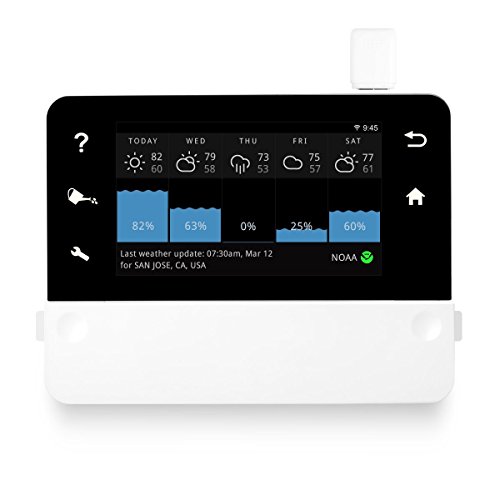
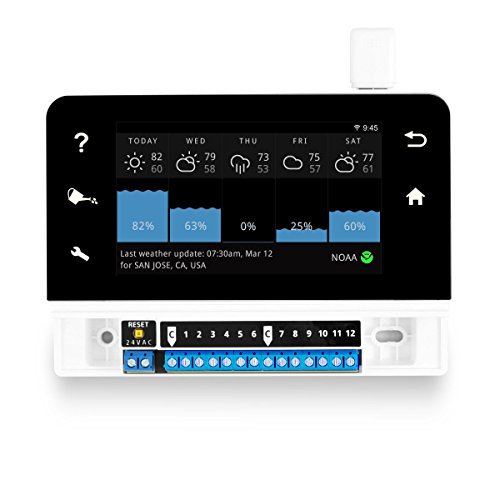


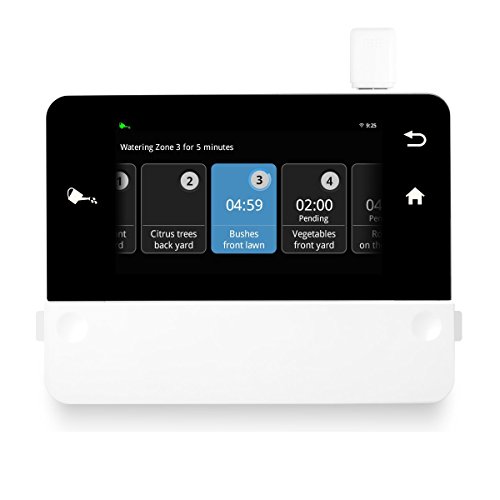


- SMART SCHEDULE & SAVE WATER - Save water with real-time weather adjustments. (EPA WaterSense Certified, check for rebates).
- CLOUD INDEPENDENT - All personal data stored locally. RainMachine continues to work even when WiFi is down.
- FREE WEATHER DATA - Direct access to NOAA, METNO or Wunderground, OpenWeatherMap, NetAtmo. Use National or Personal Weather Stations for pinpoint accuracy.
- CONTROL FROM ANYWHERE - Color Touch Screen, iPhone, and Android, PC browser access with dashboard stats. Works from Home, Work or Vacation.
- UPDATED MODEL (2019) - Improved WIFI. hundreds of Schedule and UI improvements. Integrate with Alexa, Google Home, Nest, WINK, SmartThings via IFTTT.
-
Information
-
Twitter
-
Pinterest
-
Youtube
-
Facebook
Gary Jimenez
Internet enabled, simple to use, lawn looks great & water usage is down... + Tips on wiring it.
The rainmachine has worked out very well. I've had it installed for several months and 3 criteria were defintely met: 1) Lawn looks great 2) Water usage is way down 3) I can easily monitor activity from apps/web It's fairly easy to setup once wired. Even though it has an easy & simple touch interface, I primarily use the web and mobile apps (ios & android) to make updates or mostly look at what its been doing, as the unit is in a remote, difficult location in the basement. I evaluated all of the watering the assumptions used for my old controller. I was able to use a 3 day field capacity versus 2 for most zones, and a short mid-day program for 3 'hot zones' in the sun. This causes it to water much less often and as a result use much less water. I could not have changed this on the old controller, as it had one setting and that was based on the worst case hot weather. The RM uses internet weather data adjusts! Wiring was my biggest challenge. I have (3) 13-wire bundles coming from the yard, and unfortunately those didn't line up neatly under the RM in a manageable way. In addition, multiple 'Common' and 'Master valve' wires did not easily 'jam' into the RM's small terminals. My solution was to make a terminal wiring box from a Carlon junction box, terminals and a few feet of sprinkler wire... all from Home Depot. While it took a little time, its durable and manageable. Pictures are attached. Two things to be aware of, 1) You have to have wifi to use the weather updates and mobile apps, and wifi has to reach the RM's installation location. It works without internet, but it will not know it rained, its cooler, etc to reduce watering 2) If you have a master valve or pump, you can use it, but you will lose one of the 16 zones to that purpose (Zone 1 will be configured for pump/mv control). Finally, if you are an advanced technical user, the API is very thorough. I have an ISY home automation controller with Nodelink, and use it to push alerts to me when programs run and for how long. I also use it to drive my 'hot zones' program so that it runs only when needed. I also have a Hydreon rain sensor on the ISY, and use readings from that to push delays into the RM's 'Snooze' so it doesn't water.
Susan Jordan
Fantastic Home Irrigation Controller
I've been using this for about 6 weeks now. I've been nothing but pleased with it so far. The setup was much easier than I expected. I had a pre-existing 12 zone Rainbird controller that this replaced. To do the wiring, I took a picture first of my existing wiring then replicated in on the RainMachine. After getting it wired, plugged in and mounted to the wall it was just a matter of going through all the steps as outlined. The app on the phone is very useful once you've familiarized yourself with it. There was some trial and error but overall it was intuitive and most of it I was able to figure out on my own. There was a setting or two I had trouble figuring out but their website answered those questions for me. The best feature for me is that it automatically adjusts the watering amount based on local weather. I've had no qualms with the adjustments so far. It is easy to set up watering cycles so the water has a chance to be absorbed into the ground to avoid runoff. I also like that I can make adjustments and assess what it is doing from anywhere with my phone. That it is not dependent on any specific cloud service is also a large plus in my book. So far I have no complaints at all.
Laraib Khan
Stunningly good
I almost never review a product with 5 stars but RainMachine Touch is well worth it. I used it to replace a Rainbird controller that the contractors had installed. Rainbird is ancient tech and a constant headache to program. Frankly, Rainbird deserves to be out of business given how difficult it is to program let alone the total lack of network connectivity. By contrast, RainMachine installed in minutes and the software set up was flawlessly guided by the units start up wizard. The app works well on both Android and iOS plus the unit automatically tracks the NWS (and other sites if you want) to make allowances for any precip that may have fallen. I've found no bugs or glitches at all. It has a very easy to understand user interface - both on the controller's touch screen and via the app. Great job of engineering (hardware and software - plus I think the host OS is actually a variant of Android) and extremely practical design. I've tested it out in extreme heat with no failures. I've cut power to it many times and it correctly comes back up with no loss of programming. It even tracks NIST time servers and allows automatically for daylight savings time. The positive reviews I read prior to purchase are clearly well justified.
Neena KN
Highly recommended--powerful capabilities combined with great user interface
Would give it 6 stars if I could. I am picky. This thing exceeded my (high) expectations. The installation was straightforward and surprisingly easy to set up once installed. The user interface was clearly designed by a team of people that actually *thought* about how users need to understand what is presented and enable users to do things without frustrating them. The website wiki answered the two questions I came up with (how to find the MAC address and how to link to a personal weather station). The remote access (from phone and web browser) was *very* easy to setup (you just enter your email and then hit the confirm link in the email you receive). The app is good and the website is even better (and has the full feature set to finish your setup)--well worth using in addition). My setup is a good example of the system's capabilities. I wanted to leverage using my personal weather station's data to inform the irrigation system's operation. The system is very smart about how it integrates such information and has very useful settings that allow zone-by-zone accounting for shade, soil, and wind differences that affect irrigation needs (in addition to adding custom names so my wife can turn zones on to scare wildlife out of a specific section of our lawn). My only super-minor grip is that the display control is not "snappy" in response to entries. But I assure you this is not problematic, or is it consequential once you're using your phone or computer to manage your system. I am impressed with how the how the system is accounting for the two inches of rain I got today (it has determined to skip tomorrow's watering) and how it has reduced the planned percentage based on the expected mild weather this coming week--and it will adjust further based on actual rainfall amounts (as reported by my weather station (or NOAA's local station otherwise)). This sophisticated algorithm was so far above my humble desire to get a wifi enabled controller that would hopefully at least use my personal weather station as as an old-school on/off rain sensor.
Jessie Besson
Highly recommend! Great interface, app, and web capabilities. Functional and flexible!
I'm so glad I spent the extra money on this unit. I had a professional design done for my house by one of the major sprinkler companies, and they of course recommended one of their units. In my research, I found that almost all of the irrigation controllers out there today look like they are made to be survive an airplane crash. The displays are all black and white and you interact with giant knobs and buttons. Nobody wants one of those! This controller intrigued me because of the smart functionality. Unfortunately my area did not have any Water Sense incentives, but yours may and it is worth looking into. The cool thing about this is that you aren't relying on an external rain sensor to detect/measure the amount of rain and choose to water or not. This actually interacts with national weather databases based on your specific address to determine how much it rained. It doesn't just skip watering then, it takes that amount of reported rain and calculates how much your lawn still needs watering! It may not water at all, it may cut the cycle to 80% of the scheduled, etc. I'm very impressed. It also works with a master valve which, if you are installing or planning a new system, I highly recommend. The screen is great and very easy to use, but honestly I use the android app most which is very well done. The PC browser is also just as easy. Why go out in my hot garage if I don't have to? I like to view the watering history. It tracks when each program run, tells you how much time you had it scheduled to run, and how much time it actually ran. The actual run time can change for at least two reasons - rain and really hot days. If you have the feature enabled, on scorching days it will over water to a certain degree to compensate for the temperature. Scheduling is intuitive and extremely flexible. I currently have two programs but you could have many more. One program kicks on at 120 minutes before sunrise (which will change throughout the year automatically) and runs every 3 days. This runs most of the zones in my yard, but then I have another zone setup for areas of my yard which are lower and tend to hold water to run every 4 days. I could have just as easily picked days out of the week to always run each of them, but I like the watering consistently spaced. What is important is that I do believe this unit saves a significant amount of water over the traditional clunky units. It will in the long term pay for itself.
Walt Cosby
The Ultimate Sprinkler Controller System: The RainMachine.
Rain Machine or Smart Machine? I guess the name needs to be associated with rain, water, etc. This is a Smart Sprinkler System Controller. It has all kind of features. One of then, and always thought about is the following: If it is too windy, don't do any watering. The wind will blow away half of the water. No sure how efficient is that feature with this controller. Also I like the feature that I can have my own weather system, and feed the data to this controller, and this will reflect 100% accuracy how is the weather in my backyard. In my opinion, all weather reporting systems(like NOAA) is that they used sensors installed no really close to your house. So the weather will be very different in my house at 2800 feet compare to 2300 feet where the sensor is installed. Any way, I got it yesterday, installed it, tested it, it works! Weather Underground is a little different, still I find differences how is the weather in my backyard and the closes sensor they are using to report weather. Here are some pictures how I installed it. Now, this is not my idea, I got this idea from another reviewer here on Amazon. Why I did this? Just look some of the wires, very thick wires. These wires will break the connectors of the RainMachine. Here is one thing that I dont like about the RainMachine: The Mickey Mouse thing for the WiFi. The pictures these guys(RainMachine guys) posted, the WiFi adapter thing is white, so chances are you will not pay attention until you get the controller. When I saw that I thought: what the heck is this thing? Well they mickey mouse the controller to make it WiFi compatible. UPDATE 06/06/18 The Rainmachine has been working without a glitch. The feature that I like the most is the: Weather-Adaptive Watering. It adjust itself accordingly to the weather conditions. Too hot? It increases the watering time. Too cold? It decreases the watering time. I changed the power transformer, I did not like the cheap transformer included with the rainmacine. During the installation using this Orbit box: https://www.amazon.com/gp/product/B000VYGMF2/ref=oh_aui_detailpage_o05_s00?ie=UTF8&psc=1 I found that the transformer puts out 31 volts! The reainmachine is supposed to be designed for 24 volts, so I ordered this transformer: which is also class-II : https://www.amazon.com/gp/product/B004VMVDTA/ref=oh_aui_detailpage_o04_s00?ie=UTF8&psc=1 Now this transformer is 24 volts(actually 26 which is only 2 volts above the 24, but not 7 volts like the black transformer included with the rainmachine), and has more current, 1.6A to be precise, the transformer included with the rainmachine is only 0.75 A Having more available current will not hurt the rainmachine, having more volts will fry the rainmachine. The new transformer has an LED that indicate that the power is present. UPDATE 01/18/19: Rain Machine Rain Machine, save water save money! I just love the Rain Machine. Because is easier to control it (turn OFF, turn ON)due to the fact that is WiFi, definitely I saved water, therefore I saved money. I just paid my water bill, it was about 15 Dollars less compare to previous years! Mine is installed in the garage, during this time the garage gets cold, during summer time it gets very hot, of course we dont like to go to the garage when is too cold or too hot. Just grab the iPhone and control the Rain Machine, and from anywhere around the world. How nice is that!
Jamie Biancalana
I think I finally found a smart irragation controller I like... only one little issue to resolve
I received the RainMachine HD-12 today from Amazon. I've had several controller in the past... I started originally with a stock Rain Bird unit that was installed with my system. I immediately knew that it was not going to do the job, so a couple years back I moved to OpenSprinkler, a controller I built from a kit. This unit served me well, but the one feature I really wanted was the weather integration, which by the time it was available on OpenSprinkler my hardware was obsolete, which meant I was going have to upgrade hardware to take advantage of it. Since an upgrade was inevitable, I decided to take a look at what else was on the market. For better or worse (worse as it turned out) I decide to go with a Blossom controller. Blossom is fairly new to the market and I though they had a solid product. As it turned out, the hardware was great, but the software was riddled with issues. I sold the Blossom and today, after much research, I received the RainMachine HD-12. What drew me to this unit was the long track record, the open API, weather integration, the fact the unit could be totally controlled from the unit's touch screen (important if you have folks come to maintain your system) and most importantly the unit does not rely on a cloud service to run. If you are reading this review and trying to decide on a controller, in my opinion, this one single point should weigh heavy in your decision. If there is a problem with the service, the internet or the company just plain goes out of business-- where does that leave you? It leaves you with not so smart of a controller. So, if I love the RainMachine so much way only four stars you may ask. Well, my brand new controller arrived with a defective zone. One of the 12 zones will not activate. I know that things are going to happen, so I'm not so concerned about this one issue. What is more important to me is how a company stands behind their products-- I think that says a lot. I have sent an email to their support and I'm waiting to see how they handle my problem. From everything I've read in other reviews about Green Electronics I have no reason to believe that I will get anything less then stealer service. Once I know more I will update my review. UPDATE: I was contacted by support within a couple hours and they informed me that I needed to do a firmware upgrade to fix my issue. The upgrade was a simple process that I completed from the Rainmachine app on my phone and only took a few minutes. After the upgrade my issue was resolved. I'm impressed with the quick response from support and my HD-12 is working great now. I'll update my review again once I've used the HD-12 for a while. UPDATE (9-25-16): I've been using the Rain Machine for a while now and it still works as well as the day I purchased, no issues. Green Electronics has update the firmware a few times and has added additional features. One I really like is the ability to choose other weather data providers, such as Weather Underground. Weather Underground is a whole weather eco system on it's own, which allows me to get weather data from other user's stations, one as close as a mile from my home. If you pick multiple providers then it averages the data from all your choices. Using weather data to help control the amount of water I'm using has saved me 80% over a conventinal "set and forget" stock controller... and that is a good return on my investment.
Kelly Nichole Presley
Installed in ten minutes
I bought this thing to further smartify my home. It was also replacing an old hunter pro c which was acting really bizarre and costing me a ton in water bills. Installing the wires was less than a minute. It took longer to find a spot on the wall that would reach all the wires from the hunter c pro (As the hunter pro c was a much larger device). Found my router clear thru the garage wall and another room, signal was very strong. Touch screen is awesome Best thing about this particular device is if your internet goes down, it'll still work. Of course you can start and stop the watering remotely via phone, from anywhere in the world. It's also Alexa voice controlled though I doubt I'll use that much. There's a write up on the Alexa skill about how to set it up properly to work. Really a great device, simpler to install than I imagined.
Angelica Grammann
Very happy with the RainMachine
The RainMachine was simple to setup. Replacing a 20-year-old controller for my existing sprinkler was as simple as moving the wires from the old box to the new. It took a little time but nothing complicated. The initial setup and connection to the app were super simple. The app is fairly nice and easy to navigate and use. Connection to Amazon Alexa took less than 2 minutes to get work. I particularly like the way you can take a picture for each sprinkler zone so it's easy to remember what zone covers each area of the yard. Wiring setup This probably took close to an hour all together. This includes removing the old controller and time troubleshooting one wire that I didn't get a great connection on. Again, this is simple but a bit tedious. Initial configuration This only took a few minutes. Name your system, setup a password, join wifi, provide an address so weather is accurate. Very very easy to follow the instructions on the screen. Programing With the IOS app this is just so simple. You can get as specific as you want or you can accept the RainMachines recommended settings. Very simple Pictures After wiring and getting the app working, I tested each zone and took a picture of it for future reference. This took me about 20 minutes but it makes it so easy going forward. Alexa Setup connecting to Alexa was the easiest part of all. Alexa finds the RainMachine as a device in your house and I had it working in just a minute or two. Commands are simple and easy to remember.
Tammy O'Brien
It is a no-brainer! What are you waiting for?
Home Automation - That's my new theme for 2017, primarily because I am now disabled and need to automate. One of the smart devices I bought is the RainMachine Touch HD-12 and it replaces my Hunter Pro-C controller. Installation - A breeze, probably took 15 minutes (Please follow the installation instructions it will save you time). Make sure to use "first" connector on this device for the master pump if you have a master pump on your current controller. I set it up while sitting on my kitchen counter sipping coffe, I highly recommend you do that too. After completing setup on the kitchen counter I went to the basement and disconnected the wires from the old controller and attached them to this new controller. Power it on and go back to your kitchen counter. Do install the smart phone app, you don't really need it but you can make all changes from the app on your phone or from a browser when you sign in to rainmachine.com It is pretty easy to setup and I love the app where I was able to take pictures of the yard at various watering zones. One of the reasons I changed to this from the Hunter Pro-C controller is because that had 7 zones and to add more zones the controller parts and stuff was going to cost more than the RainMachine. It was a no brainer to buy RainMachine