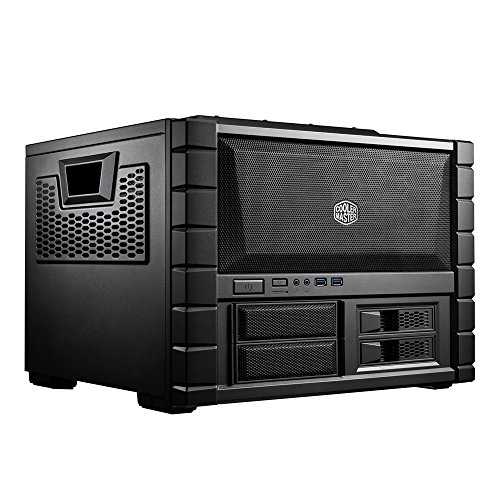




- A case quickly and easily transforms into a test bench - ideal for enthusiasts and over clockers
- Two durable trifle fans included in the front (also supports a 240mm radiator) for powerful airflow
- Supports a tower CPU coolers up to 180mm tall and high-end VGA up to 334mm long
- Supports up to 4 HDDs or SSDs by removable HDD cages
- Motherboard tray can be removed to install, remove or swap components
- Dual USB 3. 0 SuperSpeed ports and X-dock slots in the front for Lightning fast plug-n-play I/O
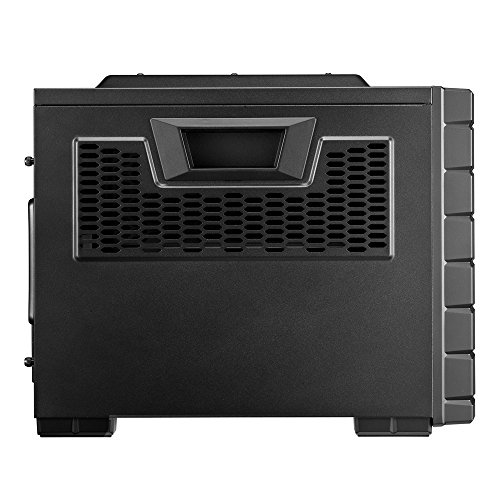
- Rigid carry handles on the side panels
- Case Type: Mid Tower, M/B Type: Mini-ITX, MicroATX, ATX
- Material: Steel, Polymer, Mesh Front Bezel
- External Bay: 2x 5.25"; 2x 3.5", Internal Bay: 2x 3.5"
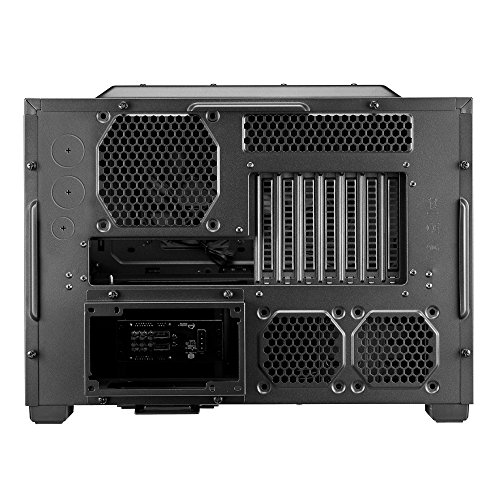
- Expansion Slots: 7
- Fan: 4
- Front I/O Panel: 2x USB 3.0 Ports, 1x Microphone-In, 1x Audio-Out
-
Information
-
Twitter
-
Pinterest
-
Youtube
-
Facebook
Lilia Soriano Castillo
Awesome case. Easy to work with not crowded
Here's my basic configuration: * Asus full size ATX ROG Gaming Motherboard * a full size nVidea GTX 1060 * i7 8700K * an EVGA closed loop 240 water cooler with dual fans * 600W Power supply Pros: Everything fit, and was easy to install in case no wiring messes. All the case cables were clearly marked. Very well ventilated on the top, sides, front, and bottom. Includes 2 case fans in front (replaces with the radiator and it's fans and used one for the rear). Very easy to work with, front, sides, and top come off easily (thought front has tabs to remove while top and side have thumb screws). Even the MB tray can be removed by removing 4 thumb screws for easy installation of board itself (even has guide and lettered riser screw holes for different board sizes), memory, processor M.2 SSD or other things. It has 2 hot swappable drive bays you can hookup to the MB power and SATA ports. For me being a plain black with light red power and disk lights (not too bright) is a pro rather than flashy lights in fans and constant glaring bright colored disk lights and other accents that are disturbing when say watching a movie or other things besides gaming. Cons: It's a beast. But it has handles so it's easy to pick up and move. Maybe a con, but I think a pro - Instead of being tall, thinner and rectangular it's short, fat :), and square. The Power supply holder juts out about 2 inches from the back, which is strange but maybe to accommodate bigger than standard power supplies or just give more headroom, based on my experience I'm thinking the latter.
Ben Myers
Great case for the money! Very flexible build and of course high air flow.
First I have been building computers for over 15 years now and have had quite a few cases so I'm very knowledgeable about them. I had a Rosewill case before this one that I really liked as well but my current build has outgrown it necessitating a new case. Pros: Build quality: On this case it is very good for the price. It is solid metal throughout which I like. I also like that the side panels are flexible. Less pressure on my cables. I like that the motherboard panel has a cutout making access to the back of the cpu bracket easier. Build Flexibility: It is very flexible and you have many options. It fits ATX and Mini ATX. I use a mini ATX It has a 2 slot 2.5 inch SSD cage that is removable if you don't want it. It has a 3.5 inch HD cage in the middle that is removable to give your video cards more space if you have big ones. I needed this having 2 large cards and I love the extra space. Also saves weight too. The top 5.25 bay has a quick lock install to make installing optical drives easier. I confess I couldn't figure it out though but I used a couple screws instead. No big deal. Cooling: Great cooling options and they made a big difference for me. My last case had 1 120mm fan in front, 1 120mm fan in back and a 140mm one at the top for venting. This case can do that and more. The front panel is easily removable so you can put in multiple 120mm fans or a 200mm fan whichever is your preference. I put in 2 high quality 120mm fans in front. One is right in front of my video cards so they get more air that way. The top of the case supports the same configuration as the front. I chose a 200mm fan for that one for extra heat flow out the top. There is also a space on the side for a 120mm or 140mm fan. I put in a 120mm fan. It is positioned directly above the video cards as well for even more airflow. The rear has a 120mm fan as well. The extra space allows air to flow better around components which I'm very happy with and needed badly. Cons: Weight. It is over 17lbs. My last case was 12.5. However I did remove the one HD case and the 2.5 SSD case so I reduced it about 2 pounds. I didn't take a star away as I was not disappointed with the weight. Not totally tool less. It didn't have thumb screws for the video cards or the back panel of the case. Again I didn't dock a star as I used thumb screws from my previous case to make up the difference and it isn't that big a deal to me. Also a minor pick is that is doesn't have a speaker but again I have spares so not a big deal. I am very happy with this case especially for the price I paid for it. I got exactly what I wanted and I can rest easy knowing my setup won't get too hot now. Whether a first time builder or a professional you can't go wrong with this mid tower case. The cons above are easily remedied with a trip to your hardware or pc parts store. Hope this helps you.
Yoseph Shiferaw
Best Desktop Case Ever
I've probably built upwards of 150 computers and opened up/stripped down/worked on as many as 1000 over the last 25 years. I have never, with NEVER in all caps/bold/italic, seen a case (or even a so-called "test box case") this good. I've been a CoolerMaster case customer since 2010, even though a lot of their cases have less-than-great engineering features. HDD slots are way too close together in the Elite and in other HAF cases. 5.25" disk mounting slots are way too high/far away from the standard SATA connector location on any mainboard (lower right corner), which gets worse the bigger you get away from mini/micro-ATX form factor mobos. In my current desktop case, the HDD mounting bays have so little space behind them that the SATA cables have to be folded/twisted to even get to the drives, can't be disconnected til ALL the drives are pulled halfway out (even if you only need to disconnect 1 drive), and mounting cages are riveted or welded together. Again: That's all the other CoolerMaster cases I've used. I keep coming back to this case manufacturer because they are hands-down the best engineers of air cooling cases/pathways/fan placements, whether it's a gaming case like the HAF or a business/classy-looking box like the Elite. This HAF XB Evo has all the benefits with none of the drawbacks. There's a good space between HDDs mounted in the cage. Every mount point is well within just a few short inches of the mobo connectors. As with all HAF models, there's plenty of space to mount a mammoth 1000w power supply. All the mounting cages are screwed in place - meaning they're totally modular and can be removed entirely, turned sideways, swapped in position, etc. The mobo mounting plate is similarly removable with just 4 thumbscrews positioned handily on the outside of the interior mounting/stability struts. The front-facing 5.25" mounting cage is particularly sweet. It's mounted using 4 front-facing screws (the front cover comes off very very easily with just a little pressure on 3 clips per side, with 1 additional stability clip at the top center) and 4 more that face down against the desk. About halfway into removing the bottom screws I realized I'd done something stupid - I removed the front-facing screws first, so now the cage was going to take a tumble when I took out the last bottom-screw (the case had to be tipped up to do this). I tried to hang onto the cage while removing the last bottom screw, but fumbled it while trying to catch/control that screw as it fell away. The cage tumbled toward the back... but some brilliant and extremely courteous engineer at CoolerMaster was thoughtful enough to bind the top of that cage to the front-panel connector cables with a little loop of ziptie, so the tumble amounted to just a little bit of rattle. I literally teared up at the awesomeness. Once removed, anal retentive techs like me have access to the screw holes on the other side of that 5.25" bay, so if the DVD drive gets pushed it won't sink into the case or strain the screwless mounting lock on the outside. One other thing that's been a long-time burr in my saddle blanket is the way CoolerMaster designed their side-mounted rails for HDDs. These little plastic rails are surely awesome - easy to pop on and off a drive, easy to slip in and out of the cage - but the pins securing them have historically been mounted with a rubbery ring that tends to slip off the pin head and then it binds up in the HDD mounting track... but the ones that came with this new HAF model simply don't have that problem. The pins are just bare metal that clip right onto the drive and then it slips into the HDD rack, with the surprisingly secure clip-in feature that I know and love from CoolerMaster cases. So yeah. Can't say enough nice things about this item. I'm glad I bought it. I'm sure if/when I start delivering desktop workstations to clients in these squat, wire-boxy cases I'm going to get strange looks from end-users who are more used to tall/narrow towers, but it's going to happen. Guaranteed!
Mariella Busuttil
Roomy, doesn't stink with chem odors, quiet
Airs out and doesn't smell like a new car or tire. Top fan and side fan (the large fans) have a light 'new' kind of odor that didn't air out after sitting on a table for 4 months. Taking them out was easy and simple. Love the spaces for cable management and connections. My old case, Antec Sonata II, was a pain for cables for hard drives and the like. I remember trying not to nick my fingers on the rail finger tabs to move the drive bays in and out, the time setting up all the little frames to drives (just so it took less time to slide in or out of their designated spots). The Cooler Master case has none of that trouble. A little bend in the drive tray containers, line up the holes (took me a few tries to get the feel for it), and voila, drive ready to go in the tray. Tray slides in with little effort. Go to the back of the case and there is a hole so you can actually see the rear end of your drives to connect cables! My old case required me to hook up my drives, hold two trays at once, slide them in, and then connect to the motherboard ... cause there wasn't enough space. That was my big complaint with the Sonata II from Antec. Not enough space. No such problem with the HAF X! I've got so much space that my cables aren't clogging up air paths, I have room to connect stuff, my parts have room to breathe in there. At a glance, I can see if it's dusty thanks to the side panel window. Very quiet (I can't hear it over my air filter). Stays solid on the desk with non-slip feet. Kind of a pain to get off a desk if you want to move it. Sort of have to grab at the top and angle it to get a hand hold underneath. This is not a case designed for moving. Set it and it's not going anywhere. It comes with little wheels if you're into that, but thankfully they're optional. I love the little trays for the SSD drives. Just screw right in to the tray, no messing with adapter mounts. Okay, so you need a #2 screwdriver for the various screws (like mounting your motherboard, SSD drives to the two trays in the top part, and to get the "thumb" screws on / off for your card slots in the back). Side panels are a little funky to get the screws holes to match. Get it in, think it's in, and hole doesn't line up. Remove, try again, a little closer but still have to press. Oh well. I haven't had a case yet that matched up 100% in these tool-less designs. While Antec Sonata II might market tool-less, you'll use tools to mount all their rails and whatchamajiggies onto your hardware, just to slide in and out of their case. I found out quickly that wasn't very efficient since I spent a lot of time mounting my drives onto their rails. With Cooler Master, the rails / trays go on without any tools. Except for a few trays that let you just screw the drive into place like for SSDs. Such a pleasure. Granted, I don't know if all Antec cases are like the Sonata II. I love the Antec power supplies because the new smell goes away. I just had enough ouchies from the Sonata II case, especially when trying to get that plastic front filter off. The front screen on the Cooler Master removes in seconds ... once you get a finger under the case (one little notch would help). Overall, very happy with the Cooler Master case. Looks so easy to clean compared to the Sonata II. Very happy with this case. I don't have modded anything, water coolers, or fancy stuff. Five drives, video card, sound card, and a power supply. It took more time to disconnect the parts from the Sonata II than to install into the HAF-X. Figuring out how I wanted to run my cables took a while in the HAF-X, because there were so many options to try to see which one I liked best.
Shqipe Llugiqi
Great Value.. Well Done
I have 2 of these cases.. One for an old amd 6 core and another for a brand new ryzen build.. Exceptionally well designed, easy to work with, and cool very well. 2 things to note in your build.. 1) you may have issues if your GPU has a high power connect location as it will be a tight fit if you decide to put in a large top fan. length is no problem and my big asus gtx 1070 Rog Strix 3 fan fits perfect. 2) the power supply location (that is well designed) actually extends about 1.5" back from the case around the power supply.. this was only an issue for me as I have a tight fight for my cases as they are stacked in a recessed rack in a wall.. I would buy another of these cases in a heartbeat..
Sarah Sylvester
FANTASTIC Case! One of the most fun and stylish cases I've ever built.
Taking a sharp detour from the traditional tower cases (of which I've built more than 100 over the years, from big to mini's - I used to be an Intel OEM Builder/dealer many many years go), this is a "BOX", literally. It's a fantastic BOX! It has a lot more vented panels than I was expecting - yes, the Amazon Item page has very accurate pictures so it shouldn't have been a surprise, but once we opened it all up, it's very clear this can get air in/out of everywhere. The removable side & top panels, and front panel openings make peripheral & MB placement makes installation and cable mgmt. easy. Everything seems to be well thought out, including openings from the upper section (MB area) to HDD/CD/DVD/SSD bays and PS area in the lower section. Components installed in this case: MSI Pro Series Intel Z270 DDR4 HDMI USB 3 SLI ATX Motherboard (Z270 SLI PLUS), Intel i5-7600 CPU (for now), Noctua CPU Cooler [NH-U12S,MyDigitalSSD BPX 80mm (2280) M.2 PCI Express 3.0 x4 (PCIe Gen3 x4) NVMe MLC SSD (240GB),Thermaltake Smart 700W 80+ White Continuous Power ATX 12V V2.3/EPS 12V Active PFC Power Supply PS-SPD-0700NPCWUS-W. Case is multi-graphic card & liquid-cooling ready, but we didn't install one at this time. Case has been in use on & off for almost one year and we have not have any issues with use, ventilation, adding/modifying/removing peripherals and devices. It comes with two fans which are installed in the front panel. The Noctua CPU Cooler [NH-U12S came with one fan, but we installed a Noctua fan to get both forced and inducted air cooling on the CPU. After all this, cooling was thought to be a concern, but it turned out all fine. The CPU runs cool, with a little tweaking of the fan rpms (via MSI's MB mgmt app), and the overall system temps run cool (ambient temperatures) even at high CPU usage rates - in other words, cooling anything in this case isn't going to be an issue as long as you have the fans tweaked to the right RPM's. If the case/CPU fans can't exhaust enough hot air, it's very easy to add another one, although I'd probably consider a big 240mm fan to install in the overhead panel by then. There is more than enough space in this case to add many more drives, especially if you're going with 2.5" SSD's, or some sort of drive bay unit. Looks of great looks from this case and will certainly consider another one. FYI: INSPECT YOUR CASE WHEN IT ARRIVES. BECAUSE THIS IS A SQUARE BOX, IT IS MORE PRONE TO MISALINGMENT - AND [AMAZON] SHIPPING PRACTICES CAN CAUSE DAMAGE. Our case appeared to have been dropped ever-so-slightly onto one corner (Top Rear Left corner when facing the front of the case). This caused everything on that corner to misalign. We noticed that the side panel and top panel didn't align at that corner. But once the tool-less screws are in place (for the side/top panels) and the case/panels/screws tightened down a bit, everything aligns "good-enuf-for-govt-work" IMHO. I'm fine with it because first of all, NONE of the drive bays had alignment issues with installing drives. Secondly, PS had no installation issue, so no misalignment there. And most importantly, the MB tray, which separates from the case itself for MB installation (A GREAT FEATURE BTW), didn't have any misalignment issues with the MB holes or with installation back in the case. But for those of you ordering on Amazon (or anywhere else online), watch out for damage on the box, especially on a corner. If it was dropped hard on a corner, chances are your case panels won't line up right, and could become an issue. (Frankly, Amazon and its shipping/packaging practices is the ONLY thing that could case this great company to come crashing down in stock price and profits one of these days. I've had to return an item 4 times, and a dozen others 3 times because it was very stupidly packaged (by Amazon) and/or poorly handled in transit (by UPS/FedEx/USPS). And frankly, anything you can get at Home Depot, I get from Home Depot from now on because Amazon will just destroy it on its way here.)
Thet Myat Noe
- Wonderful price, sure many cases are better/bigger and has ...
I intended to build my own pc and did some research on a few cases. I will break down the review into Pros and Cons. Pros : - Wonderful price, sure many cases are better/bigger and has more functionality but for the price you pay for this case it’s a good deal for a mid tower assuming you aren’t building a massive pc (SLI gpu, a s*** ton of HDs) - Feels solid, study construction the metal panels don’t flex so easily and the polymer corners and front panels means don’t dent anything when moving your computer around. - You have enough space for about 4 HDs, 2 ssds and an optical drive. - A key feature of this case is that there's a big vent on the top of the case. Everyone knows that hot air rises and cold air drops, I brought a 240mm fan to extract from the top so that the heat is ventilated better. Do keep in mind that you should try to achieve a positive airflow - Hard drive installation is very easy. No need for screws as it is a simple slot and slide in. Cons: - I built my pc with a 1060 geforce 2 HD, 1 SSD, a decent sized heatsink for my cpu and 4 sticks of ram. Due to the space the cable management can be a bit tricky and there may be issues if you intend to install a water cooling system. - Fan space is limited, you have a number of options to install more than enough fans to promote healthy airflow so your stuff doesn’t overheat. - A limited amount of USB ports. I like to have tons of stuff attached to my pc including phone, webcams, etc.. - Doesn’t have a see through window although I don’t really care for that
Brittany Easley
Perfect For My Home Server
I have a total of 8 drives for my home server with a current memory capacity of 14TB (with a 4TB HDD on the way), and I was using a regular ATX tower for years. Heating and airflow were a concern as was space. I needed a server style tower that would still fit on a shelf. This tower fits the bill. It seems well made and sturdy. The power button seems to be well made with good haptic feedback, nice and clicky. It comes with plenty of hardware, tabs for hot swapping your drives, zip ties, etc. But the best thing is it's ROOMY. I love it. I now have space for my SSD and 6 3.5" HDDs. I love the fact that it comes with two 120mm fans at the front and back. After installing all my gear, including a 4-plug SATA PCI-e card and optical drive, I still have plenty of room. Cable management is easy and I love the fact that everything isn't stuffed in their like a can of sardines. Temperature and air flow are great, my drives run nice and cool. It also comes with an adapter for your 3.5" drives to be installed in the 5.25" bays. I've already got the 3.5" bays filled so my new 4TB drive will be going in the 5.25 slot with the adapter. The rubber stopper legs are thick and help with vibration. In my old case you could hear those enterprise drives spinning from the next room, with this case they are nice and quiet. It has plenty of options for additional fans at the top and sides, if you require additional cooling. All in all, for a home server, it's a great tower and a good price. 6 months of 24/7 operation, and no problems.
Marion Proudley
This unique cube makes building and transporting your PC easier.
This case has great looks with its unique cube design and has handles for easier mobility. I have mine built up to about 50lbs, so the handles make it so much easier to move. Though, I don't see this being used as a full time LAN box or test bench; it's just too heavy and bulky. Pretty much all the panels are removable or accessible making the build so much easier. Ventilation is the name of the game and with every provided spot fitted with a fan, there has been no issues thus far. After 5 years, I have yet to find an issue with the build quality. The only issues I can say I have noticed are that wiring under the motherboard can get quite gnarly and if you have large GPUs, a radiator may be an issue. My 390X has millimeters between the radiator, so anything longer will not work. Overall, this case will not let you down.
Joan Ellen Erbstoesser
If you want your gaming rig to be portable and bulletproof get this!
I am so happy with this case, I cannot say enough about it. Here is why, 1) Super portable! Handles are beefy, case is strong enough to stand on( not on center grille but on edges) and I am 200 lbs, Motherboard lays flat so GPU doesn't sag due to transporting. 2) Really easy to build in! Cable management is a snap, you can route all your wires under the removable motherboard tray, you barely need any tools, just a #1 Phillips. hard drive bays are cool too, ssd mounted in really easy with adapters. 3)Tons of room, Corsair liquid cooler bolted right in back, huge 1060 gtx and plenty of space, awesome spot to put a 200mm blowing hot air from the top. 4)Cool form factor! I just like this case, it's so unique to anything I have seen for LAN type configurations, without stepping down to uATX. Bottom line is if you move your computer, and don't care about showing off your hardware to people this case is for you! [...]