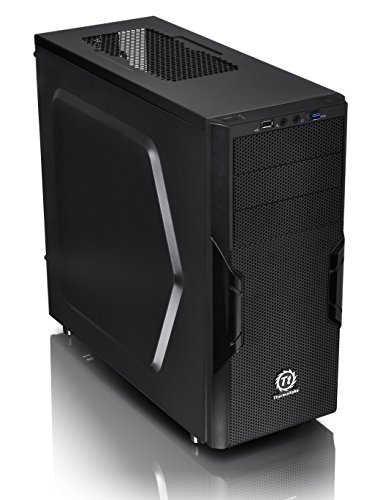
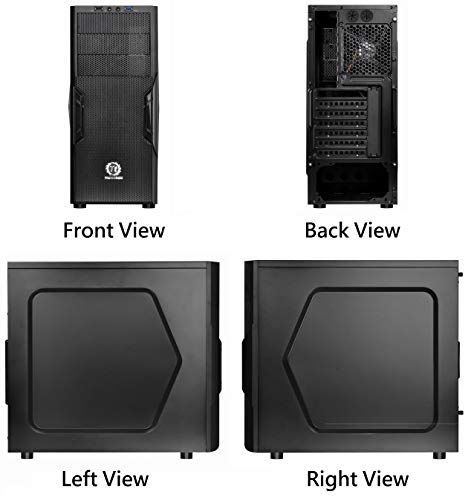

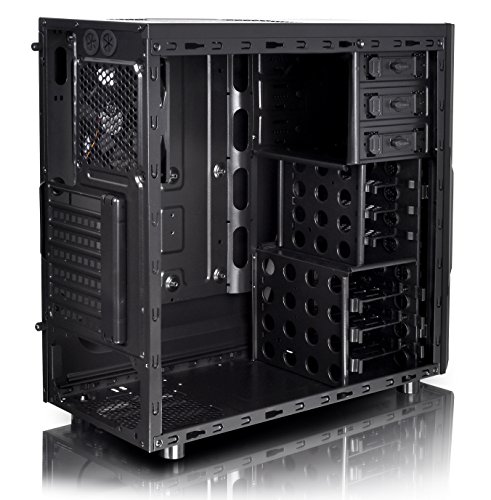

- Designed for gamer, perforated metal mesh front and top panel to allow quick heat dissipation and rapid air intake for maximum ventilation. Featuring a transparent side window to offer a direct view of inner system.
- Innovative 5.25" & 3.5" tool-free drive bay design minimized the hassles of installing/removing. Trio drive bay concept "3 + 3 + 3", a perfect ratio for accessory and storage devices. Also, Tool-free mount fan can be clipped on the dust filter.
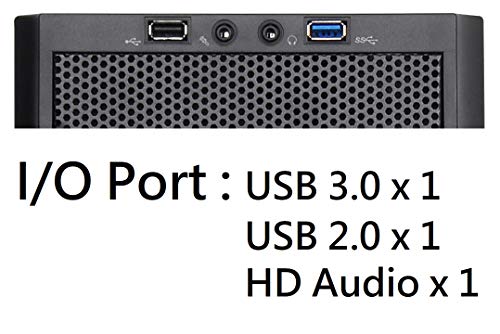
- The perforated front-top panel has implemented one data transfer SuperSpeed USB 3.0 port along with one standard USB 2.0 port, a HD microphone and headset jacks, to grand direct access when needed.
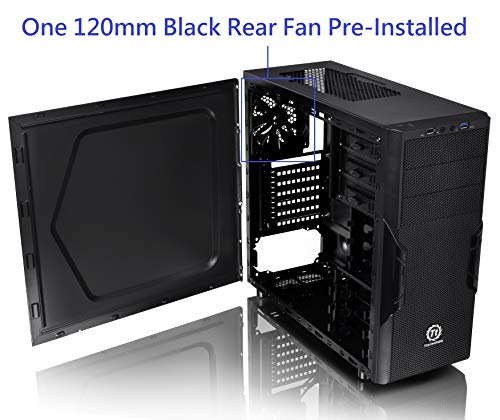
- Preinstalled one 120mm rear exhaust fan, optional 2 x 120mm intake fans to optimize system ventilation with dust filter.
- Pre-mounting holes to support motherboards up to standard ATX and CPU cooler installation, long graphic card also supported as well as Advanced Cable Management and Liquid Cooling System.
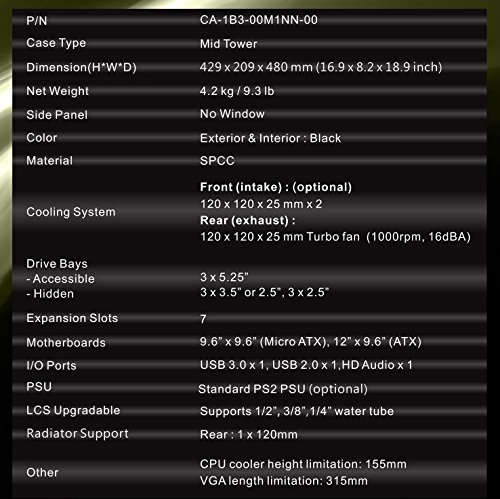
- Case Type: Mid Tower
- Material: SPCC
- External Bay: 3x 5.25"
- Internal Bay: 3x 3.5" or 2.5", 3x 2.5"
- Expansion Slots: 7
- Front I/O Panel: 1x USB 3.0 Port, 1x USB 2.0 Port, 1x HD Audio
-
Information
-
Twitter
-
Pinterest
-
Youtube
-
Facebook
Cornelius Martin
Exactly what I wanted.
After reading some other reviews, I went ahead and glued some paper washers onto the back of the motherboard at the mount screw holes. Yes, those dimples in the case are a little on the wide side and I can see where they may come in contact with the motherboard where it shouldn't. It was also nice to know that the front fan just clips in. Cable management was not a problem with me. One thing that was a small problem was the clearance that I had for the liquid cooler radiator. I wedged in a piece of plastic and taped it to the radiator so that it would not rub on the case. It is a shame that the case with the clear panel was not available when I purchased. But I will get over that. I have built many PC Towers before and this case is not bad at all. And the price is what I like also. Any problems that I had were only minor and workable. I have found that even with a more expensive case you will find about the same problems. So, overall, a great case.
Monalisa Basu
Fantastic Case
Let me start by saying I love this case. My coworker was saying that a case fits/chooses its owner and this one does. I had originally ordered a different one in sort of a hurry but decided I didn't like the looks. This case looks great outside and in. The black on the front and top is a perfect fit with all the white. It has good space for cable management and the window is a nice feature with cool 3D geometry. This case is well worth the price. I wish the usb and stuff was behind the door but I can live with it because I don't use the front ones much. The rubber plugs for the usb and audio are a nice feature. Plenty of room for fans and it has lifted feet so the power supply fan can point down. A word of caution, do not set the window side down on the desk or set anything on top of it. It will scratch, not super easily but it will. Also, for moving purposes I might suggest a different case, this one is a little awkward to grab because of the angles. It would be amazing if you could switch which way the door opened but that's a logistic nightmare and only because it is on top of my desk temporarily and facing the wrong way. Although thinking about it, it should really swing to the right because of the fact that the window is on the left side and that is likely the way someone wants to face out/towards them. I don't use the disc drive enough for it to annoy me.
Emmajane Harper Hussar
A great mid sized case at a good price.
This a very good budget case that will fill the needs of most folks. I bought this case to replace and old case that I've had since 2004. It was heavy, not very good looking and a beast to work with. I built a new PC in December 2016 and just used my old case but last week I had a hard drive give out on me and figured hellsbells lets just buy a new case. I'm glad I did. I've built several computers over the years and I've always liked Thermaltake cases, along with their other products, my power supply is a Thermaltake 800W unit and I have a couple of Thermaltake case fans. This case is much lighter than my last case but the dimensions aren't that far off. The window panel is fine and lets you see the "guts" of the computer AOK. My motherboard is an ATX Gigabyte board and i7 Pentium processor. No problem with room for either one. I like that the standoffs are built into the case. What I really liked was the power supply on the bottom of the case...it just made it easier to work on. Now I just have a Gigabyte Radeon RX 550 v/c and it fit in there easily but it is nowhere near the longest card out there so you'll want to check on the card length before buying the case. I have solid state drives and used the 3½" bays...tool less? Meh...I just secured my drives the old fashioned way with mounting screws. I didn't use the bottom 5½" drive bays yet. The top bay is mounted a Blue Ray read/write drive. Now to the fans. You can use 120mm fans. There is one that comes with the case that is mounted in the back and is quiet enough. You can use 2 120mm in the front...those are not included but easy enough to install. As you can tell there is a large ventilation area on the top but there isn't a fan mount. You'd be hard pressed to fit one from the inside and placing one on the outside would just detract from the looks of the case...that would be the only real negative I have and it's relatively minor.
Nerissa Gnocil
Great case.
Great case ...plenty of room ..will be buying more..I added 3 of the Apevia 120 mm fans.. check out the pics..
Bianca van Boven
Decent case for the price
Overall, the case does exactly what it needs to do. It has good air flow, had an easy way to neatly install an AIO, and is pleasing to look at. Couple caveats. Cable managers will want a PSU shroud and to get creative hiding those cables. No built-in way to do it here. Instead, it seems like the window on the side is cut so any cables that would be ugly as all get out hanging out in the open are just swept under the metaphorical rug. Out of sight, out of mind as it were. The other minor irritant was the spacing in the front for fans. It isn’t really feasible to put in two, or even one in any kind of proper way. Perhaps the space there isn’t really built for it, but it’s wasted space if that’s the case. I put one in anyway, but it isn’t centered, and if it were not my son’s rig but my own, I’d have pulled it back out. Those things bother me, but he likes the LEDs in the front. The other thing is, I felt like the decorative plastic grates beneath the clear shell would snap as I was removing them to install the fans and AIO. I had to be extra careful. I get it, that’s how plastic is. Force it, it will break, and, thankfully, that didn’t happen, but a higher quality polymer or an entirely different material would have been nice. It’s a lot of plastic in this case. It does keep the weight down though, which is nice. My Genome is heavy enough that it’s a pain to clean. Overall, it’s perfectly serviceable and I’m happy with it. My thirteen year old who picked it out, loves it and was stoked on the finished unit. That’s what matters.
Bone Naomi Fatty
Its that easy..
Very basic and cheap case. Tons of room through out the interior and decent cable management options behind the mother board area. Other reviews state that you cant mount an intake fan in it. Don't listen to them. You literally clip the fan to the front filter part. Its that easy...take the front filter out and look at the interior side of it....you just CLIP it in. It fits two 120mm front fans and one 120mm exhaust.
Raynaldo Aldaco
Part of my daughter's computer system designed to make her friends jelly.
Amazon once again helps us to fulfill all of our shopping needs. This Christmas we are surprising our daughter with all the component that she need to build herself a computer that will definitely make her classmates jelly. Computer assembly isn't difficult for noobs, but to the uninformed saying that your built your own is definitely impressive. With each system you need to make sure that you purchase certain components. This is what we got her: 1. Case: Thermaltake Versa N21 Translucent Panel ATX Mid Tower Window Gaming Computer Case Cases CA-1D9-00M1WN-00 - This case is a simple sleek design that will help protect the vital components from her younger sister's tiny fingers. 2. Power supply: EVGA SuperNOVA 650 G1, 80+ GOLD 650W, Fully Modular, 10 Year Warranty, Includes FREE Power On Self Tester, Power Supply 120-G1-0650-XR - This power supply was one of the highest rates, quality built, cost effective supplies available. 3. Motherboard: Gigabyte LGA 1151 Z170 2-Way SLI UEFI DualBIOS ATX DDR4 ATX DDR4 NA Motherboards GA-Z170XP-SLI - We chose this Motherboard because it will allow us to add up to three m.2 SSD hard drives at a later date, perhaps her birthday. 4. Processor: Intel Core i5 6600K 3.50 GHz Quad Core Skylake Desktop Processor, Socket LGA 1151, 6MB Cache (BX80662I56600K) - Every computer needs a good processor. Intel currently leads in performance (Sorry AMD) 5. Heat Sink: ARCTIC Freezer Xtreme Rev. 2 CPU Cooler - Intel & AMD, Twin-Tower Heatsink, 120mm PWM Fan - Heatsinks are important to help transfer heat away from the processor and help to avoid it from overheating. Water cooling is very effective but introduce additional points of failure. We chose this because she isn't heavy into gaming but it will allow her to explore. 6. Ram: Corsair memory kit 16.0 DDR4 2400 MT/s (PC4-19200) (QTY:2) - 32gb of ram is a bit overkill but provides additional room for growth. 7. Video Card: EVGA GeForce GTX 1080 SC GAMING ACX 3.0, 8GB GDDR5X, LED, DX12 OSD Support (PXOC) Graphics Card 08G-P4-6183-KR - This video card it is a bit of overkill for her, a EVGA GeForce GTX 1060 3GB GAMING, ACX 2.0 (Single Fan), 3GB GDDR5, DX12 OSD Support (PXOC) Graphics Cards 03G-P4-6160-KR is more affordable and in line with her fascination for World of Warcraft. 8. Hard Drive: Seagate 1TB BarraCuda SATA 6Gb/s 64MB Cache 3.5-Inch Internal Hard Drive (ST1000DM010) - Seagate makes a quality product, I have used them for years. I have a network drive with one of their hard drives that has been running since 2009. 1TB is sufficient for her needs. 9. Optical Drive: LG Electronics 14x SATA Blu-ray Internal Rewriter without Software, Black (WH14NS40) - This is only needed if she has a need for playing/recording DVD or Blu-ray discs. To watch Blu-ray movies will require purchasing additional software. 10. Operating System: Microsoft Windows 10 Pro 64 Bit - I prefer to use to the professional versions of windows as it allows me greater control of the operating system and aides in the monitoring and protection of the system from the youngins' 11. Antivirus: Norton Security Premium - 10 Devices [Key Card] - I use Nortons to help protect all of my computers for one low cost. There is only one computer in our household with a different AV and i've had to clean a couple viruses off of it.
Renee Hodge
I love this case!
I just purchased and finished my build with the Versa N21 Snow. Thus far, I’ve been loving the case. I’ll go over the aesthetics first and then my experience with actually building the case. Aesthetics I simply love the way this case looks. The two-tone color makes the white really pop. The front panel also has a transparent bottom half and the top panel also has a transparent section as well. If you add LED fans (which I did), it really shines through. I especially love that it gives the case a different look when it’s on versus when it’s off. I decided to go with blue Riing fans similar to what is shown on Amazon. I know some people don’t like top I/O ports, but I actually quite like it. It leaves a very stream lined look to the front of the case. No extra buttons or ports to ruin the beautiful design. The tilt on the case helps it to look even more different than what everyone else has. Build Process The inside is a relatively standard chassis. You have fan support for 120mm in the front, top, and rear. I installed 2 blue Riing fans in the front and one in the rear. For the top, I ended up installing a 240mm AIO. I went with Thermaltake’s Water 3.0 Extreme. I have an old Water 2.0 from before and didn’t run into any issues so I decided to give the Water 3.0 a go. PSU and motherboard installation was pretty standard. There are also lots of holes to route your cable management so no issues there either. I used up all 3 3.5” drive bays (1 SSD and 2 HDD). On the back plate you can mount an additional 2.5” drive, but I decided to go with the 3 x 3.5” slots since I like how it fills up that area of the case. Having empty spots just doesn’t look right to me. Although the 5.25” drive bays are empty because I didn’t feel the need for optical drives. I haven’t had to use a CD or DVD in a long while. Still nice to have in case I ever decide to add more USB ports or fan controller or whatever. I had no issues installing a GTX 970. The specs say has a VGA limitation of 250mm, but there’s actually plenty of room. I can see an issue if you were mounting the card on the bottom of your motherboard that it may hit the HDD cage, but if you mount using the top PCI-E slot, you have no issue. I actually had plenty of room to spare so you could even go with a GTX 980 TI. The overall build quality is above what I expected. The metal wasn’t very pliable like some other low end cases I’ve built. Conclusion For $60, you really can’t go wrong with this case. It looks amazing, building was simple, and can’t really find any flaws. Fans that I got for this case www.amazon.com/Thermaltake-Pressure-Circular-Anti-Vibration-CL-F038-PL12BU-/dp/B00VRKVGP0/ref=sr_1_5?ie=UTF8&qid=1457565904&sr=8-5&keywords=riing+fan
Yvonne Ebarb
Great Case For My Gaming Pc Build
Really cool case. It has lots of clearance for most of your hardware and has a great design and good airflow.Has built in dust filters. The transparent Windows look really cool with LEDs. I originally bought the black version and wanted a white version of the same case but back then they did not have the white version but as soon as the white one came out I switched it looks amazing.I would definitely recommend.
Tim Heyes
Excellent case.
I bought this case for my recent computer build. First build in 10 years and what a rock star! I have nothing bad to say about it at all. Some highlights: 1) The USB 3.0 out and up top/front. This is nice for ease of access - make sure you buy a motherboard with the USB 3.0 connector on it, so you can take advantage of this feature. 2) The sections for 5.25" external are easy to pop off for expandability. The 3.5" internal are all really easy to work with, and have screw mount holes for 2.5". I have a samsung 840 EVO SSD which is 2.5" and it holds into the tray great with the screws provided with this tower. 3) Stock fans provide great airflow. The only thing to note: they are 3 pin fans - motherboards with 4 pin PWM fan control support will not be able to control these. However, a $20 fan controller can be added to one of the 5.25" external slots for this control if need be. 200mm PWM fans are harder to come by than 120mm or smaller PWM fans. Small detail - maybe I need to look around a bit more. If I had to be really really picky, the only thing I could complain about is this - as an electrical engineer I understand the importance of ESD (electrostatic discharge) grounding. I received all of my parts ahead of the power supply, which is required to be installed in order to ground the case while working on the rest of the build. When I finally got my power supply, I noted that due to the paint or coating on the metal parts of the case, many parts of it did not meter out to a short. I'm not sure if this is more intentional now days - maybe for other electrical reasons, like not shorting components out (motherboard) this is important. Ultimately what it meant to me was the need for making sure I was grounded to the chassis by finding a screw or something that did in fact have a solid path to ground. That is really the only thing about this case that I found. Otherwise great - would love to do another build with this case!