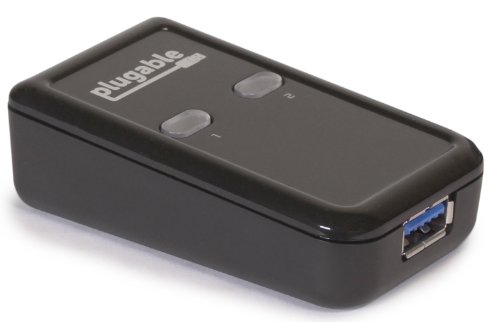




- Compact design provides easy one-touch switching of a USB 3.0 device or hub between two computers. Also backward compatible with USB 2.0/1.1 devices
- Attach a USB docking station or powered USB hub that is connected to keyboard, mouse, and USB graphics adapter for an all-USB KVM solution
- Switch works with any USB-enabled computer without drivers - attached devices may require drivers as usual. LED indicator lights show which connected computer has control of the attached devices
- SPECIAL NOTE: Not recommended for switching mass storage devices such as hard drives, flash drives, camera memory cards, etc. USB 3.0 "Super Speed" transfers are highly sensitive to cable length. For best results, we *highly recommend* using the provided 3ft/1m cables to connect the USB switch to your computers and to keep the USB cable which connects your peripheral to the USB switch under 6ft/1.8m
- We love our Plugable products and hope you will too. All of our products are backed with a 1-year limited parts and labor warranty and Seattle-based email support
-
Information
-
Twitter
-
Pinterest
-
Youtube
-
Facebook
Donald Daniel Smith
Elegant solution to USB peripheral sharing between two DAWs
I have been using one of these to switch a non-networked printer between two computers for a couple years. When I moved into a new studio, I decided to build two Digital Audio Workstations (DAWs) and share all the USB inputs (e.g., keyboards, controllers, software dongles, etc). I decided that the most elegant solution would be to connect all the USB devices to a hub, and use this switch to route the USB inputs to either DAW. This is a very inexpensive solution to what could have been a very costly problem. So, if you haven't thought about using a switch this way, think again!
John Paul
Perfect... oh, and perfect.
I fix computers, so it's rather common for me to have 2 desktops running at the same time...one is usually my personal computer while the other is the one I'm working on. I swap back and forth constantly to install software, run scans, do research and the like, so pulling the USB cable out of the back of one machine to plug into another can get annoying after a while. I run two monitors so I really can't justify a full-on KVM switch, not to mention I have found a lot of KVM equipment to be incompatible with USB hubs and even some mice and keyboards. I run a large hub for all my peripherals (the Sabrent High Speed 10 Port USB 3.0 HUB + 5V 2A Smart Charging Port with 3 Power Switches LED Indicators and 12V 4A Power Adapter [VIA VL812 Chipset] (HB-RUS1)) since my Macbook, another complicating factor, is rather short on USB ports. I've had a lot of USB gear fail me with my incessant cross-platform swapping and I give this switch high marks for never letting me down. I also use a Logitech keyboard and mouse(a Logitech G500 Programmable Gaming Mouse and a Logitech G710+ Mechanical Gaming Keyboard with Tactile High-Speed Keys - Cherry MX Brown) which run software that often doesn't detect the mouse and keyboard if connected to a KVM...again, there is no problem with any of this with this switch. If you're in the market I can comfortably suggest this item.
Harsha Mehrotra
Disconnects and freezes both laptops
Update: 1 Sep 18. I tried another USB 3.0 switch (other brand), and ended up with the same freezing / disconnection problems. Finally, I exchange the Targus docking station for a USB 3.0 Pluggable unit and things are working as they should. No more problems. I guess the Targus station is sensitive to ANY USB 3.0 switch after all (but worked well with a 2.0 one!) Original review: I had been using my 2 laptops with a Targus 3.0 docking station (Ethernet, printer, MFP, external BR drive, USB monitor, keyboard / mouse BT dongle, speakers and USB drive) and a Plugable 2.0 USB switch. No problems. Stepped up to the Plugable USB 3.0 switch and both of my computers keep freezing constantly. The docking station gets disconnected and then connects again for no reason at all. This happens with either laptop. I used new cables and I tried the original cables with each laptop directly connected to the hub (no switch). Cables are OK, both original ones and replacements. Docking station works great as usual with each individual laptop. It's the 3.0 switch! I have always had great experience with Plugable gadgets (USB switches, printer switches, docking stations), but I guess I got a lemon this time...
Meesha Easton
Ideal switch for virtualization environments.
Awesome switch! This is exactly what I've been looking for, a very simple pushbutton usb 3.0 switch. I run a qemu VM of Windows 10 on a Debian Sid host. With this switch, I can pass one of my motherboard's usb 3.0 controller to the VM, and leave one on the host, then connect one port on this switch to a usb port on each controller, allowing me to switch peripherals between host and guest with a single button press. I'd previously used an iogear 4x4 3.0 switch, but had intermittent issues with devices not connecting, or connecting slowly, after switching between ports. Now, all my peripherals plug into a single powered usb 3.0 hub, and then pass through to this switch. Perfect!
Robert Victor Moore
Share, Share, Do What You Think is Fair
Works great with a powered USB hub pairing with it like this one: Sabrent 4-Port USB 3.0 Hub with Individual Power Switches and LEDs included 5V/2.5A power adapter (HB-UMP3) With these two little gadgets I have hooked up a "poor man's KVM" without the "V" (because I had Video on both boxes already). I had two computers, each with their own monitor pairs, and I just wanted to save desktop space by getting rid of one set of keyboard and mouse. This little device helped me do that. Now with the press of a button I can switch to start typing on the other box. The only thing that would be cooler is if I could press a key combo on the keyboard to send a switch computers signal to the device. Hey, maybe it can do that, I'll have to do a little research. Anyway you can also use this for sharing printers, external hard drives, and other peripherals. Loving it!
Neb Saitiam
It works! I have it so I can share my ThinkPad PRO hub with two laptops.
I needed a way to connect two laptops to one hub. My hub is a ThinkPad PRO that has two monitors a key board, mouse, and my headphones connected to it. I wanted a quick way to switch between my two laptops without unplugging the USB3 cord. The box itself is very small, but the cables are bulky and because it doesn't have a remote switch like other USB and video switches, the box has to live on my desk. It is slow and because it is simply disconnecting the signal from one laptop and going to another, it takes even longer for the laptop to catch up and detect the displays. But for the price, the quirks are worth it. This does the job just fine and it means I can use both my laptops at my standing desk without messing with cables. I'd buy it again and I'd tell my friends to buy it too if they needed one.
Ziernalyn Muammil
Multiple Gaming Setup with limited deskspace. 100% works. Loving it
For those people who's looking for the most reliable usb switch, you've came to the right product. I've always wanted to find a solution to get all my devices connected together to my Ps4 and Pc to prevent the quality loss of my usb teeth so that I can fully utilize all my devices, save lots of space and have a hassle free experience. This small little switch with nice little blue lights solved all my problems with my workspace / gamedesk. At first, I doubt this thing is going to work so well. So I conencted my Razer Kraken 7.1 chroma headphones into this switch to my Ps4 and Pc. I gently tap on the switch button, and it gives me goosebumps. It works like a charm! Then I got greedy, and so I came out with another extreme solution, I went to a local store and purchased a simple usb hub. This time I connect the switch to the hub, with keyboard, mouse and headphones, to the Ps4 and Pc. I gently tap on that button again, and IT WORKS! Untill now I still can't believe that this small little switch is so powerful, compact and precise. And of course, the design is perfect! It solved all my issues instantly and what'ts more?! It comes with two complimentary usb cables! This product made my day, I'm 100% sastified. 10/10 Sorry if my review makes you feel that I'm overreacting to this product, but I've searched everywhere in my country for this type of switch, and all I can find is usb hubs -_- Untill now I'm still curious that why is there no one is funding this type of amazing product in my country..
Bar Milano
Works great for us
I use this as a connection to a docking station that runs additional screens and peripherals. One side is for our home computer and the other is for when I bring my Surface Pro home and use the workstation for that. For a couple of months now, we've been making the transition seamlessly--I even added my daughter's laptop into the mix and it works flawlessly as well. Generally, I would recommend this product, but for this specific situation, it has been a huge convenience for us. Three different people can use the 3-monitor workstation without any hassle--and for my daughter and I, we have a total of four screens when hooked up. Very handy.
James Rippingale
Very nice and simple to use switch for switching USB devices between two systems
My intended application for this product was sharing the USB ports on two different computer systems utilizing my Asus Predator 32" 4K Monitor's built in USB 3.0 Hub. One of the systems is running Windows XP SP3 which has some legacy applications and hardware attached that I still regularly use. The other is a late model MSI Motherboard based Windows 10 system. I am using a G. Skill Ripjaws keyboard and a Logitec G400S mouse. Both systems have Nvidia graphics cards, one having a display port and the other a HDMI for video. This is handled by the monitor, which has two inputs. So, I don't need a switch which can handle video. My audio is via the display port for the Windows 10 machine to built in speakers in the monitor and via a standard audio connector for the Windows XP machine, using stand alone speakers. Needing to switch video and audio would have greatly complicated my installation. The device comes packed in a very nice, easy opening plastic package along with two very good quality USB cables. I disconnected the keyboard and mouse from computer and connected them to the monitors USB 3.0 hub outputs. I connected the hub cable to the device's common input. I plugged in the two cables which came with the unit and connect one to each of my systems. The Windows XP machine only supports USB 2.0. As a note, the keyboard and mouse are also USB 2.0. With everything connected, I powered on the Windows XP machine, which was the last one selected on the monitor. It booted normally. There was a very brief pause after the login screen was displayed for the USB addresses to resolve and the system came up and worked perfectly normally. Next, I switched the monitor over to the Windows 10 machine. I switched the Sharing Switch selector to this machines USB port, so it would be ready and waiting upon first boot with the Plugable device attached and powered the machine on. It also booted normally, with keyboard and mouse working just as when directly connected. The Plugable USB 3.0 Sharing Switch seems of very nice quality and worked perfectly the first time right out of the box. Obviously, a hub is required if connecting more than one device - USB 3.0 if at least one of the connected devices requires this. I would suggest on first use to only connect devices to it which have been previously installed on the target computer and to make sure the switch is set so that computers USB port is selected when the computer is first booted. That way, the system can find and correctly address the known devices. Then, if your switch is always plugged into the same USB port, it should work very predictably. From my experience with USB in general, with some devices, they expect to be attached to a particular port. They shouldn't. But, some do. This doesn't apply to devices which install themselves. But, mostly to ones which require drivers to be installed from a downloaded file or attached media (CD/DVD.) If you attach such devices, and they don't seem to connect properly through the switch I would suggest simply rerunning the installation program for these devices, following the manufacturer's instructions for installation, but, with them attached to the switch, probably via a hub. That should correct most common problems. Remember, if the USB device will not function correctly attached directly to the computer, it will not work through this switch. Also, when switching, after the first boot up and when everything was working correctly, it might take a few seconds for the USB interrupts to do their thing and for the device to connect. Again, when booting a system up, I would suggest making sure the switch is in that device's position so everything can be registered correctly. Some system's, especially older ones, BIOS routines will "blow up" on boot if they fail to find expected devices and cause your system to hang or perform "unexpectedly." This is not the fault of the switch, but that the devices were not there when expected. Remember, a system expects to find a keyboard and mouse when it starts up. If your switch is not turned on to that computer when it boots it will not find them attached. This little device is perfect for my needs. I expect to be using it for a long time. It's highly recommended.
Richie Embry
Does exactly what it says it does
I'm using this so I can switch my keyboard between a USB-C dock connected to a macbook pro (work computer) and my personal desktop. This way I don't need to have 2 keyboards on my desk or suffer through using the laptop keyboard. I plugged everything in and it just worked. No issues at all with the dock or anything. There is a 1-2 second delay when you switch between inputs which isn't an issue. I have not noticed it adding any kind of input lag. I opted to spend a little more on this one instead of the 10 dollar ones on here due to issues with input lag others have reported.