


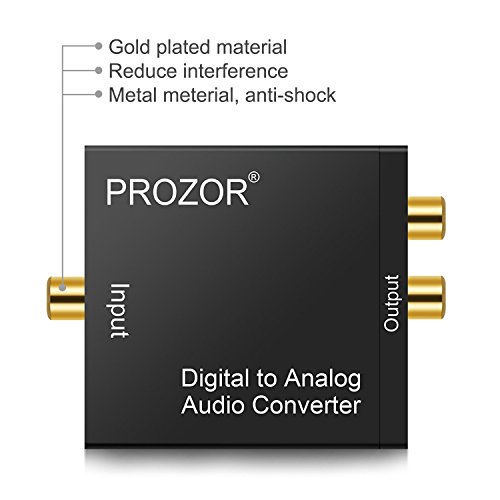
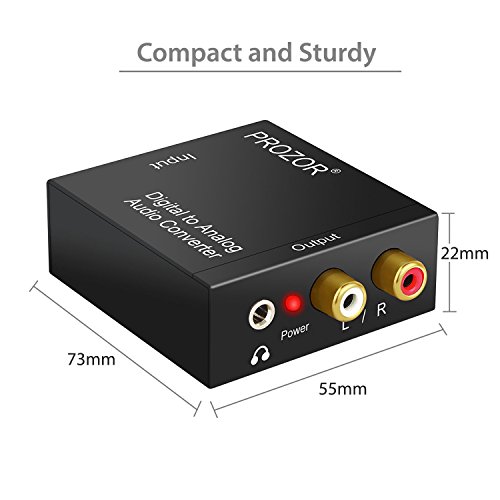


- PROZOR Digital to Analog Audio Converter: Converts coaxial or toslink digital PCM audio signals to analog L/R RCA and 3.5mm Jack audio simultaneously ( not capable of being reversed)
- Input Audio Connector: 1 x Toslink, 1 x RCA (Coaxial); Output Audio Connector: 2 x RCA(R/L), 1 x 3.5mm Jack; Powered by 5.5mm USB Power Cable (Power Adapter is NOT Included); Do Not Use Other Plugs, It Can Only Use 5V 1A Plug
- Supports Sampling Rate at 32KHz, 44.1KHz, 48KHz and 96KHz; 24-bit S/ PDIF Incoming Bit Stream on Left and Right Channels
- Supports Uncompressed 2-channel LPCM or PCM Digital Audio Signal Output; Provides Electromagnetic-noise-free Transmission(5.1 channel is incompatible, please set the audio output to PCM or LPCM)
- Easy to Install and Simple to Operate; Can be Used for PS3, PS4, Xbox, Blu-ray Player, HD DVD, Home Cinema Systems, AV Amps, Etc
-
Information
-
Twitter
-
Pinterest
-
Youtube
-
Facebook
John Doyle
Split my Xbox One with PC
This thing is fantastic. I use my computer monitor to play Xbox One and was tired of plugging ear buds into the controller for all of my audio. I have desk speakers for my PC and wanted the Xbox to use them as well. This allows me to keep my HDMI cable plugged in to the monitor and send a stereo cord to the PC to share the speakers on my desk. Took no time to set up and it just works. Thank you for taking the time to read my review. If you found it helpful, please let me know by selecting "yes" below.
Susila Silwal
I couldn't be happier with the PROZOR DAC !!
Exactly what I needed !! I have a new Samsung smart TV, and wanted to connect my Turtle Beach headset when I play games and watch movies. Sadly the new TV didn't have a 3.5mm connection. This ingenious little box did the trick. I connected the INCLUDED optical cable to my TV and connected the headset to the 3.5mm output jack, and boom, I was in business. The USB power cable was also included and plugged right into the rear of my TV. As a bonus, I was able to connect my external speaker system via the stereo RCA output jacks and use them at the same time as the headset (If I needed to). I couldn't be happier with the PROZOR DAC !!
Holly Brown
Perfect for adapting new TV optical output for Bluetooth Headphones.
I wanted to add my Sony Bluetooth headphones to my new Sony Bravia TV with no headphone analog output. I used to have an option out of my Directv STB, but that has been replaced. This little device plugged right in to my optical output on back of tv and gets power from a USB port on back of TV as well. I am using a tiny Bluetooth transmitter to then connect to my Bluetooth headphones. Note: the headphone jack on the back of my TV is not independent of my speakers, it's either both or none.
Rashmila Karki
The Prozor Digital to Analog Converter is perfect for those who are not satisfied with the tinny ...
The Prozor Digital to Analog Converter is perfect for those who are not satisfied with the tinny sound that comes from their flat screen TVs. Before you complain that the converter is defective.......please do this first! Go to your digital tv's settings,and select "Sound". Scroll down the menu to Digital Audio Output. Select PCM format.This is the only sound format the converter can utilize! Then connect the digital output cable to the Digital Output port in the back of you tv. Remove the white plastic plugs that cover the connectors,before trying to plug them in. Then connect the HDMI cable to a HDMI port on your tv and the converter's power port. The red light on the converter tells you that you are connected. This is the converter's power supply. After you've done this....connect the red and white analog audio connectors to the converter...( in my case),and the TV/Aux port on your amp or receiver. Turn down the volume control on the tv......and select TV/Aux on your receiver or amp. It works for me...and it should work for you!
Kelley Darling Tessier
Connect Headphones to a TV that does not have a 3.5 mm port
This converter box is all you need to connect your stereo headphones to a TV that does NOT come with a 3.5 mm port but instead features a DIGITAL AUDIO OUT port. It took me a while to become familiar with digital audio cabling... It comes with a “Toslink” cable with protective plastic caps. After removing the caps, you plug one end into the port labeled “digital audio out” or “digital optical audio out” or “SPDIF” on your TV and plug the other end into the port labeled “SPDIF” on the Prozor box. NOTE: The SPDIF ports are covered with a lid that moves out of the way when you insert the Toslink cable. You may have to find out the correct position by trial and error. The converter box needs a 5 Volt power supply. It comes with a power cord that you can plug into a USB port on your TV or an unused charger with compatible voltage. Depending on your situation, you MAY need a longer Toslink cable than the one that comes with the converter. I needed this device for a TV that only had a digital audio out but ne 3.5 mm stereo port. On that TV (Samsung 32" H.D.), you still need to go through the menue and change the audio setting to "audio out" from "TV speaker" Hope this helps.
Alice Lopez
It works for me
I bought this so I could attach external speakers to a TV that only has a digital output. The speakers I'm using are very basic, something I've had sitting around not being used for anything else, so when I ran across this converter I decided to give it a try. For this reason, I am not going to talk about sound quality because the speakers I am using are very basic. However, I can say that there is no distortion or anything wrong with the sound, my speakers are doing what they were designed to do. This converter needs to be powered by 5v DC, to which they include a 5v USB power cable. You plug it into a USB port and then into the converter. The only problem for me was that my TV does not have a USB port. Luckily, I happened to have a 5v DC converter sitting around so I am able to power it with that. The instruction sheet is minimal but this unit is pretty straight forward and you don't need a lot of instructions, you just plug it into a power source, run a digital cable from your source to the converter and plug in the speakers either through the RCA jacks, left and right (white and red) or the 3.5mm jack.
Prabhu Kumar
Great for adding an audio connection from a TV without one.
I recently bought a 40" Samsung 4K TV at a low sale price to replace the smaller 1080 HD TV that I had in my den. However, being satisfied with the new TV otherwise, I was disappointed to find that it had neither Bluetooth nor audio out connections that I could use to connect it to my Pyle stereo amplifier for the external sound system. The only audio outputs available from the TV were the optical output and HDMI, neither of which the Pyle amplifier had an input for. Looking up what was available to rectify the situation, I first ordered from Amazon an Avantree aptX Low Latency Bluetooth Transmitter that had an optical input connection. It provided a very good Bluetooth connection to my Pyle amplifier, but no direct, hardwired audio connection, which I prefer to use. Researching further, I found the PROZOR, at a much cheaper price than the Avantree unit, and I ordered it. It was easy to install and to get it working with the Pyle amplifier and found it works great. I also used the supplied USB cable to plug into the TV to power the PROZOR. That way, when I turn on or off the TV, the PROZOR turns on and off also. NOTE: If you are using this unit as I am for providing an audio output from a TV, if it does not appear to be working, you will need to go into your TV's audio settings and make sure the optical output is set to PCM. The PROZOR will not accept any other kind of Optical output. I can even have the PROZOR transmit Bluetooth for my wireless earphones by plugging a TaoTronics Bluetooth 4.1 Transmitter / Receiver that I already had into the PROZOR's RCA receptacle. Nevertheless, I am keeping the Avantree Bluetooth transmitter. Another note. If, when you use any of these kinds of devices for converting a TV's optical signal to audio and there is a noticeable sync difference between the lips of the people on the screen and what they are saying, you can usually go into the TV settings to adjust the audio lag to make it sync. One way to make the sync adjustment is to have both the TV speakers and the sound system speakers on at the same time. Make the audio lag adjustment until the audio from both systems coincides, then disable the TV speakers. TaoTronics Bluetooth 4.1 Transmitter / Receiver, 2-in-1 Wireless 3.5mm Adapter (aptX Low Latency, 2 Devices Simultaneously, For TV / Home Sound System) Avantree aptX Low Latency Bluetooth Transmitter 100ft Range, DUAL LINK with A & B Button, Digital Optical, 3.5mm & RCA Wireless Audio Adapter for TV, PC, Bluetooth 4.2 - Audikast [2 Year Warranty]
Melonie Moore
a good item from a good company
Recently purchased a new TV (Sumsung 40")and did not pay attention to the fact that it only had a digital audio out only. Got online, did some research and found that it required a converter to connect to my receiver. Placed my order and expected the converter to be delivered in a few days. Ordered on 11/24 late evening and it was delivered mid day on the 27th, at least a full day before expected. Converter works as advertising, shipping was extremely fast. So far, a good item from a good company!
Robert A. Patterson
Allows you to have RCA Component Cables or 3.5 mm headphone jack on your TV again
This product worked perfectly out of the box. 1. This converts an input digital audio signal from a Digital Optical TOSLink to analogue output. Output choices include RCA component cables and a 3.5 mm headphone jack. In may case, I split the TOSLink from my TV via a 3-way splitter (one signal goes to a sound bar, and one to this converter). The splitter is at https://www.amazon.com/gp/product/B01IP9DK3Q/ref=oh_aui_detailpage_o00_s00?ie=UTF8&psc=1 2. Please note the VERY SPECIFIC power requirements for this product. It needs to be connected to a VERY SPECIFIC USB port of specific size, and must not be over-powered. The USB cable, but NOT the USB adapter, is shipped with the product. You will need to buy the right USB port. 3. There is no diminishment of signal through this analogue port. Audio quality is clear and not perceptably quieter or more distorted coming through this converter. 4. I bought a Samsung UHD TV 55" television (MU8000). Surprisingly, there is only one audio output beyond the TV speakers (Digital Optical TOSLink). I am a hearing aid user, and I need a 3.5 mm audio jack to plug an FM-transmitter into (Phonak Roger Pen, https://www.amazon.com/Phonak-Roger-Pen/dp/B00N32FR1O/ref=sr_1_1_a_it?ie=UTF8&qid=1504754879&sr=8-1&keywords=roger+pen to send audio to my hearing aid). By splitting the signal with the https://www.amazon.com/gp/product/B01IP9DK3Q/ref=oh_aui_detailpage_o00_s00?ie=UTF8&psc=1 , I then send it to this digital-to-analogue converter headphone port, and that gives me the jack I need to plug my Roger Pen into.
Mehdi Arabpour
Great converter for audio needs
I didn't know anything about digital optical audio output but when I decided to get headphones for my tv, I had to learn about it. My tv has digital optical audio output and the headphones I was planning on getting have a 3.5mm male jack. This converter came with everything I needed to set it up. I connected my tv to the converter using the optical cable that came with it. Also, to power the converter, I connected it to the usb port on my tv using the power cable that came with it. You can connect it to any usb port but by connecting to my tv, when I turn off my tv, the converter gets turned off too. Finally, I conected my headphones to the 3.5 mm output on the converter. The sound is great and it was very easy to set it up. I liked it so much that I started to think about getting headphones for another tv but the second tv audio output is SPDIF. Again, I knew nothing about this. I found a cable on amazon that has an SPDIF rca male to RCA male. I was able to use this converter to connect my tv to headphones but I needed the extra cable to make the connection. I bought one on amazon for $6.99. I connected the converter to the tv using the extra cable I bought separately. The headphones connected to the 3.5mm output. Again, great sound and easy to set up. I'm no expert and if I can set up 2 tvs with different types of audio output in under 5 minutes, what more do I need to say.