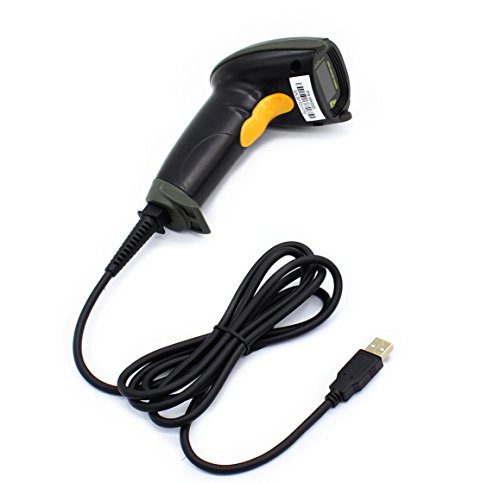


- Plug and play, This laser handheld barcode scanner has simple installation with any USB port and Ideal for businesses, shops and warehouse operations. Its function is unbeatable and easy to use, design is stylish
- Compatible with Windows, Mac, and Linux; works with Word, Excel, Novell, and all common software
- Scanning Speed: 200 scans per second. Scanning angle: Inclination angle 55°, Elevation angle 65°. Operational Light Source:Visible Laser 650-670nm.
- Decode Capability: Code11, Code39, Code93, Code32, Code128, Coda Bar, UPC-A, UPC-E, EAN-8, EAN-13, JAN.EAN/UPC Add-on2/5 MSI/Plessey, Telepen and China Postal Code,Interleaved 2 of 5, Industrial 2 of 5, Matrix 2 of 5 ; 300 configurable options for prefix, suffix and termination strings
- Color: Black. Dimensions: 3.6 x 2.6 x 6.1 inches. Type of Cable: 2M or 6ft straight cable. Shock: 1.5m drop on concrete surface. Regulatory Approvals: FCC CE.
-
Information
-
Twitter
-
Pinterest
-
Youtube
-
Facebook
Crystal Marie Perkins
So far so good
I really like this scanner. We had a different model (cheaper) that lasted about a year. I like the feel of this one. Feels much more expensive and hardy. Scans well.
Amy Harris
Point and click, data goes were your cursors at. No drivers, no software, no BS:)
This works great with excel. I use it to perform simple inventory functions, nothing fancy. I only have a few hundred item that need inventoried twice a year and the occasional check in/out function. I have tried expensive and over priced software/hardware packages before but never could get the software to work as quickly and as effectively as my excel spreadsheet I have kept for years. All I really needed was a way to more quickly get the data into either a search box in excel or in a column during a full inventory. This works perfectly. No software needed (I just use excel but it will drop data wherever you put the cursor), no drivers needed. Just plug it in and load up Excel or what ever your using:) Gives a pleasant chirp when it has accurately scanned the tag and even automatically moves down 1 cell so your ready for the next tag without having to move the cursor. Stays in the colum you put it in too which not all do. Some automatically move to the next row by first column or some don't move at all. This is exactly what I needed. Now I can use my excel spreadsheet and this to take inventory fast and easy. Love it.
Reginaldo Guerrero
Great Scanner
If you are looking for a simple barcode scanner this one works just fine. I use it to scan books for my personal library. Typing in the ISBNs became a chore so this scanner is perfect for the job. It reads the codes quickly and places same in my book catalogue program. Although the cord gets in the way, I can deal with it. A nice scanner for the price.
Chantal Finn
No Problems
Seemed to setup with no fuss and work great. Quality appeared to be fine for this price but I can't speak about longevity, as I only used it for a short time.
Tara Gordon
Fun, easy, reasonably priced AND effective !!!!
Wondrous. I'm shocked nowadays to find anything that works right out of the box and without drama, let alone something so reasonably priced! This is both fast and accurate. I've tried it so far both in a book inventory spreadsheet I'm building, and a couple of book seller sites, to check current value. (Just make sure you click in the field where you want the isbn number to show up.) It's also kind of fun to use, though ask me again after I've scanned several hundred books on my shelves.
Janit Davies
Great value -- gets the job done!
This inexpensive barcode scanner gets the job done -- and the price is right. I've only had it for a few weeks, but so far, it's been perfect. I purchased it in order to catalog my (physical) book library, and it got the job done quickly. (Note, it just scans the barcodes, you need something else to actually do the cataloging.) Like most barcode scanners, you configure it by scanning barcodes. I reduced the beep volume to low, as the default was a bit loud.
Lewis Garner
Inexpensive and Works Great !
Plug and Play, no drivers needed. Just plug it into a USB port and start scanning. Scans into an Outlook email, Excel spreadsheet, Notepad, Word, even a field on a web page. Perfect for what I need it for, and the price is unbeatable - a third of the price of other hand scanners I looked at.
Joel Olry
Works Straight Out of the Box
I am using this barcode scanner on both Windows 10 and Raspberry Pi OS successfully. When you first connect to Windows 10 , there is an automatic set up. Raspberry Pi is plug and play. Unit does come with a small manual to activate various settings, should you require.
Sweetness Jones
Worked great for us and saved lots of time!
This thing is awesome! We had 1000s of books and comics to enter and this was a life saver versus typing in titles or ISBN numbers or bar codes. I just wish there was some kind of handy stand to place it in so that you could just wave a book below it and have it scan automatically. There may be a generic one, I just couldn't find one specifically for this one. Just make sure you don't lose the directions since it is filled with bar codes that you have to scan in order to change the various options of the scanner.
Nicole F Jarrell
Perfect. Only used for a few minutes
Simplicity and the way Plug and Play should always work! Recognized immediately. I launched Notepad (Windows app) and then scanned an ISBM barcode. BANG. Done it placed it right where the mouse pointer/cursor was positioned. Perfect. Only used for a few minutes, hope it is reliable and lasts several years. I recommend to anyone needing a barcode scanned for general use.