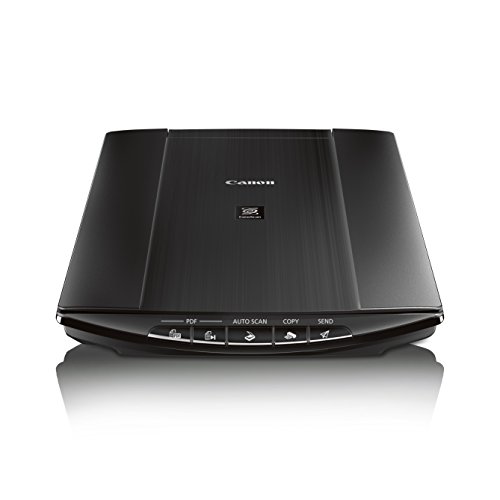


- With Send to Cloud you can easily upload your images to Cloud Services like Evernote and Dropbox
- Auto Scan Mode automatically adjusts settings by detecting what you are scanning
- Scan a letter-sized document in approx. 10 seconds
- Auto Document Fix automatically employs area-by-area correction for beautiful, easy-to-view scans
- OS Compatibility - Windows:5,6 Windows 8, Windows 8.1, Windows 7, Windows 7 SP1, Windows Vista SP1, Vista SP2, Windows XP SP3 32-bit.5,6. Mac:5,6Mac OS X v10.6.8 - 10.95,6
-
Information
-
Twitter
-
Pinterest
-
Youtube
-
Facebook
Kypriani Thoma
Excellent value for a basic scanner
This is an excellent scanner at a great price. Needed something to scan in personal documents (letters, tax returns, photos, etc.). The scan quality is excellent, ease of use is excellent and it's very fast (about 6 seconds per document). One-button to PDF is a big plus, handles multipage documents to a single PDF well. Completely satisfied.
Serrina Randolph
Perfect Performance under Mac OS 10.12
Beautiful, error-free performance under Mac OS 10.12 Sierra, Mac Pro 12-core, eSata card with dual USB3 ports. (The Mac Pro 12 core has no native USB3). Bought it to replace a LiDE 100, which is not supported under OS 10.12. Installed driver, no restart. Installed Utilities, no restart. Plugged scanner into a SEVEN port USB3 hub, no error warnings. Scanned some 3-4 times faster than the LiDE 100, NO errors. I scan only 600dpi b/w documents to PDF, but the photo/color function seems to work well. Be aware that resolution seems to be limited to 600dpi for all tasks, however, with a Mac. It's NICE to get a very reasonably priced machine that is simple to install, and works right out of the box. It was a considered guess; the LiDE 100 that it replaced cost me $40 seven years ago, and performed flawlessly up until 10.12.
Leathaj Cooper Degraw
Zero issues with Windows 10. Very easy and high quality all around.
I didn't have a single issue getting this up and running on my Windows 10 PC. I did, however, read the reviews and expect some updating or the like. So instead of using the included CD, I just went to Canon's website and downloaded the lastest driver/software bundle. Even that was still a couple years old, so I'm not sure how old thee complaint reviews are. There's a very basic scanner utility with only about 6 buttons and a few settings and also a separate editing software called "My Image Garden" that will allow you to reduce red eye, sharpen images, etc. I don't even use it. The basic scanner utility has everything I need in an ultra simple dummy proof fashion. I've scanned....phew....probably over 1000 old 4x6 photographs already. You can scan two at a time and it will automatically split them into two separate image files. I tried scanning three 4x6 photos, but it just thinks it's all one picture. I did however scan up to four small wallet-sized photos and it worked PERFECTLY! Multiple image files all saved separately. I have occasionally had an issue where it gets slightly off on an image for no apparent reason, and it puts a white bar across a random edge (see attached photo with white bar at bottom). This only happens roughly 1 out of 50-75 scans. Not sure why, but it's no biggie. Delete the file and scan it again. All in all, very happy with it. The scans look great and I was up and running in just a few minutes.
Kath Lyn Dichosa
Scanning multiple photos at once, but auto saved as different files, is a time saver
Converting some people's old photos to digital and the quality is great. Just keep in mind, you're not going to improve upon what you start with. You can scan in a higher resolution all you want to have a bigger digital image, but if you got a 5"x7", it'll only look amazing at 5"7". Don't expect to scan a 4x6 and print off on a blanket. That's not a limitation of the scanner, that's a limitation of your source image . . . your photograph's size. This also saves time as you can fit multiple photos in there at once and it'll automatically make a separate picture file for each one.
Jeannette Chambers
Highly Recommend
So pleased with this scanner! I inherited a BUNCH of old family photos after a tornado destroyed my mom's apartment, and I want to convert them to digital, because I live in Tornado Alley and the next big one could hit our house and I want these pictures to be backed up. I researched all if the current models of <$100 flatbed scanners, and this one had the features I wanted AND plenty of positive reviews around the web, so I bought it. For me, the top features are the ability to scan more than one picture at a time in a single scan and the custom scan settings. Like I said, I have hundreds of pictures to scan of various sizes and it saves time being able to scan 2-6 pictures at a time! I have shared several of the pictures with family, and 3 different people have commented on the quality of the scans. That was another important feature for me; having negatives is obviously the best way to preserve a high quality back up of the photographs, but that is something I have no control over. This scanner scans well at high dpi and preserves color, contrast, and detail very, very well. I will recommend this scanner to anyone who asks my opinion. :)
Krystal Mincher
Very Good Scanner for Pictures and Documents
Excellent picture and document scanner with scanning software. Don't get caught up in the 4800 dpi hype. I scan color and gray-scale pictures for use in books and usually scan in the range 600-1200 dpi. The image files (uncompressed TIFF) would be too large at higher resolutions. The scanner software puts limits on the resolution to meet built-in maximum file size limits, so you could not scan a 5 x 7 photo at 2400 or 4800 dpi if you tried as far as I can tell. The smaller the picture, the higher the resolution allowed.
Md Aulad Hossain
Wonderfully simple setup with Windows 10
I was specifically looking for a flatbed scanner that is compatible with Windows 10 out of the box. No extra driver downloads, no hoops to jump through, no banging my head against the wall - and this product delivers. I had a Lexmark all-in-one printer/scanner/copier/fax that doesn't have any options for driver upgrades, so it's essentially become a 20-pound paperweight. I need to scan documents relatively often for work, and after reading the reviews on this product, I took the plunge. Setting up this scanner on my Toshiba laptop running Windows 10 could not have been much easier. Put in the CD, run the program, and it walks you through the steps to install and register the scanner. I was done in about 5 minutes, and had a 12-page document scanned to .pdf and emailed in about another 5 minutes. I like that this is powered through the USB connection. There's only one cord to worry about. The scanner is light, and doesn't feel as if it would stand up to a lot of abuse, but it seems put together well. It's pretty quick to scan and reset, maybe taking 5-8 seconds per page. The scans that I've done are clear, and while colors seem a little brighter, they're not absurdly so - it seems that blue ink always looks brighter in a scan, using every scanner I've ever owned, than it does in person. I had some handwritten notes in pencil on one sheet, and the scan is beautifully legible, even with my very small handwriting. Overall, I think I've gotten a great product for a reasonable price.
Kristy Stamper-Hannah
Glad I Bought This One
I have a new 2017 iMac and needed a compatible scanner. I initially loaded all the software and found it to be the typically dysfunctional Mac version of the Windows software. I deleted the three or four bloatware programs and only installed the basic scan software and it works awesomely. I scanned some 4x6 color prints in and the result was most excellent. Works great on documents and the software will let you select what form to save the image in (pdf, jpeg, etc). The scanner is thin and easy to swap to my wife's computer as it runs off the USB power. I originally thought about getting an ultra hi-res scanner to get the best picture quality but the file size created by those scanners was in the mega-jiggly-bites. This Canon gets outstanding resolution without gaibundo file size. I love it and I am glad I bought it.
Emily Gualberto Kempis
Great scanner, just what I needed for my art. Also works on Mac, see review
I previously had a cheap scanner/printer combo, this is MUCH better. As far as I can tell, the scans look just like the artwork in person (after minor color adjustments). It's easy to use, fast, and lightweight. It captures watercolor and colored pencil, which the cheap scanner/printer could not. The only issue is that it did not work automatically on my Mac, and it didn't tell you how to set it up. If you're reading this and need it to work for a Mac, go to usa . canon . com / internet / portal / us / home / support / details / scanners / photo-scanner / canoscan-lide- 220 without spaces (I can't link). Download the full driver and software package for Mac. This will let it work and give you the software. Put the the "Canon IJ ScanGear Starter EX" icon somewhere easily accessible. Just attach the scanner and click that, and it gives you the preview and all the options for scanning.
Pascale Blangenois
Love it!
I found a bunch of old photos in my attic and was trying to use a PDF app on my phone to scan them, but it was taking a very long time, had glares and just didn’t look very professional. I bought this scanner and it made scanning hundreds of photos simple. It still took a long time due to the volume, but the scanner automatically stores the photos in an albums and makes it simple to sort them several ways. I have been posting these old photos on social media and everyone loves them for bringing back memories. It also is great for scanning records into digital format for a paperless workspace. A must have for any office.