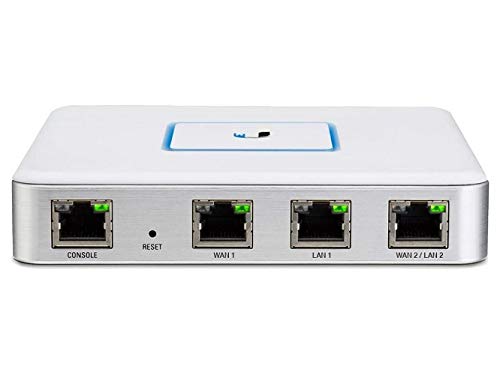

- 3 Gigabit Ethernet ports, CLI management for advanced users
- 1 million packets per second for 64-byte packets
- 3 Gbps total line rate for packets 512 bytes or larger
- Integrated and managed with UniFi Controller v4.x
- Secure off-site management and monitoring, Silent, fanless operation
-
Information
-
Twitter
-
Pinterest
-
Youtube
-
Facebook
Димитър Райков
Perfect addition to your home network (especially if you have other Ubiquiti hardware like APs, and the like)
Picked up one of these after my 5-port PoE EdgeRouter got rained on through a window - don't ask how ;) Installation of this unit was painless, though I had to tweak a few settings through the command line - as the UniFi management interface didn't let me do all I needed (adding an openvpn vpn client and key). This unit wants to be managed through UniFi, and enables Deep Packet Inspection (DPI) on my network. I have two Ubiquiti access points (UAP-AC v2, and UAP-AC-Pro) which provide great coverage in the house. I've been missing some features in the UniFi interface, but after adding this USG in, I had no more issues, and I'm pretty happy with how it functions. No issues with overheating (the 5-port PoE switch got pretty hot, so I had to elevate it and add a small fan), but this one is fine by itself and no added ventilation to keep it cool.
Heather West
Great gateway device, when paired with other UniFi networking gear.
I recently upgraded from a Netgear NightHawk R7000 router to a set of Ubiquity Unifi hardware, and my home network is working much smoother and faster. I'm using: 1x Cloud Key Unifi Controller 1x USG (the topic of this review) 2x USW8 8 port POE Switches 1x UAP-AC-PRO Access Point The UniFi system is a little different than most discrete hardware, in that you rarely log into the individual device. Instead you make changes on the controller webpage and then the controller pushes the changes to the affected devices. Once you get used to it, it makes life soooo much easier. The Deep Packet Inspection is great for figuring out what device/webservice is hogging up the bandwidth. If you're looking for an all-in-one router with built in WiFi, or you aren't comfortable with VLANs/PortForwarding/VPN/etc this ain't the router for you. If you want a gateway device that's configured independently from your other network gear, then there are other options such as PFSense. If you want separate hardware that's controllable from an integrated webpage, you want a UniFi system.
Dean Stone
Great Device, Instructions Need Work for Installing on Existing System
I decided to install a new wifi in my house. I ordered the Ubiquiti Gateway, 3 access points and the cloud key. I kept my existing switch. I received the gateway and the access points first and I could not wait until I received the cloud key. So I downloaded the software and installed everything. I had a little issue with the mac privacy settings, but after that issue was resolved, set up was a breeze. So when I received the cloud key, I did not know how to switch everything from the software management to the cloud key. I watched a video on Youtube and it was worthless. I messed up the entire network and after 3 hours had gone full circle. So let me save you a bunch of time. It should take 10 minutes tops. Open your software and create a backup of the settings. Follow the directions for setting up the cloud key as a new device. Once that is done, go into the settings and restore the backup you made of the software settings and you are done. It is that easy.
Sarah Guerra
Newest hardware are shipping with the VOIP port gone and it's now a WAN2/LAN2 port
Purchased this to compliment my Unifi network at home * Easy to setup and gets adopted very easily with the Unifi controller software * Lots of great options built in and they are adding more all the time ***Newest version of hardware no longer as the VOIP outlet and it is now a WAN2/LAN2 port * Feels nice and heavy and is very well made and will last a long time * Very happy with this purchase and highly recommend
Afshan Arshid
More than pleased.
This firewall is a little challenging to set up (it is a managed device), but once set up it works flawlessly. Right out of the box it has all service ports stealthed, and the only thing that would make it less of a target is if it did not respond to external pings (it does). This is more of a style issue than a bug, and it can be turned off. I am exceedingly pleased to the point where I am recommending these to my clients, and the unit I tested has replaced a custom built firewall that was independently rated one of the best security appliances for under $5000.00.
Tigist Seid
Easier than the Ubiquiti Edge Router
I bought the Ubiquiti Edge Router first to go with a Unifi Switch and AP. I decided to return the Edge Router as the Unifi Security Gateway can be managed from the same utility as the switch and AP which made configuration much easier. The Edge Router would have worked if you were configuring something relatively simple or else really know what you are doing with it but I fell somewhere in the middle. Using the Unifi management program was easy. I really like how you don't necessarily manage the devices but instead configure what you want and then the management program manages the individual devices. I was impressed as this is my first time working with Ubiquiti.
Ambrosio Rivera
... using these things for about 6 months and absolutely love them. We have been using Meraki MX devices ...
I have been using Unifi products for about 3 years now and just have started using these things for about 6 months and absolutely love them. We have been using Meraki MX devices but for clients that do not need all of the features that a Meraki has they work great. The picture attached is one of our small office installs with a 16 port Unifi switch along with an AC Lite on the ceiling.
Nancy J Munoz
For experienced Ubiquiti users or patient tinkerers only!
If you have no Ubiquiti experience, or can't google your problems, don't even buy this. ABSOLUTELY. DO. NOT. If you are patient, comfortable with troubleshooting, reading forums to resolve problems, maybe using a little linux command line, and are already running Ubiquiti's UniFi software on a server; then yes, you should absolutely buy this. Why don't you own it already? The UniFi software makes setup a breeze, if you realize that the USG's default IP address is 192.168.1.1, and set your server to a static IP in the 192.168.1.xxx range. I could have saved about 5 hours of set up time if I had bothered to realize this when installing on a 192.168.0.xxx network. The second one that I installed took about 5 minutes. You'll only need to SSH into the device if you run into problems, which if you're like me, you have created yourself by not following instructions.
Eddie De Leon
It’s basically Ubiquiti’s EdgeRouter that is being developed on the fly to create an incredible ecosystem with complimentary products like UniFi AP’s and switches
So first off, you have to know what this product is. It’s basically Ubiquiti’s EdgeRouter that is being developed on the fly to create an incredible ecosystem with complimentary products like UniFi AP’s and switches. It IS a router... but as far as a router goes, the refinements are coming, but not there yet. For example, I need to be able to setup site to site VPN’s using a FQDN as opposed to a static IP. It’s not possible yet. Site to site static IP, no problem. That all being said, I simply love this device. Configuarable to dual WAN, supports DNS, the UniFi controller software is simply amazing. As long as UniFi continues to roll out updates and listening to their customers, this little box will be simply amazing, especially considering the cost. The UniFi controller is what makes these products. Kudos, Ubiquiti! Update: 4/1/18 so the controller software has been updated and now correctly displays the status of manually created end point VPN tunnels. This was a frustrating issue that had finally been resolved. I must say that this equipment is the best network equipment that I have ever used. I own 3 pharmacies and they connect to my house which acts as the hub for the 3 locations to communicate between each other. VPN tunnels connect all 3 locations to the central server at my house. It is imperative that the tunnels are dependable. I have used Sonicwalls, linksys, Cisco, and Netgear routers all of which cost 3-4 times this unit, and it blows them away. I have not had a single VPN flake out over 6 months. The single unified controller manages the adoption of all UniFi devices, as well as the deployment of things like firmware updates. I literally lay in bed with my iPhone and initiate rolling firmware upgrades across 4 locations without any issues. Amazing. It’s a bit of a learning curve, and the software is scrambling to keep up with the equipment’s community’s requests, but they are working on developing and rolling out all of the requested functionality. It’s like watching a product evolve in real time, yet enjoying the incredible reliability of their EdgeRouter line. For $100, buy a USG and an AP, and dive into the UniFi ecosystem. You owe it to yourself. And no, I am not getting paid for this review. It’s simply the best equipment I’ve ever used.
Christine Turney
Why do I need a Cloud Key? Unless you want to read message boards for 2 hours, get the summary here:
It's not clear on Ubiquity's site, but if you are building out a Unify network (Unify series USG, Unify series Switch, Unify series Access Point), you need this! I bought all of these items initially without the Cloud Key. I thought that the Cloud Key was only needed if you wanted to remote manage your network. This is for my newly remodeled home and once setup, it didn't care about remote management so I initially did not buy it. Wrong. Yes, there is a free config app that you can download that does what this can do, but then you need to run it on your own computer. While I work and manage in the technology field, I don't want to go home to a rack of servers or dedicated/VM controllers just to occasionally config my house system. BTW, even if you do that, you cannot use Ubiquity's cloud platform to manage it unless you pay or you VPN into your own. When you're in your 40's you loose interest in doing such "money saving" time wasters. For under $100, this is a Linux PC on a stick. If you have a POE switch, you're done. This bad boy is not only the centralized setup for all of your Unify gear, you can download the free Unify app and manage everything remotely on your phone or PC-for free. Centralized Unify setup, no monthly fees, essentially no power draw, stupid easy to use and setup, under $100 = no brainier. If you're on the fence, get it.