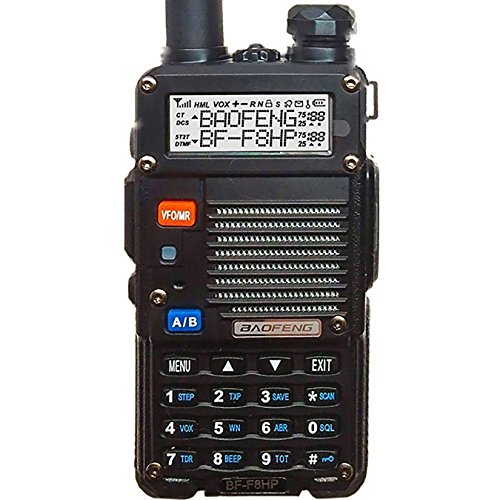
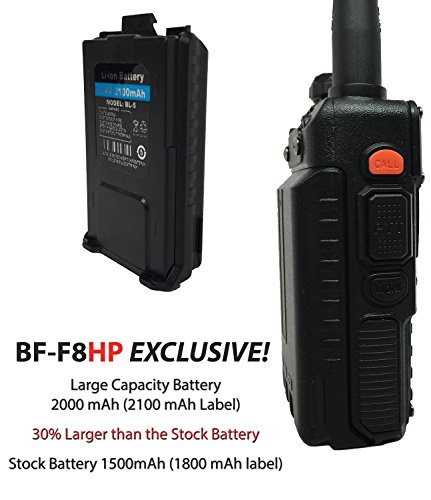
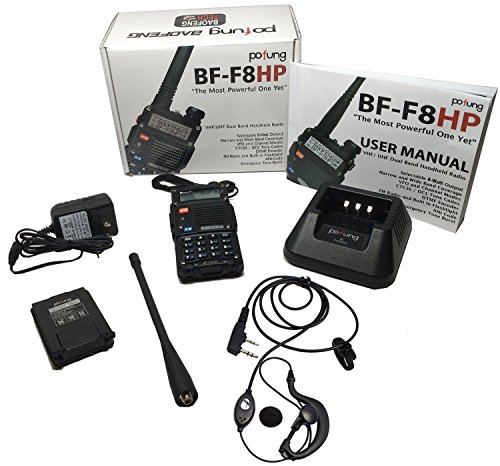
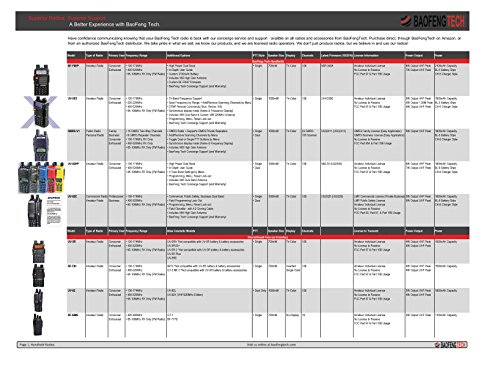
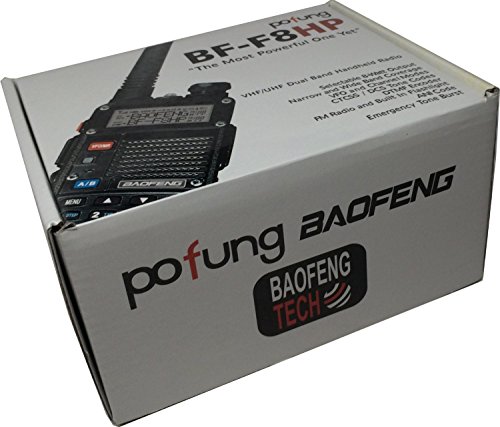

- Upgrades from our Previous Generation UV-5R: Twice the Output Power (8 watts up from 4 watts output), New Hardened Durable Radio Shell, 30% Larger Battery, V-85 High Gain Antenna (Twice the Antenna Performance), USA Support + In-depth User Guide Included
- High / Med / Low Power Settings (8W, 4W, 1W); Frequency Range: 65-108 MHz(Only commercial FM radio reception) VHF: 136-174 MHz(Rx/Tx). UHF: 400-520 MHz(Rx/Tx); Broad (Wide) / Narrowband (Narrow) Selectable
- The BF-F8HP was designed in the USA and because not everyone is a radio-expert we really wanted to focus on providing an easier user experience! That starts with the new in-depth manual that guides you through the capabilities and customization of the BF-F8HP. On top of that the BF-F8HP also includes exclusive concierge customer help and warranty support. This concierge service is only available on select BaoFeng models such as the BF-F8HP, UV-82HP, and UV-5X3.
- A PC03 FTDI Programming Cable is Recommended for Easier PC Programming
- BaoFeng Tech is the only authorized USA BaoFeng Distributor to honor the Manufacturer Warranty. Only BaoFeng Tech offers warranty claims without shipping anything to China. You must insure that BaoFeng Tech is your selected buying option when buying to be able to have the full USA warranty.
-
Information
-
Twitter
-
Pinterest
-
Youtube
-
Facebook
Gurwinder Kaur
Good radio for a beginner HAM operator
This is the first radio I bought after receiving my amateur radio license so I don't have anything to compare it to. As a first time radio, it was easy to program using a programming cable (sold separately) and CHIRP. The included battery holds up well, I've had it mostly on for days, listening with a few minutes of talking here and there as something piques my interest, and only had to recharge it twice since I've had it. The 3 power settings are useful I suppose. I'm able to hit a repeater about 6 miles from my house on medium, however, I've been told when I run it up to high my sound quality is much better. It claims to be outputting at 8 watts on high, I have no gear to test and verify this claim but I've seen YouTube videos of people testing and it's somewhere around 7.5 watts. Maybe I'll run over to HRO one of these weekends to see if they have something which can test it. I was able to make a contact a few nights ago on 2 meters simplex at about 12 miles. Of course, he was probably at 500 feet of elevation and line of sight to me and had a 50-foot antenna behind his house so.... I think if this is a first-time radio for you, you can't go wrong. It's cheap enough that if you break the radio it doesn't hurt so much and it will get you into using a radio and used to radio etiquette.
Joy Campbell
if you're like me, once you get your call sign you ...
A few days before going to get my technician's license, I ordered this so I could at least listen to real radio dialogue while waiting for my license to be processed and get my call sign. It's really straightforward to listen to a repeater and get the gist of how things work. Now, if you're like me, once you get your call sign you immediately want to get onto a repeater and get a contact. This radio is perfect for that, but a little tricky. For those absolute newbies: 1. Switch to frequency mode 2. Hit menu, type 13 to get to the T-CTCS menu (transmit CTCSS tone), and switch to the repeater's tone. 3. In menu, hit 26, and set the offset. This is most likely going to be 000.600. 4. In menu, hit 25 to set the shift direction. The most common is a negative shift. Once done, you should be able to hold down PTT and give a quick test message like "This is testing link to repeater . Could anyone please send a signal report?". I tried this on a Saturday night at 9pm and get nothing, but by Sunday morning at 10am I made my first contact.
Eddie De Leon
Perfect Experiment
I'm a brand new ham. I wanted to get a radio that was just barely good enough without spending too much money. After lots of research, I rejected the UVR5, despite a just about perfect price. Too many indications of issues. I didn't want to spend $150 on a radio only to find I didn't like the hobby, plus, tons and tons of bells & whistles when I don't know what I'm doing are a waste. I finally arrived at this radio, very small & inexpensive, like the UVR5, but a little more power, a little more range, a little more function. Enough, but not too much. Perfectly satisfied with my choice. I've used it from the house and I'm able to hit a lot of local repeaters including some 15 miles away. I've made multiple contacts (and received one lecture on how Baofeng is all things evil... whatever). I've also used it on the road. I set up repeaters down the highway and was able to make contacts just fine. I've so far only made a single simplex contact, but I keep trying. I've found the radio very easy to learn and very easy to operate. It was also easy to program. I've used both Chirp and the Baofeng software. I prefer chirp. I did purchase a longer antenna for it, which radically changes the radio for the better, so you might want to do that as well. As a first step into the world of amateur radio, this is a great choice. Waiting now for my Yaesu 8900R to arrive so I can install it in the Jeep while I study for my General. KC1KCE
Toky Noel Marcelin
The Best Radio yet
I already have the BF-F8HP and it really picks a lot of frecuencies like the police, fire dept, emergency units, the weather channel,marine frecuencies, and other frecuencies that you would know once you purchase this radio that you will not regret and you could also comunicate with other parties that why i purchase another one and i highly reccommend anybody to buy this radio, also has flashlight and you could also hear FM stations.
Ashley Baker
So far so good, my advice to buyers spend the $20 on ...
So far so good, my advice to buyers spend the $20 on the correct programming cable. Utilize the CHIRP software and you'll be able to easily program your radio automatically as opposed to manually; it's a HUGE time saver. I'm studying for my Technician's license now so I can get the chance to transmit and make contacts but for now I'm just listening to taffic in my area. Invest in a better handheld antenna(dual-band) and one for your vehicle and you'll have more flexibility and fun with this radio; I purchased the Nagoya NA-771 and a Tram BR-180 respectively. For the new HAM the CHIRP software has access to repeater resources such as "RadioReference.com and RepeaterBook.net". Repeaterbook.net has the most current public accessible repeaters listed in the US. While in CHIRP select the "Radio" tab, then "Import from data source", then select "RepeaterBook". Then a pop up window will appear and you can then select from the state, county, and frequency band. Each repeater out there is setup differently and this is where the programming cable becomes very useful. Once you've selected your inputs you can then select the repeaters you want access to. VERY IMPORTANT NOTE: If you decide to import repeaters from, let's say 2 meters and the 70 cm bands, each time you access these bands for an area they will be listed 1 through however many that's. listed. Once you've imported the repeaters for 2 meters the 70 cm band will list 1 through how many that are listed. There will be a conflict with your memory channels if you utilize the same channel numbers for the 2 bands. So whichever band you decide to program first start with 1 and then annotate the last channel used in that band. Once you start to download the next band begin that sequence with the number after the last one you just programmed(If you stopped at channel 10 on 2 meters start with 11 on 70cm). You do this from the list of available repeaters from the "Import from file" pop up. You will see the following tabs at the top of the page: Inport, To, From, Name, Frequency, and Comment. Start by unchecking all the boxes from the "Import" tab then find the repeater(s) you want and and then double click in the number field of the "To" tab and change the number in sequence starting from the number after the last number saved in your previous frequency band i.e. 10 for 2 meters, so this set for 70 cm will begin with 11 and so on. Once you have changed the numbers to the repeaters you want saved then select the corresponding repeater by selecting it from the "Import" tab(recheck the box). Once you have all the repeaters you want then click "OK" at the bottom of the page. This will then load the repeaters sequentially back to the main page. From here you will then need to secure the programming to your radio and then click on the "Radio" tab at the top of the page then select "Upload To Radio", the software will then prompt you to do a few things with your radio, it basically comes down to you powering on your radio, ensuring your radio is not tuned to an active frequency, and then it asks you to remove the antenna. Once you've completed these tasks click OK or upload. You will see a blue or green light appear on your radio which indicates the information is being uploaded. Once everything has finished loading disconnect the radio cable from the radio ONLY. Reconnect your antenna and select your memory channels by pressing the VFO/MR button on your radio to verify the channels have been saved and then scan or scroll through them to see if you can hear any traffic in your area. Don't be discourage if you don't hear anything right away because ther may not be anyone chatting at that time. But if you have time just hold your scan button until it's start scanning in your memory settings and sit back and wait, you'll hear something soon. Just a few more steps, Go back to CHIRP and save your imported data by selecting "File" at the top left corner of the page and click "Save" if you want to keep the file named as is or click "Save as" and name the file yourself. You are now finished with programming your radio. This may sound like a lot to do but you would have to multiply this process by each repeater you would want to load manually. One more quick note if you want to make any changes afterwards reconnect your radio to the programming cable and your PC, select the "Radio" tab and then select Download from radio and go from there. I hope this helps someone. If you get the programming cable and download the CHIRP software and follow these instructions you will be good to go to in getting started with access to repeaters and listening to traffic. REMEMBER, YOU CANNOT TRANSMIT UNTIL YOU'VE EARN YOUR TEXHNICIAN'S LICENSE. Good luck, I hope this was a help to many.
Jackie Snyder
New Ham, Great Radio!
I'm a new amateur radio technician and picked this up as my very first VHF/UHF radio. I was pleasantly surprised by how much there was inside this little thing - and it is tiny! Much smaller than I expected, fits nicely in the palm. Many menu options, tons of configurability, and it's all easy to access to control through shortcuts. All in all it feels like and so far is a well-bought radio that works great, has excellent battery life and is easy to learn and use. Also feels like quality materials and design - the plastic feels heavier and/or thicker and has a nice texture to it. I also bought the Nagoya NA-771 antenna and that is a great buy too. I can highly recommend this product to anyone, you won't be disappointed.
Yawar Khan
MUST RE-PROGRAM THESE BEFORE USE IN US!!!!! Awesomely versatile, inexpensive alternative to blister pack radios.
DO NOT USE THIS RADIO AS SHIPPED!!!!! These powerful and programmable radios MUST be programmed for specific channels (and reduced power!!) before use in the US. If you use these channels as provided, you will quickly find yourself at odds with the FCC and/or military - many of the frequencies that are pre-programmed land squarely in military use only ranges. Make sure that the programming cord for this radio is included, or purchase one separately. Download one of the free radio programming apps from the interwebs and look for a few programming guides - with an hour of research you too can be felony free and enjoying these inexpensive and versatile radios. Ham license operators can enjoy more of the options, but for non-license holders, you will be restricted to 1.5w transmit power on a very limited number of available frequencies if you wish to avoid costly fines.
Dana Faust
Outstanding Radio
What an excellent arsenal to my radio career! The radio is user friendly, easily programmable and has the capability to communicate in bands needed by othesr outside the HAM radio community. As an avid sailor I frequently failed to understand WHY I had to pay for a radio that was limited in its coverage despite the need. for broadband coverage. To put it bluntly I had to pay for a $300 radio that ONLY covered marine bands + another .. $$ whatever for a HAM HT as well. This little unit does ALL that and MORE. That you for FINALLY making the radio market make sense !!! Its a lot easier to use than my old Yeasu HT, more durable, and it cost LESS than (2) replacement batt's for my Yeasu HT ! What more can one ask for? Well Done !!
Stephen Kelly
but this one is FAR superior in EVERY way
THIS is the one to buy!!!! This is the 2nd BF-F8HP unit I've bought from Amazon and I'm not sure why, but this one is FAR superior in EVERY way. This one came in outstanding packaging, with a FANTASTIC manual and appears to be better made than the other. I'm not sure exactly why my other unit (which is "Baofeng" only - NOT "Pofung Baofeng" as this unit is...) is so different - but this one is much nicer. I have *several* versions of the Baofeng HTs - this is the first one I could describe as a truly professional product. Extremely pleased!
Alejandro Suez
Nice radio
I own both a BF-F8 HP and one of the original "upgraded" UV-5R's from here on Amazon (the 35$ deal that includes the extended battery). I have to say that the BF-F8 has somewhat more of a rugged feel than the original, slightly more solid. The plastic overall also has a better finish, giving it a nicer overall appearance. I was afraid the silver colored speaker grill would look cheesy but I was impressed with how nice it actually looks in person. I'm newly licensed so I haven't gotten around to playing with it much but just from basic testing so far the transmit audio sounds nice and clear. Speaker quality is not bad, what can you expect from an HT. It definitely gets loud if you turn it up, but also sounds worse once you get towards max volume. The larger battery that comes with it is nice, it'll work as a backup to my extended battery (I bought an extra for the BF-F8, so now I have one for both my radios.) One thing I will say about the extended battery on the BF-F8 is the fit is tighter than on the original, you have to give it some effort to get it the battery to connect but once it's in there is no functionality issues, you can remove and re-connect with no issues. I'm really happy with this purchase, I did a lot of bouncing around between all the various UV5R variants and I'm glad I went with this one. The quality from BTech radios seems pretty good, my guess is they're Baofeng radios with better overall quality control and customer service? At any rate, if you're thinking about which Baofeng to get just go with this one. The only other one I would consider at this point is the UV-5X3 tri band version, again another BTech radio, if you're looking for that added functionality.