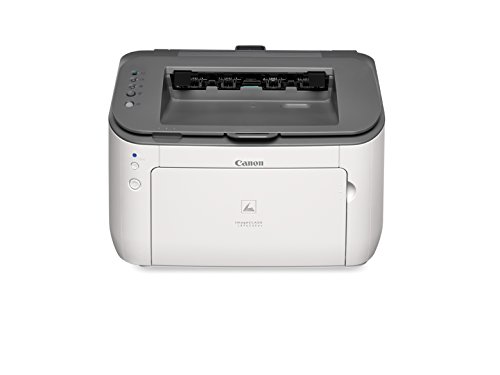


- Print up to 26 pages per minute
- Space-saving, compact design conforms to personal or home office environments
- 250-Sheet maximum paper capacity
- All in one single cartridge system combines the toner and drum into one unit, making cartridge replacement simple
- Easily Print from a mobile device with the free Canon mobile printing app
- *Prints in black and white only
-
Information
-
Twitter
-
Pinterest
-
Youtube
-
Facebook
Ella Baesso
Love this printer; ditched inkjet HPs
I love this little laser printer. Simple and quickly PRINTS. I went through the usual HP printer series over the last 10 years, and ended up hating each one..as they were constantly running out of ink, jamming photo papers, dumbly sitting there while my document wasn't printing. Sometimes my HP would print clear BlackWhite, then the next document would not be readable indicating I was out of ink....enough belly aching about HP. This Canon Laser Printer is wonderful and is priced very well.
Mahendranathsing Auckle
Glad I Ignored the bad reviews!
I was nervous about this due to bad review saying the print was light and the wifi was hard to set up. Especially when an alleged IT networking professional claimed to have issues, and after a headache setting up a Canon Color wireless laser print my mother recently bought. The hardest part of the set up is finding where the drivers downloaded to. I downloaded everything from Canon's website since my XPS doesn't have an optical drive. Once you find the folder, it's easy. Wireless Setup: Once you installed the driver, you run the wireless set up Utility. 1. You connect your computer with the supplied cable (yeah, this included the printer cable, which never happens anymore!) 2. Your wireless network appears on your computer and you select the one you want. 3. It automatically sends the password from your computer and presto, it's set up. Printing has been flawless with the wireless, and the print quality is just as good as the professional laser we have at work. Total set up was under 10 minutes, including the unboxing. You cannot go wrong for this price, which in itself was a real bargain. Bonus... there is a little arm that pulls out of the top printer chute to keep the paper from falling. I learned this when papers when one by one flying to the floor, which made my dog go nuts and for a fun show. So bonus pet toy included.
Sharon Brace
Great laser printer for the size and price!
The near perfect home laser (so far). Our inkjet decided to kill itself by eating 25+ sheets of paper at once, so I figured I'd give laser a shot since we rarely need color printing and (in general,) the running costs are much lower on laser. Setup was very easy. Followed the little getting started card and removed all the shipping tape, foam, etc. After plugging it into power, I simply downloaded the newest driver and utility from Canon's site as the disc included has a driver not supported by Mac OS 10.10 Mavericks. Although you really should be getting the newest driver no matter what. After installation you simply fire up the utility, set your wireless info (if you're using wifi) and select the printer on your computer. Had zero issues finding it on multiple Macs around the house with the driver installed. WPA2 is supported despite me reading a spec page somewhere not listing it. Text quality is sharp and clean. Images look, well, like they were done on a laser printer - as expected. Printing is very fast (for a home printer) - I thought it was still warming up and it had already spit out a page. The whole thing is very compact and folds up quite nicely if you don't keep paper in it. Even with all the trays out it is still very small. Takes up less space than my multifunction inkjet (since this has no scanner). So far, the only minor annoyance is the stupid "I am connected to the network" blue LED on the front. Why do I need an LED on for that? I haven't found a way to disable it in software yet. From what I can tell, it stays on during low power mode as well.
Gladys Faye Odom
Great Printer...
This is a great printer, exactly what is needed for a regular family. By switching to a laser from ink, we saved a ton of money. The upfront cost is relatively the same as an "ink" printer. Although the laser printer has not needed any maintenance, toner or other items to use in years. The ink printer in that time would have gone through at least 4 sets of both color and black ink. The cost of this ink is more than double the amount of the costs of the laser printer. I would recommend this Canon imageCLASS LBP6230dw Wireless Laser Printer to any family. The only draw back is I haven't figured out how to link it to my Iphone, and print directly from my iphone through the internet...
Sharon Jane Waters Moore
Easy Setup on Windows 10
Went ahead and purchased this laser printer after reading many mixed reviews. Let me say that the setup and operation of the printer is actually pretty easy in Windows 10 OS. Installed on two laptops and my Surface Pro. It was very easy to connect the printer to my network - just pushed a button on my Linksys EA6350 router and pushed a button on the printer and after about 20 seconds it was connected. Most modern modems have this capability. It's the easy way to go. This connection between printer and router is NOT dependent on which computer OS you are using. I did not use the installation disk that comes with the printer. Instead, I logged on to the Cannon support site and downloaded the correct driver package - LBP6230_V2145_W64_us_EN.exe (this way you get the latest driver update). Run this file to extract the files. By default they will extract to the folder: LBP6230_V2145_W64_us_EN. Navigate to the sub-folder: LBP6230_V2145_W64_us_EN\UFRII\us_eng\x64 and run the Setup.exe file. This will install the drivers, search for your printer on your network and register the printer. Please note that the printer must be connected to your network BEFORE you run the setup application. The printer prints very well, responds quickly and the duplex operation (which can be de-selected) works very well. I am very pleased with the printer. I bought it to replace an older Brother MFP that has malfunctioned. This printer costs less than a repair fee for the old printer, works better and upgraded me to wireless printing!
Michelle Gloria
Great price for a dependable product
I needed a basic black/white printer for printing shipping labels and receipts, this is perfect! For Mac users related to wireless printing: The CD included is for PC, so you have to go online to the Canon support website to download the driver. No sweat at all, but when you do that, the second step is to download the wireless network setup application. Whereas you downloaded the Mac driver in the "Drivers" tab of the support website, you need to go to the "Software" tab for the wireless setup app. It's easy to miss that part and tear your hair out when the wireless won't work...or maybe it's just me. Once you have the wireless setup app downloaded, it's very user friendly and easy to set up. Yay!
Erin Nichole Schneider
Its so easy and simple to use that i though it is made by Apple!
This is my First Laser Printer and wow i am so glad purchased one! Why i Love it #Space saving. It is quite small and fits in tight spots #Wireless setup was a breeze. I have Verizon Fios and all i had to do was install the software, click the printer WPS key and my Router's wps key. #Sleep mode. I love this function. Energy saving mode yet, i'll click print and it prints less then a second. #Toner. The toner that comes with the printer can print up to 1050 pages #I hope this review is helpful to anyone that thinking about purchasing a Laser printer.
Airic Aie
Manufactured date 12/2018. Made in Vietnam. Firmware version 1.11
Printer has a manufactured date of 12/2018, and it was made in Vietnam. There is a 1.10 firmware update on Canon website that is dated 12/22/17. Mine came with firmware 1.11. You can find the current firmware by printing a network status report. Firmware will be at the top left on the first page. I did not use the included CD to setup wireless or install the printer driver because it's common for those to be behind the latest updates. I downloaded the software from the Canon website, and setup wireless with WPS, and the printer was online in a matter of seconds. Wireless setup was super easy with WPS and an Asus router. Wife installed the Canon android app for a Galaxy Tab, and she had no problems printing. Awesome printer for the money!
Evangelist Folarin Abimbola Ajasco
Five Stars
It is nice and compact and the print comes out very nice, clear and clean. I would recommend this.
Marina Egorova
Quiet, quick, and flawless
This replaces a much larger HP color laser I had, the Color LaserJet 3600, which is defunct. This is just B&W of course. I decided to use this for B&W and then do color prints on an inkjet, it's just cheaper, the color cartridges on a color laser cost a fortune to replace. I had no install issues at all, although I will say the install software is oddly worded and has confusing screens. Seems like English was a second language for whoever made the software. I installed it on wired Ethernet from a Windows machine, seems like Apple installs have problems from the comments. It works great, prints immediately even after not having been used in hours. No complaints yet.