
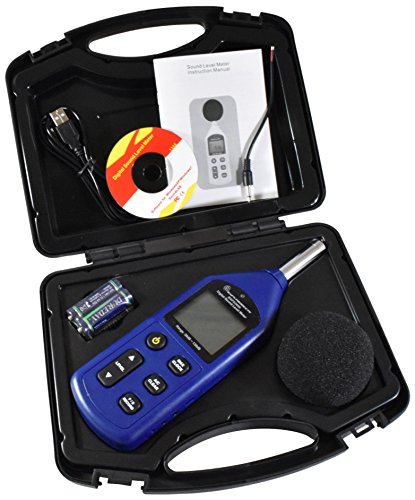
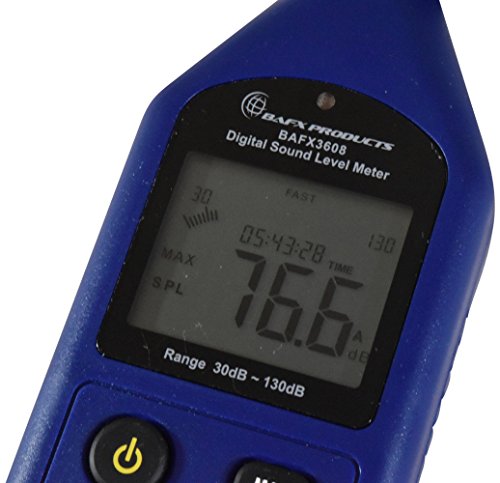
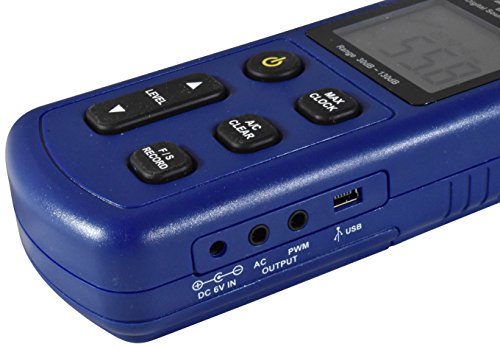
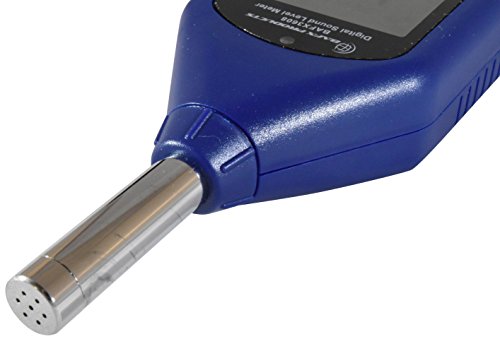

- Measurement Range: 30 dB ≈ 130 dB; Measures in both dBA and dBC frequencies
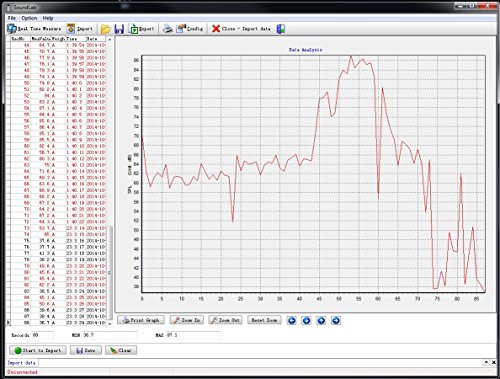
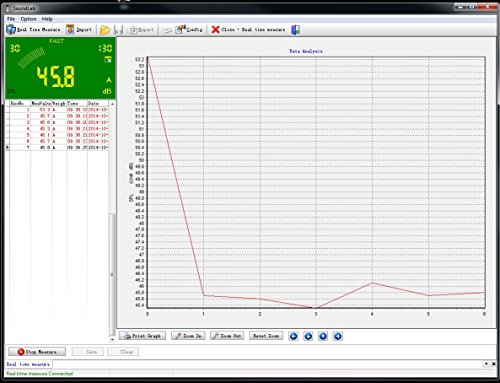
- Internal Storage Capacity of 4700 data points; Includes analysis software for Windows based PC’s
- Accuracy Within +/- 1.5 dB; Adjustable Sample rate preset to 8x/second
- Requires 4 AA Batteries – Included! Can be powered with 6V DC Wall adapter Not Included
- 1 Year BAFX Products warranty against manufacturing defects!* - (Software for windows use ONLY!)
-
Information
-
Twitter
-
Pinterest
-
Youtube
-
Facebook
Kelly Johnson
Using It On My Loud, Annoying Family... Jaw-Droppingly Funny!
The decibel meter works great! I've been using it on my mom and sister because they're talkative, joke a lot with each other, can't seem to hear themselves, and are obnoxiously loud. My sister's squawking, high-pitched laugh ("Ha!"): 95.7 db from 5 feet away! Wow! No wonder my ears hurt! My mom needs sound amplifiers, so her "normal voice" alone is loud. When she was yelling while making some joke about a grumpy Santa Claus: 93.4 db from 5 feet away! They didn't know I hid the decibel meter, so this is the noise level I have to tolerate every day. (Not easy, let me tell you. But they have their mental/physical disabilities, so I can't always complain.) The great thing about the decibel meter is can turn it on, select the option that measures the top record, maximum noise level, and I can walk away for up to (I think?) a good 15 minutes before it shuts off. One thing I wish it did is has a memory of what it recorded, for when I don't make it back to the meter in time and see how loud they got. I've also captured my mom playing with the silverware as she throws it in the silverware drawer: 118.5 db from 1 foot away! This time, she knew I was using the decibel meter, so she made sure she threw down the silverware with much emphasis. Other than that, what can I say? It's easy to use, conveniently has a battery included in the package, fits comfortably in my hand, and is small enough to hide (It's the length of my hand). I'm happy I made this purchase. The only cons is possibly how quiet it will measure. Even in the middle of the night, when the loud ones are asleep, I can't seem to get it below 32 db in the bathroom, even when I shut off the light, leave the room and shut the door. So, I wouldn't recommend it for measuring how quiet things will get. There's a high possibility it's not as sensitive as an expensive, high-quality decibel meter, which is expectable of a product at this low of a price. Still fun in the higher decibel range, though!
Elena Hepworth
Works for me!
I own both, the smaller basic meter (BAFX3370 dBA only) and the larger (BAFX3608 dBA/dBC) advanced meter. PROS 1) Gets you some good data for how loud your neighbor's really are, and whether or not you should evacuate before the loudness causes hearing damage. 2) Has a nicely and easily readable lit display, including light sensor for usage within dark or dimly lit areas. 3) For the ADVANCED BAFX3608 dBA/dBC meter: Although Windows only, the software is made by "Sound Lab" and titled "Sound Level Meter", and is a nice simple tool, and easily comprehensible or easily utilized tool, as well as apparently being packaged without bloated software and/or software features. 4) For the ADVANCED BAFX3608 dBA/dBC meter: When connected via USB ports, the device is automatically powered through the USB port. 5) For the ADVANCED BAFX3608 dBA/dBC meter: If you so desire, you can stand at your window or outside your door holding this very large meter for the next door neighbors to readily see you're have issues with their noise! (I wonder if anybody also sells any flags stating a person is going to file a civil complaint?) 6) For the ADVANCED BAFX3608 dBA/dBC meter: This dBC capable device performs much better than the dBA capable devices, and significantly notices the lower-frequency noise range displayed by small 4-cycle engines. CONS 1) Familiarize yourself with the peak level button, else you may find you're not getting the results you desired. 2) No adjustment for auto shut-off power saving feature. (ie. If you plan to leave this device for more than a few minutes, the device auto powers off.) 3) For the ADVANCED BAFX3608 dBA/dBC meter, the unit does not allow the users to specify the initial on state of the readings. For example, the unit defaults to dBA and fast reading when initially turned-on. I prefer to always take readings using dBC and slow, mainly dBC as this tends to detect the lower frequency range better than dBA and selecting slow/average readings to average in anomalies versus readily seeing a distracting spiked sound anomaly. Likely when recording, the slow reading option maybe more desirable unless you're trying to monitor for very short bursts of sounds such as gun shots, and then faster readings are desired in order to capture the short bursts of sound. 4) For the ADVANCED BAFX3608 dBA/dBC meter, although already heavily specified Windows Only software, such a simple device should be able to output using libUSB (and likely does so already) simple streams of data that can be easily piped into a text file for graphing by other open sourced tools. (I'll have to use WireShark to further examine the protocol used, whether serial or libUSB. USB Vendor Device ID is 64bd:74e3 "SM".) 5) For the ADVANCED BAFX3608 dBA/dBC meter, the hardware manual states possible to sync the time with the computer when connected via USB, but no option appears to exist. 6) For the ADVANCED BAFX3608 dBA/dBC meter, a pamphlet packaged with the device gives a download URL for downloading a copy of the software (eg. SLVersion2.exe), but this is really an old copy of the software dated 2015.10.07, and the newest version (as of this writing) is already packaged inside the box of the device, using a small mini CDROM. (The version on the mini CDROM is SoundLabSetup20160720.exe, or dated 2016.07.20) Would really be nice to have a USB feature for computer logging, or memory for logging, and easily transferring (regardless of operating system) to a computer for hard copy. (This feature is now implemented within the larger Advanced BAFX Decibel Meter.) NOTES: The ADVANCED BAFX3608 dBA/dBC meter contains a usb SILICON LABS C8051F320 8051 8-bit Microcontroller hub chip, with the firmware registering the device under Windows' Device Manager as both, a HID-COMPLIANT DEVICE and USB INPUT DEVICE. The device's USB product vendor and model USB id's are 64bd:74e3 "SM". The device contains a likely closed soure firmware, likely incorporating some minimal addressing with arguments commands to initiate retrieving recorded records, ordering the device to start sending live data, and commands for getting the current time and sending the current time. If I had more time, I would provide some C code to perform these functions, but this is tedious work versus having the specifications or already written code. The hardware manufacturer should be providing the firmware specifications (eg. PDF) for communicating to the device via ASM/C programming code. (eg. Uniden provides specifications for their firmware used on their hardware products, although sometimes difficult to find.) ATTACHED: Attaching an image comparing an apparently older basic BAFX sound decibel meter alongside the newer larger BAFX sound decibel meter.
Timothy Johnson
NOT PROFESSIONAL BUT VERY GOOD
is not accurate like the professional phonometer , but for this price is very good, i test just the noises on the ships motor and i comparate with professional db meter ( 800 $ ) and this BAFX have just 2 db of difference up to 115 db... if you need for not professional use is perfect!!!
Steven Williamson
Verified - it's loud inside my car!
I recently moved to a new area that has rough roads that are terribly noisy to drive on in my little go-cart; I bought this gadget to find out if it really is that loud inside my car or if it's just my imagination. Turns out it's pretty loud, around 82 dB! My new commute can be up to 2 hours each way on bad days so that's a lot of noise to subject myself to on a regular basis. My husband's car averages around 74-76 dB on the same road, which is quite a difference. I'm considering either trying to deaden some of the noise in my existing car or maybe just buying a different one - either way this meter will help me verify I'm getting a quieter ride.
Shauna P Green
Great tool.
This meter gives you a usable unit of measure to all forms of sound from ambient noise all the way up through your neighbor’s car with no exhaust. The meter has a mount point for a tripod or camera attach point, which allows you to position the meter and still read it. It has an auto shut off feature too. The display is large and easy to read. This was worth the money.
Toky Noel Marcelin
showing them the local noise ordinance and the fine for exceeding the allowed decibel levels did
The BAFX Advanced Sound Level Meter works well for my needs. It may not be as accurate as a professional sound level meter, but it serve the purpose of convincing my neighbor to turn down the volume of their music. I recorded the the both the "A" and "C" noise levels. While the decibel values in themselves didn't convince them, as usual, showing them the local noise ordinance and the fine for exceeding the allowed decibel levels did. The Soundlab software is only for Windows Based computers and it worked as stated in the manual, for the most part. I've tested the software on a Windows Vista (32-bit) and Windows 10 (64-bit) laptop. When the meter is connected to the USB port, either 2.0 or 3.0, it does not show in Windows or in the Soundlab software, even if the meter is turned on. Once the recording starts via the software, Soundlab shoftware shows the device connected. The recorded data can also be downloaded as a .csv file, even when the software shows that the device is not connected.
Carmen Spasevski
Top notch product and service!
Very pleased with this product! Well made and easy to use. Contacted Mark Cowen, the owner of BAFX Products, with a question on how to use it properly in my scenario. Wow! He came back that same day with a detailed explanation of sound monitoring that truly amazed me. It will definitely make this product far more useful to me. Highly recommend both the product and BAFX.
Lucky Day
Easy and fun
We are replacing our air conditioner tomorrow, and plan to use this to see if the manufacturer and vendor's claims are anywhere close to true. This meter has a reassuring tendency to settle on a range of numbers, even as it displays decibels to the tenths place. My ten year old daughter ran around the yard measuring the air conditioner noise. We both found it extremely easy and fun to use. It's so simple. It's one of those rare products with two buttons that just works out of the box. If I returned to the same place in the yard, the readings were the same. It's a solid little unit.
Cyndi Wayward
Hearing Protection? Yes? No? Find out with this Decibel Meter.
I needed a simple, easy to use and consistent decibel meter for product reviews that I do. This BAFX meter absolutely does the trick and is consistent. Primarily I use the LOW and MAX functions to record ambient (LOW) and evaluating noise made from flying machines (MAX) so that we can do basic audio comparisons regarding noise generated and if we should or should not be requiring hearing protection. This unit can bee off by a decibel in either direction, so we fail SAFE by requiring hearing protection if the source of noise is even close. It's well constructed and I make frequent use of the 1/4 20 threaded receiver which is the standard mount for all photographic tripods etc. Battery life is fantastic, read out is clear, absolutely performs as expected and I can't imagine anything better for the money spent. I definitely recommend it without hesitation to friends and colleagues.
Elfaris Zaki Sirgyous
Excellent product + very useful software
I purchased it for 2 reasons (a) Handheld use (b) Great software features - Both expectations were met 100+%. For handheld use - all the features & ease of use buttons make the unit very easy & intuitive to use. Everything from putting the batteries in, to date/time setup, to using it in A/C wt, Fast/Slow, sound levels, max mode, recording data, design of LCD display, etc. - all worked as expected - very satisfied. For software use - I use Windows 8.1 & was fully expecting to run into problems - nope ! The min-cd installed the software & drivers smoothly - I had NO errors at all. I rebooted after the install just to be sure the drivers were installed. I just started up the app & was able to use all 3 features in the app (a) Real time measurement & saving the data (b) Data view analysis of saved data (c) Import data saved in the unit during hand-held measurements. --- Great, couldn't be happier - freed a couple of hours I had set aside for troubleshooting problems ! Caveats - The user manual has tons of typos (probably written in "C...." land) & is not up to date - specifically at the end of the install there is no checkbox to install the database (pgs 25-27), apparently that's auto. taken care of during the install I guess. The app's UI is clunky (very 20th century ! & has references to Windows NT (!)) - not as intuitive as the device, but functionally works as expected. Overall - very happy w/ the product, exceeded my original skeptical expectations.