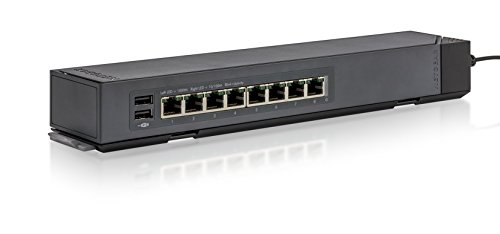

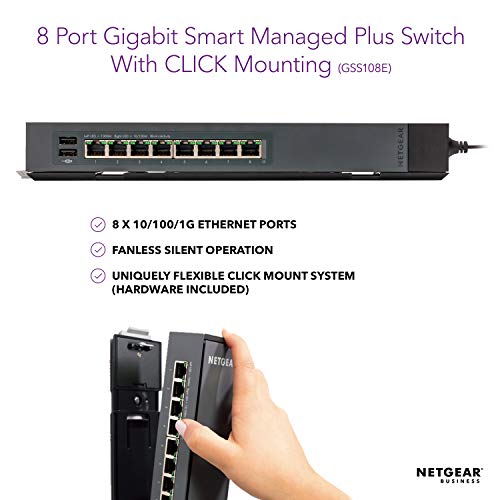


- ETHERNET PORT CONFIGURATION: 8 Gigabit ports
- CONFIGURATION & CONTROL: Management software with easy-to-use GUI interface offers basic capabilities to configure, secure, and monitor your network.
- CLICK MOUNT SYSTEM: An innovative and flexible mounting bracket, makes it easy to mount vertically or horizontally, flat or perpendicular, on a wall, under a desk, or strapped to a pole, allowing you to put your ports where and how you need them!
- SILENT OPERATION: The fanless design means zero added noise wherever its located, making it ideal for noise-sensitive environments
- PROSAFE LIFETIME PROTECTION: Covered by an industry-best Lifetime Limited Hardware Warranty, Next Business Day Replacement and 24/7 chat with a NETGEAR expert
- ENERGY EFFICIENT: Designed to optimize power usage lowering its cost to operate. Most models are compliant with IEEE802.3az Energy Efficient Ethernet mode.
- BUILT TO LAST: Every NETGEAR Network switch is rigorously tested for reliability, quality, and performance.
-
Information
-
Twitter
-
Pinterest
-
Youtube
-
Facebook
Sudath de Silva
This is great. This thing is QUALITY
This is great. This thing is QUALITY. Not only is it just plain heavy, made out of solid metal casing, it has no capacitors and has a lifetime warranty. It is heavier than it looks and screams quality. I am an IT professional and I would recommend it for home or small office / retail use in an instant. It does full gigabit and can support full gigabit on all 8 ports at once. It does have a built in cable test as well which is nice. It supports VLAN segmenting and is just solid. You don't have to use the VLAN features, but its nice to have the model that supports it if needed. This model can be configured via the web interface by just going to the IP address of it, you don't have to load the software. By default it grabs a DHCP address, but the default IP is listed on the bottom of the unit, so if you want to set a static without trying to find out what address it pulled, just plug it in by itself for a few minutes then set a static IP on your NIC and then connect directly to it and configure it to have a static in your own range.
Sharon Brace
Excellent performance and sleek design
Performance-wise, this switch works wonders! I previously owned a D-Link business-class, managed switch that required a reboot about once every 3-6 months, sometimes several times in a row, especially during heavy Torrent traffic or uploads (where I back up my data from one NAS to a remote NAS). Until that D-Link would be rebooted, the internet would stop working. I finally decided to get this ProSafe because: 1. It's design looks sleek! 2. It's easy to install: mount the base plate as desired, then click the switch into place 3. Lifetime warranty that comes with the ProSAFE line Surprisingly (and thankfully), I haven't had to restart my switch (or cable modem or router) despite heavy Torrent traffic and uploads from one NAS to another. I was impressed and bought a 16-port one for the attic as well, and that one has also performed well.
Neil Bell
I had begun wiring out the house to be able to provide faster and more reliable network connections so that we could take better advantage of being a household that streams ALL of ...
I purchased this switch to help me clean up my local network in our house. I had begun wiring out the house to be able to provide faster and more reliable network connections so that we could take better advantage of being a household that streams ALL of our TV viewings. As I was adding these capabilities to our home I began to place smaller 8-port unmanaged switches to help accommodate all of our devices, and next thing I noticed there were several of these smaller switches hanging off the network. Most people wouldn't notice the difference but seeing as we work in this type of environment I would notice that the network would get slow at times or would require that the devices would need to be rebooted several times a month. After purchasing this device and eliminating all those smaller switches the difference was noticeable. The quality of the streaming improved especially the ability to stream in the higher definition, the media from our local media server. There are still some minor fine tuning required to take full advantage of all the features of this device but do recommend it.
Sammy Lee Stowers
Perfect & Powerfuml Switch for non tech folks
This is a perfect switch if you want to expand your home or small business network. If you want to plug in multiple devices to your existing network then this device is for you. I am giving this product a 5 stars for the reason below: 1. Plug and Play. Absolutely no programming or setup required. 2. Percect device for novices users and non IT/computer users like me. Again...no setup required. Just plug in your devices and you will be automatically connected to your LAN. 3. Excellent quality build. The entire unit looks and feel high quality. Case is metal and device is heavy. No cheap plastic and lightweight feel. 4. Netgear is a reliable and makes excellent switches. I have a 10/100Mbs 5 port netgear switch that I bought in 1999 to use in my college dorm to get multiple computers to a single network port in my dorm. I still have this switch 18yrs later and it is still 100% operational. In matter of fact I bought this 8 port to replace my 18yrs old switch. I am only upgrading because i wanted 1000Mbs speee and more ports. Some misc tips for novices/non tech folks. 1. If your house is built after 2004 and was originally wired for telephone lines throughout your house then you already probably got either cat5e or cat6 cables installed already. Electrician will use cat5e/cat6 cables to wire your house for telephone use because they are just as cheap as regular telephone line and more readily avaiable. Therefore, no need to run ethernet cables. Just pull apart your telephone wall plates and verify. I hope this review helps.
Hoymond Louie
Love The Product, "VERY DISAPPOINTED WITH NETGEAR CUSTOMER SERVICE AND NETGEAR CORPORATE OFFICE"
Love NetGear Products. Have been buying NetGear for almost 25 year. I have however noticed a massive decline in the Customer Service. When trying to replace a Plus Product (which is guarantee replacement next business day), Customer Service (Philippines) told me they have been upgrading their computers since June 10th and CANNOT send any replacements out at this time and do not know when the upgrade will be completed, its now July 3rd. Contacted NetGear Corporate Headquarters in CA and left a message with the Senior VP in Charge of Operations, no surprise, have not received a return call. Having a real problem supporting a company and product that neither Customer Service nor Management seems to really care about and puts profits before people. Five Stars for the Product, "NO STARS" FOR CUSTOMER SERVICE OR MANAGEMENT. Recommendation: Check Yourselves, before you Wreck Yourselves. - Just a Thought.
Murtaza Kothari
Don't hesitate to buy for a client or your location if you need that extra management but not full layer 3.
Price to feature set is amazing. You get a nice set of layer 3 features but you don't need a degree in IT Networking to figure it out. I've been a corporate IT consultant for 12 years now and I hold certs with HP networking and Cisco and I can say that bang for the buck, this Netgear switch series has all the features your standard office setup would need. You can Vlan, traffic prioritize and get some good analysis from the device. We've had this series installed for years now at some high use facilities and they are going strong, and compared to a Cisco of similar specs, well priced. This is perfect for someone that needs that extra management ability because of VoIP or other networking needs but doesn't need or want to get into full layer 3 switching. The web interface is easily learned and accessible. You can lock it down as well. Netgear has been really good about product support as well and they fix issues fast with firmware updates as needed. I've yet to have one of these fail (knock on wood) and we have these installed in most of our clients' locations.
Yvonne Walker
This switch is built like a steel vault; Thanks Netgear for yet another bulletproof product!
These switches are perfectly designed to give you just the right amount of ports with just the right amount of management software in a web browser. This switch is built like a steel vault. I doubt this will ever stop working. Ethernet standard worldwide will likely die out first! Anyway, as an IT admin I use these at scanning workstations, printer depots and in equipment rooms to give extra ports where I need them. I can't always run a new line back to my primary Cisco SG-300 business switch because our building is old and running cable is expensive and difficult. I have had ZERO issues with saturation, conflict, LAN dropping, address issuing/resolution and port speed. ALL devices run at gigabit and perform as expected! Thanks Netgear for yet another bulletproof product!
Lucky Day
Worked right out of the box, cheapest way to get VLAN tagging. Software on CD is atrocious.
Worked right out of the box, cheapest way to get VLAN tagging. Words of wisdom: - I have changed my network from 192.168.1.1 to something else for security's sake, so I could not navigate directly to the firmware webpage. - In order to find the device, I had to install the software that came on the CD to assign an IP address to the switch. - The software that comes on the CD is VERY old and VERY intrusive. - The advice: make a restore point before installing the software, change the IP Address of the switch, then restore your PC. - Yep, the software on the CD is THAT bad. - And another thing...as soon as you've assigned a static lease to the switch on your router, backup the router. Otherwise...you'll have to go through all these steps again if you need to restore your router to a previous backup. PASSWORD CHANGE ISSUES: 1. manual says 20-character limit. 2. Trial and Error: you must manually type in the new password in order to change it. 3. It bears repeating: If you copy/paste from your password manager into the "New Password" field, it will not change the password. You have to type it in manually in order to get it to change. I stand by the 5-star rating because it functions as advertised and it's 1/2 the price of higher-end managed switches. Just beware that the web interface is rudimentary at best, and the software that comes on the CD is worse.
Shannon Kilfoil-Russo
2016 Best home office network switch
After a few exchanges, I’ve finally found the best home office network switch and I’m excited to share my findings: The NETGEAR ProSAFE GS108E 8-Port Gigabit Web Managed Switch and here’s why. 8-Ports: Spend the extra cost and reserve it for the future, you may not have use for the extra ports now, but you will eventually. I ended up buying two of these GS108E’s and already found use connecting additional devices (wired is always better than WiFi). Build Quality: The fact that this is fanless and energy efficient (max <4.08W + auto power-down) is huge in my books, not to mention the sleek compact metal case for desktop or wall mounting. I found both TP-link and Linksys to be quite annoying with their power supplies – both brands seem to be using a low quality plug that emits an extremely high pitch noise. Price: The Unmanaged NETGEAR ProSAFE GS108 8-port kicks off at $44.21 ($34 after current rebate), which is an absolute deal compared to the GS105 5-port ($42) and the “low quality” TP-link 8-port ($24). Remember, you get what you pay for! The Managed GS108 8-port (from the intro) starts at $52.26 ($37.26 after current rebate) is a no brainer for the extra “$13' from TP-link, and for an extra “$3' to get managed is a great deal. The managed is nice to have for future use, but the unmanaged is still sufficient. Web Managed: The GS108E Plus (managed) has a very simple and easy to use web interface. Not that I’m using any of the managed functions / controls just yet, but it again will be reserved in the future for i.e. setting priority on ports for home TVs, VoIP; rate limiting; vlan; etc.. See my full review @ [...]
Ni Ca
Great small addition to a managed network
Not a bad switch for the price. I needed to extend managed VLANs to a guest house on our property which is connected to a Netgear GS724T 48-port managed switch. This GS105Ev2 is pretty straight forward. Took me a minute to figure out how to configure the 802.1Q VLANs as there are four different VLAN setup configurations you can choose from (Port Based - Basic; Port Based - Advanced; 802.1Q - Basic; and 802.1Q - Advanced). For true VLAN support choose 802.1Q Advanced. Configuring the VLANs is a little clunky: you have to assign the VLANs to ports, assigned the PVID to the port, then go back and remove the unneeded or untagged VLANs from the ports. Not intuitive but for less than $50.00 I'm not complaining. Device firmware upgrade required a TFTP server although the documentation says HTTP upgrade is available. For the security professional out there, I port sweptTCP 1-1024 and the device only responds on port 80. Advanced sweeping (meaning try to access even if port shows closed) still only showed port 80 open. A small SSL/TLS server probably would be nice but, since this device is isolated upstream and restricted access is in place elsewhere in my network, managing via port 80 isn't too much of a concern for me. I monitored my firewall and found no evidence that the device was trying to connect out to the internet (NTP, updates, "phone home") which is nice. Only traffic I saw initially was a DHCP request.