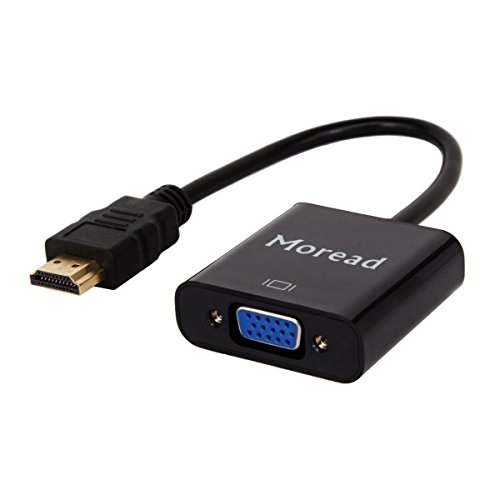


- COMPACT DESIGN - The compact-designed portable Moread HDMI to VGA adapter connects a computer, desktop, laptop, or other devices with HDMI port to a monitor, projector, HDTV, or other devices with VGA port; Tuck this lightweight gadget into your bag or pocket to do a business presentation with your laptop and projector, or extend your desktop screen to a monitor or TV; A VGA cable is required (sold separately)
- SUPERIOR STABILITY - Built-in advanced IC chip converts HDMI digital signal to VGA analog signal; It is NOT a bi-directional converter and cannot transmit signals from VGA to HDMI
- INCREDIBLE PERFORMANCE - The HDMI male to VGA female converter supports resolutions up to 1920x1080@60Hz (1080p Full HD) including 720p, 1600x1200, 1280x1024 for high definition monitors or projectors; Gold plated HDMI connector resists corrosion and abrasion and improves the signal transmission performance; Molded strain relief increases cable durability
- BROAD COMPATIBILITY - The HDMI-VGA adapter is compatible with computer, pc, desktop, laptop, ultrabook, notebook, Chromebook, Raspberry Pi, Intel Nuc, Roku, PS3, Xbox One, Xbox 360, Wii U, Set Top Box, TV BOX, or other devices with HDMI port; NOT compatible with Blu-ray player and devices with low-power HDMI ports such as SONY PS4, Apple MacBook Pro with Retina Display, Mac mini, and Apple TV
- 1 Year WARRANTY - Exclusive Moread Unconditional 12-month Warranty ensures long-time satisfaction of your purchase; Friendly and easy-to-reach customer service to solve your problems timely
-
Information
-
Twitter
-
Pinterest
-
Youtube
-
Facebook
Maria Vallejo
Does exactly what it's supposed to do. We purchased ...
Does exactly what it's supposed to do. We purchased this to connect a laptop to an additional monitor. It takes advantage of the laptop's HDMI out port, and connect it to an older monitor with a (blue) VGA port. Keep in mind - HDMI is digital and VGA is analog signal. You can connect digital out to analog, but not vice versa. You would need some sort of converter for that.
Ram Prasad Guggilapu
Perfect for chromebooks!
I'm using this on a monitor I have set up on a desk in our loft that the kids use for homework. I've got a couple chromebooks that they use and this is perfect for being able to connect those to the monitor to make the work easier when they are home. As it has been said, you have to tell the machine not to send audio through the HDMI if you need it to come through the machine, but that is the only adjustment that had to be made. It is exactly what is needed for anyone who has a chromebook and needs to connect it to a VGA monitor.
Angelica Grammann
Works, but may not be effective for your components
I am trying to use this to connect my HDMI port to a vintage display. The display detects the input, but gives an "Out of Range" message, and the computer does not recognize the display. So it works, but the system components are not able to interact. Not the fault of the connector. Addendum: I used it to connect the same computer to my HDTV, and it works very well, indeed! By chance, I found an old converter near my TV, and that one works with the vintage display! So I am satisfied all around; customer service was sympathetic to my initial problem, too. Good price, good hardware, good service!
Travis J Strachan
Purchased for a PS3? Read this:
I needed a quick and easy way to connect my ps3 to my computer monitor as I do not have a conventional TV. I saw this ad and purchased it, thinking it would be rather simple. After receiving the item I plugged everything in and got no signal or image out of my monitor; not even a "wake" signal to the monitor. However, if you seem to find yourself in a similar situation here's what you do: 1) while the ps3 is turned off, press and hold the power button until you hear two beeps (one after the initial press and one after around 10 seconds) 2) release the power button and wait. The monitor will now wake up and you will see dialogue from the ps3 saying a HDMI input has been identified and wants to know if you would like to use it 3) select "yes". At this point your monitor will go blank as if something has gone wrong. A message stating "frequency out of range" may pop up at this point from your monitor. 4) wait around 30 seconds and then you should see your ps3 menu pop up on the monitor as if like magic. NOTE: the image you will see is 480p. This is the best you will get using this method due to the digital to analog conversion and wonky backwards approach. Also, if your screen is 4:3, the ps3 won't fill the entire screen in game due to the games running at 16:9, but this is normal for any monitor or screen of 4:3. I am definitely not saying to buy this for specific use for ps3, but it can be done if you find yourself in my position. Another note is that this is only for video. I bought the converter without the audio out because I use the ps3 component cable for sound. There is an option for this item with an audio out though when checking out.
Janit Davies
a must have for projectors.
bought several and plan to buy more. I bought these so that when people use my projectors I'll be ready if their laptops only have hdmi out. All to often that happens now and some of my projectors don't support hdmi yet, or the run is very long and i only have long vga cables. So this adapter solves that problem. it's very handy and i keep one in all my projector cases now just so it's handy when i need it.
Marcia Libosada
Works as advertised
The cable worked as advertised. I had a very frustrating experience trying to get it to work with my work laptop, but it wasn't the adapters fault. I couldn't change the display properties, they seemed locked down. I searched many recommended solutions only to discover that the laptop had a built in graphics adapter and the graphics vendor (intel) had its own application for managing displays (not using the windows systems settings. I found the Intel Graphics application in the sys tray. Once I found this everything worked as expected and saved me from having to go buy a new second monitor with HDMI input.
Rosey Paul
Five Stars!!! This HDMI to VGA Adapter works perfectly!!!
The HDMI to VGA adapter I recently purchased works perfectly (so far, anyway - I have had it just a few days). I have an older model monitor and older VGA cables. The adapter was needed in order to connect to my newer-model laptop so I could do spreadsheets at home. This product works exactly as advertised. It screws in, which I find to be a plus, and the adapter fits perfectly into my laptop. I had to figure out how to still be able to hear audio from my PC after it was hooked up (thank heavens for Control Panel), but that was not the fault of the adapter. Bottom line - Great item. Five stars!!!
Sumbal Javaid
Works great on Raspberry Pi B, 2 and 3
I had an old Sanyo vga color monitor I picked up in the late 1990’s that had been sitting around. I needed a console display but it would only be used when booting etc. I didn’t want to buy a dedicated HDMI monitor, so I got this HDMI to vga adapter. It works better than I thought it would. I did a fresh build of Debian stretch and booted. The rainbow pattern came up followed by the raspberries and lines of boot messages. After setting up the computer, I did the same with a raspberry pi B I hadn’t used in 4 years. It too came right up. Also tested with a pi 2, and worked as well. I’m quite happy with this adapter. Recommend and I’d buy it again in a second.
Robbie Dyches
Works as Expected
I bought this adapter to run an old VGA monitor off of a new nVidia graphics card as part of a three-monitor set-up. The video card has three different outputs; DP, HDMI, and DVI. It is able to use all three simultaneously if desired. This adapter was obviously for the HDMI port. I bought another brand of adapter for the DP port to compare quality. Admittedly not a very exciting experiment, but I'm happy because they both work as intended. Windows 10 correctly identified the ancient monitor through the passive analog adapter and is able to send it whatever resolution I ask. Frankly, I was surprised at how good it looked and how easily it all came together. I see no reason to pay more for an adapter such as this. It does the job. I had never heard of Moread before, but the reviews were good enough to give it a shot. I have not been disappointed. The flexible cable between the two ends allows me to put the computer box closer to a wall than if it was a solid one-piece unit. I didn't want a 4-inch plastic lever sticking out the back of my computer, so I got this. So far, so good. Everything communicates correctly across this adapter.
Amna Khan Niazi
Successful set up with HP VGA monitor and Lenovo ThinkPad Win 10 laptop HDM I port .
This product worked as advertised for my environment: old HP VGA monitor, attached to windows 10 Lenovo ThinkPad HDMI port. However, when I first set it up I got messages saying that the resolution had to be reduced. My first choice to try reducing the resolution was using the windows 10 display parameters but that made no change in the monitor seem to go dark and go to sleep with in a minute. My second choice was to use the Intel graphics adapter resolution parameter, and that worked. I operated the environment for four hours straight with no going to sleep on the monitor. The picture remained clear the whole time. I am very very happy and pleased with this device. ...two days later and I was able to work comfortably today using the adapter for the nine hour span with no display problems.