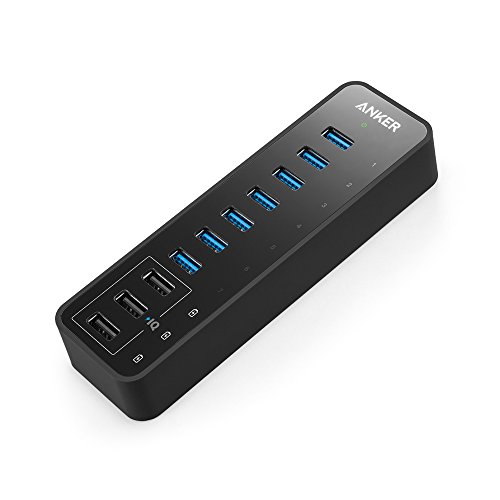



- The Anker Advantage: Join the 20 million+ powered by our leading technology.
- Ultra Fast: 7 ports offer high-speed data transfer of up to 5Gbps. Get synced up in no time.
- Advanced Charging Technology: 3 dedicated charging ports equipped with Anker-exclusive PowerIQ deliver the fastest possible charge of up to 2.1 amps per port.
- Compact Power: Packed into the size of a pen case for superior workspace conservation.
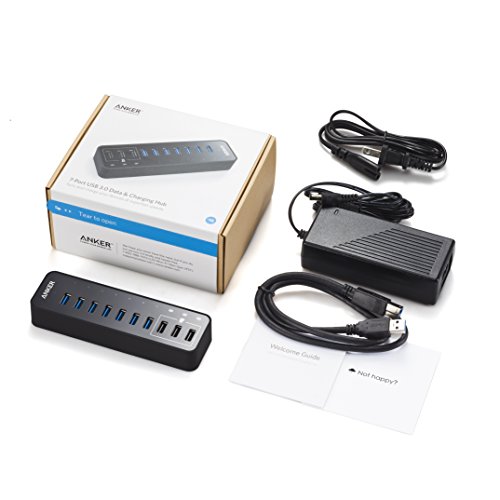
- What You Get: Anker 60W 10-Port USB 3.0 Data Hub, 12V / 5A AC power adapter, 2.6ft. USB 3.0 cable, welcome guide, our worry-free 18-month warranty and friendly customer service.
-
Information
-
Twitter
-
Pinterest
-
Youtube
-
Facebook
Garcia Matias Lee Harvey
Great Deal, Just Not Durable EDIT: GREAT CUSTOMER SERVICE
It was a great port, with 7 usb ports, you could hook whatever you wanted to it, and the charging ports on the end were very nice for not having to find my charger for my phone. That being said, it just isn't durable. I used it for one year of college, attached to a desktop, velcroed to the wall above it, it was never moved from there or beat around, and yet after about three months of use the power cord seems to have gotten lose to the point that you have to rubber band it to the side to hold resistance. Otherwise you get that nice "ba-ding" of Windows 10 finding it about every ten seconds while it loses power. This makes it useless for drives, mice, gaming hardware, etc. EDIT: I have changed this to a five star review because I was contacted by the seller several months after the sale, and when they inquired about the hub, I told them that I was not satisfied, and it had been sent damaged as the power cord did not work. After this they pretty much overnighted me a new hub, that works great. We'll see how long this one holds up, but the customer service was great.
Austen Leone
My second hub is as great as the first (bought 2)
I utilize a laptop workstation as my main rig which only has 4 USB ports on it. I have about 10 USB accessories (some of which require large chains of bandwidth) + a handful of other charging cables for phones, headphones, wireless devices, etc. I bought 1 of these Anker 10-port's about a couple years ago now and absolutely love it. It works as expected and is exactly what I needed (and hoped I was getting). It feels sturdy/durable/heavy in the hand and even looks good on the desk so I didn't need to hide it. It became such a staple of my laptop setup that I semi-permanently attached it to my desk with 3M tape squares (pretty sure that will rip the finish/paint off my desk if I remove them but if this hub ever stops working, I'm just going to get another one will fit in and cover that up again). There are 7 actual USB ports and the other 3 are charging-only ports. As my USB peripherals increased over the past 2 years, I was running into some bandwidth problems (my audio devices weren't being recognized/working because of the overload I had running through this USB hub which makes sense) because all that data is going through the same channel. Sooooooo I bought another. =) Second one works just as great as the first and is identical. I've also now attached this to my desk on the opposite side. You can't go wrong with this hub and the quality of this product has truly made me consider Anker for other purchases since I've witnessed first-hand their high-quality products.
Pierre Francois Du Plessis
Speed for days - phenomenal product
INTENDED USE CASE: Utilize the data ports for the following items in order to free up onboard 3.0 ports for my new VR headset: - External hard drive - USB sticks - Keyboard - Webcam - Mouse Utilize the 3 power charging ports for the following: - Charging phones (Samsung Note 8, S9, and Google Pixel 3) - Charging GoPro batteries (3rd party accessories/attachments) - Powering LED strip lights behind monitor and around desk (from Wal-Mart and Amazon) Performance is highest priority. Performance for me is defined as consistent power output, fast read/write (comparable with onboard ports), and enough ports to fit growing accessory pool. PREVIOUS EXPERIENCE: Let me start by saying that I have purchased and used many USB hubs. I have come to learn that if you intent on plugging in any items that need high speed transfer or require significant power to run (external hard drives -- especially if not SSD) you need a hub that is powered externally. The power your motherboard can output and allocate to each port is limited and you will experience lack of performance the more things you plug in. In my experience, a general rule of thumb is to keep solo standing USB hubs to 4 ports or less for best possible performance, and even then keep an eye on the things you plug in. THIS PRODUCT AS A SOLUTION: Perfect. This product met and exceeded my expectations. The read/write speeds for this product are amazing (see image - used usbflashspeed tool), and the charging speed/consistency on my Note 8 was fantastic (see image - used Ampere app). I tested the device with the following plugged in during both the data transfer and charging tests: keyboard (with led), external hard drive, webcam, Cyberpower UPS, Samsung Note 8 (power port, not data). The speed test images show all you need to know. If you are looking for an AMAZING USB hub, look no further. IMPORTANT NOTE: I am currently using the Logitech G602 wireless gaming mouse, which had issues when plugged into the hub. This is NOT a concern for me because most wireless mice have various latency or lag issues with then are plugged into hubs -- externally powered or not. For best results when using wireless mice, especially if you want the accuracy to be crisp and on target, use an onboard port for your receiver.
Maman Nadeem
Not bad, but could use improvements
UPDATE: Anker support reached out to me and sent me a replacement product free of charge. As far as I can tell I have not suffered from the issues outlined below since. I really appreciated that someone reached out to me! This hub sufficient expands my USB needs. I use a MacBook Pro with only 2 USB 3.0 ports so having this is very convenient. Here are a couple things that I have noticed in my usage of the past 2.5 months. First, certain peripherals simply won't work by plugging them into the hub. Notably, my wireless receiver dangle for my Logitech MX Master was one of those devices. I had that plug that directly into one of my USB 3 hubs on my laptop before it would resume functioning properly. Second, I have an Apple Pencil charging dock that I plug into this USB hub. Sometimes when I plug this into the USB hub all of the lights flicker and all of my devices connected to the hub disconnect for a split second before immediately reconnecting. This is problematic because I have an external hard drive connected to this hub. And every time I reconnects I get a warning about my hard drive getting disconnected improperly. Third, 2 of the 3 dedicated charging ports suddenly stopped working. This was very unusual. After disconnecting and reconnecting power to the hub the hubs appear to be working again.
Aroha Samuels
Great accessory but with a warning
This is a great accessory. It seems to charge cellphones faster than plugging them directly into to wall, though I don't see how that is possible. I like the IQ section for non-data transfer, power only connections. WARNING: It looks very similar to a multi-outlet power cord. My wife wasn't wearing her glasses and was going to plug her cellphone into it using the same AC plug adapter that she uses to plug it into the wall. And the spacing of the usb outlets is such that it will accomodate an AC plug. Fortunately I was right there and immediately pulled it out without any apparent consequence. I had to show her that you have to remove the AC plug and use the USB plug instead. UPDATE: I absolutely love this company. Their customer service and commitment to stand behind their product is unparalleled. Story: A year after I bought the Anker 10 Port 60W data Hub the data hubs stopped working. Only the 3 IQ charging ports continued to work. We get a lot of power outages here and it is quite possible that the subsequent voltage spikes experienced when the power comes back on contributed to the malfunction. What is important is that immediately up being notified about the malfuncion, this company emailed me some troubleshooting support, and upon my informing them that all the USB ports on my computer were still functioning fine and that resetting the unit had no effect, they immediately sent me a new one, which of course, works fine. There was no lengthy Q and A, no long waits for their email responses. It was like I was their first and only customer and they wanted to make sure I was a very, very happy satisfied customer. Needless to say they succeeded. I highly recommend this product and any product that this company has to offer. I am one very happy customer.
Marsha Felton
All Ports function without fail I chose the 7port USB ...
All Ports function without fail I chose the 7port USB 3.0 with 3 Power IQ because I knew I would need to charge a couple of things while also transferring data. This hub is big enough to accomodate even the biggest gaming enthusiasts with many peripherals. The fact that this is a poweree hub sets it apart from its competitors, meaning I can have a lot of draw on the hub with no burnouts/faltering. Currently I have a large USB mic (Blue Yeti), Gaming keyboard (Corsair K70), Gaming Mouse (Logitech G502), Two 2TB External Hard drives, two phones charging RIGHT NOW, 2 Wireless Xbox controller recievers and an extra cord for when I need to insert a flash drive. Not to mention the whole thing is aesthetically pleasing too. It really succeeds in freeing up ports on the back of my PC and moving them to my desk. 100% worth the price, Anker and Aukey are dependable brands and they will definately see my business again after knocking this one out of the park.
Katie-Lynn Arter
The perfect powered USB hub
This was my first purchase of any Anker products. Happy to say i have purchased many more of their products since i got this piece. This thing is separately powered via a power adapter, so its providing its own power to all 7 ports. The 7 'blue' ports, are USB 3.0 and all transfer data like any other USB port on your computer. the 3 'Black' ports are only providing power via USB. This is nice if you want to be able to charge multiple devices at the same time. I have hooked up my phone, ipad, and nintendo Switch up to it, while all 7 'blue' ports were also in use and this thing doesnt flinch. Everything was charging, and all 7 peripherals were transferring data no problem. This is a great addition to any work station that is in need of more USB Ports.
Joyce Thalacker-Hudson
Best USB hub for iMac 5k... Nuff Said!
Computer: iMac 5K w/ 32GB, 1TB SSD, R9 M295X, OSX EL-Capitan. Use: Photography & Music Production External Peripheral's: - 2 4TB G-Technology 3.0 USB Drives - 2 Toshiba 1TB SSD Drives - 2 Canon Printers - Focusrite Audio interface - M-audio 25 key Midi Controller - Akai Advance Midi Controller - Apple DVD/CD Drive Having a workstation and connecting external components is critical in my workstation. I have tried multiple USB 3.0 hubs and they ALL ended up either going to the trash or being returned. At first I thought my iMac had an issue not connecting to the other hubs properly causing me to do a reformat and fresh install of OSX El-Capitan. After the reformat and upgrade to OS X El-capitan, my previous hubs non-powered seem to not connect properly or had some type of issue connecting my equipment. Having an iMac 5K is limited to 4 3.0 USB port so having a reliable USB hub is essential for my needs to connect all my external gear. After reading the positive reviews of Anker's USB hubs and great customer service prior to purchase, I pulled the trigger and made the purchase via Amazon. The Hub is PERFECT in every way. Size fits nicely in my workstation. The benefits of charging my Nexus 7, Nexus 5 and iPad Air 2 is sooooo convenient. Connecting my cameras and any external gear without drivers is not a problem. My external drives transfer info quickly with no problems at all compared to my previous hubs.. Plug & Play... :-) Works flawlessly! This HUB is a must have to those who have a workstation!!! NUFF SAID. Thanks Anker!
Ajay Kapoor
This is the one. Stop searching, this is the one you you're looking for.
I went through 6 of these types of USB docks. I use this for my music production studio to connect my laptop to a load of important devices via a single USB cable. The problem I was finding was that most of these couldn't simultaneously charge a phone, transmit audio to my audio interface, and allow USB 3.0 data transfer to my backup hard drives. Most of these docks could do 1 or 2 of these tasks with no problem, but as I hooked up to more ports, but it seemed no matter what I connected to them my computer would not allow all of these things to coexist. After much back and forth ordering and returning, this one does it all. It's a nice build quality and more importanly does everything it should. Originally I resisted this one because of it's price "why would I pay that when I can get one for less than half...?" ....Well, because they don't work as well, or in some cases not at all. This one is not the cheapest, but it does everything I need it to do without compromise. Apparently in USB docks like this, you definitely get what you pay for.
Leno Fountain
Great Unit
Being able to both charge items, and be used as a standard USB hub, is critical in my business. This unit is well built, fast as speeding bullet, and charges anything I plug into it. So, what is my problem? I am not sure if it is on my end or their end, but it keeps dropping items. For example, I have two disk readers that I use to transfer data from my cameras. And, when I plug the card into the reader, it does not recognize it. So, I have to reach back behind my main monitor, find the right plug, unplug it, and plug it back in. Card readers are not the only thing, but they seem to fail most often. UPDATE: I did some testing and found out the problems were primarily on my end. After playing about for a bit, everything seems to be working fine. Thanks for a great product. The reasons I am still using it are: 1. I believe that someday I will figure it out. 2. Even though I have to reach over and plug-and-unplug the offending item, it is still the fastest multi-plug unit I have found. When, and if, I figure out the problem, I will come back and give this unit 10 stars...