

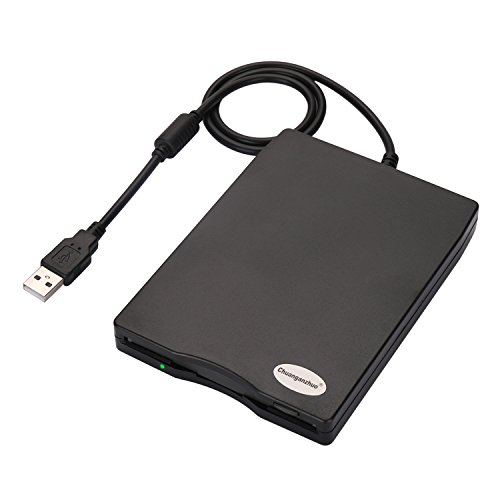


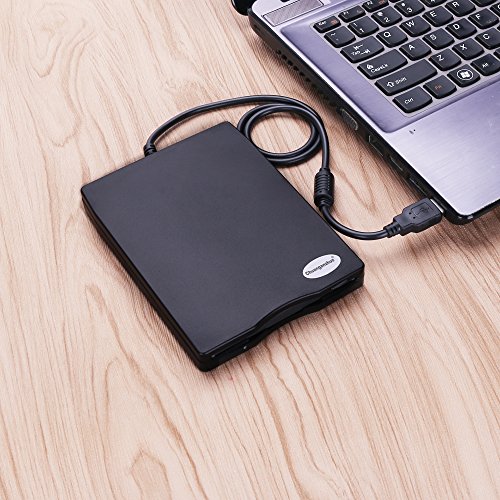

- Give new life to your old floppies, get your memory from old floppies
- Portable External Floppy Disk Drive,High quality hard plastic enclosure,durable and very nice looking
- Plug and play, no extra driver required, just plug it into usb connector directly, it will automatically install driver by itself
- Powered directly from the USB port, no external power required.USB 1.1/2.0 compatible,Read/Write 1.44 MB floppy disk
- ideal for Desktops and Laptops, Support Windows98/ SE /ME / 2000 / XP / Vista/Win 7/Win 8 Notebook,PC,Desktop,for Dell, for Acer, for Sony,for HP etc, Note: it's not compatible with MAC
-
Information
-
Twitter
-
Pinterest
-
Youtube
-
Facebook
Pat Huang
Simple, Easy and Cost Effective Floppy Drive Solution
This was only going to be a one or two time use purchase, so I didn't want or need anything too expensive. This item had decent reviews and was one of the cheaper options, so I thought I'd go for it. Bottom line is, it works just fine. Connecting it to my laptop via a USB hub wasn't a problem, although I did use a powered USB port just in case. It read the floppies I needed it to and all went well. When you connect it, it's not obvious Windows (Windows 10 Pro 64 bit) has recognized it. Nothing happens. A new drive letter does not appear in Windows Explorer. Even putting a floppy in the drive doesn't make it respond in any noticeable way. To get things going I moused over the "Safely remove hardware and eject media" icon on the task bar and selected Open Devices and Printers. The floppy drive appears in the Devices section as TEACV0.0. I right clicked on this icon and the drive came to life. From the pop-up menu I selected Browse Files -> Floppy Disk Drive (A:) and I was off to the races. A familiar Windows Explorer window appeared with a directory listing of what was on the floppy disc I'd just inserted. From there it was a simple case of copy and paste to another disc. Easy. I have several old 3.5" IDE floppy disc drives in a box somewhere. I could have found a way to plumb one of those into my modern setup, but for $11.95, my time was better spent buying this USB solution. I'll probably never use it again which is a shame because it works great and there's nothing wrong with it. It's a simple, plug 'n' play solution that was cheap enough to make it a no brainer purchase. Recommended.
Debbie Elrick
A good 3.5 external, portable, FDD.
I have many 3.5 disks with a lot of pictures of my family from 20, 25 years ago. My old Presario 5140 stopped working, and I need something to transfer the content of disks to windows 8.1. I was looking at portable SABRENT. Good ratings, good information and price. But then, for the same price, an abundant information about the product, I discovered the 3.5, portable external FDD with an unusual name: "Chuanganzhuo". Veri good ratings, with one half of a star more than Sabrent. It didn't matter to me the number of ratings. I bought it and I received it in 2 days. Perfect I thought. It looked very nice, strong built, compact, light waight, and to me, vas perfect on my PC, which is shine black. It worked as it was told. I used it with laptop windows 7, with PC windows 8.1, just plug and play. I transferred many pictures already and I live it plugged in the back usb of my PC. More happy I am, it works with windows 10. Advice for the 3.5 portable external FDD Chuanganzhuo buyers! Read about it, buy it, follow the instruction on amazon's site, and you will be happy owning a very good product. I know I am.
Axad AR
Five Thumbs Up
I have a lot of photos and some (now semi) important information stored on 2 shoe boxes of floppys dating as far back as '97. There's also a few photos that are extremely important that I needed to to find and get printed out ASAP before they became lost forever to corruption. After checking reviews, I decided to take a chance on the Chuanganzhuo floppy drive and received it quickly and very well packed. I run Linux Mint and had no problem getting started right out of the box, as it was Plug N Play... NOTE: the manufacturer suggests plugging the floppy drive into a REAR USB interface or motherboard directly. If connected through a USB hub, USB extension cable or frontal USB interface, it may not be recognized by the computer because it cannot get sufficient power. That said, I forgot and used the front port without a hitch. So far I've retrieved 162 photos (16 corrupted) and one video off 11 floppys; all without a hiccup... I am SO relieved to finally be able to get the photos I need off these old floppy before they all (eventually) succumb to droid rot.
Amy Elston
A Convenience Device
The situation that prompted me to buy this item involves a refurbished older desktop computer I bought. It has a slot for 3.5 floppy disks. My thought was that since the slot was there, why not use it even though floppy disks have largely been replaced by USB sticks. I ordered a box of 10 un-formatted disks but couldn't format them on this pc. I then ordered the external disk drive. While floppy disks are no longer a common means to preserve data they are still a viable means for the task. The external floppy drive allowed me to bypass the pc's limitation.
David Cote
I was disappointed: I could only access 2 of the 6 ...
I had about 6 3.5" disks, and wanted to transfer the files . At first, I was disappointed: I could only access 2 of the 6 disks. But, it looks like they were either Mac or Apple ][gs disks, which cannot be read with a normal IBM drive (from what I understand). I then found a stack of about 25 more 3.5" disks. Guess what? All 25 copied without a hitch! I had read in forums that 15+ year old 3.5" floppy disks rarely still worked. But some of the disks were as old as 1988 -- nearly 30 years, with most around 1992-1995 (20+ years). So don't assume old floppies won't be readable! What you do need to be aware of is that most 3.5" drives will not read many non-IBM disks (like the guy that gave it 2 stars because it wouldn't read a 3.5" disk made from a word processing typewriter). So don't expect it to read Mac, Apple ][, or other non-IBM disks; it wasn't designed to do that. The first couple of times I used it, for some reason it seemed like I had to unplug the USB cable to get it to recognize when I put in a new disk. Doing the stack of 25 disks today, I didn't need to unplug it at all. So if it doesn't seem like it works, it might be worth trying to unplug the USB cable and plug it back in again before assuming it doesn't work, although it shouldn't be necessary.
Billy Rayburn
It's a USB floppy drive, and it works as one.
Look, this isn't complicated. You want to access some floppies and your modern motherboard doesn't have a header to install one. You buy a USB solution, and Windows supports it natively, and it works. In my case, I need one for at work. I'm a museum drone and we have innumerable caches of 3.5" floppies, both in collections and from previous staff. This has worked for all I've tried it with. Note: your experience will vary with the format of the disks. If you are trying to read Mac format disks, you will need software which can read it. If you are trying to read Atari format, you will need software which can read it. So on and so forth. Windows can only natively understand IBM formats, although it should be backwards compatible so your modern Windows PC should be able to read a single-sided 360kb disk from the early 80s. Note 2: Your floppies may not be good anymore. The data will degrade, and the physical structure of the media will degrade. Older floppies tend to have a greater lifespan, newer floppies were made more cheaply (same with newer laser-read media) and don't last as long. Although, I was surprised to see an off brand floppy from the mid 2000s still read. No complaints. It's a good drive. Plug it in and you're good to go. I only wish there were easy solutions for 5.25" disks (there's a kit for that, but it isn't particularly cheap). Or reasonably priced USB drives to read Zip disks (original drives are becoming way too expensive). Those are my two next challenges at work.
Crystal Trofholz
Excellent buy
I originally bought a different external floppy drive. It required over a minute for the system to "mount" and was unable to read any of the floppies that I know had good data on. I returned it a bought the Chuanganzhuo. This drive was a great experience. It read the floppy immediately. It is accessed through Printers & Devices, right click on the floppy drive and select Browse. A replacement window opens with the Floppy Drive shown as the "A" drive. I had no problem reading 1.44 or 720 disks. The unit is well built with a solid feel to the floppy insertion and extraction process. Comes with a handy carrying pouch,
Scott Mcfee
What's on all these floppies?
I have not had a computer with a floppy drive for years. However I have floppies around everywhere. Some of them I know what they contain and some not. I found pictures of my grandkids on some floppies! The external drive installed itself quickly. Using it was easy, just put a floppy in and it appears in the directory. Glad to have it and it makes it easy to find out; what's on these floppies?
Phil Will
Works as it should
Nothing too special, it just works. Glad to finally have one! I haven't had a PC with a floppy drive in 15 years, but I realized I had all of these family photo's trapped on tons of floppy disks with no way to access them. This worked as soon as I plugged it in to the USB port. But you need to remeber what it was like to work with floppy disks! Its loud and slow! Don't expect flash drive speed from this media format, the floppy disk technology hasn't changed in 30 years. I'm happy with the size of the drive and the quality of the build. Can't ask for too much else.
Laura
Works well with Windows 7 with one hitch
After a few reviews with people having a hard time with Windows 7 I had a little apprehension purchasing this. Glad I did. I have a couple older milling machines that still use Floppy drives. Seems to work well after my "issue" below. It shows up as a "Sony" drive when plugged in. I will say that it DOES take 3-5 watts per the documentation. At 5v that's roughly .6 to 1 amps! I tried using it directly with a laptop via on board USB and the device wouldn't power up. Slightly discouraging. I have it plugged into the docking station USB port and all is well now. I would venture to guess a powered USB port hub would work similarly. I am only guessing that users that are having problems are most likely not able to supply enough power to the device.