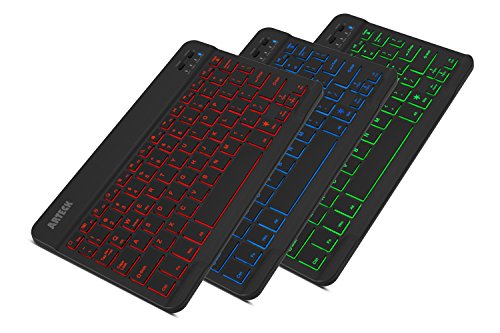


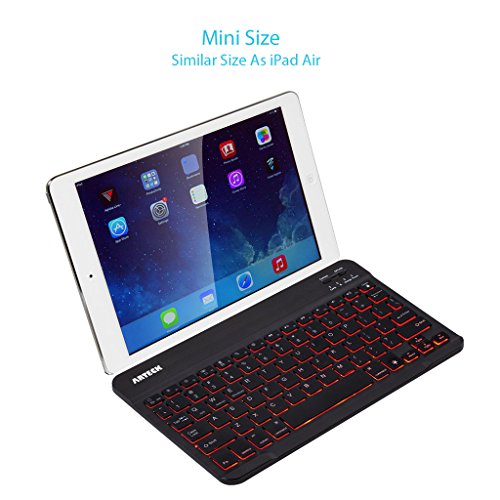


- 7 Unique Backlight Color: 7 Elegant LED backlight with 2 brightness level and auto sleep feature to maximize power usage.
- Broad Compatibility: Use with all four major operating systems supporting Bluetooth (iOS, Android, Mac OS and Windows), including iPad Air 3 10.5-inch (2019) / iPad mini 5 (2019) / iPad 9.7 inch iPad 6 2018, iPad 5 2017 / 10.5 inch, 11 inch and 12.9 inch iPad Pro, iPad Air / iPad mini / iPhone / Android Tablets like Samsung Galaxy Tab, Google Nexus / Windows / Mac, etc.
- 6-Month Battery Life: Rechargeable lithium battery with an industry-high capacity lasts for 6 months between charges (based on 2 hours non-stop use per day and backlit off)
- Ultra Thin and Light: Compact size (9.7 X 5.9 X 0.24in) and light weight (0.37lb) allows easily carried and packed backpack, messager bag or case.
- Package contents: Arteck Backlit Bluetooth Keyboard, USB charging cable, welcome guide, our 24-month warranty and friendly customer service.
-
Information
-
Twitter
-
Pinterest
-
Youtube
-
Facebook
Ruel Parala
The Best Bluetooth Portable Keyboard I've Ever Used
When the Samsung Note 1 first came out, it was a big, almost cumbersome device that almost resembled more a tablet than a phone. I can't recall how I came across it, but I had my first bluetooth keyboard that was designed specifically for Android. It was awesome. I gave it away shortly after I traded in my Note for something else. Ever since I've wished I had kept it. I now have the S8+ and I thought it was high time I got another one. This keyboard is superior to my original one in every way possible. Much smaller, yet still very much full-sized. I was really blown away at how thin it turned out to be. Like crazy thin. It was ridiculously simple to pair with my phone and within less than 3 minutes of opening it up, I was using it on my phone. One of the key features which I LOVE is the ability to work best with your particular operating system, such as iOS, Android or even I believe a Windows phone (though I'm not 100% certain about this one). The light-up keys are a very nice feature that I'm sure will come in handy in dark environments. I used my keyboard extensively last night answering emails, text messages, Snapchats, and I even wrote a review here on amazon for another product I had purchased. It was all simple and unbelievably more convenient than using the Google keyboard on my phone. The truth is, a lot of what I did last night wouldn't have been done at all had I been forced to use just my phone's keyboard. I found myself LOOKING for things to respond to or write just in order to get more use out of it. Another wonderful addition is a built-in rechargeable battery. My previous keyboard used 2 AA batteries and it was a pain when they would suddenly be spent without any advance warning. As long as I'm near a charging cable, if this goes dead, I can still plug it in almost anywhere and still use. I haven't had the time to see how long it'll run on a single charge, but should that change or become noticeable one way or another, I'll make sure and come back to write an update. All in all, if you are considering a portable bluetooth keyboard, I simply cannot recommend this highly enough. Oh, I almost forgot, this keyboard does NOT fold up, so what you see when you open up the packaging is what you get--which is not an issue for me...however, if you prefer something that'll fold up to be a shade more portable, you might want to consider something else. However, for the money, you certainly cannot do any better in my opinion.
ツ ツ
Better than expensive models
I'm quite impressed. Much better design than a mainstream Belkin model I previously had. Connects quickly, and reconnects from sleep mode very quick. Doesn't drop connection, no observable lag when typing. Very light and thin, uses internal battery charged by USB. These are all desirable traits for a travel keyboard. The buttons are a little bigger than similarly sized keyboards, so it's a bit more comfortable to type on. The keys are more tactile and feel sturdy, feels more like a real keyboard rather than a membrane style keyboard. Little rubber feet are provided and were needed to keep the keyboard from sliding around on the desk while typing. Solid enough to sit on my lap too. The backlight is nice, but haven't had to use it yet. Battery life is good so far, with casual use I haven't run it down in over a week.
Ana Kolevska
Great! (Remember to Fn+E, Fn+Q, Fn+W !)
I've been using the keyboard the past couple of days. Quick layout of Pros/Cons: (NOTE: Please read the con and notes after! The Fn key is a bit tricky if you don't go through the manual!) Pros + Small like advertised - This thing is lightweight and tiny to the point in which it can rest in my lap without hardly being a bother. + Backlighting - The lighting itself looks pretty cool, albeit far from necessary to have. I really like it. + Easy to Pair / Connect - Booted the thing up and hit that connect button to instantly link a tablet of mine to it. Con - Fn Key needs to be matched up to the OS you're using! Read below! HEADS UP! This keyboard might be configured a little oddly right out of the box if you're tech savvy and don't read the instructions. Do the following based on your OS: Windows: Fn+E iOS: Fn+Q Android: Fn+W This will make sure the Fn key behaves as expected. Overall: I was in the middle of typing out a 3-star review when I decided to look through the manual again to see if I by chance missed something (I know, I know, RTFM). That little tid-bit isn't one of the most upfront pieces of information so it's easy to miss once you end up happy that your keyboard is paired. It's great that this can provide a proper layout to different operating systems, but any users who miss the matching step might have their mostly positive experience with the keyboard with their frustrations of the Fn key. To the makers: • Spellcheck the English. There are a few errors that should be easy to catch if you're able to use an English dictionary in your document maker. • Make a "Quick Start" note card separate from the manual (or on the front of it) that give simple steps for how to get started. Make sure that the Fn+[Key] is emphasized to reduce confusion. • Make the Manual easy to find online, please. Although I still have mine, I know that having access to it in the future might be helpful. All iterations I've found online don't match what I've received in the package.
Ella Baesso
Perfect keyboard for the Wacom Cintiq 22HD Pen Display
I'm a designer who uses a Wacom Cintiq pen display. I always struggled with where to put my keyboard so I could access it for quick keys and shortcuts in programs like Photoshop or Sketchbook Pro. This keyboard fits perfectly in-between the stand legs and is so easy to access while drawing now.
Ashley Salazar
Rugged and durable
Before reading any further, if i could sum this product up into a single statement: affordable, durable, and impressive. I bought a $140 keyboard for my iPad Pro. The keyboard lasted 13 months and Apple told me to go take a hike when it stopped working because it was a month outside its one year warranty. The Apple keyboard does not light up and has to be physically attached to the iPad to work and can only work with an IPad Pro. So I bought this Artek keyboard. I’ve had the keyboard for 7 months and love it. This keyboard does light up, can be positioned however I want, and can hook up to any device with Bluetooth; I could connect it to my iPhone if I wanted. Even more impressive, I left the keyboard by accident in an absolute downpour for 30 minutes (not a mist, not a sprinkle, but an absolute downpour). When I brought the keyboard in it was on and functioning, but I turned it off and let it dry. Came back two hours later and the keyboard was 100% operational and still is so 1 month later. The keyboard is (slightly) louder than the iPad keyboard, however, you do have a better feel with the keys than you do with the iPad Pro keyboard and the apple keyboard tends to be muted with very little feedback. And. ITS $20!!!! Its worth it. It’s worth it even if you’re completely skeptical, its a fraction of the cost of any other keyboard
Carey Jordan
Wow. What have I been missing?
Being a touch typist, I have missed the ease of typing on a keyboard on my iPad. So when I invested in the 5th generation iPad, I decided to explore the idea of a keyboard. I didn’t hold out much hope that I would be happy with one because I am very, VERY picky when it comes to keyboard feel. As a typist, I have always chosen typewriters - yes, typewriters - and now computer keyboards - by their feel. We need to be a match or it’s over. If it does not have that special something that I always look for, I pass on a keyboard - or moan and whine until I get it replaced. Right out of the box, I knew that this was a match practically made in heaven. For one thing, it is not one of those flat silicone things that pretends to be a keyboard. This one has a bounce in its step with the scissor spring of the keys. That was very important to me when I chose to try this and I read the reviews as carefully as I could to discern what I could about the keyboard feel. The reality does not disappoint because I absolutely LOVE this keyboard. I will not pretend that I have explored every aspect of it because, at this point, all I care about is that we can get along with feel and speed. It passes on those counts beautifully. Paring it via Bluetooth was virtually a breeze. I was up and running as soon as I fully charged it and began the connection process. As far as the other reviewers complaints that it disconnects when left too long, I am not planning to use it in a stop-and-start fashion. My main goal is to word process and I have absolutely no complaints so far with disconnection. Time will tell, but I will do a work-around should that be a problem. I will try to anticipate long delays in use. For around $20, all I can ask is, what have I been missing with my last four tablets? I should have done this sooner and I would surely have started with the Arteck here because it really is just what I want. Happy camper! Happy keyboarding!
Tr Delphine
Works great, Excellent customer service, Just a few Cons
Pro's - $20 - Super light weight and at it thickest probably about 2 1/2 - 3 American Quarters in depth - Personally I use this for my Asus Netbook that runs Windows 10 and on my iPhone 5S just for the sake of testing. (The iPhone usability actually came in handy as I'm using this Keyboard right now to write my product review on through my phone. - Beautiful array of keyboard colors - Battery seems to hold a charger very wel although I can not say how long. But I can say that I've used it moderately for about 5-6 hours in one sitting playing a strategy game, so this should be good for almost anything you need to do until you're done doing what you're doing until it needs to be plugged in. Neutral - The instructions included were actually better than most products I have seen in the past with devices like this but as always I wish there were more information in regards to troubleshooting connectivity issues. Con's - The only indication of how much battery is left is when a blue battery indicator light constantly blinks letting you know that it's going to die soon. I wish when it connected to my Windows 10 device that it told you the exact percentage as I've seen with similar products. - The backlighting is excellent but to save power it turns off the lighting after 10-15 seconds when not in use. This is a minor inconvience to me as I sometimes like to play an old strategy computer game called, "Stronghold Crusaders." The mouse is mostly used but the arrows keys are needed to scroll through the game map. So you can see how this can be annoying. I don't see anywhere in the instructions on if there's a setting to change this feature. **Updated the Con about ESC key** - Manufacture was prompt in telling me after I wrote this review that pressing the "Fn+E" keys after I pair the device would solve this issue. I did as instructed and it solved my ESC button issue listed below. It's also mentioned in the instructions to do so. User error on my part. **Issue Resolved**- I haven't really tested the ESC button on other programs but I did notice that while playing that game, if I just press the ESC key, it minimizes the game and loads and Internet Explorer window. I have to press the Fn+ESC to get the Menu options I want in the game without it minimizing. - Lasty, this may be just a fluke thing with the construction of this keyboard I got but I've noticed that I have to press the, "L" key with a bit more force as compared to all the other keys. **Updating this to 5/5 because I respect a company that promptly follows up with user issues even though I wasn't complaining to them. My Con's list other than the ESC button issue still stands though. I give this a 4/5 only because of the minor Con's I have listed. Other than that this works great. I only hope this has longevity but at $20 if it works for a year I'd still be happy and recommend it. Pictures included are with backlighting on and of the size comparison to my Asus Netbook.
Alicia Flickinger
Great! - Customizable, thin, light, smooth
UPDATE: March 2019 - I had a problem with my keyboard malfunctioning after 5 months. Documentation states it has a 2-year warranty. I contacted the seller and the customer service was near perfect. I literally had a replacement keyboard at my home within about 3 or 4 days of first contact. I wasn't happy about the problem after 5 months, but I love the functionality of the keyboard AND their customer service can not be beat! I'll leave the 5 star overall rating in place. I have not been using the keyboard for an extended period of time yet, but my first impressions are very positive. I bought the keyboard as a replacemnent for an Amazon Basics Bluetooth keyboard that had started getting quirky and other people's devices seemed to be interfeering with its functining properly. I use the keyboard in conjunction with an Amazon Fire HD 8 (2017) - Android, and I use my tablet almost exclusively for reading, email, and documents, so a good keyboard is a huge factor. I also create a great deal of correspondence in both English and Spanish. Initially, when I began using it for a Spanish letter, I became discouraged when I had trouble creating the special letters and characters. I contacted tech support, but even though they did get back with me quickly, I continued to play with the settings of the tablet and keyboard while I waited. I was frustrated and determined, so I worked with it for a couple of hours till I discovered the problem. It was my own user error. What I thought was a problem or a complaint actually turned into a compliment and endorsement. The keyboard was doing exactly what it was supposed to do. I had been accustomed to having to use special keystrokes to create the Spanish letters and characters. However, this keyboard actually changes to a Spanish format keyboard (which is different from an American English format) when I change the keyboard language of my tablet. This keyboard (if youread the instructions) has a quick keystroke way to change between your enabled languages. The errors were arising because I had failed to switch back to English. Now all I have to do is learn the format, for which I have already printed a template. My issue is resolved with a recognition that I have a learning curve. Their tech support got back with me overnight, literally within a few hours. I DO recommend this keyboard! Thanks again! I now completely LOVE the keyboard.
Ciara Ann Docherty
LOVE THIS TINY KEYBOARD
I've only had this for a couple days but I really like this keyboard. It is tiny and perfect for me. The packaging came in a small cardboard box. It had a manual, usb for charging, keyboard and a small 3M sticky. The keyboard is metal but it does slide on the table top. I wished it came with instructions on how to use the 3M stickies. It was a sticky with 6 dots. Initially, i thought the whole thing goes on the back of the keyboard but once I peeled off the backside of the stickies, I realized that I could use each of the individual dots (6 of them), so I placed them on each corner and center of the keyboard to stop the keyboard from sliding/flying every where. There was a off/on the top right corner, I switched that to on adn the blue light came on indicating that the power was on. I turned on the blue tooth on my surface pro 3 and press connect on teh keyboard. It took less than 30 seconds to connect and VIOLA, it was ready to go. I haven't tried it on my ipad air or my android phone but will eventually. I bought this keyboard specifically for my surface pro 3 because it's not stable and I often have to use on a flat surface. I wanted a keyboard so i can place it on my lap while I do my school assignments. I haven't used all the feautres sucha s turning on the keyboard lights - I dont really care for the colors so I turned it off. There were several colors to choose from. So far I am liking it. I have pretty small hands and have trouble using some of the keys since my fingers are still use to my prosurface keyboards, which is a bit bigger than the ARTECK. So I misspell quite a lot but this will take some getting use to. Overall, I am very happy with the product. Will buy again if I need to.
Jesse Mason Capucci
Back-lighting works great and the battery life is pretty impressive.
Works great, and the back-lighting is great, however when you first turn it on each time it back-lights for a second then you have to fumble in the dark to find they keys to turn the back-light on again, it would be much better if it would remember your preferences and turn back on to how you last had it set. Also I'm not sure yet if this is a keyboard issue or an Android issue but when I am programming sometimes I press the { key right after a tab it just makes a space so then I have to delete that character and type another letter then { then go back and delete the letter, I will need to hook up another Bluetooth keyboard sometime to see which is causing that issue. Update: The vendor sent a replacement keybaord saying the first one was defective and not working as expected. I got the new keyboard connected and the backlighting setting I last used is remembered now which helps a lot when I'm using it on my tablet after my wife has gone to bed.