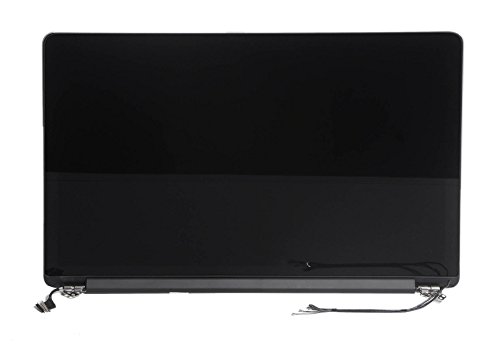
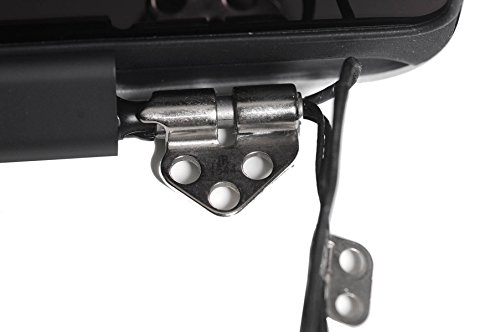
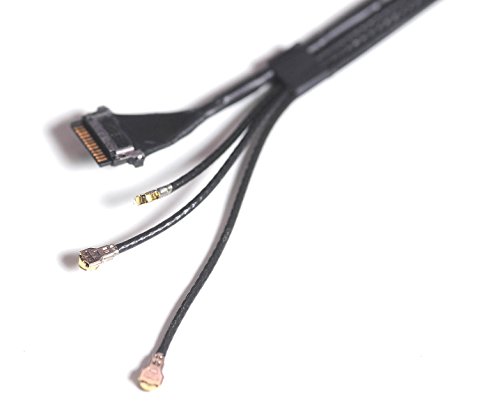
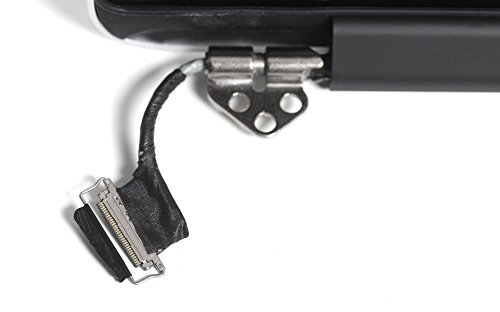
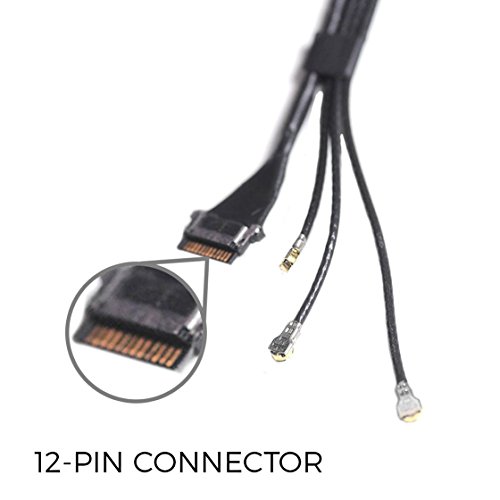

- ***Important. Please refer to the close-up pictures to confirm yours is the same***
- Part#661-8153
- Screen Size: 13 inch, 2560 x 1600 pixel resolution
- Which Year Macbook Pro: Late 2013 (ME864, ME865, ME866), Mid 2014 (MGX72LL, MGX82LL/A, MGX92LL)
- What will be supplied : The LCD Display assembly as pictured, including the LCD screen, back cover and cables. It is not a complete laptop.
-
Information
-
Twitter
-
Pinterest
-
Youtube
-
Facebook
Fando Paparoa
Very nice Mac Book Screen great OEM style part.
Ordered this screen for a client to repair a Mac book with a shattered screen. The item came well protected with a box inside of a box protected by soft packing material and soft cell foam. Item ordered was exactly as described in the ad and was installed into the clients computer same as the factory installed screen and top shell. Client was very happy with the results as was I. Screen was bright, crisp, and free of any dead or stuck pixels. Will definitely order another screen from this seller if and when the need arises to repair another mac book computer.
Elisabeta Ioana Covrig
SAVE MONEY, TRUSTFUL, RELIABLE, 1YEAR OLD
ITS BEEN A YEAR AND THIS SCREEN WORKS SO GOOD. I WAS QUITE HESITANT AND SCARED I WOULD GET ISSUES BUT HONESTLY... THANK YOU FOR MAKING MY LIFE EASIER AND HELPING ME SAVE MONEY FROM RUNNING TO THE APPLE STORE. THANK YOU THANK YOU.. GUYS... HONESTLY IT WILL WORK IF YOU FOLLOW YOUTUBE VIDEO TUTORIALS AND TAKE IT SLOW. NO RUSH
Mandy Marie
EASY PEEZY LEMON SQUEEZY
First of all let me tell you how easy this was to replace. It took me only 45 minutes and if you can use a small screwdriver and follow the easy instructions(https://www.ifixit.com/) anyone can do it. I would also recomend this kit along with TEKTON 2830 Everybit (TM) Precision Bit and Driver Kit for Electronic and Precision Devices, 27-Piece and some hobby Head Mount Magnifier glasses. I saved over 500.00 doing this myself and everything has worked like the original. Every computer service repair place I went to said 7-14 business days to get back and anywhere from 800.00 to 1,000 to pay, well I had the screen in two days from Amazon and from the time I opened the box until I fired it up it was just under 45 minutes. If you want to save a lot of money BUY THIS and don't be intimidated, read the instructions on ifixit.com and laugh at how much money you just saved yourself.....
Lily Irene Morano
Zero Dead Pixels, Super Easy Repair
Worked perfect. Quick and easy repair compared to removing the glass to replace the LCD and then putting new glass on. Glass and LCD separate are about $30 less on amazon. However the time you save on the repair more than makes up the $30 difference!! Great product, packed fantastic (zero damage on arrival) and my customer was beyond happy with the repair. If i ever have to fix a MacBook Pro screen again I will be back here buying another screen.
Jerre Neeley
Save Some $$$
Excellent product and perfect fit for my mid 2014 Macbook Display that failed way too early for as much as I paid for it just a few years ago. Apple quoted me $475 for replacement after going to their store so this saved me a few hundred bucks and I installed it myself after purchasing the Tekton toolkit. Couldn't be happier and it better last longer than the original one or I am done with Mac.
PoisonIvy Roxette
You don't need to be a "genius" to replace your macbook pro display!
A friend recently asked if I could try and fix her daughter's macbook pro; she knew I tinkered with computers and turned to me when her daughter dropped her laptop, cracking the glass and breaking the LCD underneath. I'm not an "Apple guy", but put my personal feelings aside and told her i'd take a look, after she told me the Apple store quoted her $480 to fix it. After much research, I decided that this would be the best route to take. There are cheaper solutions out there, no doubt, but I came to the conclusion that an OEM part would make more sense. I'll be the first to admit that Macs are overall well made, though are very tedious to work on, which is one of the reasons I try to avoid them. Rather than taking 27 steps to disassemble the display, this product was switched out in less than 45 minutes, with most of the work being screw and unplugging cables. It was brand new, perfect condition, easy to replace, and booted right up. No problems. Unless you're very tech savvy, I would recommend spending the extra cash and go this easy route.
Cathi Collins Mikutis
Perfect, although clearly not OEM
Amazingly, it's a good quality screen. It's not sealed like the OEM is, with optic adhesive and other such fancy things, so when you press on any point it will go directly into the LCD, very little resistance, and it will temporarily distort the image. Quite unusual if you consider the stiffer OEM counterpart. However that just says they cut corners to make it cheaper, and that's why I bought it in the first place... The resolution is the same, the laptop had no issues with it, there's no dead pixels either. Perfect stuff.
Jeanene Vanzandt
15 to 30 minute repair with basic knowledge
Very easy to install with basic knowledge. If you are new to this kind of repair take pictures and watch YouTube videos on how to make this repair. I watch two videos, and one the guy did the repair in real time in under 15 minutes. It took me all of 30 minutes because I had issue with the rf wires trying to get them seated. Other than that there where no issues. Monitor is as good as new only has light scuff on the cover plate, but I can live with that for the price. Also make sure you have the Pentalobe screw driver, this needed to remove the back plate from the MacBook Pro.
Rotica Pickens
we were thrilled when the new Retina Display arrived and perfect packaging and installed without issue
Our work laptop was damaged on a business trip this spring and we simply couldn't give it up for the time a repair shop wanted to assess the parts cost in replacement, let alone the actual time to fix the computer. After months of using the computer with an external monitor, we were thrilled when the new Retina Display arrived and perfect packaging and installed without issue. Highly recommend purchasing a tool kit from iFix It to make the mechanical work a breeze! Thanks again! Dave, MotoHub USA www.motohubusa.com
Jodie Roll
Remember the Pentalobe P5 1.2mm, different screws and follow detailed instructions.
Worked exactly as the previous one, perfectly and beautifully. Just follow the 'iFixit MacBook Pro 13" Retina Display Late 2013 Display Assembly Replacement' carefully and you will be fine... Remember to have a P5 Pentalobe Screwdriver 1.2mm, without this one you will be unable to open this MacBook, and keep track of the position of the bottom case screws since two of them are different lenght and will not fit seamlessly in other positions, pay attention on the step 16 "wider than 90 degrees".