


- *IMPORTANT* DSL Internet Only. Compatible with CenturyLink (excluding VDSL), AT&T (excluding U-verse), Verizon (excluding FiOS), Frontier (excluding Fiber), and more. Call provider if not listed here
- *IMPORTANT* Does not work with bonded VDSL. Not compatible with Comcast Xfinity, Charter, Time Warner, Cox
- Cable Modem + WiFi Router. Denial-of-service (DoS) attack prevention
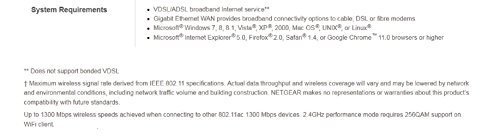
- Supports OpenVPN mobile client (iOS and Android) app for easy secure remote access to your home network.System requirements - Microsoft Windows 7, 8, 8.1, Vista, XP, 2000, Mac OS, UNIX, or Linux. Microsoft Internet Explorer 5.0, Firefox 2.0, Safari 1.4, or Google Chrome 11.0 browsers or higher
- High-powered amplifiers & antennas to extend your Wi-Fi coverage. Nighthawk supports ADSL/ADSL2/ADSL2+ and VDSL/VDSL2. Using Amazon Alexa, control your home network with voice commands.
-
Information
-
Twitter
-
Pinterest
-
Youtube
-
Facebook
Missy Childers
Great router for DSL or Cable internet service
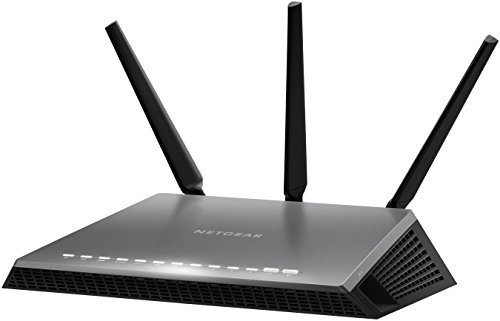
The NETGEAR AC1600 D6400 Modem / Router is touted as a high performance, high powered piece of equipment targeted at power users, and in this respect, I have to say that NETGEAR delivers. It also features a futuristic design, very angular and minimalist, that conjures memories of the monolith from 2001: A Space Odyssey. It looks very attractive from the front, and the LED is a great touch. As you see, it ships with a protective plastic sheet adhered to the front, with a sticker that tells you the factory set password and ID, making setup that much easier. The LED status indicators are easy to read in the dark, but in daylight, the amber status can easily be confused with green, which isn't ideal. The stand is all plastic, and doesn't seem the most sturdy, but it wasn't designed to be taking much abuse. It features 2 USB slots which can be used to provide network access to USB memory. A nice feature, but not one I need, so I haven't tested its functionality. Two buttons along the side allow you to turn the wireless broadcast on or off, and allow for WPS setup. ***Wi-Fi Performance*** The range on this is fairly strong. A massive upgrade from the Actiontec that Verizon set me up with initially. It covers my entire apartment, which isn't that big (~650 ft.2). I can connect to it from my parking space using my phone, from about 150 feet. All my devices display full bars as far as reception, the exception being my Acer Chromebook, but I don't trust its indicator that much. Needless to say, the AC1600 provides coverage that will surpass most any wireless router your ISP provides you with. The router broadcasts simultaneously at both 2.4Ghz and 5GHz. Each gets its own ID, and its usually set as some iteration of "NETGEAR## -5G". You'll be able to see which one is which, although your device will probably connect to the better connection automatically. You can also turn off the broadcast of either one, should you want to. The router also has a ton of security you can configure easily using the included genie. If you know what you're doing, you can make this router pretty darn secure, but I wouldn't say its the most secure option out there. This is targeted more towards people who game or stream media, so I don't think much thought went into security. However, there is plenty on board here to satisfy 95%+ of users. ***DSL*** (Works with Verizon: CONFIRMED) I tested this modem using Verizon as a ISP (5mb/s rated service; non- FiOS), so yes, I can confirm that this does work with Verizon, as is advertised on the box. The first great benefit to this model is that if you have DSL service, you do not need any additional equipment, as this has an integrated modem set up for VDSL2 and ADSL2+. The RJ11 jack is the gray one pictured, labeled "DSL". Using the AC1600, I regularly experienced speeds at the maximum of the service I was rated for, 5mbps. See the included speed test screencap, 5.09Mbps. I was getting around 3.5Mbps with the included equipment from Verizon, an Actiontec GT784WNV. ***Cable Internet Service*** (Works with Comcast: CONFIRMED) I tested the AC1600 with Cable internet service from Comcast, rated at 200Mbps. I connected the router to a NETGEAR CM1000 DOCSIS 3.1 Ultra-High Speed Cable Modem and I am regularly experiencing speed in the upper ranges and slightly higher on occasion. Again, see the screencap for the Cable results, 195.11Mbps. PROS: + Can be used with DSL or Cable + Strong Wi-Fi at 2.4GHz and 5GHz + Easy to set up + Fast wired connection (Gigabit wired) + Looks cool + 2 USB slots (can share USB hard drives, etc) CONS: - Expensive - Stand is a bit flimsy Conclusion: BUY. This is an A+ Modem / Router combo. A great idea as an upgrade to ISP provided equipment, if you have the money.
Doods Jet Cunanan
Netgear D7000
This Nighthawk solved all my problems I was having with CenturyLink. With the CenturyLink equipment I could not even half the mps I was paying for in wifi. Their equipment was alright if you are hard wired but not in wifi. It kept dropping out constantly but with the NightHawk I get constant and a higher speed. The NightHawk is not cheap but very worth the price. I have always had satisfaction with Netgear products. The only problem I have had with Netgear is their information sent with the products was lacking in technical information you need to know. That could be improved upon especially with respect to the settings. There was no information in that aspect. How to hook it up is pretty straight forward. I would recommend this to my friends with CenturyLink. Be sure to check with CenturyLink to make sure you don't have bonded VDSL because this will not work.
Thet Myat
Finally A Great Product For Wireless!!!!
After wrestling for about a year with 8 inferior modem/routers (not Netgear) purchased through CenturyLink and getting from only 0.6 - 19 Mbps wirelessly, while paying for 40 Mbps ethernet / 32 Mbps wireless, this NETGEAR NIghthawk AC1900 Wi-Fi VDSL/ADSL ROCKS!!!! I'm getting above 32 Mbps at times, while running several wireless devices. Today, so far, the lowest Mbps average on the CenturyLink speed test has been 28 Mbps. After you have connected your new Nighthawk, update it. Give it time to digest it all, don't rush. If you have a Chromecast and wonder if it will fight with the 5 GHz, it does until the updates are completed. Then Chromecast connects seamlessly. I am so excited!! Buy this product. It has an ethernet port and also dsl (vdsl is what my system uses), so that if you switch between cable and dsl, you're covered. I am just a happy customer. I was not given a free unit to test (darn). And, I have nothing to gain by writing this review, except that when you have had such disappointing results with other modem/routers for such a long time and you are so very happy with the performance of this product, you just have to let people know. I wish this Nighthawk wasn't so expensive, but it is what it is. No more months of pulling out my hair, ordering replacement routers, trips to UPS with returns, loosing connections, waiting 9 hours for Windows updates to complete,.... on and on and on. YAY!
Dana Vironet
NETGEAR for the Win!
Hands down... Best DSL end-user device I've bought! I have Centurylink as Comcast is (sadly) unreliable in my area. This Modem/Router was unbelievably simple to set-up and it is twice as fast as the Centurylink supplied device, and it even has a port for a network attached storage (NAS) device! I would recommend this to anyone that has Centurylink instead of renting their equipment. It is much bigger than their equipment, but it operates much cooler than their device did; plus you can turn off all of the status lights minus the power light with one button.
Shannon S Green
I like the security features offered by NetGear
An electrical storm fried my previous NetGear Modem/Router. I like the security features offered by NetGear, so I began looking for another one. The challenge I faced was that my ISP uses a DSL connection and not Cable (and I wasn't about to change ISPs and get sucked into a long-term contract at this time), and good DSL modems/routers are more difficult to find...and I'm not sure if NetGear is continuing in the 'DSL' market (the one I found was 'new', and it was the only one I could find on Amazon...the other ones were 'used'). So far, so good. Hardest part was connecting with my ISP (had to telephone them to find out what username/password to use so that I could enter it into the modem configuration and get the connection with my ISP).
Marvin Baluyot Velarde
signal reaches all three computers on three different floors of house with great signal strength
Modem/router surpasses my expectations! signal reaches all three computers on three different floors of house with great signal strength. Tried other products and the NetGear Nighthawk AC1900 model# D7000 is the best. It is working on a Centurylink DSL line and even though Centurylink prefers their own products it works fine.
Romel Ore
Mounting the unit:15 minutes...Setup to connect to internet: 5 minutes.
Replaced my current DSL CenturyLink modem router with this one in about 20 minutes. About 15 minutes were to mount the router (instead of having it set on the table), and the other 5 minutes were connecting it to the internet. Netgear has some great software that only requires you to only know your ISP login and password to setup this modem. Using the "easy" setup mode only took 5 minutes from start to finish. I would recommend downloading the PDF manual to see if this modem will work for your situation. Having downloaded and read the manual, I was able to perform a quick install. I would highly recommend this modem/router. The range is incredible. I am on 1 acre and the 2.4g covers all of it, and the 5g covers 98% of it. I have not had any dropped WiFi connections, and one of my laptops was able to connect with 5g (where my other router was not able to in the same location)! For direct line connections, the router was able to distinguish the difference between needing 10/100 or 1Gb network services. For example, the printer did not need 1Gb service and this modem was able to notice this.
Sara Mae Towle
Excellent Upgrade
I have Centurylink as a provider and we live in the country, in short, the internet is rather slow. Updated my router with the Nighthawk and it improved our speed considerably. I have used all 4 ports on the back and have several other wireless devices hooked up and all work perfectly. I am so far very happy with the router and glad I upgraded. With the Genie app, you can control just about everything on your router, I am still learning all it can do. Excellent product and support from NETGEAR.
KayDee Howard
This is what I needed!
I was constantly restarting the modem/router that CenturyLink provided. Internet speeds were erratic and devices were constantly getting disconnected. I tried several times with tech support to figure out what the issues were and they couldn't find anything. I read the reviews on this router and decided that I would spend the money. This modem/router solved all the issues I was having! It's well worth the money! I have 16 connected devices and they all work great now. The range is great for my 3100 sf house. I even have wifi everywhere in my yard (.25 acre) which is great for when I am listening to music while mowing my yard.
Tr Delphine
Best modem/router available
Wow, what a great unit. I should have bought this series a while back when it came out, although this model is newer and so excellent. For years we've been using the little modem/router from CenturyLink and paying a monthly fee for it. I had tried once before to replace it with my own modem/router but ran into connection trouble and backed off. But this time I was more determined and the set up was easy. The only issue was that CenturyLink doesn't require a logon and password to connect to DSL and that threw off the set up wizard. I just had to go into internet settings on the Nighthawk and select no logon/password required. Then in a brief moment, it connected and has been connected ever since. I'm very pleased with the speed and efficiency of this unit and it seems to adjust bandwidth according to the activities on our home network, even without setting up QOS rules. I have an external hard drive on order, which I plan to connect and use with ReadyShare. Just a note on that - if you decide to connect an external drive, it must only require the USB connection and not any special software or drivers. So a unit with backup software wouldn't work. And the Nighthawk has backup capabilities of its own, which can be used with an external hard drive. In summary, it's the best modem/router I've used and it may be the best currently available for home use. It's more expensive, which gave me pause, but I'm so pleased with my choice. I believe you won't be disappointed.