
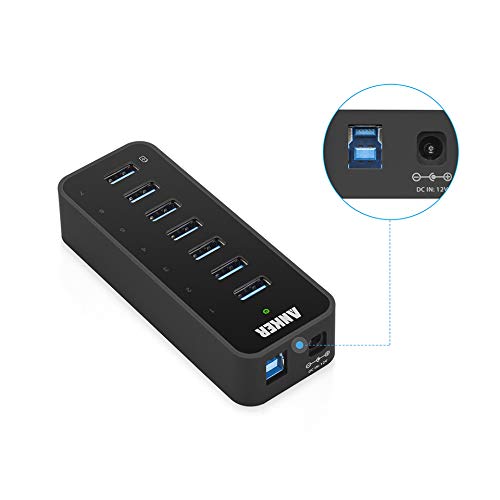

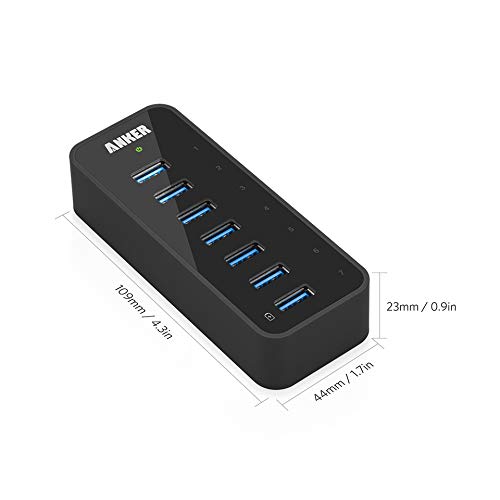


- Compact palm-sized grip (4.3 × 1.7 × 0.9in) and lightweight design (2.9oz).
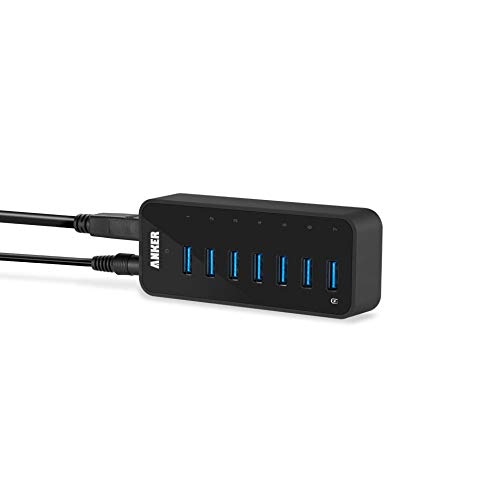
- Easily add 7 USB 3.0 SuperSpeed ports to your PC and enjoy data transfer rates of up to 5Gbps for faster sync times. Backward compatible with USB 2.0 / 1.1.
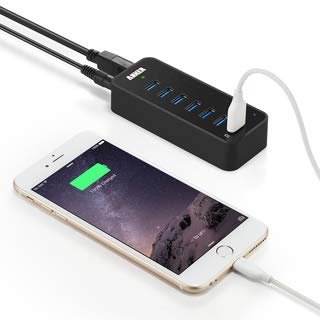
- 7th data port also delivers BC 1.2 charging speeds of up to 2 amps, while the other 6 ports charge at speeds of up to 0.9A each, with 6 amps overall among 7 ports.
- High-grade chipset and 36 watt adapter guarantee steady operation. Supports plug-and-play and hot-swapping. No installation of drivers required for Windows XP / Vista / 7 / 8 / 10 or Mac OS X 10.2 and above.
- Package contents: Anker USB 3.0 7-Port Hub, 12V / 3A power adapter, 2.7-foot USB 3.0 cable, welcome guide, 18-month hassle-free warranty.
-
Information
-
Twitter
-
Pinterest
-
Youtube
-
Facebook
Marcia Libosada
Works
Initially, I thought it was dropping connections. But after resetting it once, it has been fine. I have 5 external HDD's plugged in for various backup tasks using Carbon Copy Cloner and Time Machine. Some of my initial backup tasks were aborted because of "changed location of volume". After powering everything down and disconnect/reconnect of all cables, it seems to be working fine. Time will tell. I will update if there are more problems. I bought this hub specifically because of the orientation of the ports. The hub is adhered to the desktop and the ports face up, it is easy to connect HDD's for temporary use. The case is plastic but seems well made. There are no mounting holes but for my purpose a few blobs of Quake Hold suffice. You could also use double stick tape. The connection LED's are small numbers, are blue and not too bright. There is also a small green power LED. The blue led's light when there is a USB device connected and recognized. They also stay on while Drives are hibernating. My hub is actually attached to my Airport Extreme router so the drives are available on my network. My computer is a Mac Mini and it is also used by a Macbook Pro for backup.
Veronica Guizar
Will not work with External Seagate backaup drives
I gave this a 1 star rating because it will not work on my 2 external backup drives. My os immediately rejects the items & responds with a message about my device caused a system voltage error. When I contacted Anker-Amazon support they informed me that the product does not support Seagate external drives. BUT - nowhere in the product description does it say anything about not being acceptable for Seagate external bacxkup drives. The only response I got from Anker via Amazon was that were sorry I was experiencing problems & would fix the way they had worded their product description but didn't offer to remedy the problem by replacing it with a similar device that was compatible with Seagate External backup drives. This obtuse customer service is unconscionable. I've purchased several Anker products & power blocks in the past but will not purchase another Anker product again given this pathetic response from their support department. 2 days after posting this review , Anker refunded the full amount of the USB Hub, told me to keep it, and apologized for the problems I'd experienced. The hun, indeed no Anker hub, will work with Seagate external backup drives, but my satisgaction with Anker Customer Support has just amazed me. Changing my review from a 1 star to a 5 star. This company stands by their products. I would recommend them to anybody in search of the products they offer. 5 stars Anker, for having my back!
Elfaris Zaki Sirgyous
Thumbs up.
YASSSSSS. A HUB THAT WORKS. I needed a hub for my Macbook Air, since the freaking thing only has two USB ports on it. How hard could it be to pick a USB hub? Well, after reading thousands of reviews from people whining about the USB hubs they purchased, which they claim had ruined their lives and killed their cats, etc.... This hub seemed to have slightly fewer of those reviews than the others, so I decided to take a gamble on it. (I do not have a cat and I like to live on the edge) I had concerns that the one external hard disk which stores all my photos (no backups here.. I live on the edge, remember?) would explode after plugging it into this hub AND trying to charge my phone on it at the same time. I can thankfully say that I have owned this hub for several weeks now, I am STILL ALIVE, my hard drive has not exploded, neither has my phone, which is now charged most of the time. And I can still use a USB pen tablet, an external CD/DVD player, and a Ubikey, without having to unplug anything. AND I AM HAPPIER THAN PEACHES.
Mehboob Ahmad
Great Device! Impressed!
I read the reviews, I looked at a few other devices, but I decided to give this one a shot... Let me tell you, I am IMPRESSED! The quality is amazing, and as you can see from the photo I have five devices plugged in and online. The blue lights indicate when a device is actually connected. My devices are across the board from MIDI-over-USB DJ equipment, an two-bay external hard drive array, two external USB drives, and they all work perfectly! The shiny area even comes with a protective cover which I've taken off before taking this picture. The performance through the device is phenomenal as well. I'm definitely buying another one of these for another computer!
Nikki Darling
Does exactly what it says it does, and now I have a lot of USB ports for all my devices
Needed to add a large number of USB 3.0 superspeed ports to my computer, and having a BC charging port is a nice bonus. Unfortunately the hub needs to be enumerated (connected to the computer) for BC charging to work, but that's not that big of a deal. Also the included USB cable is very short, which was almost a problem for having it on my desk above my desktop PC.
Amy Czerw
Excellent Hub. The best I've used.
I've long been an Anker fan of their products. Excellent support, top notch customer service and a quick response time whenever I've had inquiries or issues. As an IT Director I recently I had a need to purchase a few hubs for my job. We have a lot of ultrabooks, PC and Mac, that are very short on USB ports and needed a solid solution for our build center to allow for more peripherals. Webcams, microphones, Skype Headsets, speakers, data cables and other charging ports are always at a premium especially these days when laptop systems are so stingy on the ports to allow for the thinness in form factor. I've owned a ton of USB hubs at different jobs over the years, as well as for home use. Most have been pretty cheap in quality and function but not in price! I ordered the Anker USB 3.0 7-Port Hub to ensure that I'd have plenty of ports, be able to take advantage of the USB 3.0 speeds, especially for external hard drives for imaging purposes. It was very important to have charging port at a higher capacity for the multitude of smartphones used at this company. So far this Anker product has been excellent. It's well constructed, sturdy and does exactly what it says. In the past I've had some issues with cheaper hubs giving device conflicts in Windows XP, 7 and 8. No issues to date with Anker's product, and I love it so far. Make sure you plan out enough ports for all your devices before purchasing and always opt for a few extra ports in case you add peripherals over time. You'll never wish you had less. Also if you have to choose between USB 2.0 and 3.0, go for the 3.0 and future proof yourself. You'll be glad you did with these transfer speeds.
Quintin Yates
Hankering for an Anker'in
I was looking for a sleek and compact 3.0 USB hub and this fit the bill. Came in a timely manner and upon opening the box, everything was neatly pckaged and there was even a note at the bottom that asked if I was happy. With this packaging and sleek designed Anker 3.0 USB Hub, I was very happy. You do gotta have both plugs plugged in so everything works. At first I only plugged in the power and was scratching my head to why my keyboard lights were on but no function. Come to find out, the USB cord wasn't plugged into my computer. My own idiocy, oh well. I've built my hub into my desk and I like it even more. it hides under my monitor stand and you can't see the hub at all. Which is exactly what I was going for. Overall, I'm very happy with this 3.0 USB hub and will buy another if I ever do need another. If you got any questions, feel free to ask.
Dean Tii Dezorder
Great Powered USB 3.0 Hub!
My computer only has 2-USB 3.0 ports, its from 2012 thats why. The first USB 3.0 hub I bought was from Anker as well, I bought the black aluminum passive 4-port hub. But after I accumulated a few things, I filled those ports up quickly! When you just have a few things to plug into your notebook, a passive hub should work fine. But if you have a lot of devices that require power, like hard drives, flash drives, USB audio cards, etc, you need a hub that supplies the needed power. One of the things that I've always liked about Anker hubs, is that they don't restrict the bandwidth through their hubs. Whatever speed your computer is capable of sending and receiving data from its USB port, the same will be consistent through the Anker hub. All the hub does is expand one port into 7 ports, and supplies the needed power, up to 36-watts to the available ports in the hub. Now keep in mind, this USB hub uses a big DC adapter, so your going to need some space to plug this baby in! This is yet another well made product from Anker. Its a very simple device, but when connection options are limiting, this little device, expands your options and thus, makes life easier. If your looking for a USB hub that is fairly priced, and made from a great branded company, look no further then this one. 5 out of 5 stars.
Marsha Robinson
YES, this will handle multiple Passport hard drives!
The question has been asked several times--will this support multiple hard drives. Well, here's what I find. The answer is a resounding "YES". I have currently got 5 portable hard drives (4 WD Passport, 1 Seagate) of varying sizes from 1TB to 4TB, and not only am I able to transfer files at full bus speeds, I can go between drives at full bus speeds! It's important to note that this will not work without the wall wart plugged in, but once you do, it works phenomenally well! I read review after review, and nobody was definitive as to whether or not it would support so many drives. I bought it on a chance that it would, and I'm not disappointed. I don't have the constant connect/disconnect issues I had when the Passport drives were plugged directly into my laptop (HP Spectre x360). There was all of this debate about '2.0 vs 3.0' and what not...but this seems to alleviate all of those issues. I'm here to tell you...I'd get 30 seconds to 2 minutes before I'd lose my bluetooth mouse and all functionality of the Passport drive (Seagate never had a problem). I'd have to disconnect the Passport, wait for everything to recover, then reconnect. If you had it running (watching movie, playing videos, etc.) it had no problems, but once you let it stop and sit for just a few seconds, it would shut down. This thing is awesome. I'm getting 80-100Mbps transfer rates from one drive to another, and that's unheard of. 1TB of data takes about an hour or so, which ain't fast, but at least it's going! I highly recommend this device, and will likely be ordering another one for my desktop PC.
Inez Rubio
A powerful usb 3.0 hub
I bought this Anker USB 3.0 7-port hub to replace my old USB 3.0 hub. The old one was having trougle with 2 external hard drives (it was a powered hub). The Anker hub has no trouble with 3 external hard drives connected. The extra charging port is very useful when I need to charge my phone while using the computer. With the number of available USB ports, I have enough to connect all my peripheral devices to one hub. When I need to go mobile, I just need to disconnect one USB cable, power cable and external monitor. There is an indicator light next to the usb ports to show which ports are active. This is really helpful to figure non which device is having a problem really easily. The sockets facing upwards makes it easy to manage all the cables connected to the hub without wasting space.