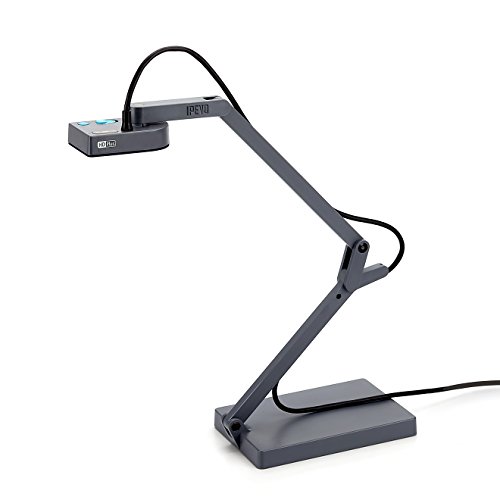
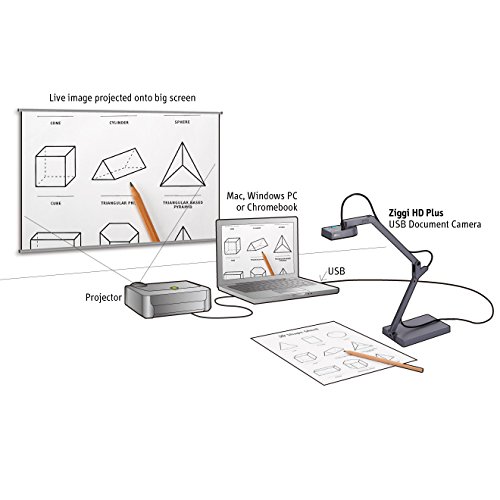



- 8.0 Megapixel camera; For Microsoft Windows Vista, 7, 8, 8.1, 10, Mac OS X 10.9 and above and Chromebook
- Ziggi-HD Plus's high-resolution 8 Megapixel camera can achieve up to 3264 x 2448 pixels when directly connected to PC or Mac. Max shooting area: 13.46” x 10.04” (342 x 255mm)
- Up to 30 fps live video capture (at full HD)
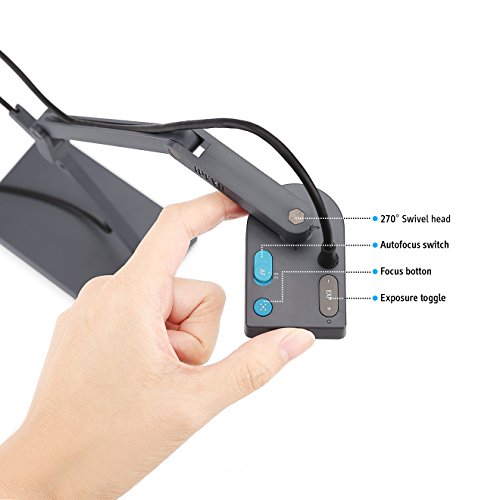
- Multi-jointed stand and swiveling head for effortless, versatile capture
- Full autofocus lens; USB 2.0 Video Class (UVC) interface
-
Information
-
Twitter
-
Pinterest
-
Youtube
-
Facebook
Sohail Imdad
A must-have for teachers, incredible display, amazing zoom, so many features!!!
I have used an older model of this document camera for the past few years in my kindergarten classroom for everything from showing illustrations in books larger so that the kids can see the details to dissecting owl pellets (again, so the kids can see the details) to demonstrating hands-on math activities. I recently moved to a new school where they didn't have these document cameras, or any for that matter. I thought I could do without one but within the first week I realized that I've become completely dependent on using a document camera in my everyday instruction...so I bought my own. I didn't really want to spend $100 on one (at my previous school the corporation had purchased them for teachers to use...it was fabulous) but it came down to the quality of my instruction and of course it's worth the money. The only thing I would change about this item is that the cord can be somewhat cumbersome (I plug it into the USB port on my desktop computer and then use it on top of my kidney shaped table where I work with the kids) when it's stretched across a few feet to get where I need it to be but I wasn't under the impression that it would be wireless or anything so that's not a defect with the product, just a wish if I could have the perfect document camera that would fit into my budget lol. I am able to zoom in on size 12 font on a page and enlarge it on my SMART board (similar to a Promethean board...basically an interactive whiteboard) to letters that are over a foot tall. I usually keep it at a distance that allows me to display the entire page on which we are working so that the kids can follow along with me. The flexible arm allows it to move into unlimited positions. I also love the auto focus feature for when the display is blurry. Finally, just today I used the screen capture feature when I needed to keep something displayed on the screen for the kids but also needed that space for something else. I was basically able to screen shot the page that was being displayed and then proceed to move the document camera to clear the space (but the kids could still see the image which I had screen captured). Obviously I would recommend this document camera to anyone who is in the market for one. I have now owned two and loved them both. I tried to get by without one but as a teacher this is one of my MUST HAVES!!!
Gail Conley
Survived heavy classroom use!
I wanted to have several months with this before writing a review. (pet peeve: reviewers that rush to put out a review after using the product for less than an hour, these are typically the reviews that get the most "helpful" clicks simply because they were first. There are also typically the most useless reviews) I used this almost every day in my classroom (Algebra II honors). It works really well, even in low light. Depending on what we are doing I will sometimes have the lights on or off, in either case the Ziggi is able to project a clear image without additional lighting. I did notice that to get the best image fit you need to position the Ziggi so that it is to the side of what you want projected. Positioning it at the top will force you to change the aspect ratio and you get a fuzzier image. Still useable, but best results I found were from the side. The arm sockets are still stiff after heavy use and hold whatever position I put them in. The camera has an auto-focus button right on the top so you don't have to go to your computer to refocus. It works perfectly and I have no complaints about it. I would easily recommend this for classroom use.
Sijo S Karthi
Simple, Solid
The Ipevo Ziggi-HD is definitely the best value / most minimal presenter camera I've used. It's lightweight, carry-able, and really simple to use. It has almost no extraneous features, and in general just works well. Pros: Really good visual quality. Very few things to fiddle with or set. It just works. Cons: For presenting in darker rooms, a light would be nice. It's portable, but the shipping cardboard box takes up more space than, say, a more expensive compact presenter might. The one thing you may have to set is contrast, as the dynamic range isn't particularly great. This is a totally solid presenter. It's a good USB camera that hooks up to your computer, and does what it should. There are a few things that could be a little better (low light performance, dynamic range, a light for low-light situations), but all of that pales in comparison to the raw value the low price provides.
Lindsay Henderson
Ipevo Overhead Book / Document / Instructional cam at a reasonable price.
Multi-use overhead scanner for books, videos, 3d objects, copying at a reasonable price. The company provides various models to meet your needs. This one has an 8-megapixel camera. Free Software for both Apple OS and Windows that is easy to use and you can control the camera many features from the computer. The weighted base keeps it from falling over and the arm allows for adjustments when using. Taking photos or pdfs are a breeze with the auto focus feature allowing for sharp images. The ability to record video with sound for training videos is a plus. Live use with an overhead projector makes it must have in a classroom, and at very reasonable price. Power for use is supplied thru the USB connector so easy to setup. Even though the camera is very sensitive under dim lights I do wish that there were built-in LEDS in this model for use when needed. Ipevo does offer one but only at 5-megapixel model, check their website for the various models and features.
Kara McKinney
Great for large artwork
Worth every penny will recommend to any artist. I had a hard time scanning pictures of my large prints (18x24)Scanning each part several times and more software to put the many scans into one photo it was a pain. And sometimes the software didn't do a good job but with this I'm able to snap pictures of my large prints all in one picture makes it easy and quick
Siyathemba Mangwana
My wife and her students love this. For the money you cant go wrong ...
My wife and her students love this. For the money you cant go wrong I mean it doesn't have all the extra features that some of the other more expensive ones do but it works great for putting stuff up on the board to show the students the information. My wife actually told me that her 3rd grade glass told her to tell me thanks for ordering this. I had just heard her talking about how her new school didn't have any and how helpful it can be so I searched on here and ordered one for her. Would recommend to anyone.
Stacy Smith
Good for book scanning.
I love this little document camera so far. It works really well for scanning books. (Use the timer feature, hue all the way down, increased constrast. It also helps to use a piece of glass to hold the pages flat.) Now I can read any book I want. Libraries and used bookstores are interesting again. That said, this generates enormous files. You will need an app that can compress them. (I use AABBYY FineReader for both OCR and compression.) If you're blind, you may be better off with a portable flatbed scanner. I've found that scanning with a document camera, I need to look through and check visually whether things are aligned and photographing correctly. (That said, sighted people are terrible at being blind, and it wouldn't surprise me if I'm missing something.)
Tina Bansal
Best customer service ever!
Very happy with this item when it arrived, but it was a month past the one year warranty before I got a chance to really sit down and use it. Unfortunately, it had quit working. Contacted seller and experienced the best customer service I've seen with any vendor. Multiple conversations with tech support - very helpful, but the item just couldn't be made to work again. I was past the warranty period, however Ipevo allowed me to return the camera for a replacement. Very pleased with their service and support. Although I don't know why this item worked and then quit, but there's a chance it's because I had it connected to a powered USB hub the whole time. Just as a precaution, I'd recommend disconnecting it from any power unless you're using it, just in case. The product itself is sturdy and very good at autofocusing and capturing documents. Highly recommended.
Alfredia Hopkins
Can't teach without it
I don't know how I would teach without it. I've used it with a Dell desktop computer and a Chrome book and it works beautifully with both. The software you can download from their website for free to go with it is amazing as well! I've used this nearly every single day all school year. It is hands down the best price you will find for a document camera, and it is compact. It's not super bulky. I have the kind that plugs in through USB (not wireless).
Mick Omerta Chinchio
Amazing camera but there's a flaw in the "Presenter" software when used with Windows 7 on some computers.
Update: Removed about half a star - read on. I was desperate to find a camera solution for a large online engineering class. Took a chance in the huge morass of cheapo webcams and stacked reviews and this little camera is completely awesome (I'm using it with a Windows 7 PC). Fast, sharp - excellent camera controls and the Ivepo "Presenter" software works perfectly with BlackBoard Collaborate sharing and allows image rotation, focus/zoom all the good stuff. This is very well designed, functions perfectly so far and is a complete pleasure to use - their design team has a lot to be proud of. I've bonded with it already. Oh, did I mention that it folds up to about the size of a stack of 3 x 5 cards? Update: So here's the bad news. The "Presenter" software which is otherwise a pretty good program includes an "auto crop" feature, ostensibly designed for document scanning. I can't get it to work (and I can get many things to work). It locks up the program on the several Windows 7 machines and has to stopped with the Windows Task Manager, which is inexcusable. The rolling menu selector in Presenter requires that you scroll past "Auto Crop" to get to other functions and that kills the program on W7 machines, which is fatal when you've got 47 students online. A bunch of trial and error gave me the result that it was particular to a series of computers we use (HP windows 7 machines) - others would work okay, the point being that there may not be a guarantee of good performance from the software. The software should be better than this... So what do you do? If you're stuck with W7...there's a chrome app that runs the camera in snapshot mode (only). Faster, cleaner and has all the camera controls. For bulletproof online work, do this. Also VLC will display it from the "capture device" menu (it's just a web cam, after all) but no camera controls. If you're running W10 then don't worry about it - you just won't be doing any scanning. This kind of workaround shouldn't be necessary, but for a great camera (which this is) it's worth it.