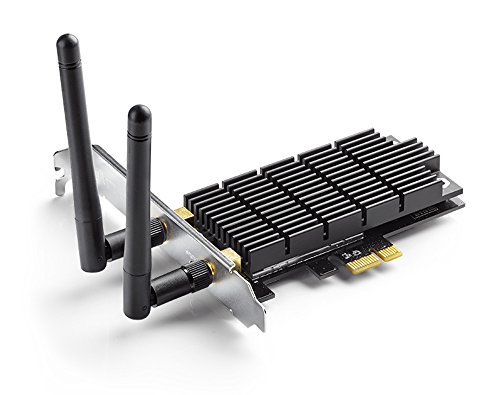

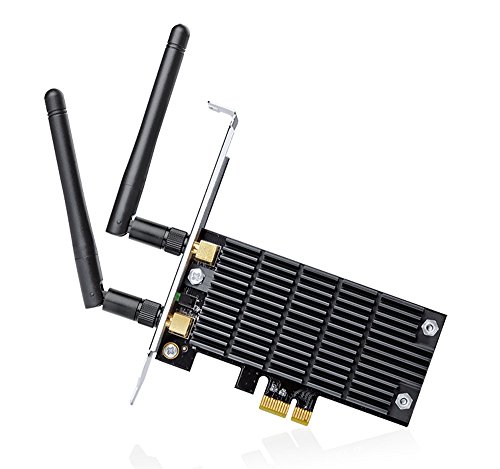


- Lightning Fast Speed:Upgrade your WiFi card to 1300Mbps Wi-Fi speeds. Frequency 2.4 GHz or 5 GHz
- More Stable Performance: Heat Sink technology distributes heat away from core components to improve reliability and performance; Built for high-performance computing, such as online gaming and 4K Ultra HD video streaming
- Ultimate Range: Increased wireless range with 2x external antennas to ensure a greater range of WiFi connection and stability. Detachable antennas. Modulation Technology: DBPSK, DQPSK, CCK, OFDM, 16-QAM, 64-QAM, 256-QAM
- Compatibility: Supports Windows 10 **Please upgrade to 17025 Insider Preview Build** / 8.1 / 8 / 7 / XP
- Industry Leading Support: 2-year warranty and free 24/7 technical support; J.D. Power Ranked TP-Link "Highest in Customer Satisfaction for Wireless Routers in 2017"
-
Information
-
Twitter
-
Pinterest
-
Youtube
-
Facebook
Casey Strunk
Works great!
I purchased this recently because my Wireless N 2.4GHz dongle I had laying around was not cutting it for my PC build in my new location where I can't do ethernet or ethernet over powerline. Installed the card and it fit rather snug. Loading windows, it was not recognized, but as soon as I installed the driver from the disc on Windows 10 with Fall Creators Update, it sprung into action right away and I was able to connect to my 802.11ac router right away. Speed is VERY fast. My only 802.11ac device has been my iPhone as my MacBook Pro has only wireless N. The speed difference is night and day. I get 88Mbps symetrical up/down which is what I get over ethernet with FiOS.
Kyle Garcia
Works great with Ubuntu 18.04
Ubuntu 18.04 requires you to use the proprietary bcm driver, so you need to install the card and connect your Ethernet wired port to your LAN (with Internet access). Run the following to install the drivers and reboot. sudo apt-get install linux-headers-generic sudo apt-get --reinstall install bcmwl-kernel-source For Ubuntu Desktop use should see the wifi icon at the top right of the screen. For Ubuntu server run sudo nmtui. I upgraded from a TP-LINK TL-WN781ND Wireless N150 (2.4 GHz) which would max out at around 33 mb/s, but with the TP-Link Archer T6E AC1300 I was getting 100+ mb/s using Spectrum with 100 mb/s plan. I know it can go faster, but to finally get my full Internet speed over 5Ghz is worth it. If you are using Ubuntu Desktop/Server it works perfectly.
Cristy Ranae Culler
Great Value
One of my best purchases in awhile. I installed this and ran a test and my upload and download speed are now maxed out for my IP. Before my old network card was about 8x slower. I don't lag out of games, I can actually watch 4k videos on youtube without waiting for buffer. The heatsink is also a good size and I think it helps with my temps as I get better frame rates but that's probably due to driver updates. The antennas are also smaller than my old ones and I get better range. No complaints at all on this and the price was good too. I think that there is a model higher than this version but I don't pay enough for my internet to take advantage of those speeds.
JoAnna Wass
Works Well
This unit is a bit more expensive than some, but it's really not that much in the grand scheme of things. I like the fact that this unit can work on both the 2.4 and 5 GHz wifi bands Today's access points typically offer both, and this increases the odds of establishing a good connection. Installation was straightforward. The unit ships with a miniature CD-ROM disk with the installation software, which means the computer must be positioned to play the disk horizontally. TP-Link specifically warns us NOT to allow Windows to auto-install a driver for this card -- the software on the disk is to be used. I can confirm that the installation from the mini-disk went well and the card worked immediately. So far the card has worked as expected with no problems. This seems like a reasonable choice for those needing to add wireless capability to a computer using this style of card.
Sandra Lowe
Pretty awesome card
As an all around ive been rather satisfied with this product. It arrived very quickly from when i ordered it. Installation was quick and easy, the mounting bracket for the Mid ATX case was already installed on it so it was for the most part plug and play. Only thing worth mentioning was i read somewhere online it comes with native Windows 10-64-bit support. It did not for me, i had to run the install disc with it, which i simply ran the driver only installation and it was as quick and easy as the physical installation. Picked up my wireless network immediately, and i could connect to both the 2.4 Ghz and 5 Ghz range within seconds. Worth mentioning i am about 30-40 feet away from my wireless router. Ran a speed test and got 27 Mbps Download / 41.76 Mbps Upload (i purchase a 30 Mbps Up/Down plan from my ISP) I have not had the card long enough to test its longevity with the wireless network, but i don't assume there will be any issues For the price, i would recommend this card to anyone looking for a wireless network speed equivalent to any wired network.
Dana Vironet
So far I am happy! Replaced Powerline Adapters!
This adapter is perfect for my needs. The connection is solid and I'm able to get my ISP rated speeds (100 down/10 up) using the 5GHz network! I haven't tested the 2.4GHz network because I am only about 50 ft from the router and I get full 5GHz signal at my desk. Before I bought this wifi card I was using TP-Link AV600 Nano Powerline Ethernet Adapter Starter Kit and I was only getting 30down, 6 up. I'm definitely pleased so far with this purchase. This card is perfect for games and 4k streaming*! The only complaint I have about it is the fact that it isn't plug and play with Windows 10 yet so make sure you download the driver from the TP-Link website before you try to connect! *This post will be updated in 6 months to update on reliability.
Jessica D Hall
(EDIT) Make sure you use the Broadcom drivers, fantastic card!
(This review is for the Archer T6E/AC1300 PCIE card) This is a great card! Coming from an N600 Netgear USB that would drop connection, despite me being well within range, every couple of minutes and then spit out DNS errors this was a huge step up! I plugged it into my motherboard, booted it up, installed the latest drivers. Now you see... that's a problem. The 2016 drivers were extremely buggy, the card would randomly cut out connection every few minutes like my Netgear. But after going back to the 2015 drivers (V1_151105) it has been FANTASTIC. I game and stream HD content and this hasn't let me down thus far, first day having it, will edit later on as time goes on. EDIT 06/22/2018: Still a complete rock to this day. The only issue I've had is Windows Update causing the driver for the wireless card to crash when downloading a list of packets so large it literally caused Windows to have a mild heart attack, freeze, and kill the running driver for the wireless card. It was as simple as going to gpedit.msc and killing off Windows Update and the problem hasn't happened since. Update 10/13/2018: Still an absolute rock. Love it. Update 04/27/2019: I found the TP-link drivers to be unstable when downloading large game files. Turns out the T6E uses a Broadcom BCM4360 chip and the actual drivers for the chip are way more stable, and the range increases pretty significantly with this driver. All that's needed is to search for the drivers, download the windows 10 variant, unzip the folder. After the files are unzipped, uninstall the AC1300 in Device Manager (do advanced uninstall so previous drivers are deleted), reboot, and when the device pops up as an unknown device, choose to search for your own drivers on your machine and select the file labeled "64" in the broadcom drivers that were unzipped. After that, you'll actually see a jump in download speed and a drop in ping. I just wish TP-link did a better job with drivers.
Jenny Omeasoo
Rough but amazing
Like many before me, I had problems with the drivers and I couldn't get it to install right. I had internet access but had constant lag spikes that made it almost impossible to play video games. However, after completely removing all evidence of my previous wifi card, rebooting, and reinstalling the drivers, and after losing my mind from all the bad experiences I've had getting a card to work right (this is my third), I FINALLY have a BEAUTIFUL wifi connection. It's super smooth and I honestly couldn't be happier. It took a lot of hair pulling out and a lot of research but it was totally worth it.
Gurwinder Kaur
Great basic card with great gaming performance
didn't use driver included on CD, I just installed the card and when the computer booted up windows automatically installed the driver and the card has been working perfect ever since. the computer the card is installed in is a self built gaming rig running windows 10. all games run lag free and connection with my router is stable. the only advice i can give is to make sure your computer has a PCI Express X1 slot (PCI, PCIe X1 and X16 are different). if you want windows to automatically install the driver make sure the system has an internet connection either trough Ethernet or however it was connected before installing the card. if you cant connect the system to the internet then us the CD driver. if the CD driver is outdated windows update should install an updated driver once connected to the internet. PCI= old PCI interface. PCI X1= new version of PCI that is for expansion cards to add functions not built into the motherboard. This card uses X1 PCI X16= replaced outdate AGP slot and is for video cards, slot is longer than X1 and normally has a retainer clip on the back of the slot. there is an older version of PCI, I cant recall the name but its long and black. if you have that slot your system is likely running either windows 3.1, 95, or maybe 98. ***update 4/12/2016**** still working great, no driver issues and connection rarely has problems and when it does its normally the router at fault. PS thanks to those of you that voted this review as helpful and made it the top review for this item. its nice to know people find it helpful Update 4/3/2017: Card still works great, the custom computer this card is in has been retired to file server duty and now runs Windows server 2008 R2 instead of windows 10. I would no longer recommend this card for gamers as there are far faster cards out there such as wireless AC cards (requires an AC router to make a difference). Also wouldn't recommend as the primary connection method for a file server (I use ethernet). This card would be quite useful still for users who do not wish to do extreme gaming ( basic internet based games are ok). For simple internet usage (social networks, YouTube, Netflix, ext.) This is a more Than Able card and provide many years of reliable service.
Mian Sohail Farooqi
Easy installation. Excellent performance.
Bought this to move my desktop PC from a wired connection to a wireless connection. I was concerned I would lose speed and consistency of connectivity moving to a wireless connection, but that was not the case. Speed remained the same and the connection has been consistent. Installation was a breeze. For reference, I am about 15 feet from my router with a single wall in between.