

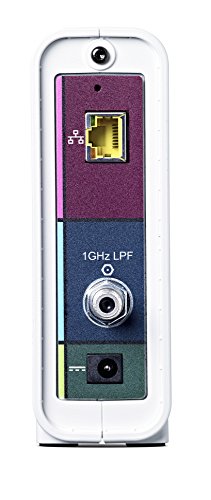
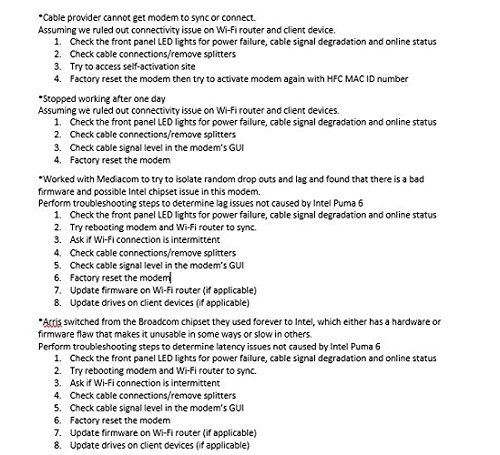
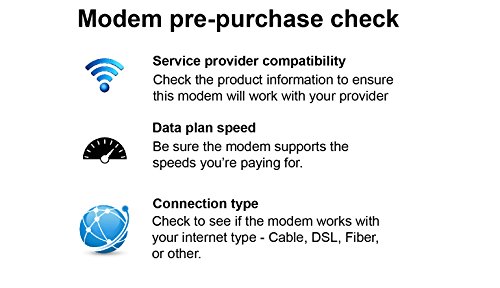

- Approved on Comcast Xfinity, Spectrum (Charter, Time Warner, Brighthouse Networks), Cox, Mediacom, Suddenlink and most other US Cable Internet Providers. NOT compatible with Verizon, AT&T or Centurylink. REQUIRES Internet Service.
- 32 Download and 8 Upload Bonded Channels capable of up to 1.4 Gbps download and 262 upload speeds. Recommended for Internet Plans 250 Mbps and above.
- Wired modem only. Does not include WiFi router or VOIP Telephone adapter. Gigabit Ethernet port to connect to PC or Router.Compatible operating systems: Windows 10,Windows 8, Windows 7 Service Pack 1 (SP1),Macintosh 10.4 or higher,UNIX,LINUX
- Ideal for UHD movie streaming, gaming and multiple device use at same time. Future proof your system.
- 2 year warranty with US based customer service. Refer to the Quick Start Guide and Installation video.
- Supports IPv4 and IPv6 – the latest Internet standard
- Note: Packaging may vary.
-
Information
-
Twitter
-
Pinterest
-
Youtube
-
Facebook
Dana Vironet
That's an upgrade
I had been using an older model Surfboard. Slightly dated at this point but was the recommended model not long ago. My wife and I were complaining of the speeds, 30 average out of paying for 150mbps. When I wired a single computer direct to the router I got up to 100. Then I realized the modem was only rated for up to 150, and you're never going to get the full speeds out of that. So instead of wasting my time with the cable company, I spent more money than I should have on the latest and greatest SB6190 with a Google WiFi to replace our aging router (I'll leave reviews of that to that page). Combined, as you may see in the picture I uploaded, not only am I getting the speeds I should be getting, but significantly more - 190mbps. Now that's at 6:30am with no other active devices, but even in peak conditions it's holding above 100 most of the time. That's a pretty decent upgrade!
Marcia Libosada
Love it my speed is great but read my note if you buy this item.
Bought this because Comcast sent me a letter stating that my old Modem was not keeping up with their speeds. I chose it from a list that they provided. The speeds are so much faster since I got it. One thing though, when I hooked it up I used the old Ethernet cord that was on my old modem and I could not get Amazon prime or Netflix to open and my speed was fluctuating Tried everything including a long time on the phone with tech support who also could not figure out what was wrong. Then just on a whim I decided to remove the old Ethernet cord and use the one that came with the modem. Amazingly enough all the problems disappeared immediately, got onto Amazon and Netflix right away and the internet speed leveled out to very fast without any fluctuation. I guess all cords are not created equally.
Domenika Kazdova
Works for a Single Woman in her Heavy Internet Using Home
I’m a single female who was having marked internet issues and refuses to rent a modem from my provider. I consider our household a heavy internet-using household. I am a photographer who backs-up/uploads large photos to the cloud. I have a son who games, games a lot. We also have cut the cord, as in everything, streams. We have 4K TV’s and smart devices including Echos and Hue Lights. I have an elderly mother who lives with me and does hours worth of HD streaming per day. In short, Internet speed and consistency is important to our household. My son and I are also Mac users. We have two MacBook Pros, two iMacs and an assortment of iPads and iPhones. It was important to me that my new modem was A.) Easy to figure out. B.) Reliable. C. ) Could handle speeds up to 1 gbps, as we are considering that upgrade. D.) Was Apple/Mac-Friendly. I have owned this modem for a solid three months now. All it took was a call to Mediacom and reading numbers off the bottom of the modem to get it set up. Easy breezy. It seems to work well with my several-year-old Airport Router (An Apple Brand). In fact, this new modem checked every requirement I had with flying colors. I immediately noticed a speed hike. Our speed tests prior to this new modem were routinely 10-30mbps, measured at different times and places within the house. Immediately after plugging everything in it we shot up between 160-300 mbps depending on what we were doing, how much internet we were using, and where we were in the house. We love the modem. Today we only have one Internet issue, but we have narrowed that down to an LG Smart TV we purchased at Christmas time. It seems the modem in the TV is flaky as it continually buffers and stops, but if you hook up a different streaming source to the tv such as an APPLE TV to watch HULU or DirecTV... no problem. So, no fault of this modem or our Apple router. I would highly suggest buying this especially if you are in one of those $10/month contracts. You will have it paid off in just a few months. When you outgrow it just sell it! This router is genuinely trustworthy and easy to operate. If you found my review helpful please click/tap the yes icon. Thanks so much for stopping by!
Tammy Sue Mccoy
Don’t listen to the psycho puma trolls! This is a great modem for normal and sane people.
Seriously who are these people who keep posting, “DO NOT BUY THIS MODEM. IT HAS A KNOWN PUMA CHIPSET MALFUNCTION”, as if they are all psychopathic automatons? I mean they all sound like rabid cult members with the way they write their reviews. Unless of course it’s the Cable companies writing those ridiculous reviews because they don’t want their customers getting what they actually are paying for, their peak internet strength? I don’t know who these people are but they are either insane or just plain weirdo trolls. Here’s my message, “DON’T LISTEN TO THE PSYCO PUMA TROLLS. THIS MODEM IS A ROCK SOLID AND STEADY PERFORMER THAT BLOWS AWAY THE COMPETITION!” This modem is awesome for normal and sane people. If you are a normal, kind, upstanding and reasonable person who is looking for a super fast modem that delivers the internet capacity you actually pay for? Then this modem is for you and will last for years to come. Plus don’t forget to follow the instructions to hook it up properly and then also don’t forget to call your internet provider and give them the model and serial number of your new modem and ask them to activate, register and re-provision it for your account and their service. And voila! Lightening fast speed at your fingertips. I highly recommend you pair this modem with this router below: https://www.amazon.com/TP-Link-MU-MIMO-Tri-Band-Streaming-Comprehensive-Antivirus/dp/B01DXVK3KY/ref=mp_s_a_1_1?ie=UTF8&qid=1549431679&sr=8-1&pi=AC_SX236_SY340_QL65&keywords=tp+link+ac5400&dpPl=1&dpID=41UG2HxV%2B1L&ref=plSrch You won’t be disappointed. Now again, don’t listen to the psycho puma trolls and rest assured in your purchase of this fantastic modem. Cheers 🥂.
Laraib Khan
Wow! Buy this thing! :)
What a difference! The cable provider told me I could buy a faster modem and just callback with the serial numbers if I did not want to rent from them. I had no idea! I got this bad boy yesterday and WOW! Our download speeds are so much faster! My husband downloaded a Xbox update last night, normally that would have taken 30 minutes to an hour, but with the new modem it took 13 minutes! Definitely happy. Some tips: *Make sure you call your Cable provider first so they can register the device with their network. *After the cable provider says you are good to go, unplug your old modem and plug in the new. *Make sure you follow the directions and plug everything in the order it tells you. This definitely mattered. :)
Tracy Ross
Most Cost Effective / Future Proof modem for Xfinity / Cable users.
This is the most cost / effective modem to purchase right now for Xfinity and most cable internet users. Right now your options are either: a) 16x4 modem that supports up to 686 megabits like this: ARRIS SURFboard SB6183 Modem 16x4 Docsis 3.0 Cable Modem $60 new b) this 32x8 modem (this review!) that supports up to 1400 megabits (or 1.4 gigabits) $90 new ARRIS SURFboard SB6190 32x8 DOCSIS 3.0 Cable Modem c) a Docsis 3.1 hybrid modem that supports both Docsis 3.0 and 3.1 standards like this: Motorola Ultra Fast DOCSIS 3.1 Cable Modem, Model MB8600, plus 32x8 DOCSIS 3.0 160-$200 new The 32x8 channel standard is likely going to be last / fastest version of anything coming out of the DOCSIS 3.0 standard. With a 32x8 configuration, you could have Gigabit internet with this modem. Right now, this one, especially one of the used SB6190s, makes the most cost effective sense because it will allow you to jump onto any of Comcast's 250, 400, 1000 megabit plans without any kind of change. With more and more 4k content being released, it just doesn't make sense to save $20 used / $30 new by getting the slower SB6183. That unit will top out at 686 megabits which will need to be replaced in the next couple years. On the opposite end of the spectrum, it doesn't make sense to spend $160-$200 for a DOCSIS 3.1 hybrid modem as most customers will not be on a plan that will fully utilize this. Also, when we get to the point of having multiple gigabit internet plans, the DOCSIS 3.1 modems will no longer be hybrid and will be single chip modems costing significantly less than a modem that needs to support both DOCSIS 3.0 and 3.1. Get this modem now and you won't need to worry about upgrading this for easily the next 4-5 years.
Nancy Ward
Works well with Comcast/Xfinity and Google Wifi
If you read the negative reviews, they are mostly from gamers who are apparently upset that this modem is possibly vulnerable to a bizarre and rare viral attack which can take a slight edge off blistering fasts speeds needed for gaming. They are fascinated with "Intel Puma" and "Pumagate" or "Pumageddon." Well, for normal people, read on... Because Amazon often bundles reviews for multiple products, I want to be clear that I bought the "ARRIS SURFboard SB6190 32x8 DOCSIS 3.0 Cable Modem - Retail Packaging - White." I had this modem up and running in minutes. It works well with my Comcast/Xfinity Internet package and a modem like this can save you a ton of money over renting or leasing a cable model from your Internet service provider. I was also able within minutes to get this modem to pair well with a set of three Google Wifi routers. My whole house has a nice wifi field at this point and every device in the house seems to be able to get a strong signal. I'm very happy with the ARRIS SURFboard. If you are a gamer and you believe your life depends on the fastest Internet connection possible, use an Ethernet cable. If you are a normal person who likes to steam music and movies, send and receive email, upload and download files for sharing, this model will likely work very well for you.
Raptor Cat
Seamless and Beautiful Performance
I couldn't believe how tiny and cute at a glance, compared to the wireless gateway model I was leasing from Xfinity. So easy to set up, within mere minutes of unboxing. I have all Apple products so the white color matches all of my other products and peripherals. I should be happy with this modem for a long time (five years at least, I'm hoping) and will begin saving $132 a year in equipment fees as of my new contract beginning next month. I like how well it works with my Apple 3TB Time Capsule, and that I can easily and without interruption of my internet connection, switch between my home Wi-Fi network and ethernet, as I like to do. For instance: all that was needed for my purposes was two ethernet cables, one for connection between computer and Time Capsule... and one (which is included in the SB6190 box) from the SB6190 to the Time Capsule. (I prefer using my wired connection most of the time, and yet still have the option for wireless when I want/need it, such as for my printer, etc.) I have one minor complaint, and that is that the blue lights are way too bright at night, if you don't hide this in a cabinet or behind something, as to the blue lit icons on the front of the SB6190. Very happy and would recommend to my friends and family.
Jose Luis Lopez
I called Arris and man the tech was so nice! They confirmed my it was my ISP issues
This modem does its job. Nothing wrong with this hardware I give it 5 stars and I called customer support about an issue and rate it 10 out of 10. With that said let talk about issues I had. I have comcast.. I know I know... Its the fastest I can get in my area. I first call comcast to get the MAC address added and after that I did a speed test and I normally got 120Mbps download and 10 Mpbs upload. After installing the modem I was getting 60Mbps download and 5Mbps upload. I called comcast and after BLAH BLAH everything (I am a network admin) I already did they said I have a 3rd party and its not a comcast modem, the modem in which its on there approval list. I called Arris and man the tech was so nice! They confirmed my it was my ISP issues. I called comcast again and asked to modem "activation" and let them know I need my modem "re-provisioned". After that I went from and fake Onsite service call to proper internet speed. I was a 60Mbps down, 5Mbps up to............ 180Mbps down, 11Mbps up. When you buy this modem test your speed before and see what your paying for. If you have speed issues then its your ISP cheating you or bad activation programming. When you call your ISP you need to use key words as I have learned. They Are... Modem Activation And Re-provisioned
Imtiaz Uppal Imtiaz Uppal
Finally getting the speeds I pay for!
Upgraded from the SB6141. I was paying for Cox Ultimate 300Mbps service but only getting downloads of about 140Mbps. This modem fixed that and I now have the speed I pay for! Tips for Cox customers: You'll have to contact Cox Support to provision the modem. Once they have provisioned it, make sure that the service code on your account matches the speed that you are paying for. My account was coded for 170Mbps even though I paid for 300 because the saw that I had a 6141 and that it couldn't handle the highest speed. Once your new SB6190 is provisioned and working, go to your web browser and type 192.168.100.1 and count the number of Upstream Channels that are locked. This modem is capable of 32 channels, but Cox currently offers a max of 24 channels.