


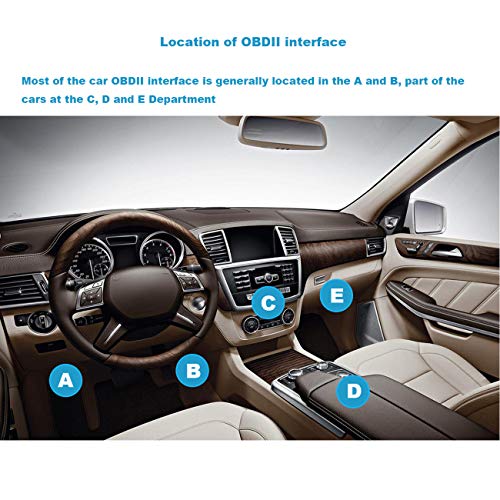


- EXCELLENT COMPATIBILITY – KitBest OBD2 scanner works on ALL 1996 and newer vehicles, SUVs, mini vans and light trucks sold in USA and in other countries or regions that are OBD2 compliant. Supports five OBD-II protocols: CAN, KWP2000, ISO9141-2, J1850 VPW and J1850 PWM. It is a mini car scan tool that DOES NOT take up much space on your car.
- 5 YEAR WARRANTY - 100% Money Back Guarantee; hassle free 5 years replacement warranty with 7 X 24 friendly and professional customer service. You can focus on your cars maintenance and health! Please be assured the purchase.
- READ & CLEAR Trouble Codes – KitBest OBD2 Scanner helps to find out why the Check Engine Light is on and save money by fixing simple problems by yourself! Read and clear diagnostic trouble codes and reset the Check Engine Light.
- COMPATIBLE APP & SYSTEM – KitBest OBD2 Scanner is able to work with Android and Windows cellphone and tablets by using the third-party OBD2 Apps. Recommend Apps including OBD Car Doctor (Free), Torque Lite (Free), Torque Pro), OBD Fusion, Car Scanner ELM OBD2, DashCommand and OBD Auto Doctor.
- DISPLAY REAL-TIME ENGINE SENSOR DATA – KitBest OBD2 Scanner allows you to read the real-time engine data: Engine RPM, Calculated Load Value, Coolant Temperature, O2 Readings, EOT, EGT, Throttle, Boost, Speed, Fuel Trim, Intake Manifold Pressure, Timing Advance, Intake Air Temperature, Prepare smog test and Monitor fuel economy, etc. Please note: this scan tool will NOT read AirBag, ABS, TPMS or Oil Change lights. Our diagnostics tool will only read codes for the Check Engine Light.
-
Information
-
Twitter
-
Pinterest
-
Youtube
-
Facebook
Eun Hee Lee
Cheap, Simple, Great!
I have bought several of these for my parents and I to have in their car at all times. They are small and stay hidden and work great! I use the Torque Pro app to monitor data and read codes in the vehicles I have, and this little gadget is all I need to take care of that. Many people worry about real-time speed of these cheap scanners, but from my experience, they do the job. I had an Amazon Fire 8 tablet running with 6 gauges monitored in real time, including ones like an RPM gauge. Though they did not update every millisecond, they were fast enough and much faster than I expected them to be. I don't believe it is worth investing 50 or even hundreds of dollars for some of the more expensive ones to get possible real-time speed increases for reading the data. I have seen mixed reviews on how well other scanners work as well. This scanner is consistent and holds up well for my parents and I. Would highly recommend for anyone looking to simply read codes or use for simple data monitoring. Can be a viable option for enthusiasts that want gauge display as a cheaper alternative to buying and wiring up actual gauges, but may slightly lack in reading speed depending on the setup. Remember that the type of app you use, how much data/gauges you display, and the processing speed of the phone/tablet displaying the information also has to be accounted for when looking to have real-time data display. Pros: Cheaper than most scanners out there. Reads data fairly quick. Very simple to use with Bluetooth connection. Reliability has held up between the few of them I have purchased. Works well with Torque App. Very compact design that doesn't stick out as much as others. Cons: A cheaper plastic design (When getting out of the car, I kicked one of these out once and the top came off and broke a chip inside. Tried to solder it back on, but it no longer worked properly).
Ma Lourdes M Felongco
So simple to use, and it works great!
I've been meaning to buy an OBD2 code reader for... well, for years now. I kept telling myself I only needed one of the cheap ones that just covers the basics--you know, the ones they sell for $40 at every parts store across America. Every time I considered seriously buying one, it seemed I was short on cash, or in a hurry, or whatever. A couple weeks ago, I was walking through my service department (I work at a large new car dealership) and noticed one of my senior techs had one of these little things. I asked him about it, and he excitedly rambled on and on about how these bluetooth interfaces--combined with an app on his cell phone--could do everything the traditional 'corded' models could do, and more. I was officially intrigued. Then when I found this model on sale here for a meager $11, I knew my time had come. Into my cart it went. Long story short, this thing is awesome! Just plug it into the car, turn the key to the ON position, pair the device from my phone, and then launch the Torque app. In seconds, I can read codes, clear codes, and more. I am even using the free Lite version of the app, so my total cost is only the price of this item. Such a deal. If you've got an Android phone and want an inexpensive way to interface with your car's OBD2 system, I definitely recommend this Kitbest adapter.
Craig Telfer
Best adapter of the the several I have used
Over the years and several different cars, I have used the Torque App. This adapter paired and worked properly with less effort then any others I have used. I think it is also the cheapest. With an in-dash Chinese Android radio I installed in a new Honda CRV , I downloaded the Torque Pro app and plugged in the OBD adapter, turned on "Bluetooth Search" on the radio, started the car, opened the Torque app and it found the adapter and paired with it with out even asking for the pairing code (0000). I have never seen that before! It connected to the ECU the torque is working perfectly. Installing the radio was a monster job but getting the OBD information was easy. Previously I have always had difficulty getting Torque to communicate with the cars ECU after it was paired. The picture is of my Torque gauge selection on a 10.1" Probably too much information but it's a start. The OBD adapter: perfect so far.
Leno Fountain
Works well and is very small. Con - you can forget it's there (and it's always on...)
This is my 2nd adapter. The first one I have works well, I'd think exactly the same as this one. However, it's gotta be 4x a large. It sticks out when inserted and, unlike this one, can be kicked/damaged when getting in and out of the car. This Kitbest one is very low profile, barely sticks out of the obd at all. That's great with one caveat. The obd 2 port in your car is an 'always on' port, meaning that when you pull the key and walk away from the car the 12v pin outs connected to your OBD2 port (in all cars, by the way) is still live. This mean, if you're planning on storing the car for a while or leaving it for a good long while this little (and all OBD2) connectors will be a 'vampire' drain on your battery. This isn't a concern with a healthy car/battery or a car that's driven regularly but in a long term storage situation or with a battery on it's last leg you want to disconnect the OBD2 scanner adapter when you're not driving. That's the problem with this little unobtrusive guy - you might forget. Not really a negative and I'm giving full stars - more of an informational warning.
Josefine Jensen
Awesome! I was able to reset my airbag fault easily
I bought this specifically to see if I could clear my the SRS airbag light that came on while I was working on my stereo and accidentally turned on the car with the airbag unplugged. There is nothing wrong with it, but once the airbag light is on it wont turn off without clearing the fault... typically by the dealer. I asked the question on Amazon if it could be used for that and others told me that it couldn't. DONT BELIEVE THEM. It does indeed have the ability to reset the airbag code with the right software. I first tried the popular Torque Pro ($5), but that only does codes for the engine. I then searched the Android Play store and found a free app called "DTC Fault Memory erase for VAG". It took less than a minute to clear the light. Saved me lots of money and time at the dealer. Thanks.
Watonia Downing
Everyone should grab one of these and attach it to the ODBII socket of their vehicle.
Bottom Line: this inexpensive device saved me hundreds and works perfectly fine. This is not my first scanner. I had previously purchased a traditional style battery powered cable module that worked very well. The only problem with it is that I lost the cable, and the cost to replace it was more than this entire module. As far as I can tell, this is basically a dongle that you can insert into the ODBII port on your car and just leave it, using the mobile phone application whenever data is needed. The only area that needs improving is the software menus; it works fine, but it is tedious to back in and out of the code descriptions if you need to read and understand multiple codes. Definitely not a deal breaker, or something that I can truly fault the device for- especially at this price.
Jennifer Krupa-Hawk
Actually works with Torque!
I was hesitant to purchase this item, having been burned by a similar OBDII reader a few years ago. I was pleasantly surprised to find that this product works perfectly, pairs to my phone with no issues, and is actually detected and 100% fully supported by Torque Pro. I initially had some difficulty getting the reader to pair with my phone. If you encounter this, pair the device while your vehicle's ignition is ON (or in the "accessory" position), but NOT STARTED. This fixed the problem right away, and the product works perfectly now. Different car makes/models may work differently; I have a 2019 Ford Fiesta. You're jealous. Anyway, this reader works 100% for codes and live data. Once I learned the trick for getting it paired (which I might have known if I hadn't thrown away the instructions), I had no problems at all. Highly recommended. FYI: some OBDII readers like this come with a generic MAC address, like 11:22:33:44... This works fine if you have only ONE reader. If you plan on using multiple readers in multiple vehicles, your phone would confuse those readers. THIS reader has a real, unique MAC address, so multiple readers could be used simultaneously. If you didn't understand any of that, don't worry about it--just know that this is the "good" version among similar OBDII readers that are out there.
Debra Sanders
SAVED OUR VACATION! A MUST HAVE!
I bought this OBD scanner because I dont trust the reliability of my wife's Cadilac Escilade. We took off for a week long trip a little over a week ago and sure enough, as we were driving up the interstate, the vehicle started shooting codes and went into limp mode. I was able to get off at the next exit and pull off the side of the road. I had downloaded the app before we left on to my kindle so I used it to connect to the scanner. The kindle quickly connected and showed me what codes the vehicle was throwing. I was able to pull up a few U-Tube videos on the codes and how to repair. Turned out it was a throttle position sensor that failed. Called the local auto parts and they had one in stock. I cleared the code with the program which enabled the vehicle to run in normal mode again and we drove to Auto Zone. Auto Zone was nice enough to loan me a few tools and I pulled the throttle body and changed the sensor on their counter in their store. Put the throttle body back on the truck and off we went. This little device not only saved our family vacation but also saved me a bundle of money in tow and mechanic bills. I highly recommend you keep one of these with your vehicle at all times.
Heather West
Awesome Product
My 1999 Mercedes C280 had intermittent check engine light on. So I needed an OBD to check the problem as it happened, I have to be honest that I was very skeptical when I ordered this product. I did not expect a $10 device would be so perfect for the job. The item arrived on time. I downloaded the free Troque app on my Android phone. Followed the instructions, My phone connected with the OBDII right away via the Bluetooth. The Torque app is very easy to use. I was able to see the error code and also see the past stored code. Found the problem to be the emission valve that needed cleaning. Was able to clear the code too. Have not tested all the functions yet. The dynamic functions like RPM, acceleration, etc. are cool. The RPM is very accurate, shows exactly the same value as the car's tachometer, however there is a little lag time, it is not instantaneous. Highly recommend this OBDII. Can't go wrong for the price
Tosin Johnson
Amazing technology at a bargain price!
This little gadget is amazing. It is an incredible amount of technology in a small package, for just over ten dollars, delivered. I decided to go with the paid version of the Torque app for my phone. The scanner paired with the phone after I found the code in the tiny instruction sheet that was packed with the unit. After establishing a profile for my truck in the app, I took the scanner for a ride. It performed flawlessly. I was quite surprised to find that the setup found more information about my truck than I expected in the on-board computers, like my VIN. I did notice that the display on my phone is too small to be of value as extra gauges. I was wishing that I had a tablet rather than a phone for on-the-road display. Don't be afraid to give this unit a try. Compared to other OBD2 scanners that are wired, this is an incredible bargain.