

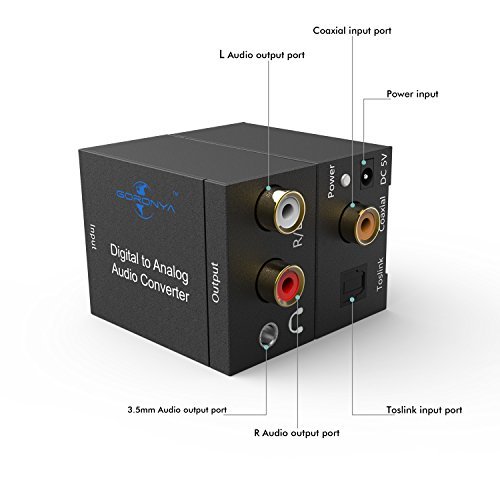
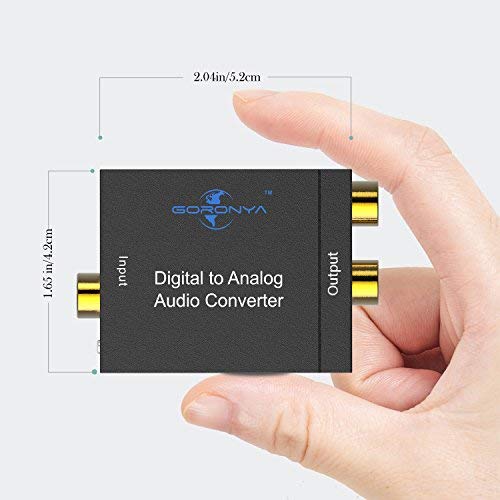
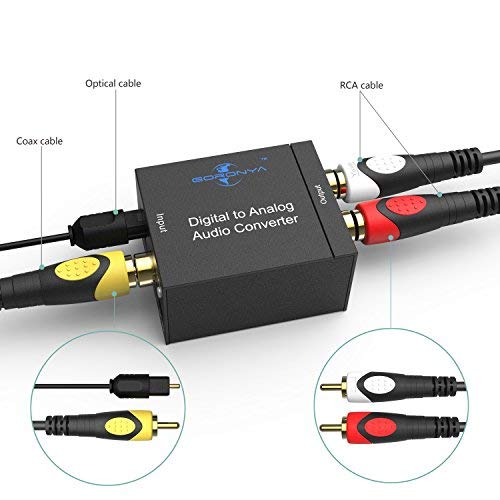
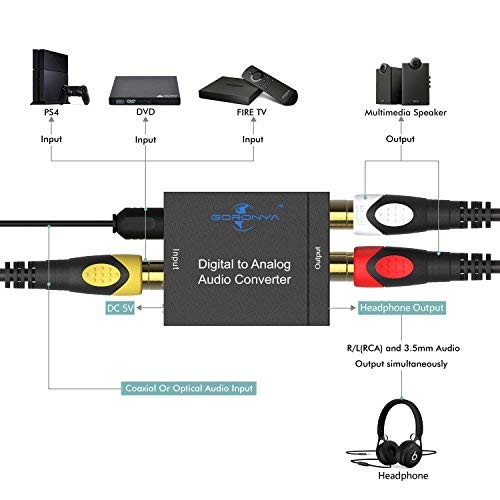
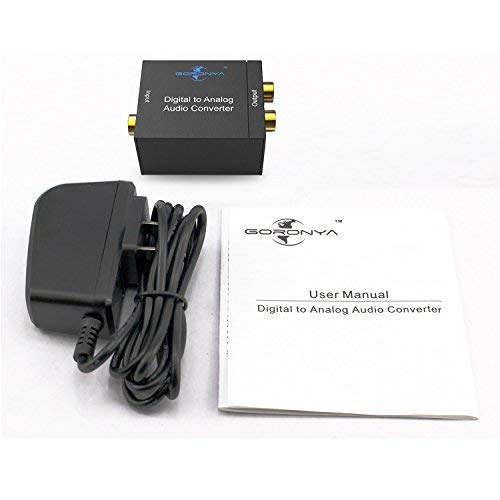

- Converts SPDIF Optical or Coaxial digital PCM audio input to analog stereo L/R RCA and 3.5mm headphone outputs simultaneously
- Input Audio Connector: 1 x Toslink, 1 x RCA (Coaxial); Output Audio Connector: 2 x RCA(R/L), 1 x 3.5mm Jack; Powered by 5.5mm USB Power Cable (Power Adapter is Included)
- Supports sampling rate at 32kHZ, 44.1kHZ, 48kHZ, 96KHz and 192kHz, up to 24-bit resolution
- Supports Uncompressed 2-channel LPCM or PCM Digital Audio Signal Output; Provides Electromagnetic-noise-free Transmission(5.1 channel is incompatible, please set the audio output to PCM or LPCM)
- Plug and play. DC 5V power adapter included. 18 Months Warranty and 7x24 hours service by Goronya
-
Information
-
Twitter
-
Pinterest
-
Youtube
-
Facebook
Nook Luvin Hers Stiff
TosLink TV
I have a new LG TV with TosLink audio out only. I needed line level output via RCA jacks to my external amp. This Goronya converter worked flawlessly for that purpose. It is small, well built and well priced. Just be sure to set the audio output format from your TV to PCM. I experienced no distortion or sync delay using this device. It just works. Recommended.
Donna Renee Rensel
Works Great!
This product works great. I am currently using this DAC to convert the digital output from a ROKU 4 to analog for my stereo desktop speakers. Sound quality is good! If you are using a new toslink cable, be sure to take the protective "caps" off of the ends of the cable otherwise you will be wondering why it does not fit into the port!
Patrick J Dougherty
Great to connect your Bluetooth speaker to TV
This device did exactly what it's meant to do without loosing frequencies. I have a UE boom 2 bluetooth speaker but my smart TV was dumber by not having either bluetooth for a 3.5mm jack. Hence I bought this to get optical connection from TV and get 3.5mm jack to my speaker. I had the other 2 cables so I only had to buy this to make it work for me, otherwise it'd probably cost me $20 total to get better sound out of my TV.
Mylene Mylene
Got this for a cheap Samsung Smart TV, that didn't come with regular audio outs ...
Got this for a cheap Samsung Smart TV, that didn't come with regular audio outs (terrible!), and the speakers were garbage. Got this to hook it up to the stereo. There was a moment of dismay, when everything was hooked up, but no sound came out, but I had to switch the TV's digital output to PCM. Works great now, very good sound quality.
Katie Lopez
Simple to use and just works
Simple to use and just works. That is really all that can and needs to be said about a product like this. It should just work. Plug it in and it works - simple. I bought it so I could plug headphones into the digital output of my TV since when you plug headphones into the headphones plug of a TV it turns off the normal speakers and I didn't want that to happen since the headphone jack is hard to get to and I don't want to have to plug in and unplug the headphones.
Freelanc King
Connect a bluetooth headphone/headset to a LG TV with only Optical/Toslink Output
This product works. The only thing for improvement is wish it can power using a USB cable instead of 110V but since it included the power supply, it still gets a 5*. This review is to help you to connect and watch TV using a wireless bluetooth headset without disturbing your better half at night, particularly connecting to the LG TV with only Optical Output. What you need. 1. This Goronya Digital to Analog audio converter. 2. A Digital Optical Audio Toslink cable (male to male). 3. TaoTronic 3.5mm Bluetooth Transmitter. A. First, connect the Optical Toslink cable to the LG TV Optical/Toslink Output, connect the other end Optical male to the Goronya Digital to Analog converter box Optical Input. Don't forget to connect the power. B. Connect the TaoTronic 3.5mm to the 3.5 Output jack on the Goronya. Use the USB cable that came with the TaoTronics and connect to the LG USB port to power the TaoTronnic transmitter. C. Sync your bluetooth headset with the TaoTronnic transmitter. D. On the LG TV, go to Settings, Sounds, make sure the Digital Out option is set to PCM. If not, there won't be any sounds coming out of the Optical/Toslink. I have my TV speaker to ON so both of the speaker and my bluetooth headset work at the same time. However, when I use my wireless headset, I just Mute the TV and the only sound is coming from the wireless headset. To troubleshoot, use a wired 3.5mm earphone connecting directly to the TaoTronic 3.5mm jack and see if you have sound. If the wired headset has no sound, then it must be the PCM setting on your TV. If there is sound, then it has to be the bluetooth not sync up with the TaoTronic transmitter.
Yhumie Arevalo Chavez
Works for me
This works well for me.. I use this to stream from the Blu-Ray DVD player to my 2003 model 57" projection TV as I have digital out only on the Blu-Ray player and no digital sound input to my TV (which has its own surround system built in) otherwise, I have to go thru my AV receiver in my home theater. Still need that for DVDs but now I can choose to go from the TV where the sound quality is very good to watch Netflix and other stuff. If I want the 5.1 DTX effects and stuff, I can use the home theater system for that exceptional sound
Heather West
Very Satisfied
This device is just what I needed for my situation and works very well. It is well constructed in a metal case. I have a DirecTV Genie Mini next to my 27 inch computer monitor. The Genie has only a HDMI and coax output. Since the monitor only accepts HDMI and doesn't have speakers, the audio must be handled separately. This device allows me to send the audio from the coax to my external speakers without any signal delay. I have a HDMI switcher to switch the video between the computer and the DirecTV.
Deeya Bagwan
Problem Solved
This is a simple device that does exactly what its supposed to do. It was purchased because our Panasonic plasma has no analog audio output jacks, only an optical audio output. This device enabled us to use our wireless headphones directly without having to go through the receiver.
Ava B Maistry
double boxed - plugged it in between JVC TV and headphones and it worked with much better stereo sound "awareness" than TV alone
First experience with an A/D converter: Goronya arrived on time, double boxed - plugged it in between JVC TV and headphones and it worked with much better stereo sound "awareness" than TV alone and no problems. I may well order more as I complete my systems in other TV rooms. I recommend Goronya for price and performance.