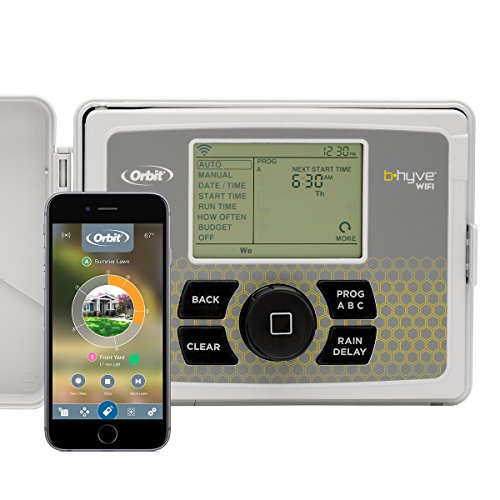
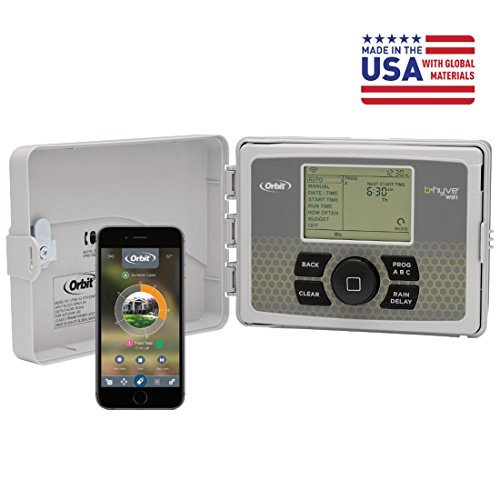
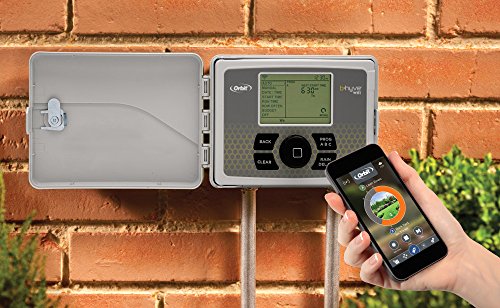
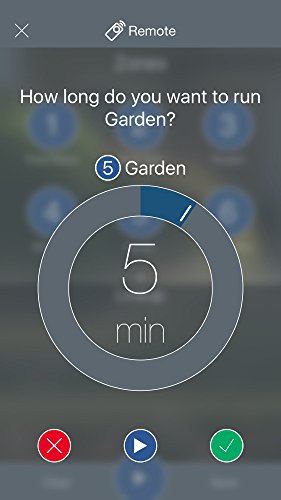
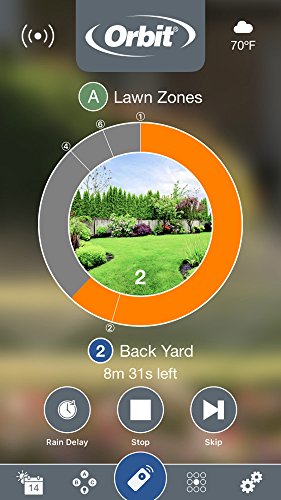

- ULTIMATE WIFI AND TIMER CONTROL - The B-hyve app is fully functional for Android, iOS or web devices and gives you control wherever you need it. Program your timer on the app, at the timer, or let the weather-based software create a program for you.
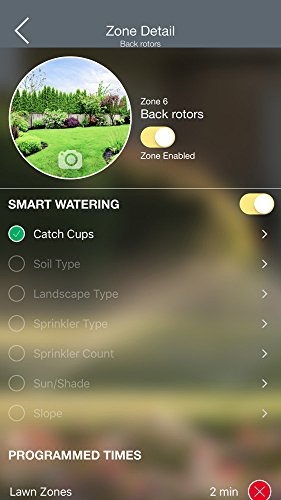
- SMART WATERING - Weather Sense technology provides watering based on site conditions such as slope, soil type, sun/shade, historical ET and live weather feeds. It automatically adjusts your controller to deliver the right amount of water to your plants.
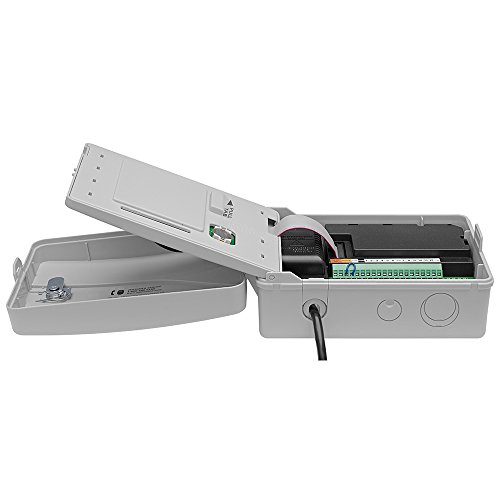
- EASY TO INSTALL AND USE - Utilize the swing panel for easy access to the angled wiring terminals, which makes wiring simple and convenient and the plug-and-go line cord that can also be cut for hardwired applications.
- CERTIFIED TO SAVE WATER AND MONEY - B-hyve is EPA WaterSense approved and certified, ensuring it will save you water and energy. This can also make your B-hyve timer eligible for local rebates, which can save up to 100% of the cost on your timer.
- DURABILITY AND SECURITY - The Orbit B-hyve Wi-Fi sprinkler timer comes in a weather-resistant case, allowing you to mount your timer indoors or outdoors without risk of weather damage and a locking cabinet that keeps your timer safe from harm.
- WATER SAVINGS - Integrate your B-hyve timer with use of Catch Cups (Orbit 26250) to save up to 50% more water than with traditional controllers. Optimize the way you water, so you can keep everything lush and green without breaking the bank.
- VOICE CONTROL - Works with Amazon Alexa for voice control (Alexa device sold separately). Visit help.orbitbhyve.com/alexa-commands/ for a quick guide on how you can use your B-hyve with Alexa to control your watering with a simple phrase.
- USE WITH 110V ONLY - Compatible and compliant only with North American electrical outlets. International versions are available for markets outside North America.
-
Information
-
Twitter
-
Pinterest
-
Youtube
-
Facebook
Shane Abasola Batas
Most affordable Smart Home Sprinkler Device on the Market. . . EASY TO USE!
Saleem Raj
I'm glad I chose the Orbit 57950
I looked at several controllers and got advice from a well-seasoned irrigation expert. I'm glad I chose the Orbit 57950. I installed it on a very hot day and had a lot of issues working in a very tight spot. I got it installed, hooked up the valves, downloaded the app and started to pair it to my wi-fi. About half of the way through the pairing, a terrific thunder storm hit, the power browned out several times but came back up. The pairing reported that my wi-fi was offline. I had checked the wi-fi signal at the controller location before ordering and it was very strong - only about five feet from the router through a wall. I rebooted the modem and router but still no signal. I then spent about an hour programming the controller at the box; setting up two programs. Who needs the app when it can be controlled from the box anyway? This morning, while cleaning up the residue of my installation, I pulled out my phone and checked the wi-fi signal again at the controller location - again, it was very strong. However, to pair it again, I'd have to reset and reprogram again. That's why I dropped one star. UPDATE: I reset the controller and tried pairing again. I had trouble with wi-fi so I tried using mobile data and that worked. I logged in but could not access the already programmed controller. Orbit support couldn't help so I tried programming a different controller. Amazingly, that was the trick - my controller popped up, all the stations were set, the programs were available. I turned off the mobile data and the phone and restarted it an hour later - this time access was automatic AND worked with my wi-fi router. Strange way to run a software app but now it works as advertised and I'm five stars happy.
Keny Ewican
Perfecto Smart Irrigation Controller
The wife and I invested in our first home a year and a few months ago. I'd decided from the get go that I wanted a smart home. We got a mega deal because we bought what is essentially a "cookie-cutter" home, ie: the builders plans and we pick a model - we couldn't make any changes. This was fine for us because why spend thousands on "upgraded" appliances and features when you can't even pick the ones you want? Better to start off cheap and then pay for what we want. That's a lot of preface for a sprinkler, but I'm going somewhere with this. When you buy cheap and then pay for what you want, to me it ends up working out better. We made a big decision in buying our home and it's a place and home we plan to spend our lives in as long as no acts of God get in the way of that. So far I've been dutifully making my home smart. Starting with all light switches changed to occupancy/vacancy and or wifi/dimmer switches, all bulbs are now LED with some being Wifi/Dimmer capable, some smart cameras around the place, etc. When you're "smartifying" your home you can either do it all at once if you have that kind of money, do it cheapest to most expensive stuff or do it most expensive to cheapest. We're not rich, we're comfortable so I've taken the middle route, cheapest parts and ending with the more expensive stuff like appliances. Where we live, our city has pretty strict rules regarding sprinkler systems - 2 days weekly for/between 4 hrs. Personally I don't know why. It rains during most of the year and whenever there's a drought there's a huge river and canals always filled to the brim but hey, they've gotta know something I don't, I've only been here for 2+ years. That being said, we had a basic sprinkler system, of course because when you buy a "cookie-cutter" home, almost everything you get as a part of the home is basic. As I said, that was fine for us. I'd put the controller as one of the later things to upgrade for the main reason that sprinklers are generally a set it and forget it thing. However ours was being slightly problematic. While it has a battery backup to keep settings, for some reason the time would be "off" due to power outages and of course, I'd have to head to change them whenever DST switched. Recently, we got our 2nd warning that the sprinkler was on when it wasn't supposed to be. This was due to a power outage that put our times off by about 10m. So they literally caught our system within that 10m "offf" window. I started getting serious into looking for smart or at the very least wifi enabled sprinkler controllers. . Enter the Orbit. I'm so happy with the system that I'm here only a day later writing its praises. I took some time deciding on systems because initially they're pretty expensive when you look up "smart" controllers. Most of the devices I found were in the hundreds and just not worth it for me, many are 6 or 8 zone and I only needed 3. I was in shock when I was able to pick up the Orbit for what I got it for. Not only was it less than 1/2 the price of other smart controllers, it was also cheaper than the most basic smart controllers, so I was prepared to make some compromises as one should when devices are on the cheaper end of the spectrum vs. others in their category. I can gladly say, no concessions or compromises made. This thing does everything and more. For one, with this controller you get a dual system. Many smart sprinkler controllers if you notice, have no head/base where they can be programmed. It must be done over/using the smartphone or a website. Not so with this system - you get a head unit that looks and behaves the same as a non wifi system where you can do everything you need to in terms of programming the system. This was a big deal for me because going back to what I said earlier, I'm a fan of value and I tend to look at things long term. How many cloud based companies have we seen shut down or change hands? If a product with a headless unit (ie: can't program from the base) has a cloud unit that shuts down, your sprinkler system is essentially useless for the most part because you no longer have a place to log into, to be able to access your system. The same could happen if the tech is bought out. If another company buys Rachio, just as an example and this company isn't interested in sprinkler systems, eventually that unit can no longer function because said company would have no need to keep the cloud going. There are 2 big differences with Orbit for me. The first is that the brand has been around for some time. I don't know irrigation products and I know 2 brand names, Hunter and Orbit so this was a good thing. For me this meant that it was highly unlikely for any of the shut down or sell out scenarios. I figured the worse case would be they sold to another irrigation company anyway. Secondly, the device is controlled both ways and independently. You can use it from the head unit solely, you can use it from the app or you can use it both ways. Finally, just like the other cloud/wifi sprinkler systems, it has a "smart" system that watches the weather for when it rains etc. and can smartly utilize your irrigation system. My system only has 3 zones because again, the builder created it all in a cheaper way. The pressure is really great in my home and the garden is no less. The entirely front left and side of my home is a zone running about ~6 sprinklers, the same for the right and then the back yard is a zone. So I have lots of sprinklers but only 3 zones and they run really well. My unit is installed on the outside of my home and many wifi sprinkler systems have to be installed inside or put into a special weather box externally. This unit comes fit for external use, so that saved me spending extra for either hiring someone to put it inside my garage or buy a box to put it into outside. In the end, I have to say that I'm fairly happy. It took me about 30m to physically install the controller and another 10m to program it using the app. The 1st floor of my home is concrete so I was a bit worried about wifi strength through the wall but it gets 4 solid bars. Setup in the app is easy. You create an account and add the device - once it's powered on and detectable, the app will immediately tell you that the device has been located, where you can then connect to it. Once connected, that's it, you're good to go. I simply took a picture of where my cables were on my Hunter unit and moved them directly over. I did have to drill an extra hole because the same of the unit is different than the Hunter. Once I did what I had to, it just worked. I tested it by doing a 1m manual start of each zone to see exactly where and what my zones were and then I set my schedule so it will never water on non-water days for me but is completely free to water (or not) on my 2 set days with my 4 hour window. The app is super easy to use and easily understandable, really well made. As I mentioned, you can turn smart watering on, where it'll detect when it rains and can put off watering for a day or more. You can also program using restrictions like mine, only on certain days or odd/even days or have an interval. I won't go into details but I doubt anyone will find it lacking what they'd need. I really like it and am very happy with the system so far.
Mish Khan
Highly Recommended
This thing is great, especially for the price. Does everything I need and the one button set and forget nature of it was a relief. Installed very easily and connected to my home network without any problems. So far been a couple months and I still show off to people how I can turn my sprinklers on and off remotely from anywhere (I'm easily entertained). I've easily convinced at least two other people to buy one of these. Very much recommended.
Alice F. Hyke
it only took me 15 minutes to install the Orbit timer (not too bad for a 57 years old lady
After read the installation instruction, it only took me 15 minutes to install the Orbit timer (not too bad for a 57 years old lady!). I unplugged the old controller and took a photo before I disconnected the sprinkler wires as it's suggested on the instruction, so I know the red wire is zone one, blue is zone two... and the white is com. I pick a new location not far from the old one and make sure there's enough room to opening the timer's door 180 degree and has good wifi signal. I hammered a big nail into drywall to create holes for inserting the provided expanding anchors, then screw in the provided 2 screws, one screw for hanging and the other one for leveling. Connect the wire using the provided small screw driver to adjust the tightness of the connectors, match the wire color with zone number and plug in the power, it's on and ready to pair! Next step actually took longer time to setup the app in my smart phone. I downloaded the "B-hyve" app, open my phone "Settings" and fond the"Orbit_SmartHome..." on the WiFi list and connect it. Then open the "B-hyve" app and setup the preference and test run. Overall the app is easy to use if follow the instructions. I've set up all my watering programs in the air conditioned living room by my smart phone and don't even need to go garage to touch any bottoms on the actual timer. It also tell you when will be the next water schedule and when was the last one, I'm very happy and glad I did it.
Ishaz Fwie
Full featured smart sprinkler, superb value
I shopped through numerous makes & models of smart internet-connected sprinklers. Rachio was recommended, but at $250 it's pricier than I expected. The Orbit met all my requirements. A 12-station internet-connected sprinkler for about $100 is a great price! FYI - I didn't notice this in the manual at first, but the Master Valve connection is labeled "Pump" and is to the left of all the zone connections. Setup is very straight-forward. Out of the box, the Orbit B-hyve creates its own WiFi network. Connect a smartphone to it and use the app to set up the password to your home WiFi network. When that's done, disconnect and the B-hyve will connect to your home network (and thus the internet). The LCD screen and buttons on the B-hyve are functional but nothing to get excited about. The mobile app is where it's at. The strength of this smart sprinkler is Orbit's mobile app. I found it extremely helpful to be able to turn on/off zones while out in the yard to test and adjust the sprinkler heads. That alone is worth getting a smart sprinkler. Orbit has a Smart Watering feature that sets the watering schedule based on the soil type, number of heads, weather, etc. This alleviates having to install rain sensors (avoiding another hassle that can fail). It supports restricting the watering to certain days of the week and/or times of day. This is great for areas in drought with watering restrictions. The app's UI can get involved, but overall it's a good balance between ease of use and customizability.
Emie Diolata
Great product EZ setup very satisfied
OK so I did a lot of reviewing before I purchase this product All the negative Issues that I read about for me it so far I haven't had any issues whatsoever talk about simple to install it was so simple. I label all of my wires for my zones so it was 123. Setting up the software also simple. It connected with my Wi-Fi and I was off to the races. I did the smart set up it had me take pictures of each zone as it tested it this software is amazing My only question would be whether there is a delay feature on this system being that I have a booster pump but I haven't had an issue with my head's coming up I am a super fan if things change will update as needed
Ross Ariffin
Well thought out, intuitive, and it just works as its supposed to. Perfect. Yes, the Alexa integration works awesome.
Having an old Rain Bird Analog rotary controller, I was looking to upgrade to a modern WiFi Controller so I would no longer be running down the basement to turn on and off the Rain Delay. I was keeping an eye on a competing product to this, but wasn't crazy about the competitors' $200.00 price tag. So when this Orbit Controller came to market with the same features at half the price, it immediately had my attention. I waited a few months to let some reviews trickle in and once I felt comfortable, I went for it. It is a one piece assembly in a weatherproof box for indoor or outdoor mounting. I opted for the 6 zone controller as currently I only have 3 zones, with plans to add one more zone for a feature garden in front of my house. Ultimately, the decision was made to keep it inside where the old one was, since I had a power outlet right there. The power cord is about 6 feet long so if you need some length, no worries. Installation took all of 5 minutes. Take a photo of the old wires, which was a Green Common, and Red, White, and Blue wires for zones 1, 2, and 3, respectively. I removed the wires from the old controller with a small flathead screwdriver, unplugged the old controller, removed from the wall, and cleaned it up and put it away to keep as a "backup" since it still worked fine. I removed the old plastic anchors and screws from the wall, popped in the new ones and had the Orbit controller hung on the wall. Then I passed the wires through the grommet in the bottom of the case, and connected them to the Common, 1, 2, and 3 terminals. Couldn't have been any easier. I didn't bother to program anything at the controller because the app was so easy. I set up a log-in with my e-mail address, connected it to my WiFi, and then I programmed a manual schedule as I don't want to use the "Smart Watering" feature. I couldn't believe how easy and fast it was. Literally, the whole process took MINUTES. The Alexa compatibility is cool. Definitely a combination of "Wow Factor" and befuddlement from anyone around when I ask "Alexa, ask b-Hyve to water the lawn" and my sprinklers run. Nice touch, but the app control is easy as pie too. Works over a cellular connection too so if you're not home you can flip your sprinklers on anytime. The best feature of this controller, however, is its integration with the weather forecast. It automatically schedules rain delays with ZERO input from the user. Want to override the rain delay? Simple click of ONE button when you open the app. I have mine set to run Monday, Wednesday, and Friday at 3AM (don't water in the evening, you don't want root rot, and don't water when the suns up or it will evaporate!). In the 3 weeks I have had this controller, my sprinklers have only run TWICE because of the weather integration. It looks at how much rain you've gotten and is forecast, and does its thing. At this rate, it will pay for itself in one spring/summer with water savings alone. I couldn't be happier. You can set Notifications in the app to tell you when a Rain Delay is automatically set, when a Watering program has run, and a few other things. Love it! The app has a calendar in it so you can look back and see what days have been watered. You can take a picture of each zone so if you have multiple zones, you wont forget what number is what. You can also go into the app and run any zone you want for any time, great for adjusting or repairing sprinkler heads or chasing birds off the lawn! Run zone 2 for one minute, no problem. Highly recommended.
Lori Peeples
Great Unit is you Spent Some Time Learning it!
I really like this system and now have 2 - one in FL and one in NH. There is a learning curve if you want to use Smart Watering and I bet that many people will get frustrated in trying to do so as you really need to understand the watering parameters that the unit calculates to do this effectively and it is not intuitive. That said, if you are willing to learn, you can tune your system to get Smart Watering work. I think any disappointment with this system is based on experimenting and figuring out how the Smart Watering part works. That said, having the ability to control and change programs via phone/internet is worth it. I also love the advance rain delay where the unit will set a rain delay for a FUTURE event based on the weather forecast. I am using Smart Watering with success in the FL home, and not in the NH home (I have a well that I can only pump so much water at a time - smart watering assumes an endless supply of water as if you are connected to a municipal system).
Ajit Ojha
Great deal. Huge timesaver.
Amazing! Took me 3 minutes to setup the box and another 5 minutes to test the zone and take pictures of the yard and link the pictures to the zones. I recommend typing the product name into YouTube so you can watch a setup video intact do this before you order. The video gives a lot of detail on the features. One thing I really like is that you can use this system as a normal sprinkler box if you ever have wifi/phone issues. That can not be said for the top competitor. As far as time saving, I can be standing in front of a sprinkler and turn it off and on to fix or troubleshoot. No more running back and forth.