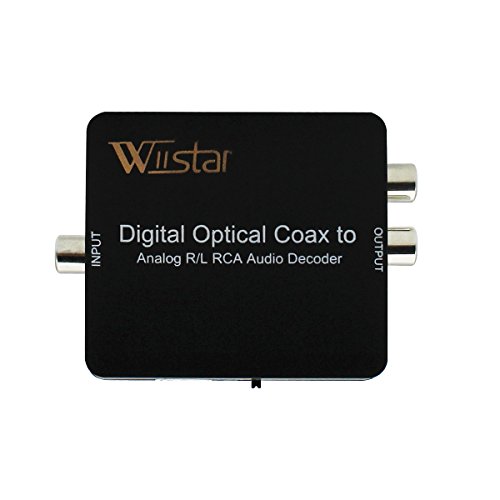


- Converts Dolby Digital, DTS, PCM digital audio (up to 5.1CH) to 2CH analog stereo audio
- Supports digital audio input: Optical SPDIF (Toslink) or Coaxial
- Supports simultaneous RCA L/R and 3.5mm Headphone output
- Support all digital SPDIF audio formats including PCM 32KHz/44.1KHz/48KHz/96KHz, Dolby Digital 5.1 and DTS; 24bit spdif incoming bit stream on left and right channels
- Plug and play. Supports US note : 1.This item does not support DTS 7.1 and DOLBY 7.1.2.Please switch the right channel which you need via press the key "SPDIF/COAXIAL" in the side of the product. 3.You need to push the cable in with a little more force than you're used to. You should hear it "click" in when you've properly made the connection. standard power adapter
-
Information
-
Twitter
-
Pinterest
-
Youtube
-
Facebook
Sanjay Duhlani
Small but very functional
This device works very well with my Samsung UHD 4K tv. The Samsung UHD 4K uses both Dolby and PCM depending on the source. Everything you need is included. I did find the Toslink fiber optic cable to short for my needs. Connection is straight forward. Just remember to remove the protective covers from the Toslink fiber cable. The audio is very clear with no distortion. There is a 3.5mm audio jack on the unit, but the signal is not strong enough for my hearing. I've connected the RCA jacks to an input on my stereo and use headphones through it
Ajay Kapoor
the sound quality is really good for the price you get
This is a device is a must have if you want to keep old 2 box+ amplifier stereo running new tech devices i have fire tv and i needed to output its sound to the old 90s stereo system. the sound quality is really good for the price you get: 1- Optical + spdif inputs 2- dolby digital suppots up to 5.1 dts its really handy not all devices support that at this price 3- comes with Optical cable 4- just great.
Marvin Baluyot Velarde
TAKE THE PLASTIC TIPS OFF
This is exactly what I needed to convert my LG TV optical audio out (Toslink) to my Logitech Surround System which has a 3.5 mm headphone jack. Except that I thought it wasn't working because the Toslink cable comes with plastic tips and it took me a while to realize that. Once you take the tips off, it fits and works perfectly. Even delivering true 5.1 surround sound and not merely replicating L/R across every speaker. Worth every penny.
Cindy Parent
Perfect for hearing impaired with wireless headphones - TV's with Dolby sound
I have minimal hearing in my L ear. Recently, my Samsung TV with a Tautronics Bluetooth transmitter (TT BA01U) died. High anxiety. Hearing affects relationships. Got a CHEAP Hisense Series 7. Transmitter would not pair. Bought a Digital to Analog converter. Did NOT work. Everything said to change your audio output to PCM (Pulse Code Modulation). My other TV - a Sony - has no PCM and no bluetooth - was never able to make the Taotronics transmitter work with it. Read hundreds of reviews and questions. Eureka! You need a converter that handles "Dolby" audio signals. Beware - there are several variations and permutations of Dolby's/audio signals. As well as other types of audio signals. Got this beauty today. Tried it on both TV's: Sony: optical out wire on tv to optical in this converter. Converter to power supply (wired - which I like since Sony only has 1 USB input taken up by Roku Stick; Hisense only has 1 USB port for input, not as power supply). Transmitter to Converter Audio. Transmitter wired/connected to power supply with AGPTEK USB Wall Charger 5V. First time ever that I have been able to use headphones with Sony Bravia TV (2012 Model). Re. Hisense - Have Yamaha soundbar connected via HDMI ARC. Left this alone. Connected Converter just like I did with Sony TV. Works perfectly. Important Issue for me: Being able to listen SIMULTANEOUSLY via headphones AND TV speakers/soundbar. All is well with this gadget! Thank you to all who took the trouble to provide relevant reviews.
Teri Fanguy
Works with LG TVs
Was worried about connecting our new LG (55HU6090) TV up to our old Sony sound system (RCA Analog L-R inputs only). I'd read that LG uses Dolby audio output only, and that most adaptors don't support Dolby. Connected the cable (included with adaptor) to the TV optical output and the SPDIF adaptor input. Connected the L-R outputs to the sound system. Set the switch on the side of the adaptor to SPDIF, and it worked fine. The LG TV has an optional setting for audio of "LG Sound Sync/Optical". Works best using this option.
Rodica Liliana
Finally!!
After what I consider a painfully circuitous trial-and-error process to get my Emerson TV which outputs Dolby through its coaxial digital audio out--the only option for audio output it offers, as far as I can tell--this thing arrived today and solved my problem. I can now get the TV sound to come through the speakers of my analog Kenwood stereo. I had ordered another cheaper unit that did not work due to its accepting only a PCM signal. I had to discover all this through an array of frustrated Googling sessions. Anyway, though I haven't played a CD through the speakers, the sound from my TV and Blue-Ray player sound great. Very pleased. A reasonably priced solution for a pain-in-ass problem.
Johnny Gamboa
Worked as advertised. I discovered that the optical linking ...
Worked as advertised. I discovered that the optical linking cable only works in one orientation. There is actually an up and down, right and left to it. Because I had read another review that mentioned taking the protective plastic tips off the cable, I did that. I don't know if I would have realized it was necessary if I hadn't read the review, and there was no mention of it in the directions.
Sally Benitez
Confirmed- works for LG OLED65BP6 optical output when set to Auto
If have an LG OLED65BP6 TV and am using the TV's internal speakers as well as the optical output into this converter which in turn sends analog audio to a set of wireless headphones. I have the TV sound output settings as follows: Single Sound Out=Internal TV speaker Simultaneous Sound Out with Internal Speaker= Internal TV Speakers + Audio Out (optical) Digital Sound Out The adapter works perfectly and is converting a Dolby Digital signal to analog stereo. I had a different digital to analog converter which did NOT work with my LG TV's Digital Sound Out set to Auto...it would only work if the output was set to PCM, which meant it was not sending Dolby Digital signals to my surround receiver (note: I am using an optical splitter to simultaneously send the TV's optical output to both this converter and to my surround receiver. Splitter info: Optical Cable Splitter, VIMVIP Toslink Digital Fiber Optical Audio Splitter 2 Way in/out Optical SplitterAdapter https://www.amazon.com/gp/product/B00OY0WBTA/ref=ppx_yo_dt_b_asin_title_o03_s00?ie=UTF8&psc=1) So for people who are in my situation, I can confirm that this truly works as advertised. It converts Dolby Digital optical signals to an analog stereo signal. I did not experience any signal delay whatsoever, so no sync problems with the audio.
Caroline Frederick
Worked great.
If you are not sure which one of these converters to get, get this one as it converts both Dolby and PCM to an analog. I used this to send TV audio to a Sonos connect. TV had a Dolby signal.
Richie Embry
Wioreless headphones finally working again!!
We replaced our ten year old projection TV with a new LG 65" LED set. The new TV lacked audio output RCA type connectors for our wireless headphone transmitters. BIG PROBLEM! Call to LG resulted in no answer other than maybe the USB connector would work. No such luck. The USB connector is input only. Another call to LG resulted in learning that there is an "optical" connector for a sound bar which is the only audio output connector. Now to Amazon to search "optical to digital audio converter". GREAT! Then start reading the reviews and learn that this device does not work with Dolby Digital. Checked the book--nothing about Dolby Digital. Call LG for the third time. Give them the model and serial number and they check and YES we have Dolby Digital! Back to Amazon. Search "optical to Dolby Digital analog converter". Bingo! Ordered it. Being forewarned by the answer to another users question I looked for and removed the caps on the optical cable connectors. Plugged one end in to the TV-a trial and error thing until it finally snapped into place. Connected it to the converter box and connected the power supply to the converted. Turned on the TV and looked for the green LED audio light on my transmitter. DRAT! No light. Carefully look over the converter box and find a tiny slide switch on one side. Slide it to the left. BINGO! We have sound! Both our transmitters are now working fine and we can enjoy the British shows we like and understand every word of the dialogue. I took the time to call LG again to inform them of this solution. They thanked me for letting them know. Hope it helps someone else. I came SO close to returning this TV! There are RCA type audio and video INPUT connectors on this TV and I plugged our Nintendo WII into them.It works fine too.