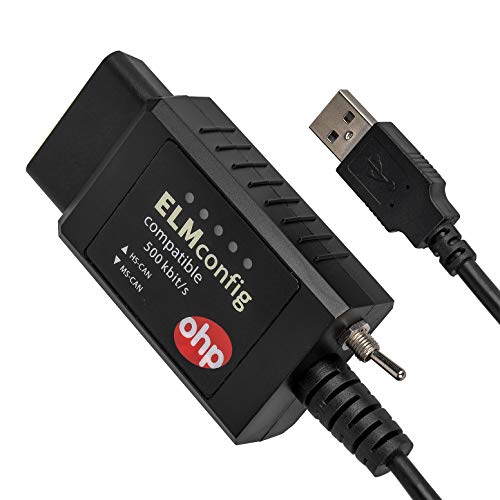


- OBD2 USB ADAPTER: USB device with ELM327 compatible interface at a constant speed of 500kbit/s.
- DIY DIAGNOSTIC TOOL W/ MS-CAN & HS-CAN SWITCH: Use this device to conveniently access, diagnose and configure the as-built data of your vehicle. Use the switch to access and communicate with the existing modules in your vehicle.
- SUPPORTED SOFTWARE: FORScan, FoCCCus, ELMconfig, FF2
- ALLOWS DOZENS OF FORSCAN MODIFICATIONS: Enables users to apply FORScan Mods on their vehicles, such as the Global Window feature, Bambi Mode, reverse tilt mirrors, tire size correction, Perpendicular Park, Secure Idle, 5 turn signal flash, heated steering wheel, disabled double horn honk, disabled door ajar chime, and many more!
- SUITABLE FOR FORD, MAZDA, AND LINCOLN OWNERS: Compatible with Fords, Mazdas, and Lincolns since 1996 (Cars and light trucks only).
-
Information
-
Twitter
-
Pinterest
-
Youtube
-
Facebook
Nancy Reis
Great to use with FORSCAN
I used this in conjuction with FORSCAN to disable the double honk on my Ford Explorer. Everytime I exited the vehicle with my keys in my pocket it would honk twice. Not cool at 2am in the morning in my neighborhood! I researched a forum and found the instructions on how to use the program and they recommended a ELM327 device to interface with the car. This one has the built in switch so it suited my needs perfectly.
Adam Escorial
Perfect for Forscan on 2018 F150.
Worked perfectly using Forscan and my 2018 F150. The switch and labeling was oriented so that it wasn’t obvious which side was HS or MS, but Forscan tells you to swap the position, so no big deal. After using, HS is up, literally, when plugged in. The MS is toward the floor on mine. Cord is plenty long to have a laptop on the center console and have this plugged in.
Teri Fanguy
Works great.
Works like a charm on my 2018 F-150 in conjunction with ForScan. Only issue is some of the codes given by ForScan doesn't appear to be entirely compatible with my '18 F-150, but that's not this tools fault. Made a couple of minor modifications already but I'm looking forward to getting some larger tires and this will help me modify my speedometer settings. This is the goto tool with ForScan if you plan on making modifications to your F-150.
Kaori Miyawaki
works perfect on windows 10
I have an old netbook running win10 build 1511 with a super slow amd c-50 1 ghz processor. despite that, as soon as I plugged this in it detected and installed the ELM drivers automatically. I plugged it into my ford escape, ran Forscan, and it immediately detected everything and I was up an running in minutes. Incredibly simple to use, and my expectations were completely blown away by how useful this is and the features it offers. If you have a ford or mazda, this is the scan tool to get. as others have said the switch is a little funky, but nothing bad. it's just a cheap switch that can rotate around sometimes. if it doesn't work in one position, just flip it the other way. it's really a non-issue.
Matilda Lot
Late model Ford truck, Windows 10, ForScan, and a device driver: A+
It's really hard to figure out what OBD adapter to buy so I wanted to confirm for anyone that cares that this device, "OHP ELMconfig Forscan OBD2 Adapter with MS-Can & HS-Can Switch for Ford DIY Diagnostics on Windows" worked on the first try for me on a 2019 F350 and ForScan for Windows 10. The device came with a little card telling me where to download a needed device driver. Once I did that, everything worked as expected.
Yhumie Arevalo Chavez
Works with F150 for FORScan.
Bought this to run FORScan on my 2016 Ford F-150. Works great. Writes fast. Didn't want to mess with adding Bluetooth to my old laptop. Sees all the modules with the MS/HS switch.
Saymalyn Aradji Sabdaini-jimenez
This thing works great. It was inexpensive has a HS and MS ...
This thing works great. It was inexpensive has a HS and MS Can switch and allowed me to program my Trailer Brake Controller myself. I needed Forscan to do it but with the program and this adapter I can change all kinds of stuff like daytime running lights, dark car light profile, and the seatbelt reminder. If I where more advanced it would let me do even more.
Maryann Burton
2005 Focus this unit will do PATS
I purchased this so I could add new transponder keys to my 2005 Ford Focus 4dr 2.0 using Forscan. Using this hardware plugged into my laptop using Forescan, I was able to program keys as I wanted. I had previously purchased the keys and previously had them mechanically cut to match my working keys. I only had one working transponder key when I purchased this 2005 vehicle in 2016, I added two ignition keys using this hardware and the Forescan software. The purpose of my review, and my purchasing this hardware/software, was to make the software change to add my newly-cut keys to the "list" permitted to start the car. This device has a switch to switch between normal OBD2 and CAN BUS. Since my 2005 focus required only normal OBD2 I have not flipped this switch nor have i tested it on CAN BUS. I cannot report on CAN BUS or Focus newer than 2005. I have several other USB>OBDII adapters including the Auto Ingenuity Proline with GM enhancement. That hardware would not work for Ford and therefore I needed to make this purchase. Because I had several other devices previously installed on my Windows XP laptop (that never gets on the internet) I do not know if I can properly report on the driver installation. I can say that on my ~2003 era WIN XP laptop with several other OBD2 items installed, I only needed to install the simple serial driver provided with the hardware on this unit to make it work. This may or may not apply to you. This hardware shipped to me with a sheet of paper full of links to web addresses of drivers. I downloaded and installed the windows XP driver and it worked perfectly first try with no issues. In conclusion, I know from experience how difficult it is to get conclusive answers about hardware/software for Ford especially with PATS, and I wish I could be more helpful. I can report this unit will do PATS on a 2005 Focus, without flipping the CAN switch as of 12/7/2016. I used my [...] account to get around the timer. You can do PATS with or without [...] account. Beyond that I can not provide any verifiable facts. I have not tried any other tests or "service items" other than PATS with this software/hardware on my 2005 Focus. Use at your own risk. I would definitely purchase this unit again for my needs. It was well packed, and shipped quickly.
Makenzie Rossman
Works great on a 2009 Crown Victoria Police Interceptor
I recently bought a 2009 Crown Victoria Police Interceptor and wanted to disable dark mode and also enable remote keyless entry. The adapter that I previously had did not allow me to do this so I bought this wired adapter instead. All I had to do is hook the USB cable to my computer, start Forscan and connect to my vehicle, no drivers or anything else was required. I was able to change those settings within a couple minutes and I am very happy with this adapter. The read and write speeds are impressive on it.
Elisabeta Ioana Covrig
Works like a charm! Saved me a trip to the Ford dealership!
Works awesome with FORScan software and my laptop hooked up to my Ford. Saved me a ton of money so far! The switch was in the wrong position, but it can only go in two directions, so it doesn't take a rocket scientist to figure out that if it's not working, you just switch it the other way (and label it so you know which way is what, for next time). Its amazing what you can find out about your OBDII Ford, Mercury, Lincoln, and I think some Mazda vehicles - but you'd have to check with the software for compatible years. One of the things I needed to do was to program a 2nd key for my Explorer Sport Trac, since I only had 1. I bought a blank, uncut, transponder key off Ebay, had it cut, plugged in the cable between my truck and laptop, started the software (available online, separately, and free), accessed my vehicles PATS system, and followed the instructions to program the key. Works perfectly. Dealer tells you it's a couple hundred bucks for them to program a SECOND key if you only have one (you can easily program a third and fourth key from inside the vehicle IF you have TWO programmed keys). The cable is well made and was just long enough to reach outside of my vehicle to my laptop on my hood. Helped diagnose a faulty 4x4 component that the handheld scanners didn't pick up. Am I satisfied? 100%!