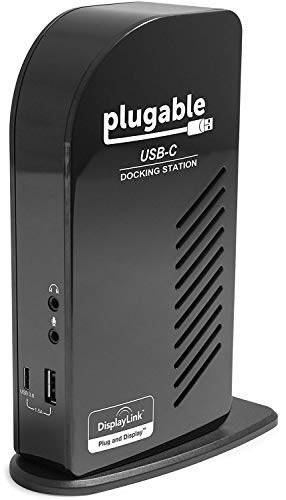
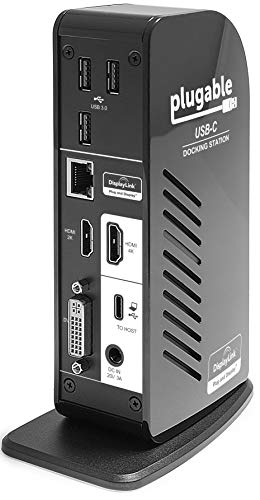
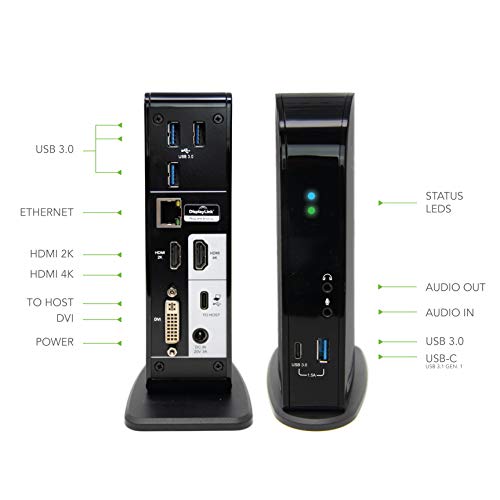
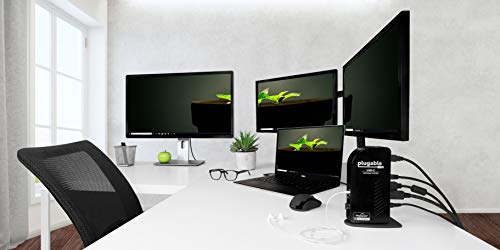
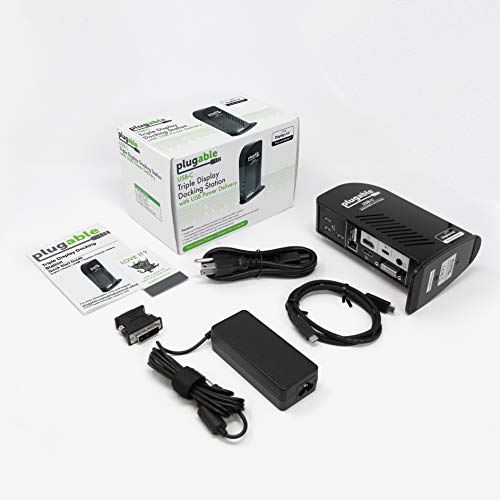

- Provides compatible Windows USB-C and Thunderbolt 3 systems with up to three additional displays and up to 60W of charging power. Utilizes cutting edge USB 3.1 features along with the tried and tested features of our best-selling UD-3900 dock
- NOT macOS COMPATIBLE (10.13.4 version and later). Requires compatible Thunderbolt 3 or USB-C Windows system such as the Microsoft Surface Book 2, Dell XPS 9350 / 9360 / 9370 / 9550 / 9560, Lenovo Yoga 720 13" & Carbon X1 5th Gen, most 13" HP Spectre x360 models
- Advanced features of the UD-ULTCDL such as host-charging and "Alt Mode" video output must be supported by host system to function. As such, dock is not compatible with legacy USB 3.0/"USB-A" systems. Not all systems with USB-C ports support charging or video output; please see Technical Specifications PDF below for most up-to-date system compatibility list. Not recommended for gaming
- Two additional video outputs (1x HDMI & 1x DVI/VGA) and Gigabit Ethernet via DisplayLink DL-3900. "Alt Mode" 4K HDMI port supports resolutions up to 3840x2160 4K@30Hz; DisplayLink HDMI and DVI outputs support 1080P@60Hz
- We love our Plugable products, and hope you will too. All of our products are backed with a 1 year limited parts and labor warranty as well as Seattle-based email support.
-
Information
-
Twitter
-
Pinterest
-
Youtube
-
Facebook
Dawn Johnson
Make sure to install DisplayLink drivers on your pc/laptop!!!!
It works! From the ONE cable it: . Charges . Displays on internal and TWO external monitors Using Plugable UD-ULTCDL with the following: . 2018 Levnovo IdeaPad 720S (14") . 8th Generation Intel® Core™ i5-8250U Processor (1.60GHz 6MB) . NVIDIA® GeForce® GT MX150 2GB . Thunderbolt via USB-C . Win 10 Home and dual monitors . Benq GW2450 (VGA + DVI) - connecting via docking station HDMI 2K port . Benq GW2750 (HDMI + VGA + DVI) - connecting via docking station HDMI 4K port NOTE!!!! Lenovo did not install the DisplayLink drivers, so initially only the single HDMI 4K monitor port worked on the docking station. Went to the DisplayLink site and downloaded driver version "8.5 Beta 16 Mar 2018". Like magic, the two monitors displayed. I successfully tried multiple combinations of 2K+2K and 2K+4K ports. DVI to HDMI and VGA to DVI converters work in any combination. Took a bit of tweaking, but all three displays can be set up to extend the desktop independently.
Whitney Suzanne Junelle Brooks
One-Connection Office Solution for my 2017 Macbook Pro 13-Inch
I've been using this Plugable docking station now for a week - it works GREAT! I've got added two screens, a back-up unit, power, ethernet, and a charger for my iPhone connected to it, and it only takes one Thunderbolt 3 connection to the computer to run it all AND charge my 2017 MacBook Pro 13-inch. And I've got several ports on the unit still open for additional future connections. When disconnecting from the dock, I first close the Macbook, then disconnect. When reconnecting with the laptop still on, I make sure it's closed, reconnect it to the dock, open it & re-sign in, and the monitors come right back up & everything works. Highly recommend this thing - love it!
Sonni Hill
Works perfect for me
Worked out of the box on my HP x360 15.6" Spectre (15-bl000 series) like a charm. I made sure to update every bloody driver on the whole computer first then plugables product page had the displaylink drivers; installed those real quick and it was plug n play. Equipment Used: HP Spectre x360 2-in-1 15.6" 4K Ultra HD TouchScreen Laptop 7th Gen Intel Kaby Lake i7-7500U 16GB Ram 512GB SSD NVIDIA 940MX Thunderbolt Win 10 HP Active Pen plus Best Notebook Stylus Pen Light ASUS Designo MX279H 27" Full HD 1920x1080 IPS HDMI (x2 displays) Monoprice 113581 Ultra Slim Series High Speed HDMI Cable, Silver Rain Design mTower Vertical Laptop Stand Update: Keeps the laptop at 100% battery which seems to be ok as long as you discharge the battery to 5% once per month according to HP..
Noelle Holloman
Great solution for a MacBook
I wanted to give a review of my experience with my new MacBook - and this unit has provided everything I wanted with a minimum of fuss. It was more than I wanted to spend - but nothing else seems to check all the boxes of 1) Power Delivery/Charging 2) Multiple Monitor support 3) Additional USB ports with charging. This id for the Triple Display Docking Station with USB-C. My setup is a new MacBook running OS X Sierra along with two external HP Monitors that lack HDMI ports (EliteDisplay E231). This provided a bit of a challenge initially, since the pluggable unit recommends HDMI to support DisplayLink and only has a single DVI connection. I dug in drawers and pulled out a few cables and adaptors that allowed me to make connections - but only one external monitor came up. I gave up on the adaptors and ordered two DVI-HDMI cables ( about $6 ea wit same-day delivery from Amazon Basics!) and everything came up first try. If you are considering a new MacBook - this unit is almost essential for setting up a full featured workstation, otherwise you will end up with a collection of dongles and kludges to get things connected since the MacBook only has a single USB-C port. Using the 3 backside USB ports allowed me to connect my HP Wireless keyboard transponder, a Garmin receiver so I can easily download my workouts & publish to Strava and still have a few ports left over. On the front of the Plugable unit is a powered USB connection so I can charge and sync devices like my phone, iPod etc... Everything has been stable and shows up effortlessly on my Mac so the USB-C 'multi-function" capabilities are stable and true. I've watched YouTube and Netflix videos in HD on the primary screen and the video is stable and well sync'd that is very well engineered also. ( I'm not a graphics pro - so if you need this for video or photo editing that would need independent verification - but at least it all connects great!)
Bobbie Martin
Single-Cable USB Docking has Finally Arrived
The Plugable USB-C Triple Display Docking Station is a great product for those always on the go with a compatible laptop and wanting a true single-cable docking solution. I've been anticipating this capability for years, waiting for the USB and DisplayPort standards to deliver on their feature and integration roadmaps and finally see implementation in new laptops and docks like this one. It's finally here. Despite Plugable's great reputation, this product was not my first choice. I originally bought a Dell WD15 dock along with a Dell Inspiron 7378 laptop. On paper, I preferred Dell's use of DisplayPort MST hardware technology for all multi-monitor support, as compared to Plugable's use of DisplayLink software drivers for the 2nd & 3rd external monitors. It also seemed logical that having both laptop and dock from the same maker would help ensure compatibility, but this was not the case. There were numerous problems with the WD15, which Dell finally conceded could not be solved in my case. I then went straight for the Plugable dock as a replacement, and it's working great. My setup is for dual monitors and is built on a Dell Inspiron 13 2-in-1 laptop (new model 7378), which has a USB 3.1 Gen2 (10 Gbps) Type-C port and supports "DisplayPort Alternate Mode" and "USB Power Delivery". That means native DisplayPort video output, USB 3.1 bus, and charging of the laptop can all be accomplished over a single Type-C cable to a compatible dock. Connected to the Plugable USB-C Triple Display Docking Station are: 1.) Primary monitor - new Dell U2415 (24", 1920x1200) operating via DisplayPort Alt Mode (Dock 4K HDMI output > HDMI to HDMI cable > Dell U2415 HDMI input) 2.) Secondary monitor - older AOC 2217 (22", 1680x1050, rotated to portrait mode) operating through DisplayLink (Dock 2K HDMI output > HDMI to DVI cable > AOC 2217 DVI input) 3.) Gigabit Ethernet 4.) Orico 10-Port powered USB 3.0 hub, with a DragonFly audio DAC and amplified speakers, a Logitech webcam, various USB thumb drives and hard drives, etc. 5.) The Dell U2415 monitor's built-in USB 3.0 hub (for future use) My Logitech wireless keyboard and mouse are connected via a Unifying receiver plugged into a USB 2.0 port directly on the laptop. This is to allow seamless use with another mouse I keep in my backpack. I normally use the docked laptop with the lid closed, but sometimes open it up for a third display (Full-HD, although small). Either way, most times the fans are quiet and CPU utilization is low. This is a fast PC with 7th Gen i7-7500U CPU, 16 GB RAM and 500 GB SSD. Any impact of having the secondary monitor driven through DisplayLink is negligible. I use the system for business productivity, and the secondary monitor in portrait mode is for document review, chat windows, video conferences, and the like. There have been no problems with refresh rates on either monitor in this application. Overall this combination of technologies is still on the leading edge and there were some glitches at first, but they were not the fault of the dock. When I first installed it I was running Windows 10 Home, Anniversary Update. There was a problem where sometimes after waking up from Windows power management's screen blanking, all open application windows across the two monitors would be consolidated on the primary monitor. We found this was due to differences in the wake-up response times of the two monitors. The older secondary monitor was slower to wake up, and by the time it did Windows had already decided it was not there and performed the consolidation. We also found these timing differences were worsened by the primary monitor being driven through DisplayPort Alt Mode and the laptop's built-in Intel graphics controller, while the secondary monitor was driven through the DisplayLink software controller. Driving both monitors through DisplayLink reduced occurrences of the problem, but it noticeably drove up CPU utilization and use of the laptop's cooling fan, which I didn't like. I attribute that performance hit to the additional and much higher resolution of the primary monitor. We theorized that the problem with window consolidation was a Windows or driver issue: the OS needed better process and tolerance for waking up multiple monitors. Lo and behold, I installed the Windows 10 Creators Update and the problem was solved! Other factors that contribute to stable operation of the dock are having it and the connected peripherals on UPS power (so the state of these devices is always maintained), and booting up the laptop before connecting it to the dock's USB Type-C cable. This hot-docking procedure results in consistent restoration of connectivity to all peripherals. Because I have USB storage devices connected to the dock, my typical undocking procedure is to power down the laptop first. If I didn't have storage devices connected, I believe I could get away with hot-undocking, too. All of this was concluded with the help of Plugable's excellent and patient technical support (thanks Bob). I highly recommend the product and the company. The dock is reasonably priced and delivers a high-end result.
Lia Sahakyan
More than I expected.
Purchased several for my office users. While initially we had a few issues, Plugable's tech support went above and beyond to make sure that the issues were solved to our satisfaction(you have to expect some issues with early technology like USB-C). My productivity has gone up since being able to plug a single cable into my HP Spectre and have three additional monitors fire up as well as an external BD-ROM, mouse/keyboard, hard drive hot-swap station, external speakers, USB backup drive... oh and I still have ports available. You won't get that ANYWHERE else.
Cornelius Martin
Finally my Macbook is no longer in dongle hell!
I am running a Macbook Pro 2016 with Touchbar. I've been looking for a dock that would ultimately end the "dongle hell" as I've been running off of those dongles for over a year and between them sliding out, poor performance or simply having to disconnect and connect other dongles to accomplish other items, it was a frustrating experience. Enter in when I decided to purchase this item last week, DisplayLink technology which is leveraged in the docking station has had issues with Mac OS 10.13+, however, the latest beta of Mac OS Mojave has re-added support in for DisplayLink allowing these to work properly and I went ahead with the purchase. I have been quite pleased, there is certainly performance differences such that DisplayLink causes some delays and that can be an aggravation factor at times but having the ability to be back to a "normal" setup, I can honestly say, I am more than pleased with the experience thus far. Read below for the full review. Pros: * Multiple Displays * Plethora of Ports * Built-in Ethernet * Headphone and Microphone Jack Cons: * DisplayLink Software Performance * Secondary USB-C port limited to 1.5A * No Memory Card Reader * Third Monitor Port not HDMI/DP Initial Setup: I initially unboxed everything and downloaded the DisplayLink installer, I ended up having to manually configure the DisplayLink agent for the mac as it did not auto-install itself. The installation will require a reboot. After doing this, I then hooked up all of my monitor cables and a couple USB devices. I connected my Mac power adapters USB-C / Thunderbolt cable from the docking station to my Macbook. I could only get a single monitor to display (The 2K one not the 4K which is a direct pass-through). After going through all other options, I used the provided cord instead of the one from my mac power adapter and the 2nd display turned on and ready to use! Therefore, DO NOT use your mac power adapters cord but rather use the provided cord with the unit, otherwise the 4K HDMI/DP WILL NOT WORK. Up and Running: The unit is nice and compact, leaving me with being able to hide it behind my monitor and attach it to the laptop. I can easily switch between more of a "desktop" environment and go mobile quickly without worrying about the 5 dongles that used to be thrown about and worrying about connecting each one (or as it happens, searching for said dongle after it falls off of the desk). I am now using 2 HDMI ports, the Ethernet port, all 3 USB ports. The only port I am not using is the headphone port as there is not a need to do so since I work from my home office and noise is not of a concern. The performance has overall been "good" not "great". This is mainly due to the DisplayLink drivers sometimes causing a bit of a visual lag or causing a lag with the Macbook itself. This is not a consistent problem but does happen from time to time. That's not necessarily a hardware issue but rather a software issue with DisplayLink which will slowly be ironed out (they are not known for their quickness in resolving problems). Future Considerations? * Having a memory card reader. * Having a secondary usb-c / thunderbolt port that is not limited to 1.5A. * Removal of DisplayLink technology * Change the 3rd display port to be the same as the HDMI/DP
Andrew Webster
Only 1 cable to power everything!
I have a brand new Macbook Pro with High Sierra and dual 24-inch DVI monitors on my desk...and at first I purchased two USB-C to DVI adapters to run the screens, but of course us Apple users are too high maintenance to have to plug in 4 things every time we sit down (2 monitors, speaker jack, and power)...so I shopped around for docking stations that would make it so I only have to plug in 1 cable, which means it also has to be able to charge my laptop while plugged in, in addition to running the two external monitors and USB devices I have. This was the only docking station that I could find that would do that for under $200. It works perfectly. Only 1 cable to plug in. Very happy with my purchase! :) Install notes: I had to download/install DisplayLink for the second monitor to work, and had to change my Sound Output device to "Plugable audio".
Francis Roy
Great Solution for Macbook 12 owners, or just Macbook Pro owners who like lots of monitors!
I love this dock so much that I ordered another one for my office. I have 2 MacBooks, a 15-inch TB, and a 12 inch MacBook. While Multiple monitors were never a problem on the 15 inch, I was stuck with 1 external monitor when using my MacBook 12 because it only had one USB-C port and Apple restricted the video display tech to 1 feed. Using adapters to hook all my peripherals up was also a cable nightmare. I ordered the Plugable USB-C about 2 months ago, as I got sick of another brand of USB-C to HDMI adapters failing. Took about 5 minutes to setup including downloading & installing the drivers. Works flawlessly with both of my machines and I finally can have multiple external monitors on my MacBook! I just added a 3rd 27 inch monitor to my desk setup this morning and it handled it without hiccups. The best part of this is only one cable going from Dock to Computer for Power/Video/Ethernet & USB. Every once in a while when I plug into the dock, only one monitor will show up, put power cycling the dock fixes this. UPDATE: There is a known issue with Apple Breaking the Display link drivers in 10.13.4. This does not just affect this dock but apps like Duet Display and anything that uses the Apple Metal Subsystem. I am waiting on installing this update until Apple fixes this.
Cyndie Guut
Works great with 15.6" HP x360 Spectre
I purchased this for my 2017 HP x360 Spectra 15.6" laptop. I was a bit nervous because reviews are mixed about its ability to work properly with that computer. I was assured somewhat by the feedback I saw about Plugable tecnical support and I saw enough positive feedback that I decided to give it a chance. As soon as I placed the order I received emails from Plugable technical support which was very reassuring. They also said they would be able to offer me a refund if it didn't work for me. This is far beyond the support I am used to receiving. I received it and everything worked except the displays. Then I read the directions and saw that I needed to install the drivers. I downloaded and installed the latest drivers and everything works GREAT!! I currently have one external monitor and an overhead projector attached via the Docking Station and they both work properly. I am also using every input on the dock (except the microphone) and everything works. The Dock is powering my laptop via a Thunderbolt cable. The only other thing that I have attached to my computer via the native ports on the computer is the receiver for my wireless keyboard/mouse. Everything else is attached via the Plugable Dock, which means less wear and tear on the computer ports if I choose to detach it and bring it home or with me on a trip. (It currently resides at work.) I couldn't be happier with how this device has worked out for me.