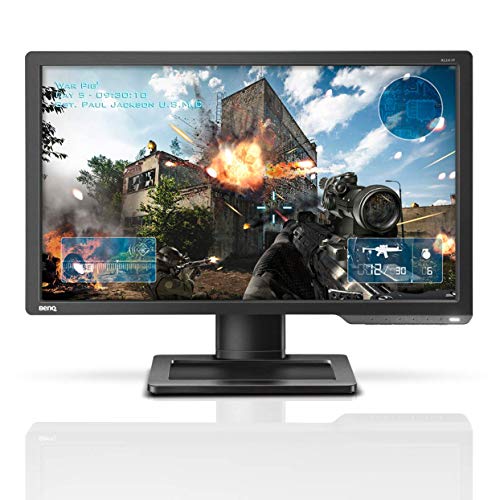


- Lightning-fast 144 Hz refresh rate performance for a smooth gaming experience.
- 1ms Response Time (GTG) to eliminate ghosting and lag, providing the optimal gaming experience.
- Exclusive Color Vibrance and Black eQualizer technology to enhance visual clarity and customized color settings, giving players the advantage on the battlefield.
- Multiple connectivity options featuring DisplayPort, Dual-Link DVI-D to reach 144Hz, HDMI, and Headphone/Microphone Jack input.
- Full height, tilt, and swivel adjustment with VESA Compatibility: 100mm x 100mm. Manufacturer Limited Warranty: 3 Years
-
Information
-
Twitter
-
Pinterest
-
Youtube
-
Facebook
Art Crum
Great display!
This display is great! The refresh rate is awesome and really improves the experience of playing games on it significantly (especially fast paced games, like shooters) It’s not an IPS, so picture quality and colors aren’t the best, but that’s a necessary trade off for the awesome refresh rate. The only minor complaint I have is that the bezels and overall size of the monitor are huge. I have a relatively small desk, so I usually end up having to rest my keyboard on the stand under the monitor to have space. Not a huge problem for me, but those with small desks might want to consider that. For reference, my larger HP 27XI is much thinner and takes up less desk space despite having a much larger display.
John Case
Don't skimp out, this is the 'budget' 144Hz monitor to get.
Best OSD for settings I've ever used. Exceptional colours for a TN panel (actually rivals my IPS panel). Gaming at high refresh rate is amazing and I can't go back now. Has some VERY slight scanline issues on dark greys, but really doesn't bother me that much at all. Has **no flicker**--this makes it better than the $50 cheaper 144Hz panels. Don't skimp out, this is the 'budget' 144Hz monitor to get.
Love Die
It's easy not to notice the difference a monitor makes until you try this one
I picked this monitor out because I'd heard of the brand through watching eSports and I wanted to support a company that supported one of my interests. I expected to get a "normal monitor" experience and pay a slightly higher price for quality build. I was very wrong, the difference between gaming on this monitor and a regular one is night and day. Games feel entirely more "tactile" and real time. I am better able to place shots, see what's going on, and I feel like I have better control over my character. It is bright and crisp, colors are vivid, and the action is unlike anything I've played on before. I don't know enough about monitor stats to tell you what specifically about it is better, but I can tell you I noticed an *immediate* improvement in my in-game performance once I switched. I an doing more damage, landing more shots and better able to perceive what's going on. High definition streaming video appears crisper than it used to. If you are any kind of gamer or power-user on your PC I cannot recommend this monitor enough. I will never again think of displays as just interchangeable peripherals; even with a very high end gaming PC, you are not having the full experience unless you have a monitor that is comparable with this one.
Butch Gabriel
Flawless
I liked this monitor so much I bought a second one for my son who also games. I like the 144 Hz--complete upgrade for my gaming life. Bright colors. No dead pixels. Good packaging for shipping. I don't use the base, because I used a VESA mount to put it on a swing arm so I can game in an easy chair. Good value for the money.
Dana Vironet
It would be helpful if BenQ settings could be easily cloned from monitor to monitor
The BenQ ZOWIE XL are exceptional! Packaging was superb and protective. Instructions for setting up and putting into operation was straightforward. My windows 10/GTX 1060 installation struggled initially with having two of the same monitors attached (auto-detect only picked up on one of them). Disconnected both, then connecting one at a time and letting windows complete the hardware detection routine before connected the next solved that issue. Across both units I had zero defective pixels. It would be helpful if BenQ settings could be easily cloned from monitor to monitor, but manually comparing and configuring the same isn't too difficult.
Crystal Ash
Absolutely amazing esports monitor!!!!
SecretoMoney Na Power
... some minor adjustment of the digital vibrancy everything looked great and it had almost no color banding on black ...
Out of the box the colors were definitely off and it had some pixilation on darker colors but after some minor adjustment of the digital vibrancy everything looked great and it had almost no color banding on black gradients. The Dell S2417DG’s I had had serious color banding issues which I couldn’t ignore once I saw it. I was pleasntly surprised a cheaper monitor didn’t have that issue. The only thing that could’ve made this monitor an epic 11 out of 10 is speakers but I don’t think most gaming monitors have them except the the asus v248ge.
Sijo S Karthi
Awesome 1080P 144HZ monitor!
With all the great selections of 1080P 144HZ monitors, I decided on purchasing BenQ XL2411P. Out of the box, the colors aren’t great. What are the best or perfect Color Specs via Nvidia Control Panel and OSD? No one can’t really tell you, it’s preference. I first messed around what look acceptable on the OSD, then adjusted the colors through Nvidia Control Panel and I’m happy. Highly recommended! :)
Aida Cunanan
this is what looks good to me
So crisp! make sure you go into the Nvidia Control panel and set it to 144hz. I did have to set up the display settings, this is what looks good to me. Picture mode to "Standard" and tweaked the rest like brightness to 75, Contrast: 55, Low Blue Light: 6, Color Temp: Normal, Hue: 50, Color Vibrance: 10, AMA: High, Instant Mode: On, Sharpness: 7, Gamma: 5
Fozia Amjad
Great for FPS gaming
This Monitor is for gaming! The colors are meant to give you an "edge" in competitvie gaming. If you want crazy colors that look super nice this is not the monitor for you. Playing overwatch as a dps on 144hz is LITERALLY LIFE CHANGING. It is so much smoother and worth the money. You have to go to nvidia display settings to switch to 144hz and need to use a DVI. Adjustability is great. 10/10 monitor so far for FPS gaming :)