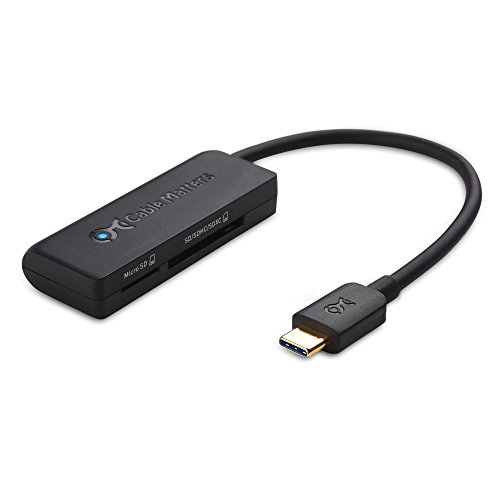


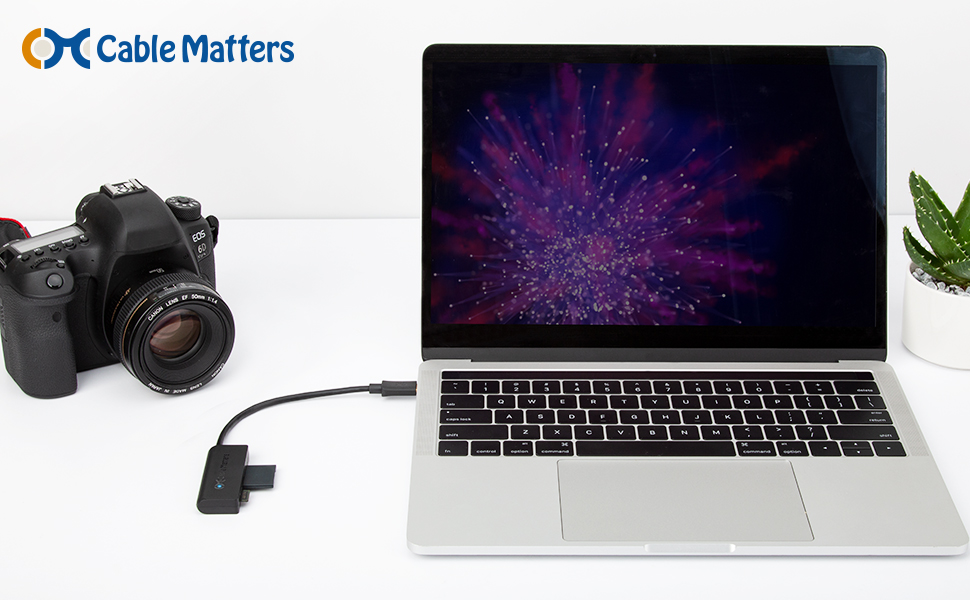

- DUAL SLOT SD card reader USB C adapter provides convenient access to SD, SDHC, SDXC, and microSD cards from a host computer or smartphone with a USB Type-C port or Thunderbolt 3 port; USB C memory card reader can access data from both cards simultaneously for downloading files from a video camera to your computer; USB-C card reader offers fast data up to the USB 3.1 data transfer rate of 5 Gbps; USBC SD card reader is an ideal accessory for an OTG enabled smartphone without a micro SD card slot.
- FLEXIBLE USB-C SD CARD READER with a 6 inch cable tail does not block adjacent ports and provides easy access to insert and remove your SD cards; USBC card reader supports hot swap support on the SD adapter eliminates the need to unplug and re-plug when changing cards; Portable bus powered Thunderbolt 3 card reader is compatible with smartphones with USB Type-C such as the Samsung Galaxy S8, Note 8, OnePlus 3, Nexus 5X/6P, Lumia 950/950XL, LG G5, V20, and HTC 10/U11.
- DELL COMPANION USB Type C card reader weighs less than 2 ounce; USB C Micro SD card reader connects to popular Dell models with Thunderbolt 3 ports including the Dell XPS 12 9250, 13 9350/9360/9365, 15 9550/9560, Latitude 5480/5580/7275/7280/7370/7480/7520/7720/E5570, Precision 3520/15 3510/5510/M7510, 17 M7710, Alienware 13/15/17
- USB-C & THUNDERBOLT 3 port compatible USB C SD card adapter for the 2016/2017 MacBook, MacBook Pro, iMac, iMac Pro, Acer Aspire Switch 12 S/R13, V15/V17 Nitro, TravelMate P648, Predator 15/17/17X, Chromebook R 13, ASUS ROG GL/G5/G7/GX/Strix, ZenBook Pro UX501VW, ZenBook 3 Deluxe/Pro, Transformer 3 Pro, Schenker XMG, Chromebook Flip C302, Gigabyte Aorus X5 15, BRIX/BRIX S, Razer Blade/Stealth/Pro, Samsung NP900X5N, Notebook Odyssey, Notebook 9 15 Inch, FUJITSU Workstation CELSIUS H760
- USB C TO SD CARD ADAPTER is also compatible with HP Elite X2 1012 G1/G2, Z1 Workstation G3, Spectre 13.3/x360, EliteBook 1040 G4/X360 G2/X 360 1020 G2/Folio G1, ZBook 17 /15 /Studio, Envy 27 All-in-One, Microsoft Surface Book 2, Lenovo Legion Y720, IdeaPad Y900, Miix 720, ThinkPad P 50/70, T 470/470S/570, X270, X1 Carbon, X1 Yoga, Yoga 370/900/910, MSI Phantom Pro, Vortex G65, LG Gram 15Z970, Intel NUC6i7KYK, Toshiba Protege X20W, Sony VAIO S11, Samsung Galaxy S9/S9+/S8/S8+/Note 8
-
Information
-
Twitter
-
Pinterest
-
Youtube
-
Facebook
Zhai Ambion Castro
Works perfectly with 2016 Mac book pro with touch bar
Works perfectly with 2016 Mac book pro with touch bar. Both SD and Micro SD works together.
Angie Lopez
Fast, small, and well worth the price
I usually don't spring for Amazon products when it comes to tech peripherals since there's so many reputable, established brands in this space, but I'm glad I went for this one. I needed the one day shipping, but the product itself exceeded my expectations as well. It's significantly smaller than I was expecting. Of course there are larger options with additional adapters, such as USB A ports, additional USB C ports, etc. But since my devices are only missing an SD card reader, this is exactly what I needed. It's built out of plastic, so don't have too high of expectations for the build. For plastic, it feels quite solid and substantial, and the cable is thick enough that I don't worry about it bending and fraying. I still keep it in a carrying case just in case, but for the average user the build is more than adequate. It's super easy to use, just plug and play (although the cards go in upside-down for some reason, so don't try and jam it in too hard the wrong way!). Speeds are at, or just below the legacy port built into my old device, so for an external adapter I'm completely fine with the performance. If you don't need additional ports beyond the SDs, don't hesitate to buy this one.
Usman Jehan
Live and die by the dongles
Ugggghhhh MacBook!! Why does everything have to be so complicated? I purchased this because the app to transfer photos from my Canon camera to my new MacBook is crap. My former card reader didn't have a USB-C and the in-between dongle wasn't working, so this was the easiest way to fix the problem. I guess one day the whole planet will be smothered beneath a mountain of wires and dongles that Apple has invented and then discarded. Until then, this works great, as expected.
Oshi Amarasinghe
Very handy and dependable card reader
I bought this 3.1 Type C for my 2016 MacBook Pro with Touchbar "15inch for importing my .Raw files into my computer. First let me make sure anyone reading this considers buying this! This will give really nice flow to your imports and I have tried some usb to usb c adapters but a lot of those are usb 2 and not 3! so if you shoot raw.. this is the better way to go.
Anna Dove Frankos
Lovely-lovely USB 3.0 speeds. Product works, and is tidy and reliable.
Works as advertised: USB 3.0 speeds. So far no problems. (E.g., no "USB device unrecognized") USB 3.0 is a such a nice speed upgrade over 2.0. I usually get 80-90 (or higher) MB/s transfer speeds, and essentially never less than 35-45 MB/sec. This is as compared to 10-20 MB/sec on USB 2.0. I like that it only has the two common slot types: SD and micro-SD. That's all I need. The readers with 6 or 10 slots for a card types I never use just look clunky, fragile, and like dust magnets. Not a huge fan of the short cable, but for some uses, that's preferred, I realize. Anyway, I bought a USB 3.0 extension cable for my application. That has worked fine so far (a few months in). Those USB 3.0 extension cables are pricey though.
Johnny Jdog Jenkins
Works great on Samsung Galaxy Note 8
I bought this so I could use it to check my trail/game camera cards in the woods without having to bring them back to a computer to view. This device was immediately recognized my my Samsung Galaxy Note 8, and has successfully read every card I have ever inserted into the slot. Nothing else I could ask or wish for - great product!
Crystal Black
Works like a charm on my 2016 MacBook Pro
My daughter "appropriated" my original one and I am now ordering a replacement. It works great with our MacBooks and does not take up a lot of space. I like that it has a little pigtail as apposed to plugging in directly as I like to sit with the laptop on my lap and the converters that plug directly into the MacBook puts a lot of stress on the connectors if you happen to bump it while moving. I have also tested both a SD and micro-SD at the same time and they are treated as two separate drives- awesome!
Thomas Kitchens
Works great so far
Works great so far. My old USB 3.0 reader died and my new computer has 2 3.1 ports so I went this route. I have never hit he 5GB transfer rate. I am reading from these cards. https://www.amazon.com/gp/product/B01J5RH5Y2/ref=oh_aui_search_detailpage?ie=UTF8&psc=1 and https://www.amazon.com/gp/product/B072HRDM55/ref=oh_aui_search_detailpage?ie=UTF8&psc=1 . And my C drive is a Samsung https://www.amazon.com/gp/product/B01LYFKJR7/ref=oh_aui_search_detailpage?ie=UTF8&psc=1 . With a EVGA Motherboard https://www.amazon.com/EVGA-Z270-Intel-Motherboard-132-KS-E277-KR/dp/B01N6NCQWV/ref=sr_1_fkmr0_1?ie=UTF8&qid=1517187695&sr=8-1-fkmr0 . I usually run a 95 MB/s read/write speed. I figured it would be much faster. But it works so I am happy about that.
Carlos Hankins
Works really well.
Works great with my HTC U11. Before, I was trying to use a MicrUSB card reader from another brand, and I had to use an adapter, and that wasn't working. So I bought this, and it worked right out of the box. Very fast transfer speed, and it's plug-and-play. The cable is the perfect length. It's short enough so that it doesn't take up much space, but it's long enough to prevent the cable from kinking up.
Elizabeth Hocog
Will transfer data at the maximum speed of the SD card
When tested, we found that this SD card reader will transfer data at the maximum speed of the SD card - around 90 MB/sec in our case. The SD card used for the test was Samsung 64GB 100MB/s (U3) MicroSDXC EVO Select Memory Card with Adapter (MB-ME64GA/AM). Using an HP laptop with the factory built in SD card reader, we saw a sustained read speed of 89 MB/s using this card. Using this Cable Matters USB 3.1 Type-C Dual Slot Card Reader for Micro SD / SDHC / SDXC Memory Cards, we saw identical sustained read speed. Also note that we tested the USB 3.0 model of this card reader as well - the Cable Matters SuperSpeed USB 3.0 Dual Slot Card Reader for Micro SD / SDHC / SDXC Memory Cards. Once again, we saw identical sustained read speeds.