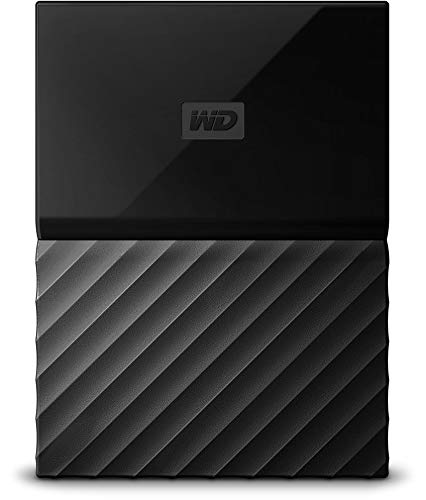

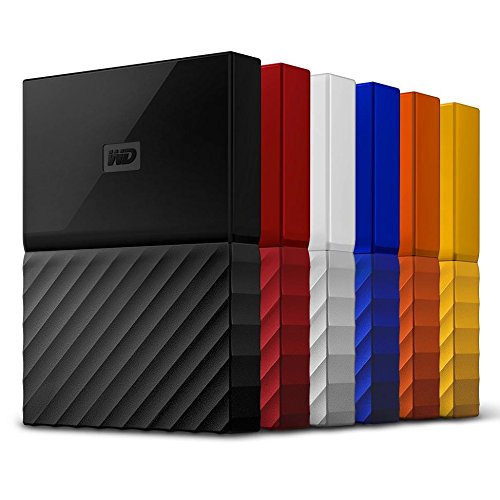


- Auto backup with included WD Backup software
- Password protection with hardware encryption
- Trusted drive built with WD reliability
- USB 3.0 port; USB 2.0 compatible. SYSTEM COMPATIBILITY: Windows 10, Windows 8.1, Windows 7. Requires reformatting for Mac OS X operating system
- 3-year manufacturer's limited warranty
-
Information
-
Twitter
-
Pinterest
-
Youtube
-
Facebook
Jeromy Rillstone
Great External, No Need for Power Outlet
I have owned probably over 15 WD drives over the years and while they aren't without occasional issues, I seemed to have far more success with them opposed to Seagate. Since I have been filling my other drives up and don't have anymore power outlets for My Books to plug in I decided to go with the 4TB Passport. The passports are smaller, don't require a separate power source, and with USB 3 they transfer very quickly. Everything has gone smooth so far and I've transferred about 200GB quickly and without issue. I have to say, for the price/GB these drives are great and I can easily recommend them.
Thet Myat Noe
Works perfectly with Xbox One!
Plugged this into my Xbox One (not the One S) and it automatically asked if I wanted to use it for apps and storage. Once I said "yes", the Xbox handled it perfectly. This is a great solution for expanding Xbox One storage!!!
Lai Yin Han Oo
Access denied after only 6 days!!!! Problem fixed after online search.
Update … after researching on the web, I found an article that indicated one possible option was that the drive security permissions needed to be changed. I went in & found (after 2 tries), that was in fact the problem. So I've changed my rating from a 1 star to 5. I've used WD quite a bit in the past, so to lose a drive that fast was very discouraging. I would suggest that WD should have been more proactive in sending tips with the drive … as it turns out, I had the same problem a few days later with another WD drive. It would have saved me some time & aggravation. However, to be fair with the vendor, once I got the permissions issue corrected, both drives seem to now work. And while I didn't realize it until I came back online to update this review, the vendor did respond to my "blast" with some helpful suggestions & an invitation to call support. Wish that had been in the box with the drive. So I'm now changing my rating to a 5 star partially because I feel I blasted WD pretty hard for a fixable problem & partly because I've had several of their drives in the past that were stable. Less than a week after loading all my files on the drive, I started getting an error message that states "there is a problem with this drive" immediately upon plugging the drive into the USB port. When I tried to access the drive directly via file explorer, I get a message that "Location not available" "drive is not accessible" "access is denied". I also tried plugging it in while the PC was shut down & then powering up … same error message. Finally, I tried to utilize the WD utilities to trouble shoot & got a message that "smart status passed" … also scanned drive & got a message "Passed at Thursday June 14, 2018 8:07:31 PM". Then went back & tried to access the drive, I again get a message that "Location not available" "drive is not accessible" "access is denied". Now all my personal data is on the drive & I can't delete it, so there's no way I can't safely return the drive to get a refund or replacement. What a waste of time & money. It's too bad because I've used Western Digital drives over the years & only switched because I needed more space. But this experience is so frustrating, that this will be the last WD drive I purchase. I can't afford to throw money away like that after less than a week of use. Looks like my only option is to pursue online back-ups vs. what I hoped was a less expensive option.
Sean Disney
and it's perfectly fine. This HDD has an insane 4TB of space ...
This little external hard drive is unbeatable for the price. I had my doubts, but after months of heavy use I can attest to the functionality of this very well designed product. Survived drops, splashed with water, and it's perfectly fine. This HDD has an insane 4TB of space and is so tiny you can easily carry it in your pocket and forget that it's there. The sleek and metallic body has a hefty feel to it despite its slim profile, rubber bottom provides a reliable grip to surfaces. The overall look and feel of this device just screams quality. Affordable, durable, and reliable, the WD 4TB My Passport HDD is quite simply the best bang for your buck when it comes to external hard drives.
Angel Dimitrov
Incredible customer service from Western Digital A++
Bought a 4TB drive on Feb 26th had been working great until yesterday when out of no where it stopped working and my computer wont recognize it anymore. The light is on and I can hear the drive spinning but several computers wont recognize it. I contacted Western Digital and a new was being sent however data recovery is not normally part of the warranty. I called Western Digital back the next day to talk about the data recovery and why this isn't covered on a device that is 2 months old. I spoke to Eunice (A++ service) she talked to her supervisor, because my device is only 2 months old Western Digital stepped up and did the right thing and is allowing me to send the device back to them to have the data recovered and placed onto a new 4TB My passport drive at no charge. It was going to cost me $400-$900 from a 3rd party company if Western Digital did not allow me to send it back to have the data recovered. Thank you for standing behind your product and doing the right thing I will purchase more drives from you in the future because of your actions today. Thank you SO MUCH Eunice from Western Digital and your supervisor your understanding and doing the right thing is much appreciated you now have a loyal customer for life.
Shannon Jamarcus Riminton
Great for Gaming
I use this for my Xbox one and it works perfectly. The Xbox one comes with limited storage space and I constantly found myself deleting games to make space for more. This portable hard drive was easy to add; just plug it in with the usb. It has tons of storage and I can download as many games as I want. I haven't had any problems yet and I've had this for a while now. It works perfectly and has a reasonable price.
Jomz Grajo
PS4 will format this for you. No work needed
Just want to add in a review with the ps4 tag so people can easily see it when they search for "will this work for ps4" and such. You do not need to do the preformatting as originally described by many. You also should not pay more for the "ps4 version" of this drive. My experience with this was surprisingly smooth and easier than expected. Turned on my ps4, plugged in the hdd, and 2 notifications popped up -Discover:You can use your external drive as storage -Unsupported drive format. If you go onto the discover notification it gave me the option to format it and it was faster than any formatting windows has ever done on a drive especially one of this capacity. Long story short, ps4 will preformat this for you once you plug it in and confirm it to do so. Once formatting is done it will give you the works about how installing on external storage works and for me it set it as the new default. Things to keep in mind: -Only game data is stored on the ext drive. -Saves, screenshots, videos etc are still on local storage -Check storage settings to switch between which should be default installation drive.
Tyandra Chappell
Playstation 4 Compatible!
Bought this right after Playstation 4 gave us the update to use an external hard drive. So I've been using this for some months now, and quite pleased overall. For those wanting to use it for the PS4, be sure to connect before powering up the unit, so it'll recognize the device is connected. And if you happen to lose power, when you regain power, it'll promptly say the device was disconnected and needs to be restored. It's as simple as clicking the ok on the screen to fix, and doesn't take long to reconnect. It doesn't require a power source aside being hooked into the PS4 USB port, and it's size is small. If there's any negative, it's the fact it's hooked into an USB port, so mine is currently plugged into the second port. So if you use the VR, there's no further ports available for anything else, like the charging cable. But for the price I paid, $110, 4TB, I have all the storage space I'll virtually ever need.
Calvin Parkinson
Not reliable doesn't mean a bad drive, read please
People buy these hard drives expecting reliability, this disks are made to transport data, not to make lifelasting originals of the most sacred memories. These mechanical discs break, and you can restore your data every time, but you will have to pay for a specialist a lot of money. Alternatives to these disks: dvd, if you burn a dvd it will be way more reliable than a hard drive, burn many if you need 4tb. Another alternative is 2 or 3 of these disks with copies of your data, if one dies you can buy another and transfer the data and always have 2 or 3 copies. 4tb of your most preciated pictures and videos are worth more than 100bucks, so use one of this options or pay for cloud. You can check and will find that all these drives have the same score in the reviews and the people complain about the same, people just keep thinking these drives are a safe storage, they couldn't be more wrong. Having this said, the disks are working great, I'm leaving some pictures. vote helpful it it was for you
Jessica Canhigh
Works great for Mac, but be aware of the important steps!! :)
Mac users! Don't go straight into Mac's Disk Utility just yet. Avoid major error by running WD apps first. 1. Plug in and open the Hard drive; install the Mac driver/software (inside) and "WD Drive Utilities"; it will prompt for latest updates--run updates. 2. Now run WD Drive Utilities app to Erase--must select "HFS+J" which is Mac Journaled. 3. Finally, it is now a Mac External HD. You can start using it, or run Mac Disk Utility if you like. *I ran Disk Utility after I did it all that to make sure I don't run into future issues. :)