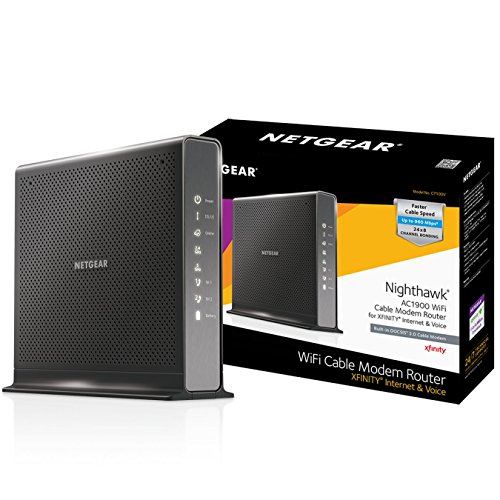



- Compatible with Xfinity from Comcast
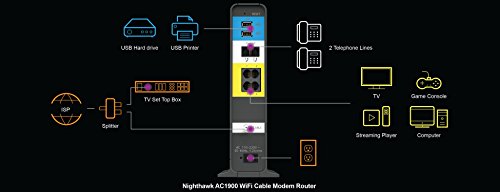
- Three-in-one DOCSIS 3.0 Cable Modem + AC1900 WiFi Router+ Xfinity Voice and 2 USB ports
- Up to 960Mbps modem speed and Dual-Band AC1900 (2.4GHz & 5GHz) WiFi speed. 24x8 channel bonding/ Approved for plans up to 500 Mbps
- DOCSIS 3.0 unleashes 24x faster download speeds than DOCSIS 2.0
- Ideal for streaming 4K HD videos, faster downloads, and high-speed online gaming
- 2 Voice over IP (VoIP) Ports and 4 Gagabit Ethernet Port.System Requirements:Microsoft Windows 7, 8, Vista, XP, 2000, Mac OS, UNIX, or Linux.Microsoft Internet Explorer 5.0, Firefox 2.0, Safari 1.4 or Google Chrome 11.0 browsers or higher
- NOTE: Check User Manual on Technical Specification before use
-
Information
-
Twitter
-
Pinterest
-
Youtube
-
Facebook
Jennifer Lindeman
Does everything is says it will!
Finally bit the bullet and purchased this rather than renting from Xfinity. Wish I had done this from the start. The WiFi in the rental unit (Arris TG862) was just horrible. On top of that we usually could only manage about 8-12 Mbps, when we were supposed to max out at 100 (we have the Performance Pro). On a good test I was able to d/l @ 26 Mbps. I've been running speed tests for the last 3 hours since we got this up and running, because I just can NOT believe the speed I'm getting. Using the 5 Ghz WiFi channel.... I'm getting 175 Mbps, consistently. I wouldn't believe it if I wasn't seeing it for myself. The first two pix are the inconsistent speeds I was getting last week. The other MAJOR improvement is the WiFi coverages! It is SPECTACULAR all over the house (2400 sqft). I just can't say how happy I am at the moment. It did require an Xfinity tech to come out and set it up, because the person I spoke with when I called to set it up did it wrong. The tech who came to my house was fantastic. Pleasant, polite, professional and got it all dialed in in about 30-45 minutes. Again I wish I'd bought this unit 2 years ago (well... last year when it came out)!!
Erf Shiela Brito
Wonderful wifi cable modem/router!
Wonderful cable modem/router, even better than xfinity's own! I purchased this one after I learned that it was okay to acquire our own modem to replace xfinity/Comcast's rental. It pumps up more bandwidth and is faster than xfinity's. It also has better security features as well as a "guest" mode. To install it all I had to do is make some adjustments to the firmware via the virtual Netgear website. After that, the xfinity system was able to recognize the modem over the internet and install it without having to contact a customer service rep at all! The only caveat is that if you have xfinity's home security system, you'll have to get a separate modem if you want to be able to control your home's alarm system via the internet (with your iPhone, computer, etc.). I wasn't aware of that until I was ready to leave on vacation and much to my surprise, the alarm system did not recognize this modem. Later a technician explained to me that in order for the xfinity home security system to work over the internet, a VPN had to be created, but only xfinity is able to do that--legally. Hence a technician had to come to my house to install a small router, which he configured with a virtual private network so the home security system is working perfectly now. All in all however, this is a winner all around just make sure to contact your cable provided if you have a home security system installed by them too.
Cassy Heichel
BLAZING fast speeds...for a price
If you have the Comcast triple play with voice, stop reading right now and buy this modem. I bought this so I could save myself $10 a month for the rental fee of the antiquated Arris modem we received when we first got the triple play. I wish it would have been available sooner. We were rated for a max download speed of 75 Mbps, and a max upload speed of 10 Mbps. With the Arris I never hit anything over 32 Mbps unless it was 3:00 am then I would occasionally hit 35 Mbps. The first thing I did when I got this installed was run speed tests from various sources on my desktop, and on my cell phone. With this modem I am hitting almost 90 Mbps. on my desktop AND my cell phone. Below are some pros and cons. PROS - Ease of install - Super easy install and activation. Just unplug your Arris cable modem, and plug this one in, simple as that. Activation is a bit more involved, but still super easy. You have to log into your router using 192.168.0.1, and setup a new password, as soon as you save that you will be automatically redirected to the Comcast activation website. A couple more clicks and you're good to go. Speed and Performance - This thing is BLAZING fast! As I stated above I am seeing speeds almost triple of what I was with my old Arris cable modem, this fact alone is reason enough for me to buy it. The Netgear Nighthawk series of routers is well known in the IT community for their fantastic performance, and this is no different. I'm sure there are more bells and whistles that I can tweak to squeeze every Mbps out of this thing, and secure it like Fort Knox, but it's only been installed for 12 hours so I haven't had time to play with it. Multiple Wifi channels - One thing with the old Arris is that you couldn't easily select whether you connected to the 2.4 Ghz channels or faster 5 Ghz channels, with the this C1700V you can set them both up independently with separate SSIDs and passwords. So, if you're like me the kids and their 27 devices can go on the 2.4 Ghz leg, and you can still have blazing 5 Ghz speeds on you own devices. CON - Notice that it doesn't say "CONS", just con, only one. Price - This thing is EXPENSIVE. However, for the performance it is worth it. Do I wish I didn't have to spend $300 that I won't get back for at least 30 months? Yes, but I would do it all over again if I had to just based on the performance. I will eventually make my money back, I mean Comcast is the ONLY cable provider in my area, so I don't plan on switching anytime soon so in 30 months I will break even. It is a hard pill to swallow at first though.
Audrey Andersen
Best modem for Xfinity Triple Play
If you have Xfinity Triple Play and want to get rid of the $10 per month rental fee, this is the modem you want. It looks exactly like the Cisco 3941T and has similar excellent performance, but has completely different software. While it's not as easy to configure as Xfinity's own modems, I do feel it is more secure. Installation was much easier than I expected. I disconnected the Cisco 3941T that I was renting from Xfinity and installed the C7100V. After plugging it in I followed the instructions in the manual and logged in to the router from my computer. It automatically opened a window to Xfinity prompting me to enter my Xfinity login and password which then updated my account to use the new modem, no need to call Xfinity as described in the manual. The modem did reboot and all the lights came on, but for some reason I wasn't able to get a connection from my laptop. I ended up rebooting the router again and everything came up correctly and I haven't had a single problem since. Voice quality is very clear and running a speed test over an Ethernet connection resulted in a download speed of 89.8 Mbps and an upload speed of 11.8 Mbps on my 75 Mbps service. This is definitely a speedy router/modem. It supports gigabit Ethernet, up to 600 Mbps over 2.4GHz, and up to 1300 Mbps over 5 GHz. The 24x8 DOCSIS 3.0 support also makes it future proof for much higher speed plans. WiFi settings are the same as other Netgear routers. It allows you to set up both 2.4 GHz and 5 GHz wireless networks as well as 2.4 and 5 GHz guest networks. You can also set up a white-list to only allow devices with a known MAC address to connect and block all other devices, even if they have the correct password. (On the Xfinity modem you can't do this, you can only have it notify you when a new device connects.) One of the downsides of switching to your own modem is you lose XFINITY xFi. xFi only works with Arris 1682G, Cisco 3941T, Arris TG3482G or Technicolor CGM4140COM modems rented from Xfinity and provides a simple interface for your network that can be viewed and controlled from the Xfinity web site, the Xfinity xFi app, or from your X1 box. What I liked about xFi was you could assign devices to groups and then easily view which devices were currently connected and how much bandwidth each group was using. You could also set parental controls for each group. One of the things I didn't like about xFi was it easily displayed your WiFi passwords. Additionally xFi doesn't allow you to set up a white list, you can only disable a device after it's already connected to your network. Using your own modem you also loose the Xfinity SSID which other Xfinity customers can use to connect to WiFi. While some aspects of xFi are nice, especially for those not familiar with configuring their own router, I don't feel it's worth the extra money you'd eventually pay by renting.
Ní Ghallachoir Ellí
With this modem the web doesn’t suck any more…
This is a review of NETGEAR Nighthawk AC1900 WiFi Cable Modem Router with 2-Voice Lines for XFINITY (C7100V). I have Comcast Blast internet service that typically got me ~150Mbps (measured using speedtest.net). However, I still found that browsing the web (even using WIRED connections) was TEDIOUS – with each new page typically taking 2-4 seconds to fully paint – who’s got time for that?! I got to just assuming that that performance was as good as it was going to get in 2017 (“zzzzzzzzzzzz”), and when I ordered this modem, it honestly never occurred to me that it would improve the performance of my web experience on WIRED connections. Boy, was I wrong. As soon as I had this modem up-and-running, the difference was immediately clear. Web pages now pop up just like they do in the TV adverts – immediately! This will change my (so-called) life, and I already find myself delving deeper into websites because I’m not subconsciously dreading the slow painting with each new click. Speedtest.net is now showing 280+ downloads, but the difference in browsing performance seems proportionately much quicker than that figure would suggest versus the previous 150. Wi-fi signals seem commensurately faster, and certainly have range enough for my medium-sized two-story house (with the modem in one corner of the house). The installation was a breeze. DON’T CALL COMCAST – I just went to xfinity.com/activate and with 2 clicks and a restart I was up and running (internet and phone service) – almost unbelievable! The router administration utility is well designed – easy to navigate, and seems to have all the capabilities that I (a fairly technical user) might need. Of course this box isn’t cheap, but with the new speed I feel like I’ve jumped 5 years + into the future. So that’s worth $300 to me – especially since I’ll recoup that in Comcast rental fees after 30 months! Addendum - Everything is still working fine, however I discovered that the Comcast 'Stream TV' service would not work - their system thought I was NOT on my home network, so wouldn't show some of the TV Channels. So I had to call Comcast (Yuck!) and wasted an hour of my life telling them that they needed to register the MAC addresses. After they finally did that, it worked. So the web might not suck any more, but Comcast still does :).
Aroha Samuels
Excellent, Easy, Fast!!
I've had this setup on Xfinity for 3 weeks. It's by far the fastest wifi I've had, and I had the Nighthawk X6. My favorite feature is in the web management console. It shows you a chart of the wifi channels and how many other wifi networks around you are using each channel, so you can select a clear channel for yours! In my neighborhood nearly every wifi network uses 1 of 2 channels, so I had my pick of the others. Just as an FYI - I'm still waiting for the optional internal backup battery to become available from Netgear, but I don't see any reason that should reduce my rating.
Merlys Francis
I'm Satisfied -- No Complaints
As it appears Amazon is grouping reviews of similar products, I'll note first that I'm reviewing the Netgear Nighthawk AC1900 WiFi Cable Modem with two lines of telephone support. I paid Amazon $279.99. Apparently there are other "AC1900" router models out there, and this is not one of them. I bought this to replace the WiFi cable modem for which I was paying Comcast $10 per month in rental charges. Now it looks like it'll be 28 months before I'll see any return on investment. That'll be fine, assuming my new modem continues to work for the next 2+ years. Setup was easy, and once I'd established my own SSID(s) and password, I called Comcast. The nice Comcast/Xfinity lady who spoke almost-good English got internet and voice telephone working pretty easily -- she had to send multiple signals to the modem but it eventually responded and has been working fine ever since. One surprise for me is that I now have TWO WiFi connections in my house -- one 2.4 GHz signal like I had with my Comcast-provided modem, and a new 5.0 GHz signal. It has turned out that some of my WiFi devices (printer, Oppo BluRay) require the old 2.4GHz signal, and others (iPhone, Apple TV, and even an older Android Nexus tablet running Nougat) like the faster 5.0 GHz signal. While I've been using my new cable modem only about a week, I have no complaints so far. Relatively easy installation, lower monthly Comcast bill. I'm satisfied.
Diane McArtor-Stidd
Good for now
I have Comcast internet and voice service. Over the years, Comcast has been raising the modem rental fee to the extent I finally bought my own. Setup is very easy. First, you power off the old modem/router. Next, disconnect the power cable, coaxial cable, and voice line. Reconnect these cables back to the new modem and turned on the power switch. Upon solid illuminations from the power, DS/US and the internet online indication, contact Comcast customer using your cell phone. That way, they can add the new modem/router CM and EMTA MAC addresses to their databases. After some wait , verification, and setting up on their end. Comcast support will text you a message. In it, a web link to acknowledge the rental cancellation. Once that is done, it will be followed by another couple of minutes of wait like 5-15 mins depending on their work load. Finally, you should have restored back your good old internet connection. You can test it out using your cell phone. However, it would be easier to bring out an iPad or Galaxy tab to test out the wifi connection while you are on phone with Comcast customer service. After the internet has been re-activated, you have to request the service representative to re-activate your voice line again. Voice is tied to the old modem. This should take another couple of minutes like 5-15 mins depending on the time of your call and their work load. Next, the representative will ask you to try incoming, outgoing and voice mail to ensure voice line is working properly. As for the Netgear C7100V, it performed well as of now. I had very strong wifi signals in rooms where it was poor using Comcast modem/router Overall, I'm happy with the product till I re-update it again after several months of usage.
Ashley Bree McNally
No reset necessary
So it’s been about 2 weeks now since I installed this in our spread out 1500 sq. ft. Home. I replaced the Xfinity cable modem/router combo that I had rented from Comcast for a couple of years and haven’t had to reset it once! Not once! We used to have to restart the xfinity box two or three tones a week. Connected, We’ve got TiVo, two iPads, 4 iPhones, an ecobee tstat, Alexa, a smart light hub, ps4 and other devices when other people are at our house. I highly recommend this netgear nighthawk ac1900 for any household that requires a cable modem/router/phone combo. It took less than 10 minutes to set up and all I had to do is follow the install prompts. I never had to call Comcast! Do yourself a favor and make your life easier and better... Update: 1 month and has worked flawlessly.
Angela Brawley
Excellent modem\router, as long as you know how to set it up (see my advice for Comcast in review)
So far has made a BIG difference over theComcast modem\router. My WWE network on ROKU (which had CONSTANT, ABSOLUTEY INTOLERABLE buffering making it UNWATCHABLE) has only buffered ONCE (the one buffering hs left me VERY disappointed, but I'm hoping it's a one-time thing), and worked perfectly since I installed this modem\router. Picture on the WWE Network is perfect as well (was pretty good, but VERY "iffy" with the Comcast modem). Internet speeds (I have the Comcast 150 Mbps - which I will probably be lowering now to 100 to save money) hit 180 Mbps repeatedly on one speed-testing site. Yes, this modem\router is very expensive, but it was worth it to me (I like to buy ONLY the best, and am willing to spend the extra $$$ for it), and it will pay for itself in 2 years. The ONE thing I will caution potential purchasers - if you have Comcast, CALL COMCAST FIRST AND HAVE THEM ADD AND REGISTER THE MODEM\ROUTER BEFORE YOU SET IT UP - I went through 2 hours of pain and suffering because it wouldn't set up since I didn't do it right - it knocked off my phone and internet, so I had to reattach the old Comcast modem to get my phone back to add\register the modem\router. That got back my phone on the new modem, but THEN EVERY web page went to a Comcast registration\activation page, asking for a code. Comcast wouldn't give me athe code, and told me to call Netgear, as it was a Netgear problem. Netgear told me it was a COMCAST problem. Back to Comcast, who kept redirecting to the wrong departments. How I FINALLY got this to work was to activate it under 'other methods' (shown as a little 'link' under the code input box). It will ask you for some other activation choices, such as 'address' - I think that as the one I used - and once that was done, I had full internet. So this works GREAT if you know what you're doing when you set it up. Follow my advice for setup with Comcast, and you should have FAR less problems then >>> I <<< had.