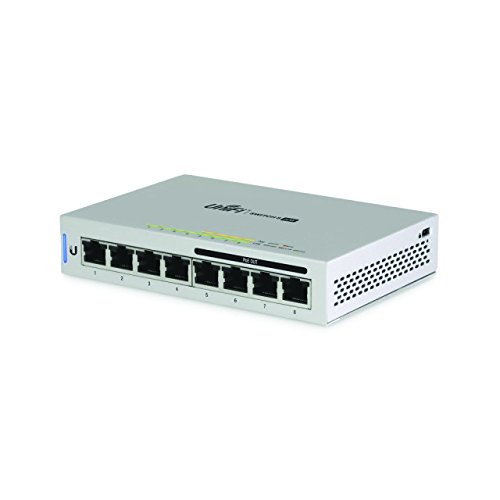


- The US-8-60W is an 8-port gigabit switch with four 802.3af PoE ports. Its auto-sensing PoE ports deliver up to 15.4W of power per port.
- Non-Blocking Throughput The new 8-port models feature Gigabit Ethernet ports in a compact form factor. For its total, non-blocking throughput, each UniFi Switch supports up to 8 Gbps.
- Switching Capacity The UniFi Switch offers the forwarding capacity to simultaneously process traffic on all ports at line rate without any packet loss, with a switching capacity of 16 Gbps.
- 8 x RJ-45 Gigabit Ethernet Ports 4 x Auto-Sensing 802.3af PoE Ports 8 Gbps Non-Block Throughput 16 Gbps Switching Capacity
-
Information
-
Twitter
-
Pinterest
-
Youtube
-
Facebook
Sandy Stripling-Groves
Great Switch. Love Ubuity.
I have grown to love basically everything about Ubuiti. This is a great switch. I love the management/controller software (just wish it could run on the switch itself). I paired this with three AP-Pros, and it's dreamy. Note that this unit WILL NOT power the AP-LR. I think it only powers the Pro. I'm sure people who understand the finer points of PoE will say "duh," but I somehow assumed it would work with both/adapt to each AP's needs. No big deal. I returned the LR and just got another Pro in that case.
Grace Harris
UBNT FTW
Great addition to my setup.
Elaine Fragua
Easy to setup either as a standalone switch or port of your Unifi deployment
Great 8 port switch that has 4 POE ports that are able to power select Unifi items * Easy to setup and compliments the rest of my UBNT network * Installed this in my home network and was able to connect to my USG with no problem * Unifi controller recognized it right away and was able to adopt it easily
Lorraine Moser Baron
Fantastic switch, but it does get hot!
Love these switches and the management application. tried one, upgraded my whole network immediately after. Uplink port is identified in the software, POE ports are identified, gigabit and 10/100 ports are identified, you can address this thing, i feel like im just scratching the surface so far in configuring it. It does tend to get hot though, had to move it from the closed cabinet it was in to somewhere with a little more air circulation. didnt notice a performance difference but i caught it after only a few days of use. i would image prolonged exposure in that environment probably would have killed it.
Vicky Henry
Works great, runs hot.
This device was a breeze to configure and I am currently using POE for two devices. I am powering an access point and a cloud key using POE so the power draw in minimal, however I have noticed the device does run hot and luckily I have installed it on a shelve that has an open weave metal construction so that it can get better airflow. I also noticed that the USG I have runs hot as well and decided to place the network gear on the open weave metal shelve to improve cooling for the devices. Still with that little nit pick being the only downside I would not hesitate to recommend Ubiquiti products to anyone. Fantastic products, beautiful construction, all devices have been stable since installation and have not any trouble.
Regina Bowler
Another Win for UBNT
Another win for Ubiquiti bringing their enterprise-level tech down to the consumer and small business markets. This is a terrific 8-port managed switch that integrates perfectly into the UniFi platform and has the added convenience of 4 PoE ports delivering up to 60W of power. Many of my UBNT installs are for small businesses with only 2-3 access points and a cloud key controller and this is the perfect solution to power them all with one plug. Best of all, it's a full $100 less than UBNT's 8-port switch with provides 150W of power on all 8 ports. For those just starting out on the UniFi platform, this is a great switch at a great price. Please note: You WILL need a UniFi controller to manage this switch. There is NO web interface to manage it directly. Without a controller, it's just a gigabit switch. Also note that this little guy does both 802.3AF and passive PoE.
Mera Tumpang
Unifi Solid Networking at an excellent price
I have used Ubiquiti Unifi gear for three years now and the Enterprise Class Network devices and integrated management make this a wise choice. I've installed Unifi for four friends of mine as well. This is actually my third Unifi switch in my home. I have one other Inifi Switch 8 60W and the Unifi Switch 24 250W. I also have a Unifi USG and two of their excellent Unifi AP-AC Pro access points. I also recently upgraded from a Cloud Key Gen1 to a Gen2. When you decide to opt into the Unifi line of equipment you are making a decision to bring Enterprise class networking into your home. In order to configure and manage Unifi network devices you need to run the "Unifi SDN Controller software". The Unifi SDN is where you make all the changes and settings to Unifi devices. Unlike consumer class network devices, Unifi devices are not managed, configured or monitored from a web server embedded on the device. Instead, the Unifi SDN makes secure socket connections to the target devices for management. One way to understand this is that you can configure one wireless access point and then add ten more access points with a single click and they are automatically configured with the SSID's that you have defined on your network. You can run the Unifi SDN on Windows, Linux, Mac or a Unifi Cloud key. I have run the Unifi SDN on Windows, MacOS, Linux, and as a Docker image from my NAS. After plenty of experience, I decided that a Unifi Cloud Key was a much better choice since it is a dedicated environment from which you run just the Unifi SDN. Although it is not necessary to run the Unifi SDN 24x7, it is a great advantage to run it from a device like the Cloud Key for realtime monitoring, reporting and statistics. This Unifi 8 port POE switch is completely manageable, which means that it allows for the creation and management of multiple VLANS and four of the eight ports are Power Over Ethernet (POE). I've used the POE ports to support both my Unifi Access Points and also several POE cameras I have around my property. I've included a picture of this latest Unifi 8 port POE switch that I have which is handling my Family Room entertainment center connection to my Samsung QLED Smart TV, a Roku 3, a PS3, a Raspberry Pi running OSMC, and a camera which monitors the area when we are gone. The visual indicators on the Switch itself and on the GUI let you know if a device is communicating and at what speed and if the attached device is drawing POE power, you get the exact wattage that is being used on that device. The only downside to this switch is that it is passively cooled and needs to be used in a well ventilated area because it does run hot. My summary recommendation if to seriously consider this device, but to also consider a Unifi Cloud Key with it. As long as you make the dive into the Unifi Ecosystem, also consider the USG or USG Pro as your router to complete the integrated suite of devices.
Nawar Muntaha
Excellent layer 3 lite switch with 4 ports of PoE
Excellent layer 3 lite switch, especially if you only need 4 ports of PoE. If you need full layer 3 control at the switch, be sure to buy a UniFi Security Gateway which ties the whole system together. For the price, this switch + USG + UAP AC Pro (up to 4 on this switch) ... You'll have a wireless network that's unbeatable by any consumer grade junk. I like to think of the UniFi line at Uniquiti as being "Enterprise Lite" ... Good enough for small enterprise organizations, at a price point that makes it a no-brainer for consumer homes that want excellent functionality, security, and feature set.
Skyler Overton
Great managed switch with awesome controller app
This switch lets me see a lot of information from the Unifi Controller. I can remotely see each port's connection link speed, PoE port power consumption, and devices per each port etc. It also offers countless configurations. Each port can be configured for Switching/Mirroring/Aggregate, and limit packets/second, PoE on/off, and even set Link negotiation to Auto/Manual. Per switch, Enable jumbo frame/Enable flow conrol, etc etc. Honestly most of these are not absolutely needed for home network, but I appreciate the fact that I can see all these info without go to my main distribution panel. 60w PoE is more than plenty for four ports. My UAP-AC-PRO consumes about 3.66w and Cloud Key consumes 3.18w. Glad that I didn't order 150w version. One thing I wish is an ability to track LAN traffic for devices connected to it but it seems it only tracks per-port not per-device. However I am not sure if other managed switch offer such functionality.
Jessie Besson
Switch is a winner as an integral part of a Ubiquiti system (or by itself)
Great switch. It's the central part of my Ubiquiti setup. I use the POE to power the UAP-AC-IW, and it works flawlessly but no longer supports POE passthrough. Passthrough requires POE+, which this switch doesn't support. I wasn't using the passthrough anyway, so no loss for me. However, using this switch to power my AP allowed me to remove the POE+ injector I was using from my setup, so that's a plus. This switch is really well built, metal case and small form factor. I needed a POE switch with aggregation ability in a small form factor so this managed switch fit perfectly. As others have said, it does run hot with it's passive cooling design. Physics says that's probably not good for the long term life of the components, but I've never heard of Ubiquiti long term quality problems. Also, I have a fan pushing air to this and my Edgerouter X-SFP just in case, but I wouldn't have bothered if I didn't have that fan lying around. The switch is easy to configure with the Unifi controller (software) that I already had running for my AP. If you don't already have Unifi Controller running, it's still very easy to set up. There wasn't any other switch that met my requirements for my setup, small, POE, managed. Even better, I was already in the Ubiquiti ecosystem so it makes implementation and management that much easier. If you have a UAP and/or USG, this is a no-brainer. Even if you don't, the ease of management and control on this switch makes it very appealing. I recently replaced a quality all in one router with a Ubiquiti setup and it's one of the best things I've ever done for my home. If you rely on internet and the network like most modern people do, look into it. [Excerpt from another of my Unifi reviews:] As much as I like this switch, the real star is the whole Ubiquiti modular setup. My network is so bulletproof now. I don't ever have to worry about network being up or inconsistent wifi speeds. Where it used to be common to hear that the "internet is down" or "too slow" from my family, I have not heard a peep about the network or experienced any performance issues in the couple months that I've had this system. And this is while I've been literally constantly monitoring it throughout the day since implementation. Not a single hiccup or issue, and we probably stream video as much as anyone (cable cutters). I may sound like a Ubiquiti fanboy, but it's because this is working for me way beyond my expectations. Other setups from other brands could work just as well, I just don't have experience with them. I just heard so much about the ALMOST consumer level ease of Ubiquiti with the flexibility and power of enterprise. But honestly, if you have experience with consumer routers from 10 years ago, it's not much harder to configure, if at all. Also there's a very big support community and very helpful videos on youtube. Regardless of any trouble in setup, it's worth the initial pain to not have to deal with a slow or down network or internet on a weekly/daily basis. I'm never going back to less than excellent performance again.