
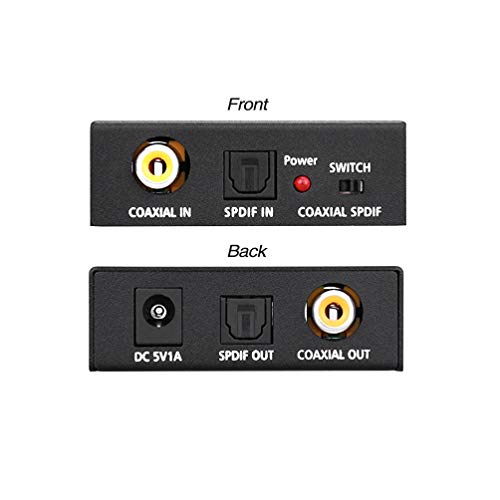
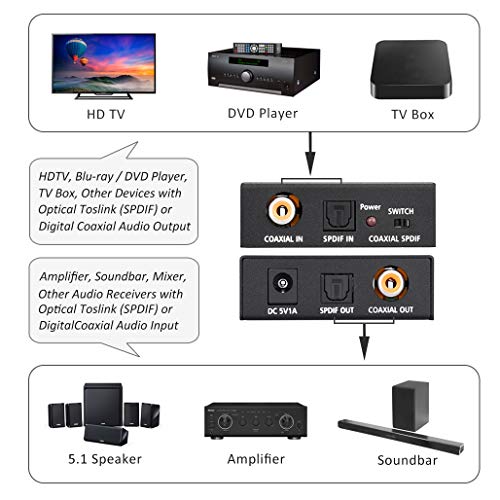
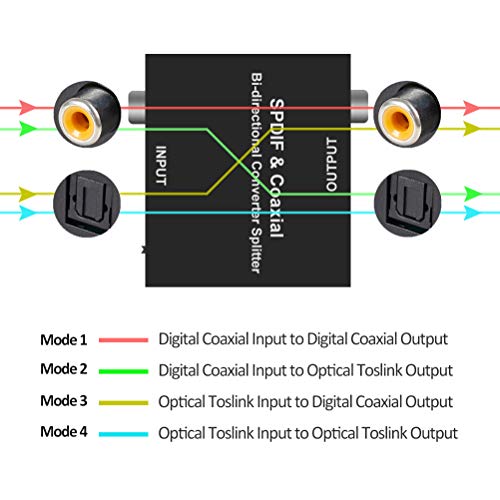
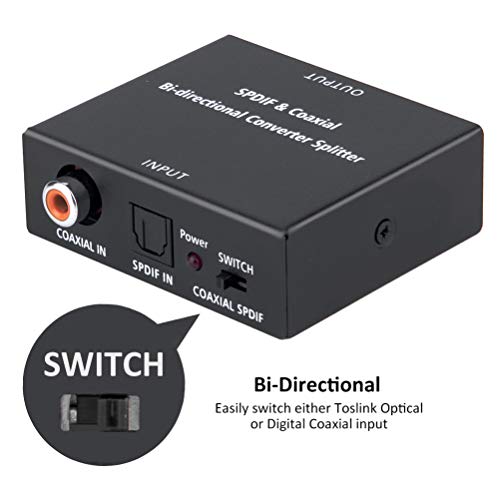
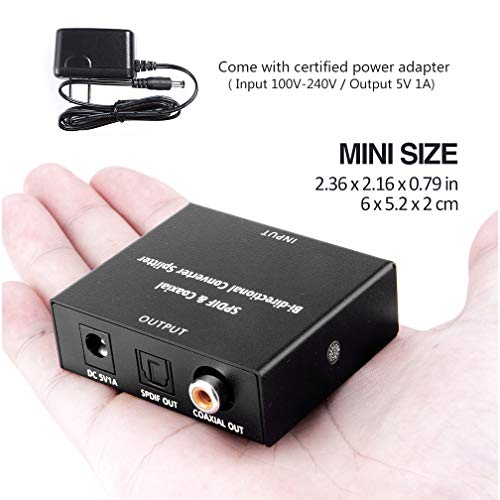

- 【Bi-Directional Digital Audio Converter】Convert SPDIF Toslink Optical-to-Coaxial or Coax-to-Optical, an input selection switch to select either Toslink Optical or Coaxial input
- 【Audio Format】 Support multi-channel surround sound, uncompressed PCM audio and compressed 5.1 audio including Dolby Digital (AC3), DTS to audio processor or A/V receiver with capacity of decoding audio source. The highest support 192 KHZ sampling rate. Noise-free transmission
- 【Easy to Setup】 Plug and play, no need any software and driver. Come with 5V1A power adapter (support 100V-240V input), no need to prepare by yourself
- 【Long Distance】Use Optical fiber cable loss less the 0.2Db/m, output distance is up to 30 meters (98 feet); Use the standard Digital Coaxial cable output can be up to 10 meter (32 feet)
- 【Wide Applicabilit & Warranty】Compatible with Blu-ray Player, Satellite receiver, BR player, Xbox 360, HDTV, DVD, Amplifier, Sound Bar, Speaker and all device with digital audio out port.18 months hassle-free warranty + Customer service and technical support via: support@roofull.com (Respond within 12 hours and 100% satisfaction guarantee)
-
Information
-
Twitter
-
Pinterest
-
Youtube
-
Facebook
Itsnot Youme
Allows me to listen to TV Speakers, Surround Sound and wireless headphones with no noticeable latency
I will give this a 5..... The converter is very simple. So I plugged and played....At first it did not work. The instructions with the converter were not too comprehensive. But the merchant included a QR icon for Roofull tech support. They were very responsive and got me going. Bottom line, you must make sure your audio output is PCM, LPCM, etc., not Dolby 5.1. I went in to the setup of my Samsung 4K UHD TV and changed the output from 5.1 to PCM and all is well. I split the signal and find no noticeable latency between the TV speakers, surround sound speakers and my analog wireless headphones. I am very happy with how this turned out and the tech support from Roofull.
Betty Straub
Solved my ARC Problem with the HDMI Cable
I have my TV wall mounted over the fireplace and there is a HDMI cable running behind the wall from there to the receiver in my basement (~35 feet). I used to rely on HDMI ARC to have the sound sent to Receiver and Speakers from the TV. ARC is not reliable and is very inconsistent in delivering audio to the speakers when I am playing some videos directly from TV. To resolve this issue, I planned to pass the audio from the Optical output of the TV to Optical Input of the Receiver through a coaxial cable installed for Cable purpose. To convert the Optical Output Signal to Coaxial Signal, I bought this ROOFULL DAC and on the other end I used another converter to convert the Coaxial Signal to Optical Signal. I had little confusion in the beginning on how to use these converters but after contacting customer care, I was able to resolve the issues around this and at the end these worked like a charm. Customer Care was really responsive. This is my setup TV End --> Optical Output --> DAC (Optical Input) --> Switch position to SPDIF -- DAC (Coaxial Output) --> Coaxial Cable Receiver End --> DAC (Coaxial Input) --> Switch Position to Coaxial --> DAC (Optical output) --> Receiver (Optical Input). Anyone who has confusion about how the switch works, Switch on this device is nothing but an optical to tell the converter what kind of signal is the input signal. If the input signal is Optical then switch position would be towards SPDIF side and if the input signal is Coaxial then switch position would be towards Coaxial. Hope this helps everyone who has problems with ARC. Btw my tv model is Samsung NU8000
Butch Gabriel
It converts. It isn't junk.
Well it's a little metal box (of dimensions, including coax connector socket, L 6cm x W 6cm x H 2cm, that's L 2 3/8" x W 2 3/8" x H 3/4" for the stone-agers) housing a digital signal converter that works precisely as described here on Amazon. It does its job so well, I forgot I even bought it until the retailer contacted me with questions about my experience using it. Well, it does the business and it stays out of the way once you configure it. That's exactly what it should do and it performs this task exceedingly well. Some tiny problems for those who might care about them: * the switch for designating whether the coax or optical is the input feels very flimsy and gummy. It will switch and it'll stay switched, but the quality of this switch lends itself to being set and forgotten. If you need to switch between different input sources, get something else dedicated for that purpose. * the red power LED is unnecessarily powerful. On the bright side, you could use it to examine the shadows of the bones in your hand.
Ggja Tabo Tabo
Remember to remove the plastic tips from the audio cable
I was completely flummoxed by this device, since I've never used optical audio before. I was on the point of deciding that there was some sort of fault with the device (I could see the red light transmitted through the fiber) when I came back to comb through reviews. Many thanks to the reviewer who commented, off-hand, that the optical "cable" has plastic covers that need to be removed. Once this was done, the ends clipped smartly into place and the device operated easily, with no need for further instruction. It might be nice to include this tidbit with the device to save other purchasers from this frustration.
Jodie Roll
Exactly what it promised.
Worked perfectly! Plugged in the optical output from the Xbox, plugged the digital coax (RCA) into the receiver (that has no optical input). Bam! Digital surround sound. The box has a solid feel and is well built. I have to give kudos to the seller, too, who delivered it in less than 24 hours!
John Wright
Does what it says! Works well!
Solid little box for connecting an optical audio to an older analog system. Works great. Don't be dumb like me, though, and leave the little plastic protector-nubs on the end of the supplied audio cable. I didn't realize you had to remove them so I thought it didn't work. Duh. After I took them off like I was supposed to, the cable snapped right in and worked perfectly with this little box. I'd buy several more if I had the need. Good quality build!
Vanessa Gomez
A well-built device that works well for a good price.
This is a really nice little converter. I use it to drive powered speakers from my TV (instead of the low-quality TV speakers). I would expect it to work well with any other device that has a digital optical output. This rather small, well-built metal box came with the digital optical cable (TOSLINK), and the power supply. (Also, a coax cable, which I didn't need or use.) It was very easy to plug the optical cable into the back of the TV, and the other end into the converter. Then connect the power supply, and the 3.5 mm stereo plug for powered speakers and we were up and running. Please note that the TV no longer controls the volume levels. That is now controlled by the audio device that is being driven by the converter. In my case, that's a medium quality set of computer speakers. I expected something like this to cost a lot more, but I got it for about $13 with Prime. The quality at that price is excellent.
Katie Jo Moore
Allows Optical or coaxial output to feed a optical or coaxial input.
If you have a somewhat complex home theater system, you may find that the digital output options and AV Receiver input options do not precisely match up. This box will convert optical to coaxial in either direction. It requires a power plug (5V) and room to work as it needs some ventilation (as does the entire system if it is in a cabinet) but is light and can be positioned on the side of a cabinet with Velcro. FYI, the optical Out from your TV is usually only stereo as most TVs will downmix the 5.1 signal to fit their speaker setup. You would do much better to use the second HDMI from your blue-ray player to go into the receiver, if not an option, get the digital audio out from the blue-ray player. This is where the converter can fix any mismatches. If your disk player does not have either, you might consider switching the main HDMI through the AV Receiver and thence to the TV so the Receiver can pull off the 5.1 audio. If your system is very simple, please disregard the above.
Dan Morrison
The missing link in my home theater system.
Nicely manufactured case, extruded and machined aluminum housing. LED to indicate power. Simple to set up -- wall wart power supply that I plugged into a switched outlet on the back of my old surround sound receiver, an optical cable from the new TV, and RCA jack stereo wiring to the audio inputs on the receiver. I needed this because my receiver did not have HDMI or optical inputs -- too old for those -- only RCA jacks. I was set up and had audio in 5 minutes. The MUCH harder part was programming my DirecTV remote to "punch thru" the volume control for the receiver so that it worked elegantly. Also programming the TV to turn off its' speakers and output PCM audio on the optical port.... I do think that the complexity level has reached a breaking point on home theater....
Crystal Ash
Works great converting from the different inputs, to the outputs I needed. Sweet product and small.
Was attempting to set up from the TV to a separate 5.1 speakers. TV had TOS, and the inputs to the speakers, were full, other than the Subwooofer cable input, which I didn't have. I needed a converter. I already had the other inputs full from computers, unfortunately, so I could watch or work using the big screen. So I looked around and found this little guy and ordered it, along with the cables I needed from other vendors. Pretty simple really, it works like a charm. Only thing, and it's not your guy's fault, one doesn't get surround sound from the TOS, unfortunately. Oh well. I had another input just for that though (and more wires, heh). It does fine with stereo, so I'm happy.