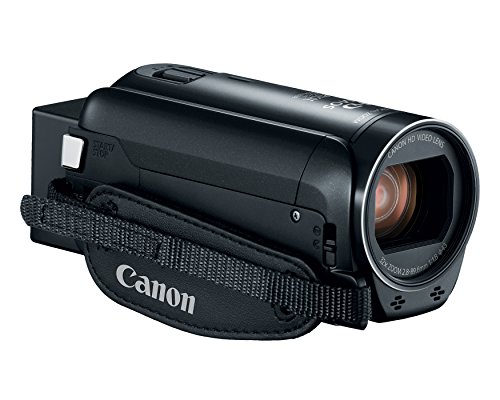


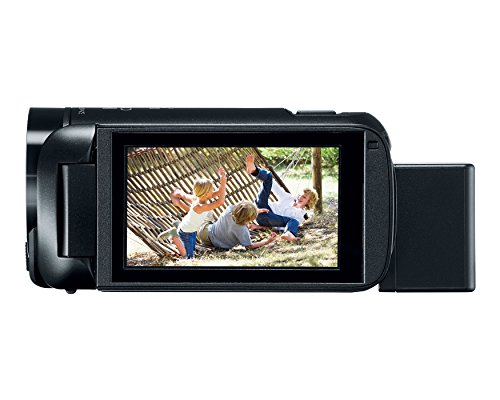


- 57x (32.5-1853Mm) advanced zoom/ 32x Optical / 1140x Digital and Super range OIS.
- Canon 3.28 Megapixel full HD CMOS image sensor.
- Digic DV 4 image processor.
- Minimum Focusing Distance-All other modes: 10mm (WIDE end), 1m across entire zooming range (from edge of lens).
- However, approx. 50cm at tele macro setting established at this time (automatic movement to TELE end)
-
Information
-
Twitter
-
Pinterest
-
Youtube
-
Facebook
Ami Skinner
Great camera
I am able to zoom in and obtain details such as license plate at 200 meters with just the 32x optical zoom enabled in 1080/30P. The camera has excellent image stabilization. The camera is able to view a license plate at night with slight illumination from a street light located approximately 30 feet away and the license plate is bright on the screen. Noticed an issue with the camera set on highest quality while trying to film many moving objects simultaneously on a bright day (at ice rink). The video appeared glitchy when set on the highest setting while trying to track these numerous fast moving objects. I resolved issue by reducing quality setting down by one and have not noticed any further issues. The quality setting must be reduced by one from its highest setting in order to use decoration features such as date-timestamp anyways, which the date-timestamp is output on the final video as well. If using for extended periods of time with intermittent activity and a need to maintain the date-timestamp on video then purchase an external cable with USB end and plug into an external battery pack. This will keep the camera from going into power saving mode and prevents the user from having to manually add the date-timestamp decoration each time the camera sits, so long as the view screen remains in the open position. Another option is to disable the power saving feature, which allows the camera to stay on for the entire duration of when the date-timestamp is required; however, an external power source will be required after approximately 178 minutes of run time (so charge often). Another useful feature of this camera is the manually controlled audio source. The audio can be manually turned all the way down, which essentially acts as a mute button for those who do not want audio in their videos.
Ladyc Evabless Hayles
Fantastic value. The image stabilization is a great feature.
I bought this to replace a Sony CX220 camcorder which has somewhat similar features. I chose the Canon HF-R800 because it has the same performance as a newer Canon model, but lacks wireless features which I don't need and don't want to pay for. This camera is great for several reasons: The image stabilization really works and allows for really steady long shots without a camera support (tripod, etc). I can also make a walking shot with minimal camera motion. The stabilization does give an occasional weird motion artifact in high motion situations, but the resulting video is still better than the otherwise shaky version. The touch screen display is reasonably sensitive and usable. The camera, recording at the highest bitrate, produces great quality images. I like the fact that it can be charged without needing to charge through the USB cable, like the Sony camera does. The built-in lens cover of this camera works much more smoothly than the Sony version. The camera has a solid feel considering its small size and price. The low light sensitivity is good. On the negative side, this camera does drain the battery faster than what I'd like, so I keep a second battery on hand. I am very happy with this camera and would easily buy it again.
Sue Laird
Great Little Camera to Capture Family Memories
Perfect little companion to my Canon DSLR for my family videos. I was sick of switching between video and photo and also going without autofocus or zoom on my DSLR when trying to capture my toddlers' antics, so I got this for our family videos and I am SO happy. This little camera is so small and lightweight, easy to use and carry around (I just throw it in my purse when we go out). I would HIGHLY recommend this to families who want to take nice videos on the fly. However, be aware the quality is not great in indoor low light even at highest the res setting, but otherwise its great. I would NOT recommend this for anyone tying to get in to professional videography, it's just not strong enough. Another con, the USB cord does not communicate with my 2017 iMac (my 2012 Canon DSLR does) so I have to manually remove the memory card to transfer videos each time, but this isn't a huge deal. I love this little camera to capture my precious family moments!
Lyka Habal Belisario
Good for Churches
Great so far. I ordered this to record our minister's sermons for posting on the web. Almost all DSLRs will not record past 30 minutes due to a stupid EU regulation, but the HF R800 automatically starts a second file for videos longer than 30 minutes. And he sometimes goes a few minutes past 30 for his sermons. Stuck an SD card in it, put it on a tripod, plugged in the power line and wireless microphone output from the receiver, zoomed a bit and pressed the Record button. The results came out fine for an internet video even though our lighting is mediocre and we had to zoom from the back of the auditorium. I used the free software that comes with Windows to process the video, uploaded the file to the internet (took several hours for a 2GB file) and it all worked fine. Very pleased for $200.
Tawana Winfield
Great battery life, Great 60p video, but transfering from camera takes forever.
Updated Review 6/5/2017: I updated my review from 2 stars as I had initiated a return, but the shipping didn't work for me. I decided to cancel the return and try to work on the issue of extremely long transfer times. Seriously, if you're going to buy this camera, make sure you have a card reader. Transferring 10 GB of footage from the camera will take about 25 minutes, LONGER if you use the Cannon transfer software. I bought an external USB 3 card reader, and 10GB file transfers now take about 90 seconds. I had also previously complained about not having AVCHD recording for smaller file sizes. However, the Highest quality MP4 60p recording makes it so much easier to Edit in Sony Vegas. Rendering times are faster than real-time. a 30 minute video will render in about 16 minutes in Vegas. I use these for shooting pinball video's with a 2 camera setup, which I upload to YouTube at a very high quality. I edit these in Vegas, as mentioned, and they come out stunning and with the 2 videos combined, Picture in picture, it takes close to the actual amount of time to render. Again, a 30 minute video will render in about 34 minutes, keeping the MP4 settings as close to the original footage specs as possible. With the AVCHD files from my other cameras, it took more than twice as long to render - about an hour for a 30 minute video. Plus, this MP4 format uses my Intel graphics chip to aid in rendering. I previously mentioned the indoor quality was not so great, but a few lighting adjustments and the picture is perfectly fine. I still wish that you could record 60p at lower bitrates. These files takes up a TON of space. However, with being able to transfer the files much faster, this isn't so much of an issue. Again, if you want 60p recording, you have to use the highest setting of 35Mbps recording. This will only allow a maximum of 16 minutes and a few seconds, after which a new file is created. They appear as 1 video in the camera, but if transferring to a computer, there will be multiple files that have to be edited together. While the video is seamless, there will be a slight glitch in the audio track. One other thing, as far as audio, it's stereo only. No 5.1 surround. But I can live with that. Battery life is where this camera really shines. The battery lasts significantly longer than my previous cameras. Kudos to Cannon for including a larger battery in the box, and a charging unit with a long enough cord so I can record while using the charger. I'm glad I decided to give this camera second chance, and that I got the transfer issues sorted out.
Anmol Khan
A powerful small camcorder with MANY features. Worth considering.
I've owned this camcorder one week and am so impressed with everything it can do. You can use it fully auto, or be selective with individual functions. Even the mp4 shots are so dynamically beautiful & sharp, you will not be disappointed. It has a mic in jack, which not all do, and in stereo. The camera is surprisingly small, about the length of a Coke can. The complete user manual is 288 pages, which you will be downloading. This camera is exceptional and worth considering. Very highly recommended. I also recommend you get this for attaching a mic wireless receiver: https://www.amazon.com/gp/product/B019T1AV7M/ref=oh_aui_detailpage_o00_s00?ie=UTF8&psc=1
Misty Boss
The Good and the Bad
I love the camera, but first let me tell you about the disappointments. 1 Big major disappointment. Normally when you plug any smartphone, digital camera or video camera into your computer, the computer recognizes it so you can transfer files from device to computer. Not with this camera. After downloading the PDF and reading the instructions it read to go to a website and download a special program so you can transfer files. Windows Defender prevented the file from installing. During installation it asked to install other software. Boo Hiss........ So I had to but a card reader just to transfer files. 2. I use the video camera to record my walks through nature trails with my dog, then upload to my YouTube channel. It is very difficult to see the display, I have no idea of what the camera is pointing at because of the glare off the display. It shade it's not too bad. 3. Zoom. Not really too bad. Once you zoom in to what you want to record it is very hard to actually find the bird or critter I want to record. trial and practice it will get better. Do love how far I can zoom in. What I love about this video camera. Quick start up. My digital camera took way too long to start, then focus only to find out the critter or bird was long gone. two or three second from the moment you flip the display out to time you can record. Video quality. I have it on 1080. When I watch my videos on YouTube it looks awesome, so crisp and clear and the sound is also great picking up all sounds around me as I walk through the trails. it's almost like I'm live walking through the trails. I can't wait for summer to see all the vegetation grown back, the ponds full of water and ducks, geese. I'm going to have a great time recording my daily walks with this great camera. Hey Canon Representatives, can we chat about the software you make us install so we can transfer files??
Gęmmå Śmîth
Fully recommended.
This is an outstanding camera. The pictures are clear and give good resolution. That is, they are not in any way blurred. I particularly like the external microphone jack which was one of the reasons that I purchased this camera. The primary con is that the battery for the camera charges on the camera, and a separate battery charger and battery is not provided. Fortunately, these are available for separate purchase, and their use is recommended. An additional battery is required if one is doing extended shooting away from a power source. The external microphone jack works well. I use a condenser microphone with Phantom Power. The microphone input is added to the video, and the sounds through the microphone are captured clearly and distinctly, as if the microphone were going directly into a computer. This camera can be recommended both for the quality of its video and audio through the external microphone jack. Fortunately, it is available at a relatively low cost.
Subedi Chitra
Amazing For the Price!
I am a professional broadcast video engineer with more decades of experience than I care to think about. Canon has done a lot of things right with this camera. It is amazing given its price. There isn't much to complain about, just a few nits to pick. It would be unfair to give it less than five stars. I would give it 6 stars if I could. The touch screen is rather fiddly. Someone with large fingers could have trouble with it. My fingers are fairly slender and I'm a little bit challenged to navigate the menus on its small screen. I tried to operate the touch screen using a toothpick as a stylus, but no joy. Canon has loaded up this camera with a lot of consumer-y gimmicks but you can ignore those or disable them. The documentation omits a couple of neat tricks, but thankfully people have made videos documenting some of them. The documentation doesn't cover this, but he camera can be used for live streaming. I use an Elgato Cam Link which goes between the HDMI output and a host computer's USB 3 input. You can then use an application such as OBS to record or stream your video. You do need to disable the icon display on the HDMI output to see your picture over HDMI without icons. There is a video on YouTube that show you how. You can also export videos over USB without installing Canon's app to do this. Once you make the USB connection, press the "playback mode" button (on the left below the on-off button) and it should show up as a device on your computer, at least it does in Windows 10. The external mic input is truly amazing. Somebody at Canon really understands audio and they got it right with these camcorders. They use a mic preamp which actually provides enough gain for a microphone, unlike many dedicated audio interfaces. A mic can require up to 60 dB of gain and this camcorder doesn't disappoint. I have connected a Shure SM 63 dynamic mic using a Hosa MIT-156 to go from XLR to mini-plug. Listen to the voice of experience: this is really the correct way to do it. You will then have a trainsformer-balanced mic input, greatly reducing the chances that you'll pick up the local 50-kilowatt AM station (been there, done that). This solution costs all of $21. You could then use an E-V 635A or a Shure SM 58 or even a ribbon mic. After putting it through its paces, I have to say the auto white balance mode is poor. It puts in too much red and too little blue. The tungsten white balance mode works much better. My plan is to leave it in "tungsten" mode and use an 85B filter when I use it outdoors -- just like film! Having owned this camera for a few months, I will add that the DC connector from the AC power supply is very flimsy and does not mate well with the camera. In addition, the camera does not do 59.94 frames per second at all. The maximum frame rate is 29.97 fps.
Yharen Jade Wencci
i love it
I bought it to capture live video and stream it. I have another expensive camera but it can't send a clean output to the capture card so i went to the card site and confirmed the models and brands that works well. This camera does the job, i bought another to have two, but the other in white, very recommended. At first, i was looking for a 4k camera but everybody told me that you can't stream live in 4k, just 1080, so it is a waste of money at this time. I am using this capture card: https://www.amazon.com/gp/product/B0748QYPX9/ref=oh_aui_detailpage_o02_s01?ie=UTF8&psc=1 If your PC is powerful enough, you can have another capture card, but for the purpose of changing cameras i found that a 10 usd splitter - switcher does a clean job. https://www.amazon.com/gp/product/B079JQ9XXV/ref=oh_aui_detailpage_o01_s01?ie=UTF8&psc=1 Maybe, you'll be using profesional mics, lavaliers, etc, so you can try this to put the mixed sound in the final signal, just before the capture card: https://www.amazon.com/gp/product/B01B5FR7PY/ref=oh_aui_detailpage_o09_s00?ie=UTF8&psc=1 Finally, the lights, no matter that your camera is a profesional or a little one, if you don't have some lights the result won't be as impacting as you need: https://www.amazon.com/gp/product/B07G36ZP7G/ref=oh_aui_detailpage_o08_s00?ie=UTF8&psc=1 They can even run on batteries, rechargeable. That's it. Have fun