

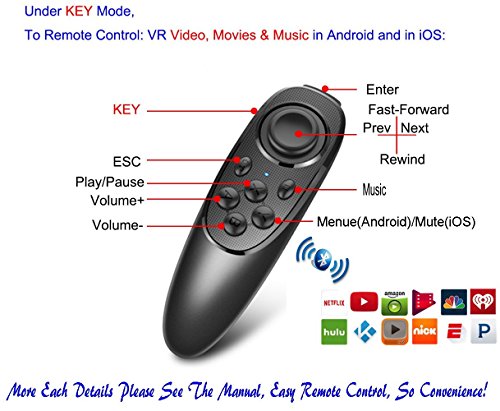
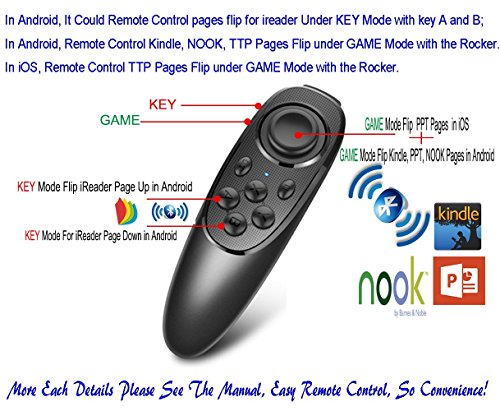


- ✅1. This portable wireless mobile cell phone remote controller, used for virtual reality headset 3d glasses mobile phone, MID, TV box, smart TV, PC EASY Samsung gear VR, Tablet, laptop. It can be used as gamepad, VR remote, wireless mouse, music control, E-book flip page, PPT presentation etc., support iOS, Android, Windows and so on. It could be a mobile remote when you use the iPhone’s Mirror Screen, or Samsung mobile’s Smart View to watch video via TV screen, very convenience.
- ✅2. For iOS system device, the controller only could 1). Adjust volume; 2). Play video, VR video, film,music; 3). As a shutter for iPhone selfie or take photo; 4). Flip E-book page in kindle or PPT; 5). Very limited function for iPhone's VR interaction game, i.e. there are very little vr games (listed in the manual) could be compatible with this remote controller, due to iOS system sealed reason (we do not recommend you buy it if you just only want to use for iPhone's vr interaction game).
- ✅3. For Android system Phones, this controller could do below remote controlling: 1). Adjusting and muting volume; 2). Playing video or music; 3). As a shutter for selfie or taking photo; 4). E-book flip in iReader such as kindle, nook, ppt; 5). Mouse operation; 6). Fully remote control functions will be available in VR games.
- ✅4. Very Easy to power On or Off: hold on 2 Seconds to turn on and hold on 5 Seconds to turn off, one button press to control smartphone’s shutter, 2-AAA-type size batteries are needed for power on. ✅5. 360 Degree Movement Location with High precision control of the rocker, Arc shape design, slip-free and sweat-free, this could avoid the wrong operation of the finger shaking.
- ✅6. Compatible Remote control, Fully support for Android system, window phone systems & very limit support for iOS system’s VR game, mouse function is only for Android system. ✅7.Remarks: if you buy this remote for VR headset, then it's just an aid for our remote operating mobiles when mobile is in the vr headset and not easy to touch with hands, so we kindly remind respected buyers here that it could control vr videos playing and part of vr games, but could not control all vr games. Thank you.
-
Information
-
Twitter
-
Pinterest
-
Youtube
-
Facebook
Serrina Randolph
and awesome with the Samsung VR
This remote is small, light weight, and awesome with the Samsung VR!!!!!!
Leslie Vial
great product
works as expected. easy to use if your device doesn't have bluetooth. I've only used it to transmit from tv to bluetooth headset though. capable of receiving from bluetooth but i havent tried it.
Tigist Seid
Works as advetised
I bought this VR remote for my iphone for the video playback abilities. I found it especially helpful for sports highlights when things move very fast. A lot of previous comments had people with issues pairing the device, but it worked well for me.
Kim Bidemi Agbor
Love it, my nephew uses it everyday
I purchased this remote for my nephew Andy who is a huge gamer but really doesn't like playing on his phone. He is the kinda boy who likes the feel of a good old controller in his hand, this wa a good in between. I was a little shocked by how small it was but not really that shocked since it is for a phone. It is about the size of half a wii remote. Everything seems to be made really well, the plastic is light but very sturdy. Buttons are all very responsive and do no stick at all. It takes two AAA batteries and is bluetooth connected to the device. You can play games on your phone with it or use it to take pictures hands free. Which has gotten my nephew into a little bit of trouble, and as his auntie i find it hilarious. Overall we are very happy with this product, it is a great deal and works fantastically.
Con Ylarde Bote
Easy setting
Linking VR glasses is very simple and stable without interference. I recommend it to users with VR glasses. It won't disappoint you.
Tera Lindsey
Quality Product. Easy Setup. Works Like a Charm.
Higher quality product than I was expecting. Works with a 5W adapter I had around the house to keep it continually powered. Connected two sets of bluetooth headphones in less than 5 minutes. Really happy with this and I got it at a great price.
Debbie Johnson
Five Stars
My grandson loved it so much, it was part of his birthday gift!
Chompink Sunshine
Five Stars
pretty cool, still have to try games with it :)
Mark Nollan
Easy to to use and works great
This worked GREAT! First thing I used it for was my VR games. I put in the 2 "AAA" batteries and turned my blue tooth on my phone and then connected it . Once connected I was able to play all my VR games . As did my kids. They thought it was the perfect size and easy to use. The next thing I used it for was taking pictures. On the side of the remote there is an option for "game or Picture" I again connected the bluetooth and used it to take hands free pictures. This works great. Im excited to see what else it will work with. I highly recommend this remote.
Yhumie Arevalo Chavez
perfect for apps, VR headsets, and music control
Exactly what my wife wanted, and now I'm using it a lot too! My wife wanted a Bluetooth remote to control some of her apps and to go with our VR headset so we don't have to actually touch the phone for certain things. This pairs up right away and works flawlessly, and the shapes/positioning of the buttons makes it very easy to memorize what button does what, without looking at it (very important if you are going to use this with a VR headset). She is on an android phone, the Samsung Galaxy, if anyone is wondering. I have an iPhone 6 and use it for music control. On my iPhone, I only use it once in a while for the VR headset and mostly for music control. I leave my phone plugged in on the table while playing music in the house from our Bluetooth speakers, so id like to have something portable to change songs, volume, or pause. This works perfectly for all of it. At first I was worried that I wouldn't be able to connect to multiple Bluetooth devices at once, like when I play my music through the Bluetooth stereo system, but it still paired up right away and works flawlessly. The first set of batteries is still going strong after all this use, too!