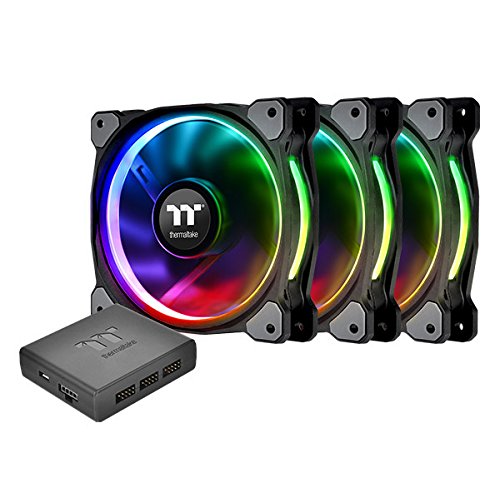


- 12 Separately Controlled RGB LEDs for unrivaled Lighting Control. paint your build with 16.8 million colors
- Patented Ring Plus RGB Software Enabled
- 9-Blade High-Static Pressure Design : Generate higher airflow without compromising on ultra-silent operation
- Digital Lighting Controller : Add up to 5 devices to one lighting controller and up to 16 controllers to the software. The controller and the coding guide are included in all packs
- Anti-Vibration Mounting System : In-mold injection anti-vibration rubber pads provide a hassle-free usage with 80% protection coverage for all corners
- Hydraulic Bearing Low-Noise Design : Lowers operation noise while improving thermal efficiency
- Link Capable up to 16 Controllers (80 Fans)
-
Information
-
Twitter
-
Pinterest
-
Youtube
-
Facebook
Vanu Vekaria
SOFTWARE LOOKS TO BE FIXED
Pros: - Amazing fan colors and effects customization, the best in those categories than any other fan on the market hands down Cons: - SOFTWARE!!! The software does let you control each single fan and led as you desire, but THAT'S IT! It seems to have a very crappy memory system. Whenever you reboot the pc, the fans go back to the default crap rainbow scheme, which is insanely fruity. The software doesn't launch on its own, so it won't go back to your color scheme until you manually launch it. Also, the 5 different profiles you can "save" don't really save; whenever you click on a different profile it doesn't properly load the profile you customized and saved to that profile number. THERMALTAKE GET YOUR FREAKIN' CODING TOGETHER!! On that note, I have added the TT riing software to the Windows 10 startup folder, so the software will start up automatically and enable the last profile you had working properly. BUT, i still have to live with the childish rainbow scheme as the pc is booting up. *** ALSO, When the software is running, and If you sleep your PC, and then turn it back on, you're out of luck completely. The color profile goes back to rainbow and you can't even change it unless you EXIT AND RESTART THE SOFTWARE MANUALLY. EDIT: 5/5/17 A software patch just came out, looks like they fixed the startup/sleep bug. Now your saved profile always starts as soon as you power on. AWESOME! Going from 3 stars up to 5 now.
Evol Kingforce Fowler
most fans will start to click when you lay them on their side to cool a radiator
This is about the only thing i'd buy from Thermaltake, everything else is meh...these are the only RGB fans i could find, i thought i gave it a shot and is actually impressed. Very quiet, moves a lot of air, and they don't make noise in vertical or horizontal orientation...most fans will start to click when you lay them on their side to cool a radiator. The controller sucks donkey balls, short wiring and has trouble remembering the settings...and randomly turns off at times. But I still gave this a 5 star for noise level and performance, even tho i wanted RGB, my lights stay on as white most of the time....see pic of my build.
Ram Prasad Guggilapu
They work, they're quiet, they're coloful
I'm using these as case fans, not radiator fans, and they are doing a great job with excellent control for the pricepoint and above. The software is comprehensive and unlike CAM software, does not crash Windows 10 while browsing. The "party" mode actually keeps up with the music well enough not to be a gimmick, and the other modes are very nice too. In addition, you can control each individual led on each fan with a different color, the fan speed, presets etc. Each fan can be controlled separate from the others, or, you can set one how you like, then set the others to "copy" and they just follow the one you set up. Easy setup and install, but you will need a good cable management case, or a creative routing, because you do get ample cabling. I am using this in an NZXT H400i and I'm using the stock led strip with the NZXT software side by side to the TT software and it's fine. If I change my mind, i'll change the review, but first impressions and install is dead on.
Maricel Ching Neri
AURA Sync controller gets rid of awful TT RGB software
There are issues between the stand-alone controller, the TT software, and ASUS AMD products. By getting rid of that controller and installing the one that is controlled by Aura Sync everything is working great now. The TT RGB software rarely worked correctly and was actually causing my computer to crash. I should have bought this in the first place (or Aura-compatible fans) and avoided the headache.
Deeya Bagwan
Best RGB 140mm Fans Out There!
I hesitated to purchase these fans because of their price tag and I considered Corsair's alternative for many weeks before finally pulling the trigger on these. You have 100% COMPLETE software control of these fans from each individual LED to RPM and they're extremely quiet up to around 50/60% speed. These fans move some air and they'll work great for any application - CPU cooler, radiator or intake/exhaust. I freaking LOVE these fans and I'm glad I didn't spend 2x the price on Corsair's overpriced dual light loops. I was all about Corsair's fans until I tried these out and now I can't see using anything else besides Thermaltake moving forward.
Audrey Andersen
Look classy, Quiet. Work on start up without intervetion.
Fans at slow speed are inaudible but are moving enough air to cool at normal desktop tasks. When gaming just barely with my rig can you hear anything. No problems with anything. Have another of these running 140mm fans in the same case. No problems with it either. Only cool thing would be that having two of these they are not timed in the color cycle that I have them running on where they run from one color to the next in a continuous-endless loop. The two different controllers get out of sync over time. Isn't a biggie and adds to the cool factor but if I wished they all stayed the same I am not sure I could get them to do that. No interlink master control input or anything to have one master controller if say I had three or with my giant case I could see having a total of 6 of these or 18 fans total if set up with push pulls on all three cooling radiators. Anyway just something you should be aware of.
Shqipe Llugiqi
Much color, much awe
I am very happy with the fans. One thing I did not realize though is that the controller takes up a USB2.0 slot on your motherboard. Which means that if you have a front panel that requires the port or another device you will require an extra part for it all to work. For my build I had also purchased the Thermaltake 850W DPS G RGB power supply. This device also comes with a cable to control the RGB via a USB2.0 slot on your motherboard. To make all of this work I purchased a NZXT Internal USB Hub. This provides me with 2 extra internal hubs which means I can run all three devices, my front panel USBs, Fan controller and the RGB power supply. TL;DR if your motherboard only has one internal USB2.0 slot you may want to look into an internal USB hub to power the fan controller and any other devices that may also require the port.
Johnny Banks
Make sure you control your fan speed in BIOS.
So, I bought these fans a few months ago and I noticed that from the very beginning that the fan speed and brightness would always keep changing. I wasn't sure why this was happening and thought that it was a defective product. I didn't know much about computers but I managed to build my own and just now after 6 months I realized that the fan speed and brightness changing was my fault because I didn't set them up properly in the bios setting. Today after messing around in the bios I managed to fix the fan speed and the random brightness changes. So before you do anything else, make sure you set them up all correctly.
Seth Wall
Best way to control all Thermaltake fans!
This controller is easy to set up and syncs easily with Asus aura or any other sync software your mobo has. If you have multiple controllers as I do, you DO NOT sync them together. Just set them up separately. each side of the controller has 3 ports. Those 3 ports will control each fan BUT!! YOUR COMPUTER THINKS THEY ARE 1 FAN NOT 3. they cannot be individually speed controlled or color controlled unless you use the TT software, which i stayed away from and just used aura to sync them all together
Joy Descallar
RGB Fans? Yes plz thnk you
The Fans are great quality, I must admit that I was skeptical at first because it was between these and the Corsair ML140's. I chose these because I liked the RGB feature which allows for color flexibility since I'm going for a black, white, and red build. The fans as I've stated are amazing they are PWM fans as well and all fans work out of the box, no dead LED's, stripped wires, scratches on or around the housing or anything. I have to admit as well that I am impressed at the amount of air these fans can move as well so between the functionality of RGB, and the fact that they are controllable (color and speed) through the software make this case fans an easy five stars for me. The cables are long, like over 18" long so be ready for some cable management. Routing from one end of your case to another will not be an issue and the LED's themselves aren't small these babies really light up the inside of my case and the surrounding area of the outside of the case. As a final note as the reviewer above stated one the software is really the only real drawback, I hope in the future they would implement more functionality over what the fans do and when for example auto switching profiles during certain games or when your desktop displays a screensaver also and this goes with all fans or anything that rotates for that matter, the faster they spin the louder they are but they aren't loud to the point of annoyance especially if you game with headphones. All in all, if you're looking for large, bright colored fans as you can see in the photos provided by myself and the other gentleman you really can't go wrong here.