
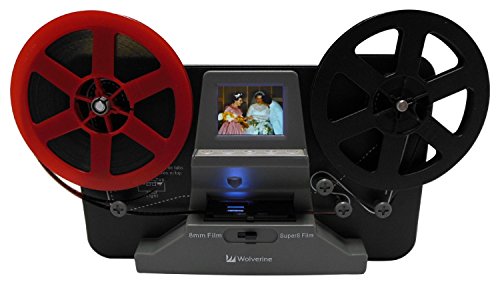
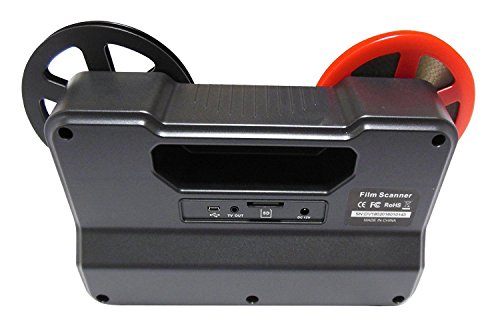


- Bundle Includes: Wolverine Film2Digital MovieMaker, USB Cable, TV Cable (3.5mm to RCA Video), MultiVoltage 110V/240V Power AC Adapter Compatible for Worldwide Use (Simply add your countries type plug adapter! Not Included), Reel (8mm hole), Reel Adapter, Blower Brush, 32GB SD Memory Card and User Manual
- A fully automated apparatus to digitize 8 and Super 8 Movie Reels, Frame-by-Frame digitizing for high-quality digital conversion
- Frame-by-Frame digitizing for high-quality digital conversion - Converts 8 and Super 8 movies into MPEG-4 (MP4) digital movie files at 720P/ 30 fps
- Scans and directly saves digital movies into SD/SDHC cards (32GB max)
- Playback to TV's using the included TV Cable (Unit has NTSC/PAL Video Output), Compatible with all Windows, Mac and Linux Operating Systems
-
Information
-
Twitter
-
Pinterest
-
Youtube
-
Facebook
Kristen Youngblood
Save those precious memories
If you calculate the cost to have someone professional transfer film to digital this item is a steel. We converted over 13 reels of film to digital so we could then share those memories with family. It is not a quick process, took a few days, however you can set it up and walk away and periodically check on it. It was easy to learn how to use, set up, transfer and then store the images. This item allowed my nephews to see images of their father and mother long thought lost, it gave me the chance to see my father and mother being silly and young, it paid for itself with those memories for me to have forever. If I had to say one negative thing it is now that we have transfer all of our film there is nothing more for it to do except sit in my closet, but I will find someone who will need it like us or someone will find more hidden treasures for me to transfer.
Sunmi Kapai
Great machine read the directions
Amazing little machine Took a little while to get the hang of how to thread it Time consuming if you have large reels of film also if the film is old you have to be careful of it breaking due to the age of the film otherwise very nice are used movie maker to convert the film and slow it down to a usable viewable film
Sarah McMurrough
Made my face leak water
Just a minuscule few moments in time were brought back with this product. I ran through about 33 reels of 8mm and Super 8 tapes and they came out perfect. These are 40+ year old tapes with some that had melted spots and rips. The Wolverine was extremely gentle on capture and rewind modes. It would not force the feed so risk of breakage or other damage was not my concern after the first reel. Not matter the cost those few moments of my child hood were priceless.
Ricardo DA Figueiredo
Five Stars
Very easy to transfer 8mm and super 8mm. Just make sure you adjust the frame correctly before transfering
Ashley Renee
Great Product!
This is a very awsome unit. Very easy to use and does a good job. It does produce a movie that plays a bit faster than the original, but with a movie editing program like Movie Maker, it is ease to get it back to the proper speed. I highly recomend this if you wish to convert your 8mm films.
Rahman Baba
Easy Transfers!
This is a great product! Threading into the take-up reel is the only hard part, and that's gonna be hard for anybody with the small reels that are necessary with any 8mm equipment. Occasionally the frame is too high or too low, but it's easily adjusted. The 8mm and Super 8 settings work great. I prefer putting everything on a chip. Once you get the material transferred, then any inexpensive video editing app lets you add sound and effects, etc. on your computer. One other thing: You can set it up and then go have lunch - if the film runs out, you just delete the extra white footage later.
Marjorie Marie Webb
Works Well and Is Easy to Use!
When I first got the Wolverine unit. I decided to try and digitize an old 200 ft reel of 8 mm film. It was 61 years old and in poor shape. The first 3 feet of the film disintegrated. It was nearly impossible to load the film into the film guide tabs as the film was cupped into a 'C' shape.the unit performed well enough but the film kept jamming. I finally gave up on that reel. Next, I tried a 60 year old film in a 50 foot reel. it was flat and un damaged. The unit worked like a champ! The oldest film I have digitized is 71 years old, and it too gave no problems. The problems I was having is NOT the age of the film so much as the condition of the film. All of my big 200 foot reels were stored in sealed cases either metal or plastic. Unfortunately, as the films age, they out gas and the sealed cases trapped the gas causing the films to degrade. It smells like vinegar (probably Acetic acid.) The card board boxes that the 50 foot reels come in do not trap the gases and they don't degrade. The curved film would digitize some, the camera portion would flatten the film, but the curve would defeat the advance pawl, causing the film holes to tear and jam the unit. This may be cause of the problems another reviewer experienced. If anyone has a solution to the curved film problem, I would appreciate a solution. All in all, I think the unit worked well and I will not complain because some of my films are in such poor shape.
Domenika Kazdova
Easy to use - worth the money in so many ways!
So far I have transferred 40+ 8 and Super 8 reels into digital media and couldn’t me happier. The oldest reel was 77 years old. It takes time to do each transfer but forgotten memories are priceless!
Mohit Jain
For the Hobbiest
I once rigged up a scanner to capture Super 8 video frame by frame. It took me a week to do one small reel. This gizmo does it in 1/2 hour. It works beautifully right out of the box. I read other reviews which spoke of modifying the film guide and others that spoke of the short comings so I was a little nervous shelling out a few hundred bucks for this gadget. But over all I'm very happy with my purchase. The videos do run at a faster frame than it should so you will need to run the video through another program. I used Adobe Premiere and slowed the film speed to 80% and the results are good. The only thing I wish this thing did would be to give the option of output product. I would preferred to have the captured frames as still photos so that I could enhance the colors and sharpness of the finished product. Then I could compile the frames in Adobe Premiere and output to an mp4 video. That would deliver superior results but you can only do so much with Super 8 film and this movie digitizer is really all you need.
Emanuel Lee Warren
Worked great to bring life to old movies
Below are the notes I took for converting 72 Super8 and 3 8mm from the my childhood. It takes slightly less than 30 minutes to convert a 3” 50’ reel. Convert Super 8 Films on Mac install ffmpeg with console: Brew install ffmpeg Super 8 is 18 FPS, digitizes at 30 FPS so need to slow down So super 8 should look like this: ffmpeg -y -i inputfile.mp4 -vf "setpts=1.67*PTS" -r 24 outputfile.mp4 8 mm looks like this: ffmpeg -y -i inputfile.mp4 -vf "setpts=1.875*PTS" -r 24 outputfile.mp4 Frame adjustments (sometimes this changes): X 40 Y -6 W 10 Editing You can do it right in QuickTime. * Open the videos in QuickTime * Edit > Trim * Save or Export those shorter clips * Import them into your preferred editor Copy file to Photos, then share with family. During playback, the number displayed is the last filename. It only increments to the current one at the end.