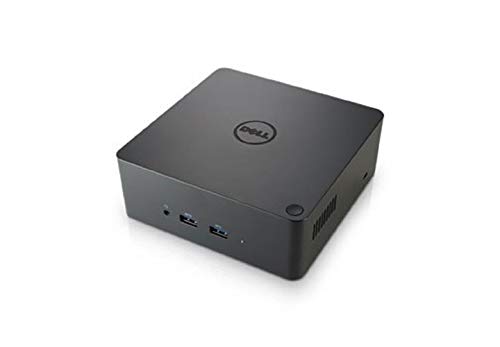
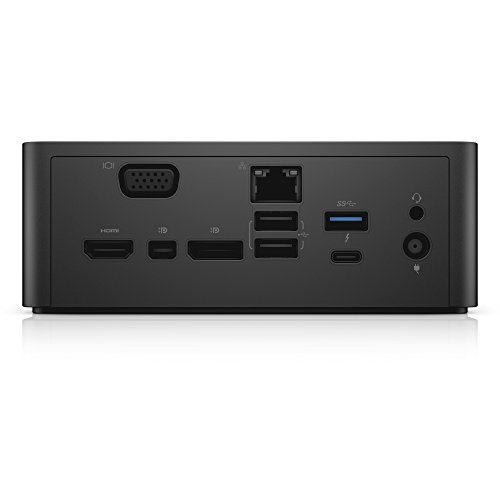

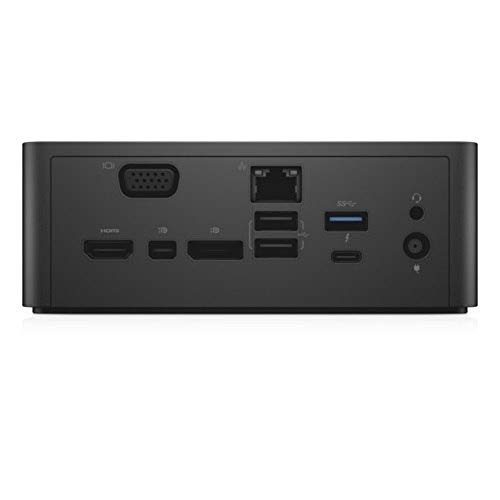
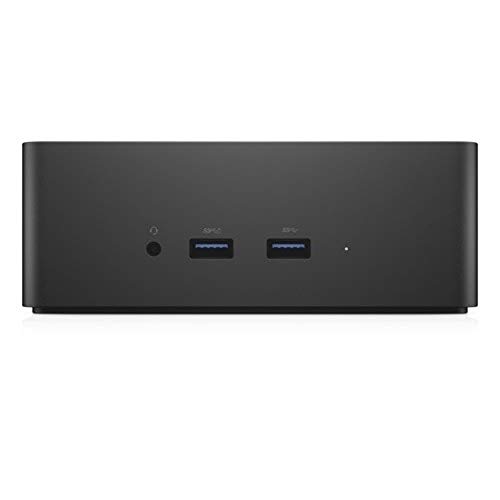

- Supports up to 3-Displays, Gigabit Ethernet Port, Speaker output
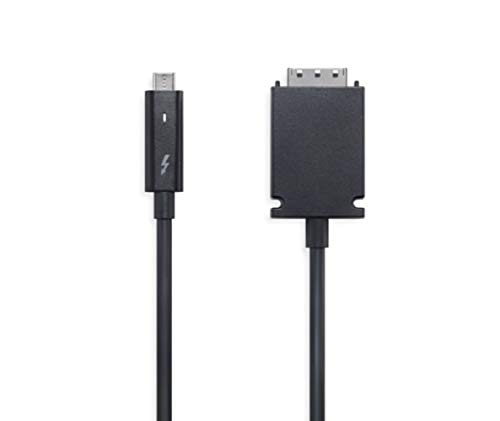
- 1x Thuderbolt 3 Port, 1x VGA Port, 1x HDMI, Max Resolution Support 60Hz (5120x2880)
- 1x Display Port, 1x Mini Display, Kensington Lock Slot; Security lock slot (cable lock sold separately), LED indicator
- 2x USB 2.0 Ports, 3x USB 3.0 Ports (One with Power Share)
- 240W AC Adapter, Please See Description for Compatibility
- Video Interfaces - VGA, HDMI, DP, Mini DP, Thunderbolt
- Data Link Protocol: Ethernet, Fast Ethernet, Gigabit Ethernet
-
Information
-
Twitter
-
Pinterest
-
Youtube
-
Facebook
Ruel Parala
Add incredible value to your XPS latptop!!!
This seller delivered superb value and expedience; I live in Colorado, placed my order late in the afternoon of August 14, 2017, and received the item in my mailbox on August 17, 2017, with no expedited shipping or preferential treatment. The item I bought was "used" but one could hardly tell other than the lack of manufacturer packaging. I received the dock in a vanilla brown box with no instructions or manufacturer packaging, but, the item itself was still enclosed in the adhesive protective plastic that a new item would arrive in. The device functions superbly and as advertised. Computer Kings was even kind enough to follow up with an email to contact them directly with any issues encountered in the transaction before seeking help from Amazon, without any indication from me that the device had any problems. I appreciate the "prime" level of service without needing to spend full MSRP to get a device in two days. A+ seller. Would have no qualms about buying from them again. Onto the device itself... Comes with the dock and a 240W power brick. The brick itself is MASSIVE, surprisingly so. Plan accordingly. Other than that, I have plugged in a DAS Keyboard, logitech wireless mouse, two Dell monitors (one via HDMI, the other via VGA, a nostromo gamepad, and an HP printer to the dock. The dock then connects to my Dell XPS 15 9550 via the included thunderbolt 3 cable. I do currently have Windows 10 installed on this laptop but frequently use Fedora as my main OS-- will update if decide to reinstall Linux as my dedicated OS on this machine, but for now, am content with the Windows 10 setup. From the setup described as above, I am able to charge the laptop with only the connection to the dock, while having a dual monitor setup not including the laptop screen itself. So far, absolutely no issues with the displays or the dock itself-- everything is working flawlessly. Will update after my wireless keyboard and mouse show up from Amazon (OnTrac was late as usual, requiring a customer service contact with Amazon to rectify the situation). I will update this review to reflect my experience after some more use, including use of the wired ethernet connection as well as the wireless keyboard and mouse I bought. As for now, could not be happier with this unit itself-- everything worked out of the box by just plugging in the cable. Granted, I have the most current bios and drivers for the machine installed before trying to connect the unit, so, I cannot attest to what your mileage might be.
Sara Mae Towle
Great Addition
With all the reviews about not supporting 4K monitors and issues with power I was expecting issues however I have had none. The 1st time I connected it I was not recognized however the instructions mentioned to update the laptops firmware and drivers and since those were completed I have had 0 problems.
Deysa Dubovecka
Dell XPS 9550/9560 owners, this is the one!
After being EXTREMELY frustrated with the WD15 (dropping ethernet every 30 seconds, dropping USB every 10) I finally decided to give this dock a shot. I literally took it out of the Amazon box (1 day-shipping FTW), and hooked it to a pretty much flawless experience (I did have to restart the computer once to get HDMI signal out of the dock). Everything on this one is working so far, ethernet at full speed (120 Mbps from my cable company), check; wireless keyboard and mouse (via usb dongle connected to the dock itself, check; HDMI output to a single Dell U2515HX (2560x1440), check. I'm waiting for the DisplayPort cable to arrive to hook up the second monitor, but I'm hopefull and very excited already (I'll post an edit if anything goes wrong with that). The performance is waaaaaay better than anything I ever experienced from the WD15 (and I have two of those, by the way). To me, the wait was worth every penny!
Mya Shaw
Works with 3 monitors.
While I rather have a true dock that my laptop sits on, to conserve desktop space, this works great. I have 3 24" monitors connect to it and able to do everything as my the old dock allowed. I am able to watch a video conference, run queries, and answer emails at the same time, so make sure you have a decent laptop.
Rommel C Pacho
Seems like a hit or miss, mine was a hit!
I am using this with a Dell XPS13 connected to two U2715H monitors (startech USB-C adapter to dual display port), so my review is based off of that. When I first installed the device, I was running the latest BIOS from Dell's website and was having issues where the USB ports would stop working within less than a minute. After installing the Asmedia USB driver, the issue went away, but your mileage may vary as there are mixed reviews online. I have not had a single issue since then and I absolutely love being able to turn on the device while having the laptop closed. I was sceptical based on others experiences, but knew that if I wanted a compatible dock it's best to go with one straight from the manufacturer themselves. I would have given it a four stars for the gigantic 240W brick, but that's not a reason to do so, as it does not affect the usability of this product.
Rebeca Shreve
Excellent Thunderbolt 3 dock -- as long as your BIOS and drivers are up to date
I had been using a Dell XPS 15 0530 for the past 3 years, and finally opted to upgrade to the current generation XPS 15 0560 just a few months ago to get the faster I7 Kaby Lake processor, 32GB of DDR4, 1TB SSD, NVidia graphics, 4K / UHD touchscreen, fingerprint reader, etc. I also wanted to be able to use this with an external monitor worthy of the machine, so I picked up a Dell P2715Q 27" 4K / UHD IPS display as well. I travel frequently for work, using my laptop on the road -- and also at the home office. I wanted to minimize the cables I have to deal with each time I come and go, and reserve options for easy expansion down the road in case I wanted to add more monitors, an attached drive, etc. I started researching Thunderbolt 3 docks, and was surprised to see how immature the market for these is. It took a bit of research and reading, but as I homed in on Dell TB docks, I learned that last year's TB15 model turned out to be a big disappointment. The newer one listed here -- the TB16 -- is another story. It works, and becomes an invisible part of your setup that just does its job -- perfectly. There are a few competitors that just finally hit the market over the past few months. But I still see the TB16 as a great option. The price has dropped from $299 down to less than $250 as I write this review. If you plan to use this dock with something like Dell's XPS 15 9560, be sure you get the version of the TB16 that ships with the 240W power brick: that's needed so the TB16 can output 90W over the USB C cable back to the laptop. It's positively delightful for me that I can put my laptop on my desk now, plug in the single USB C cable that connects to the laptop, and I immediately have power, audio, and the 4K 60Hz signal shared via the dock with my 27" P2715Q 4K / UHD Dell monitor as well. This is incredibly convenient...and it just works. Important note: Thunderbolt 3 seems to be just coming out of its infancy. With my laptop, it was important that I updated to the latest BIOS, and then install all the latest drivers for video, audio, USB, and - most importantly - anything related to Thunderbolt 3 and docks. Not doing this could leave you with a non-functioning configuration, but with current BIOS and drivers, it should work just fine. Very happy with mine. I've been watching competing products come up, but still haven't seen another one that I would have gotten instead of the TB16. My only disappointment is that I jumped on this a few months ago, and paid closer to original list price for it, whereas the price has dropped well below $250 as I write this. Excellent solid product -- highly recommended.
Erica Brehm
Three Stars
I've updated my BIOS on my XPS 9570, everything works but the USB ports -- not sure why. UPDATE: Changing my review to 5 stars. To get my USB ports to work I had to open up "Thunderbolt Software" that was running in the system tray and set Dock and Cable to "Always Connect". As I mentioned before this is hooked to my XPS 15 (9570). I am also running two 2K monitors -- utilizing the HDMI and DP ports, as well as several peripherals all through the dock.
Scott Hines
The only thing he said was the instructions could have been better! But as far as the dock itself it ...
I ordered this for my husband. He said it is "absolutely wonderful". The only thing he said was the instructions could have been better! But as far as the dock itself it is "freaking awesome". He has a lot of cords to plug in & unplug every day as he commutes & travels. This allows him to just plug in ONE cord instead of many. He is very pleased with thi
Zack Ael
Works as expected
I purchased this for my Dell XPS 9550. Mine was sold through Amazon. After downloading the drivers, it works as expected. I have it hooked up to two Ultrasharp U2415 monitors via daisy chained display port. I have an Logitech G610 keyboard hooked up to it and it works great. I typically put the computer to sleep, and when I press the button on top of the dock, it wakes and the login screen pops up. I do have an external HD attached to it for backup purposes. I find leaving that off initially keeps the stuttering noise down (the windows "ding dong" something attached!) when booting. I have found there can be scaling issues if the laptop is disconnected, used, put to sleep, then reconnected. Sometimes when I hover over a book mark or image and the tool tip appears, it can be pretty large. Thought I think is might be with the OS rather than the dock itself. I also have the Nvidia QHD video card, so might have something to do with it. Shutting down rather than "closing the lid" usually solves this. Again I think this is probably with the OS and going from QHD to 1920 x 1200 when the laptop is reattached.
Theresa M Bodman Barcavage
This dock is absolutely brilliant.
I got the 240w version to support the peripherals like USB 2.5 inch hard drives in 3.0 and 3.1 enclosures. The key is to ensure the BIOS is setup to support the Thunderbolt dock. To access BIOS press (F12) on boot to access the BIOS. Also, use the Support Assistant application or Dell’s website to ensure you have the correct and most up to date drives for the Thunderbolt port. Once the Thunderbolt drivers see the dock, they will update the system drivers to properly address the ports. The performance has been great, with no issues to this point. It is very convenient to have the extra USB 3.0 ports and easy access display ports, all without giving up a Thunderbolt port. Another feature I use often is the power switch. I have a primary display of a 43” 4K monitor, I can leave my laptop lid closed and power on the docking station to start the laptop on the external monitor. This saves wear and tear on my laptop 4K display while I am docked, as well as minimizing dust but I can always open the laptop to add the secondary display. I originally looked at this docking station as a power source for the laptop when I am at the office. This allows me to use the provided power supply as the one I take with me on the road. Again, the 240w supplies the laptop and the peripherals with more than adequate power. I've read several of the reviews for this product reporting it as problematic. Having used slightly older versions of a similar dock, I felt that the reviews were most likely inaccurate or the issues were misunderstood. I am very pleased with the product and it met all of my needs and expectations.