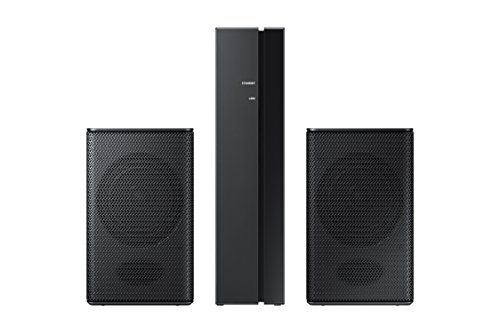


- Bring wireless surround sound to your Samsung sound+ Soundbars
- Wall Mountable
- Create an immersive surround experience to bring you into the action of your favorite games, movies, shows, and sports
- Simply plug in and pair to enjoy all the action of your favorite entertainment in surround sound. Clutter free experience
- Compatible Models - 2019 Models: HW-Q70R/ Q60R / R650 / R550 / R450, 2020 Models: HW-Q60T / T650 / T550 / T450 / S60T
-
Information
-
Twitter
-
Pinterest
-
Youtube
-
Facebook
Gary Layne
SAMSUNG DOES NOT KNOW THEIR PRODUCTS
Most reviews said volume was too low So i searched the sound bar manual and the rear spkr kit manual and called Samsung Support.by phone and got an E mail that both told me that there was NO WAY TO CONTROL VOLUME on the rear spkrs. Samsung does not Know their products very well, as there is a way Samsung needs to publish as I am sure many of these rear spkr kits have had poor reviews and likely returned Here is the FIX: Press the 'sound control' button on the soundbar remote. to get to rear speaker on/off, then 1 more time to get to rear speaker volume (-6 to +6).using up/ down arrows Easy. A further note, Using clear voice really makes a difference as the rear spkrs in some cases "muddy" the voices A great test is the James Bond opening in Specter the helicopter "flys" Behind you! Watch on Amazon Prime
Angelika Ali
I LOVE THESE!!!
These have improved my soundbar sound quality and loudness x3! These add a real surround sound. HERES MY ADVICE: 1. Turn the rear speaker volume up to +4(+5/6 just overpower the sound bar. These are meant to add sound, not be the main source of the sound.) 2. Turn your tv audio output settings to "Surround" and "DTS/Neo 2:5" (Dolby Digital can be a little quieter on sound effects) 3. Turn surround on soundbar, and put it in standard audio mode. 4. Use optical, not HDMI. For some reason the optical sound output is just louder than HDMI on Samsung soundbars. 5. Buy some speaker stands that hide the wires through the stand tubing. It will look truly wireless.
Jasmin Lingad
Great product. How to mount to a speaker stand.
I am very happy with these speakers. I purchased them with the Perlesmith speaker stands on amazon as well. I had to make a way to get them to mount up well to the stands. Here is my method which worked beautifully. I went to Lowes and purchased a black #8-32 screw in 3/4 inch length, a #8 black washer, and a brass #8-32 knurled knob. The total was around $5. This worked very well. I would recommend this product and the perlesmith stands highly. Very easy setup.
Ana Dulce Flores
Very Happy I purchased the SWA-8500S Wireless Rear Speakers Kit.
The kit complements the HW-MM55/ZA soundbar I also own. I knew that the kit was not completely wireless. The receiver module is wireless but you have to attach the two surround speakers using speaker wire that is provided. The speaker wires and receiver inputs are clearly marked. The receiver module is paired to the soundbar. The paring process is as follows: The receiver module is plugged in, and the LINK LED indicator will blink. The soundbar should be turned off. Then, the instructions say to press the VOL button on the remote control to the sound bar for about 5 or 6 seconds until the "ID SET" message appears on the soundbar. This does not work. The button that should be pressed is the Mute button. Once the right button is pushed, the LINK LED button becomes a solid blue. At this point, the receive module is paired with the soundbar. At first, I thought the speakers were not functioning. The issue is connecting the speaker wire to the speaker. If you push the wire in too far, it doesn't make the necessary contact. Pairing the speakers to the sound bar was difficult because the instructions given in the user manual are not correct. Once paired, the rear speakers are controlled using the remote control for the sound bar. The soundbar must be set to Surround Sound using the SOUND MODE button. The Sound Control button adjusts the TREBLE, BASS, AUTO SYNC, REAR SPEAKERS ON, and REAR LEVEL. Changes are made using the UP and DOWN buttons. I turned the REAR LEVEL to max. The sound quality is awesome! Takes the sounds of Movies, Music & Games to whole other level with quality surround sound.
Deigee Grandee
I mounted this to my wall behind my couch and it sounds just as great as my other samsung HTIB system in the other ...
I purchased this rear speaker module to go along with my new Samsung soundbar https://www.amazon.com/gp/product/B06XP19HRW/ref=oh_aui_detailpage_o01_s00?ie=UTF8&psc=1 This module makes your soundbar a true surround system similar to the home theater in a box systems. I mounted this to my wall behind my couch and it sounds just as great as my other samsung HTIB system in the other room (which also uses a wireless rear module.) Pros: - Easy to set up, just follow the instructions to link to the samsung system, very easy. - Low profile, easy to hide behind a couch or other furniture to make it out of sight. - Makes your new samsung soundbar a true 5.1 system. Cons: - Yes the speakers themselves are wired, at this price point you are not going to find truly wireless speakers that are worth anything
Leslie Roland
Great addition to the HW-N850 soundbar
I just purchased this as an addition to my new HW-N850 which is a 5.1.2 Atmos capable system. As good as my soundbar is, it still lacks and immersed experience when watching. The HW-N950 has surround speakers and is a 7.1.4 system but is roughly $400 more. Thus comes in the SW-9000S. And since this model is on sale almost everywhere averaging $100 (lower in Amazon), the SW-9000S is a no-brainer for my soundbar. Setup is a breeze and there's no need to install the included receiver for N series soundbars. Volume is a bit tinny though and it's surprising that volume for this is at a max once paired with the soundbar. And though this speaker set does not convert my soundbar into a 7.1.4 system, a 7.1.2 system makes me a happy camper.
Martie June
Great Sound and Worthy Addition
The Samsung 8500S 2.0 Wireless Speaker System is a great addition to my Samsung N450 Soundbar and Samsung 55" 4K UHD Smart TV. It enhances my overall viewing and listening pleasure. The pairing of the 8500S was a little challenging at first because the instructions are not very clear, but I figured it out and haven't had any problems since. Basically just reset your soundbar before connecting with this system and pairing should be easily achieved. The surround sound is great and more prevalent on certain movies, shows and sporting events. I have my 8500S rear speakers (Soundbar description) sound level set on +3 and after some adjustments, which takes time, makes this entire Samsung set up enjoyable. Recommend
Carmen Helene Malou Hansson
Surround Sound Necessary - Low Volume on the rear speakers (Initially)
When I first got this speaker I was under the impression that it worked with my recent purchase of the Samsung HW-Q60R/ZA sound bar. It didn't say it paired directly but when I was researching for this particular sound bar the site suggested I add the Samsung SWA-9000S. So, I bought it and then found out it didn't pair, boo on you Samsung for not making it clear. Deeper searching I found the SWA-9000S only paired with a few Samsung speakers. So I bought one that it paired with, the HW-Q80R. Note that the HW-Q90R comes with the rear speakers. The HW-Q80R wasn't that much different than it's predecessor other than the addition of the rear speakers. All was fine until I tried to connect it. Actually the connecting went well, so I thought at first. Once connected I found the rear speakers were extremely soft. You had to practically resting your ears against them. The search began for a cure...I got many different answers from both the store I got it from to Samsung themselves. None of which were helpful but more of a, tell the customer junk until they just go away. I called Samsung once again and was pleased to connect with someone that was super helpful. These are the steps they had me do to get the proper sound I was meant to get out of these rear speakers: 1. Power off the sound bar, sub-woofer, and rear speaker. Leave them all off. 2. Power on only the sub-woofer. Push the reset ID on the back of the sub-woofer for approx. 5 secs. 3. Using the speaker bar remote, push the upper part of the circle until you see, SET ID on the little screen. 4. Repeat these steps with the rear speakers. 5. Power on rear speaker. Push the reset ID on the back of the sub-woofer for approx. 5 secs. 6. Using the speaker bar remote, push the upper part of the circle until you see, SET ID on the little screen. 7. Make sure it's on surround sound and you should be good to go. Prior to these steps I found someone else adjusted their TV settings and it caused them to regain their rear speaker volume. Below are the steps they noted: "These work great, and contrary to most reviews they can get EXTREMELY LOUD if installed correctly. Step one is making sure they are even compatible with your soundbar. The next steps are the biggest pain. You need to make sure your TV is set up correctly in its advanced audio settings and that the source is too (Cable box, Xbox, etc...). Your source needs to be set to Bitstream audio, then set to either Dolby Digital or DTS. THEN your TV's audio needs to be set to Bitstream then also Dolby Digital or DTS. Each time you switch between a Cable box or Xbox, your TV audio settings will revert back to non surround sound. You will need to switch it back to Dolby Digital or DTS. Doing all of the above will make the rear speakers work exactly as intended, and loud. If you don't change the settings the rear speakers will be so quiet that it barely produces noise OR will act as nothing more than extra speakers for audio and will not produce surround sound" Those steps may work for you as I hope either one of the above does. The sound is amazing for the price. Merry Christmas!!!
Heidi Dorr
You Neeed to Install Correctly for Maximum Sound
These work great, and contrary to most reviews they can get EXTREMELY LOUD if installed correctly. Step one is making sure they are even compatible with your soundbar. The next steps are the biggest pain. You need to make sure your TV is set up correctly in its advanced audio settings and that the source is too (Cable box, Xbox, etc...). Your source needs to be set to Bitstream audio, then set to either Dolby Digital or DTS. THEN your TV's audio needs to be set to Bitstream then also Dolby Digital or DTS. Each time you switch between a Cable box or Xbox, your TV audio settings will revert back to non surround sound. You will need to switch it back to Dolby Digital or DTS. Doing all of the above will make the rear speakers work exactly as intended, and loud. If you don't change the settings the rear speakers will be so quiet that it barely produces noise OR will act as nothing more than extra speakers for audio and will not produce surround sound.
Keny Ewican
When hooking up the speakers do not insert the shielding only insert the bare wire.
I have the Samsung sound bar HW-N650 I purchased the Samsung SWA-8500S speaker system as an add on. Wow was I surprised. The hook up was so easy. The system paired up without any problems. I gave 4 stars only because the sound out of the speakers could be a we bit louder as they only max out at 6. Other than that this system is a must and will complete your setup. Over all watching a movie they do a very good job. When it comes to listening to music they will blow your mind. For the price you can't go wrong. I know there a lot of reviews on this but if you do your home work and take your time when hooking this system up I think you might be pleased. ( Just remember when inserting the wires into the speakers pay attention the positive and negative. Positive is marked in red, negative is marked in black. Only insert the bare wire not the shielding. If you insert the wire to deep in the speaker socket it catches the shielding and if this happens then you are not making contact and there will be no sound coming out of the speaker) Great product, Great price, Worth the purchase.