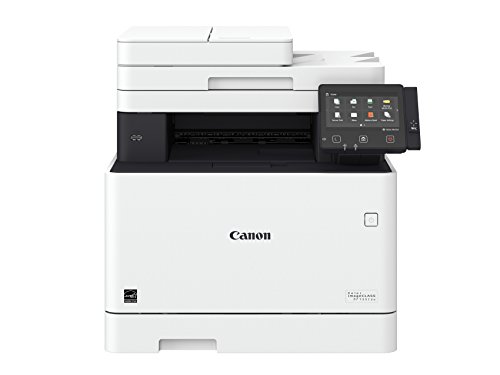

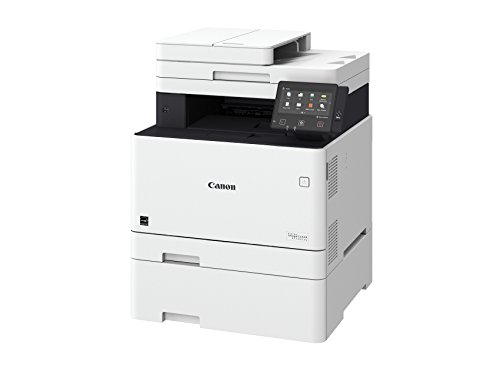


- Includes 3-year limited warranty - 100% U. S. -Based service and support team provides friendly, expert help for every level of experience
- Print at speeds of up to 28 pages per minute with your first print in your hands in 9 seconds or less. The memory capacity is upto 512 sheets and the paper output is 150 sheets (face down)
- Easily connect your mobile devices without a router using Wi-Fi Direct connection
- Generous, expandable paper capacity allows for up to 850 sheets
- Hi-capacity toner options keep up with your printing needs and limit toner Replacement interruptions
-
Information
-
Twitter
-
Pinterest
-
Youtube
-
Facebook
Linda Briere
Excellent!
1-simple 2-easy to set up 3- fast 4-reliable 5- Using laser printer premium photo paper (Staples Photo Supreme Paper, 8 1/2" x 11", Gloss, 100/Pack,use with laser printers), I achieved an excellent photo quality. It helped my Canon inkjet photo printer! 6- double side scan is a big time saver. 7-double side printing is very fast 8- Air print and mobile printing work like a charm 9- Windows and Mac compatible 10- printing app is easy to use 11-Eventhough It cant see a 5g network, having a 2.4 connection is enough for doing a good job. 12- Can copy, scan and print without connectiing to a computer 13- Has a USB port. You can print and scan from and on a usb memory stick directely 14-great price
Alicia Laporta
Honest Review
I was in the market to purchase a new All-in-one (AIO) color laser printer. The last color printer i had was a Brother 4070CDW, which is still functional. After 10 years, it was time to replace it mostly due to: 1) expensive toners, 2) leaking toners (geniuine brother toners), and 3) the most irritating printer to wireless printer. I happened to come across this Canon printer on sale at $249, and with a $50 gift card the printer costed only $214 (after tax), which was an incredible bargin. Like many other bargin hunters, the read through all the reviews and the most noteable comments were inital setup and clunky software. The inital setup: I forgo reading the manual. The connected to my router directly through an ethernet jack first as one user suggested and then I switch the printer to wireless mode. IMO I don't think it would have made a difference as it found and connected to my network pretty easy. I might set the printer to a Static IP address for the printer in future if i ever develop connection and waking issues. Aftwards, I downloaded and installed the MF733CDW (1) Drivers and (2) Scanning Utility. First print was flawlessly. I never seen a printer print immediately after hitting the "enter" button. My Brother printer took eons to even register. For the scanner, if you don't see your printer on the network during the installation, then your computer probably has a "firewall" up and requires permissions. FYI, the scanner utility runs in the background and at startup. This enables your printer to scan to specific computer on your network (granted it has the scanner utility installed). Scanning to e-mail: I recommend logining into your Canon System Manager Mode to configure this by typing the IP address of your printer onto your web browser. ***Note, if you use gmail to send it, then you might have to lower the security permission on your gmail account. I had my phone next to me when i started to get warnings about an attempted login from the printer. Somewhere in the email there was an option to lower the security permission.*** Then: 1. Preference ==> Network Settings ==> Port Number Settings ==> SMTP ....change to 587 [I used google to e-mail scan documents and following ports are recommended : Port: 465 (SSL required) or 587 (TLS required)] 2. Function Setting ==> TX Settings ==> Network Settings - Email/I-Fax Settings SMTP Sever: smtp.gmail.com e-mail address: youremail@gmail.com SMTP Authentication: User name: youremail@gmail.com Password: ***** Use TLS for SMTP: Checked I also have it setup to scan to my synology server as an alternative option as well. This requires adding the server folder in your address book. When registering a new Destination file in the Address Book, the Host Name: YourComputerName or YourSeverName Folder Path: the folder path within your computer or server I didn't setup the fax and have idea if it works since i don't have a land line. I really like this printer and it works flawlessly for me. I setup all the buttons on the main screen to my preference to make it easier to scan documents to certain locations. That was a huge plus for me. I also tried out the android app - Canon Mobile Business Solution, which connected/scanned/printed as expected. Overall, for $214 this printer quite a bargin. Only time will tell. With that, I am looking to use High Yield Generic Toners for the printer to save cost. I see how that'll turn out.
Marietjie Michelle Smit
Best "ALL IN ONE" printer
I was searching for a laser printer that will -scan documents automatically and directly to USB device and that doesn't have to be connected to a computer to do print/scan jobs. I found out about the Canon MF733Cdw through a local store ad. I was really attracted to all the features (and price when on sale) on this All in One Printer. I was split between the Canon MF733Cdw AND the Canon MF634Cdw models. Both the models are similar in function except their toner capacity and print yield (and size/dimensions of the printer). I went for the MF733Cdw because the K toner cartridge in it (#046 black) can print up to 2,200 sheets (vs 1400 sheets for MF634Cdw model). The wireless option is very useful (especially the Air print). [I haven't tested the NFC, Google Cloud Print, etc. yet]. This printer was easy to connect to the wireless.This printer does good quality scanning (double sided at once). This is a heavy and huge printer.The installation of printer driver and scanner software from the provided CD was easy. MF733Cdw model has been very user friendly- the touch screen is big and the menu has several options for the print/scan/copy functions. (I have not tested the fax option). Connect your flash drive (USB) and use the touch screen menu to print your files from your flash drive, scan a document-save the scanned files on your flash drive. There is no need for it to be connected to a computer. This Printer comes with Canon's 3 years limited warranty. 5 stars for functions and ease of use.
Raynaldo Aldaco
Love this printer
Love this printer. I did a lot of research trying to find a color laser printer to mostly replace inkjet printing. I was looking for something that had good consumable costs, printed quality text and graphics, and could do photos reasonably well when I didn't need perfect photo quality. This hit all the marks. Have also found it is fast, and lots of good features. Software support is excellent as well (for a Mac). This is my daily goto printer now.
Shazia Khan
Highly satisfied. Fast, clean wireless prints with excellent color for small business.
Received the MF733CDW four days ago and have run it through its paces. This all-in-one printer was an upgrade to an older Brother all-in-one monochrome laser printer that is still going strong in a home office, but lacked color and wireless printing. I also purchased but returned a Ricoh all-in-one color laser that was not fully Mac compatible. The Canon MF733CDW setup was easy on our Mac based wifi network. Just need to know your SSID (network name) and Network Key (WiFi password). Everything is done from the control panel by following the easy prompts. It only took 15 minutes including unboxing and fax set up. Black and color prints are fast with high quality from Mac Pro, Macbook Pro, iPad Air 2 and iPhone X. This is not for high quality photos, but very good to excellent color as a business printer. Adobe Illustrator, MS Word and PDFs files all look great, including clean small text. Copier quality is great from magazine and books. The platen is small, but suitable for letter, legal size and most magazines. Envelope printing is great using the manual feed. Was able to load three at a time. Document feeding for scans and copies was also easy and fast, but I have not tried all the duplexing options yet. Overall, highly satisfied with no complaints. I will update this review if I run into any issues through normal usage.
Dona Brown Moyers
FAST!
Wow. FAST! First: This thing really _was_ easy to set up and use. We haven't used too many features yet (basically scan, copy, print), but they all work great. Second: Did I mention this thing is FAST??? To respond, that is. I have an HP color laser (not all-in-one), the LaserJet Pro 200 color M251nw, which is a terrific printer, and it's nowhere near this fast. Example: when I have a 4-page document which combines text and pictures, normally after I click "Print", with the HP there's a delay of 30 second to a minute before the first page is printed. Fine, there's a network, there's spooling, images have to be prepared, whatever. Just a minor, but (I assumed) unavoidable "feature" of printing mixed documents. But THIS bad boy? Click "Print", count to one Mississippi, and the dang thing is starting to spit out paper! The first few times I thought "What happened? Did my wife enter a print job a minute ago, and that's it showing up? Nope, that's mine. Sheesh!" I haven't timed how long each page takes, but it's also pretty fast. For a home office environment, so far this baby is perfect.
Cho Pyone
Sr. IT Staff recommended for Home / Home-business users.
Best printer I've ever bought. Pros 2-sided multi-page feeder scanner / 2-sided print. Multi-tray can accommodate many irregular paper types / sizes Robust software / drivers (use recommended). Easy to setup and use. Ink that comes with it seem to have a good bit of life in them. Print quality is outstanding! This is especially true if advanced features are selected when printing digital-print-media. Ethernet, Wireless, or USB options. If connected to Ethernet (lan) printer is still accessible via WiFi devices if they are on same network / subnet. Unit is solidly built (slightly flimsy multi-tray door, though) Very fast printing for every day printing. This is true for 2-sided prints and high-quality (higher DPI set) prints as well. Has ability to turn off Gray-compensation (i.e. when colors are used to create shades of gray instead of just black). Mobile print is easy and intuitive. Cons HTTP Management page is lack luster. Address book management doesn't really work outside of Work-group managed service or ADDS integration. Options required lots of reading into to get exactly how I wanted it, but this isn't really the worst thing.. I hope that they add more mobile print features in the future. Print features without dedicated app are lackluster, but this is Apples and Googles fault - really...
Cynthia Martinez
Easy install, excellent text, reasonable color pics. It's heavy though.
Long ago, ink-jet printers could produce remarkably clear color prints and last a long time. Those days are gone. I have been through three ink-jet printer in the last 4-5 years. At some point they fail for mechanical or electrical reasons. In the case of my latest Epson WF, the print head clogged irreversibly, in spite of weekly nozzle checks. I don't print that much, though I scan frequently, so my hope is that this laser printer will not fail from lack of keeping the ink flowing. Speaking of ink, in answering one of the questions for this printer, someone claimed that the black toner cartridge was the standard 2500-print capacity, but the color ones were starter sized. In my case, all toner cartridges are 2500-page capacity. That should last me a few years. So far, everything has worked smoothly. Even wireless installation was a breeze. The 58-pound weight of the printer is an issue. It's really a 2-person lift to carry upstairs or set on a table unless you are pretty big and work out regularly. Still, once in place, my sit-stand desk doesn't have any trouble raising or lowering it. Image quality is good, excellent I'd say for text. Even the photo quality is better than my 2-year-old ink jet. I'll check back if anything goes wrong, but for the last 2 weeks it's been flawless.
Jacob Smith
Best All-In-One printer
Took me a while finding a All-In-One printer before I came across this one. I am one month in since I have this printer, but these are a few things I can say about quickly. You can change default settings to print Black/White instead of color. It also prints duplex - which I found many printers don't for this price (<$320). I can scan things to my email or PC folder. Additional plus thing which it was not specifically noted is, it has Ethernet port. It also looks like toner cartridges are below $200 for all 4. One small challenge I had was to configure Fax and Scan to email or PC. Didn't find it on any of the documentation. Someone youtubed the instructions - very helpful. I got it to work afterwards.
Sennen Cancerian Salise
Carefully shopped, Stands Scrutiny, Works Well, Fast, Quality Print, Easy Scanning, Mac Installation a Snap. Best in Class.
Although I ultimately purchased locally I did a great deal of research here, and wanted to contribute something in return. Although I looked at many printer brands (Ricoh, Lexmark, Xerox, Samsung, etc.), and models with prices up to about $1400, me search was narrowed to three moderately priced machines, the Brother MFC-L8900CDW, the HP LaserJet Pro M477fdw, and of course this machine, the Canon imageCLASS MF733Cdw. I have a background in electronic design as well as IT, so I am a fairly obnoxious shopper on technical products (which is why I spent several days on this). First let me touch on the two candidates I did not buy. The Brother MFC-L8900CDW: I own a lot of Brother printers, both personally and in a business setting. I have generally had good results with Brother and this printer should have been an automatic choice for me, but it wasn't. There are two reasons for that. The first reason is that Brother is engaged in a very dubious practice regarding toner management. There is a long background to this, involving an claimed variability in print density and correspondingly changing corona bias that would appear to be the justification for disallowing the swapping of toner cartridges between identical machines. and disallowing non-Brother cartridges. I personally question the need for this engineering complexity, but assuming that it is justifiable, I believe it could have been readily accomplished without dis-allowing the insertion of anything other than a brand brand new unused Brother cartridge. The second part of the issue, specifically the excessive toner wastage, has to do with the cycling of internal cartridge components. The bottom line is that if you print a lot of small jobs, there will be a substantial reduction in the amount of the toner you can actually use before the cartridge is expired. (If anyone wants a full explanation of the toner management issues, please ask in the comments.) If you buy a Brother I strongly suggest that you read up on how to bypass this expensive "management" by resetting the toner cartridge. While this may interfere with the benefits of variable corona bias (if any) and may allow for a little more wear on internal cartridge parts, I believe it will save you a lot of money. It is however a bit of a nuisance to do. I am also personally bothered by certain apparent activity that I have discovered in some of Brother's software, and the response I got from Brother when I inquired about it, but that is a discussion for another day. If anyone wants a full explanation of the toner management issues, please ask in the comments. Moving on to the next candidate, the HP LaserJet Pro M477fdw: I have had a lot of HP printers in years past. I can almost wax nostalgic about my long deceased LaserJet IIID. But like the IIID, the unquestionably excellent HP of old is no more. Still, when I went to a local retailer to look at this printer, the build quality seemed pretty good. However, the reviews made it clear that the HP has a consistent flaw in its scanner, and that HP has been less than proactive about solving the issue. Combined with a substantially higher price tag, this was a deal killer. Now to this printer, the Canon MF733. Although I love Canon photographic gear, and have been primarily shooting Canon since the early 1980's, I have been less enamored with their printers. (In spite of the fact that all of my early HP printers actually had Canon print engines in them.) As I read over the reviews I saw various complaints. I began to wonder f there were any viable printer choices in this price range. I didn't want to spend thousands of dollars for a home multi-function printer. In the end I decided that (a) Only about 16% of the reviews were negative, (b) there was not a single compelling complaint theme running through the negative reviews, (c) it was worth risking $350 in the hopes of avoiding a $1000 and up expenditure for a more commercial printer. So buying this printer was less an affirmative choice, and more of a "last man standing" selection. That said, now that I have spent the last week putting it through its paces, I could not be happier for a printer in this class. I had none of the Mac related installation issues cited by at least one reviewer. I have standardized my systems on Mavericks (10.9) and have a number of Macs as well as Win 7 machines on the network. On the Mac I simply let the Mac discover the printer (without installing Canon's software) and was immediately able to print and scan. Later I did install the Canon software, and it also works properly. I did all of my printer configuration through the console at first, then through the web interface, all of which went well. Print quality has been good. I use Epson large format printers for my photographic work, and the output certainly is not up to that level, but for ordinary business class graphics I am satisfied. The print speed is really nice - a big improvement over the older monochrome multi-function that this unit is replacing. Scanning works well. The Canon Business Print app makes control and communication with my phone easy and airprint is also supported. I have not tried the NFC yet. It is the quietest color laser I have owned. So far, I'm a happy camper. People in the 16% that make up the one and two star reviews have mentioned issues with cartridges and with general reliability. And while I don't dismiss those who have had problems, I saw one or two negative reviews that I would attribute to "user error". I've only had this printer a week, although I have been exercising it because I have a 14 day return window. I recognize that a problem may yet develop. But my experience (and industry experience) is that most products fail when new (infant mortality) or when they are simply old and worn out. If this printer continues to perform as it has for the next ninety days then I believe it is going to give me years of satisfactory service. I hope whatever printer you choose meets your needs as well as this one is meeting mine. Good luck, and I hope this is helpful/